
1. Overview
The RORRY Portable Charger is a compact and versatile power bank designed to provide on-the-go charging for your Apple Watch, iPhone, AirPods, and other compatible devices. With its 5000mAh large capacity and built-in cables, it offers a convenient and efficient charging solution for travel and daily use.

Figure 1.1: RORRY Portable Charger with built-in cables and Apple Watch charging pad.
2. What's in the Box
- RORRY Portable Charger (Model D2) x 1
- 1M USB-C to USB-C Charging Cable x 1
- User Manual x 1

Figure 2.1: Included items: RORRY Portable Charger, USB-C cable, and user manual.
3. Product Features
3.1 Universal Compatibility
Designed for a wide range of Apple devices, including Apple Watch Series 9 / Ultra 2 / 8 / Ultra / 7 / 6 / SE / 5 / 4 / 3 / 2, and iPhone 16/15/14/13/12/11/Pro/Max. It also supports AirPods and Android devices via its built-in USB-C cable.

Figure 3.1: The charger supports various devices including iPhones, Apple Watches, AirPods, and Android phones.
3.2 5000mAh Large Capacity
This power bank provides substantial power, capable of charging your Apple Watch approximately 7-10 times, an iPhone 15 about 1 time, and AirPods about 6-8 times. The power bank itself fully charges in approximately 2.5 hours.

Figure 3.2: Charging capabilities and power bank recharge time.
3.3 Charge Multiple Devices Simultaneously
The RORRY Portable Charger allows you to charge your Apple Watch, iPhone, AirPods, and Android devices concurrently, making it highly efficient for users with multiple gadgets.
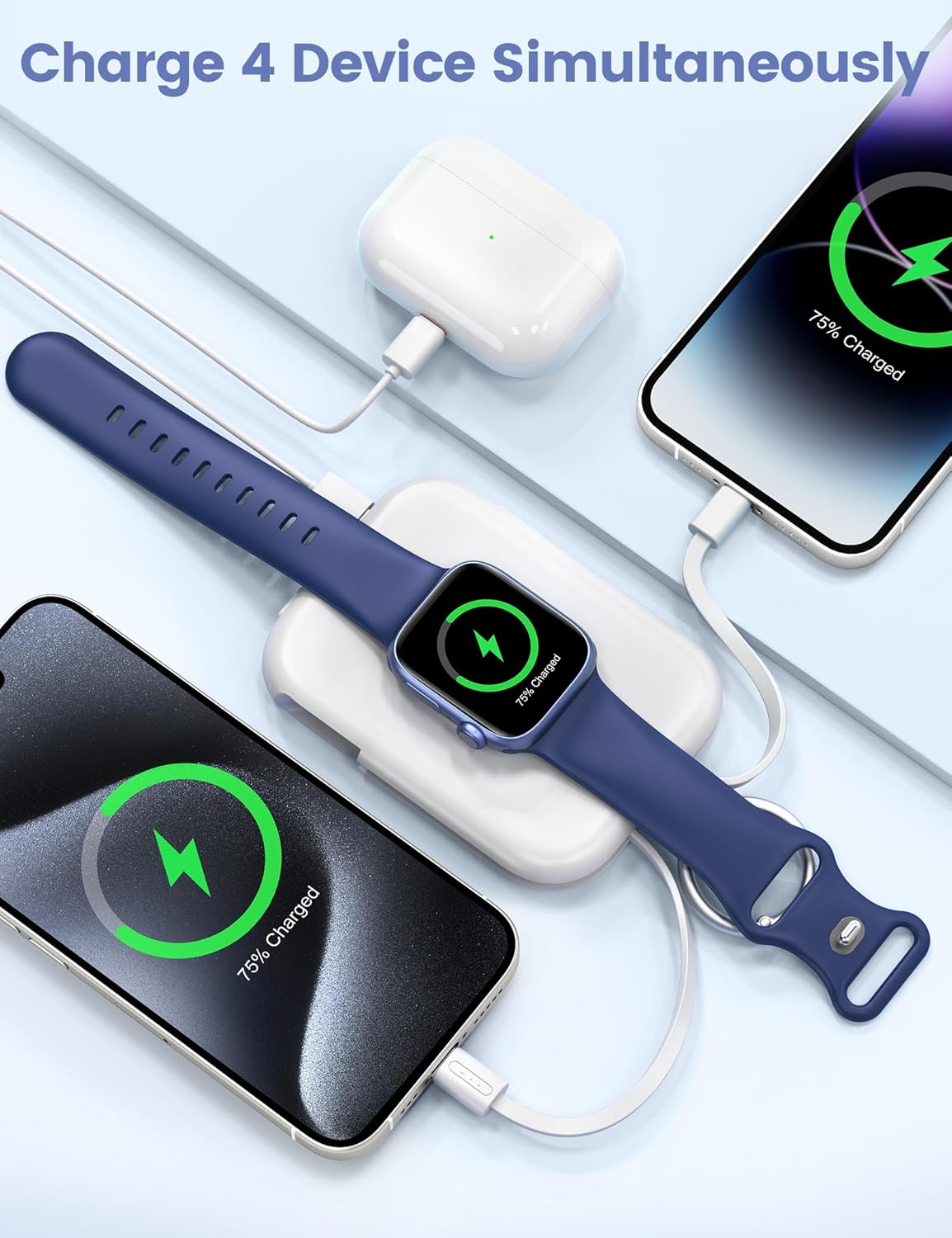
Figure 3.3: Simultaneous charging of an iPhone, Apple Watch, and AirPods.
3.4 Portable Travel Design
Featuring a compact and lightweight keychain design, this portable charger is easy to carry in your pocket or attach to your backpack, making it an ideal companion for travel.

Figure 3.4: The portable charger's keychain design allows for easy attachment to bags.
3.5 Superior Safety Features
Equipped with built-in protection against over-temperature, over-current, over-voltage, and short circuits, ensuring safe and reliable use of the product.
4. Setup
4.1 Charging the Power Bank
- Locate the USB-C input port on the side of the RORRY Portable Charger.
- Connect the included USB-C to USB-C charging cable to the power bank's input port.
- Connect the other end of the USB-C cable to a compatible USB-C power adapter (not included) or a computer's USB-C port.
- The blue LED indicator lights on the power bank will illuminate and blink to show the charging progress. Four solid blue lights indicate a full charge.

Figure 4.1: USB-C port for charging the power bank.
4.2 Power Indicator Lights
The RORRY Portable Charger features four blue LED indicator lights to display the remaining battery level:
- 4 Lights: 75% - 100% charged
- 3 Lights: 50% - 75% charged
- 2 Lights: 25% - 50% charged
- 1 Light: 0% - 25% charged (recharge soon)
5. Operating Instructions
5.1 Charging Apple Watch
- Place your Apple Watch onto the magnetic charging pad on the top surface of the RORRY Portable Charger.
- Ensure the Apple Watch is properly aligned for optimal charging. The watch screen will indicate charging status.
5.2 Charging iPhone and Other Devices
- For iPhones (Lightning port): Pull out the built-in Lightning cable from the side of the power bank. Connect it to your iPhone's charging port.
- For Android devices or other USB-C compatible devices: Pull out the built-in USB-C cable from the other side of the power bank. Connect it to your device's charging port.
- Ensure the cable is securely connected. Your device will indicate charging status.

Figure 5.1: Demonstrating charging an iPhone and Apple Watch using the built-in cables.
5.3 Simultaneous Charging
The RORRY Portable Charger supports charging multiple devices at once. You can charge your Apple Watch wirelessly while simultaneously charging an iPhone via the built-in Lightning cable and another device via the built-in USB-C cable.

Figure 5.2: Example of charging multiple devices simultaneously.
6. Maintenance
- Keep the power bank away from extreme temperatures, direct sunlight, and liquids.
- Clean the surface with a soft, dry cloth. Do not use harsh chemicals or abrasive materials.
- Store in a cool, dry place when not in use.
- Avoid dropping or subjecting the device to strong impacts.
7. Troubleshooting
| Problem | Possible Cause | Solution |
|---|---|---|
| Power bank not charging | Cable not connected properly; Power adapter faulty; Power bank fully discharged. | Ensure secure connection; Try a different adapter/cable; Allow a few minutes for the power bank to respond if deeply discharged. |
| Device not charging from power bank | Power bank low on battery; Device cable not connected properly; Device incompatible. | Recharge the power bank; Ensure secure connection; Verify device compatibility with the charger. |
| Slow charging | Using a non-fast charging adapter; Charging multiple devices; Cable issue. | Use a fast-charging compatible adapter; Charge fewer devices simultaneously; Try a different cable. |
| LED indicators not lighting up | Power bank completely discharged; Malfunction. | Attempt to charge the power bank for an extended period; Contact customer support if issue persists. |
8. Specifications
| Feature | Detail |
|---|---|
| Brand | RORRY |
| Model Number | D2 |
| Battery Capacity | 5000 Milliamp Hours |
| Product Dimensions | 4.33 x 2.83 x 0.83 inches |
| Item Weight | 4.4 ounces |
| Connectivity Technologies | USB |
| Special Features | Compact, Built-In Cables, for iPhone Watch, Keychain Design |
| Color | White |
| Manufacturer | Shenzhen Xianyang Innovation Technology Co., Ltd |
| Date First Available | April 7, 2023 |
9. Warranty and Support
RORRY is committed to providing excellent customer service. Your RORRY Portable Charger comes with:
- Friendly customer service response within 24 hours.
- Lifetime technical support.
For any inquiries, technical assistance, or warranty claims, please refer to the contact information provided on the product packaging or visit the official RORRY website.


