
1. Introduction
This manual provides detailed instructions for the setup, operation, and maintenance of your Kmise 88-Key Full Size Semi-Weighted Electronic Digital Piano. Please read this manual thoroughly before using the instrument to ensure proper function and longevity.
2. Product Features
- 88 Full-Sized Semi-Weighted Keys: Designed to replicate the touch of a grand piano, with velocity-sensitive keys for dynamic expression.
- 128 Rhythms & 128 Polyphony: Offers a wide range of musical accompaniment and complex sound layering.
- 20 Demo Songs: Pre-loaded songs for practice and enjoyment.
- Recording Function: Allows users to record and playback their performances.
- Portable Design: Features built-in speakers, external double headphone jacks, and battery power option for use anywhere.
- MIDI Functionality: MIDI input/output jacks for connection to computers and other MIDI music equipment for arrangement.
- Bluetooth Connectivity: Wireless connection for compatible external equipment or software, enabling smart teaching features.
- Dual Mode: Supports teaching mode and duet playing.
3. Setup Guide
3.1 Unpacking and Placement
Carefully remove all components from the packaging. Place the digital piano on a stable, flat surface or a compatible keyboard stand. Ensure adequate space for operation and connections.
3.2 Power Connection
Connect the provided power supply to the DC9V-12V power interface on the back of the piano and then to a wall outlet. Alternatively, the piano can be powered by batteries for portable use.
3.3 Sustain Pedal Connection
Insert the sustain pedal cable into the "SUSTAIN" jack located on the rear panel of the piano.
3.4 Headphone Connection
For private practice, connect headphones to either of the two headphone jacks (6.5mm or 3.5mm) on the rear panel.
3.5 MIDI Connection
To connect to a computer or other MIDI devices, use a MIDI cable to connect the MIDI IN/OUT jacks on the piano to your external equipment. A USB cable can also be used for MIDI over USB connection.
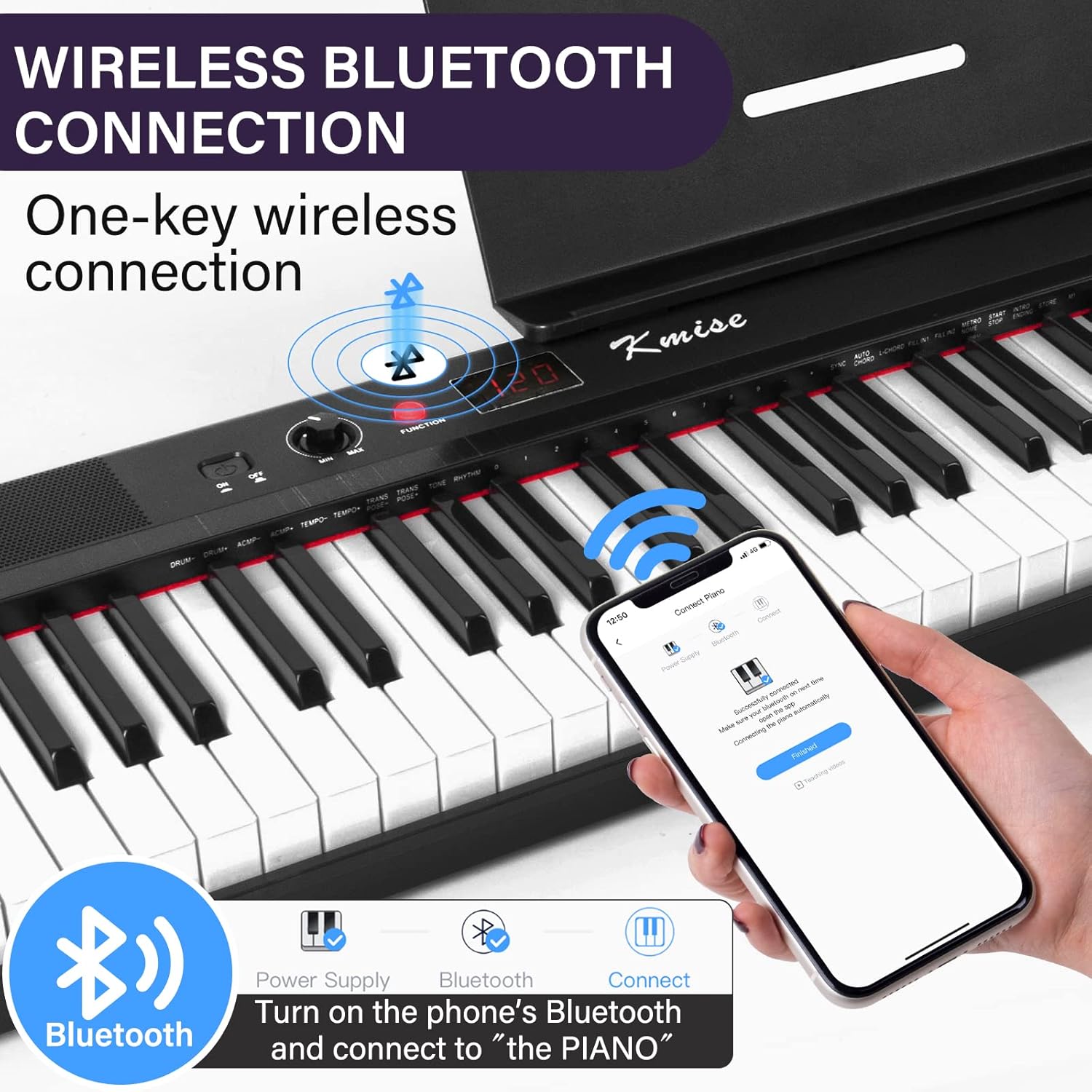
Figure 1: Rear panel connections for sustain pedal, MIDI, USB, audio, microphone, headphones, and power.
4. Operating Instructions
4.1 Power On/Off
Press the power button located on the control panel to turn the piano on or off. The display will illuminate upon power-on.
4.2 Adjusting Volume
Use the volume knob on the control panel to adjust the overall sound output. Turn clockwise to increase volume, counter-clockwise to decrease.
4.3 Selecting Tones and Rhythms
The piano features 128 polyphony and 128 rhythms. Refer to the included quick start guide or the full manual (if available) for specific button functions to select different tones (e.g., Acoustic Piano, Guitar, Cello) and rhythms.

Figure 2: Control panel displaying options for 128 polyphony, 128 rhythms, and 20 demo songs.
4.4 Recording Function
To record your performance, press the "REC" button. Play your desired piece, then press "PLAY" to listen to your recording. Consult the full manual for advanced recording options.
4.5 Bluetooth Connectivity
- Turn on the piano.
- Activate Bluetooth on your smartphone or tablet.
- Search for available devices and select "PIANO" to connect.
- Once connected, you can use compatible apps for smart teaching or other functions.
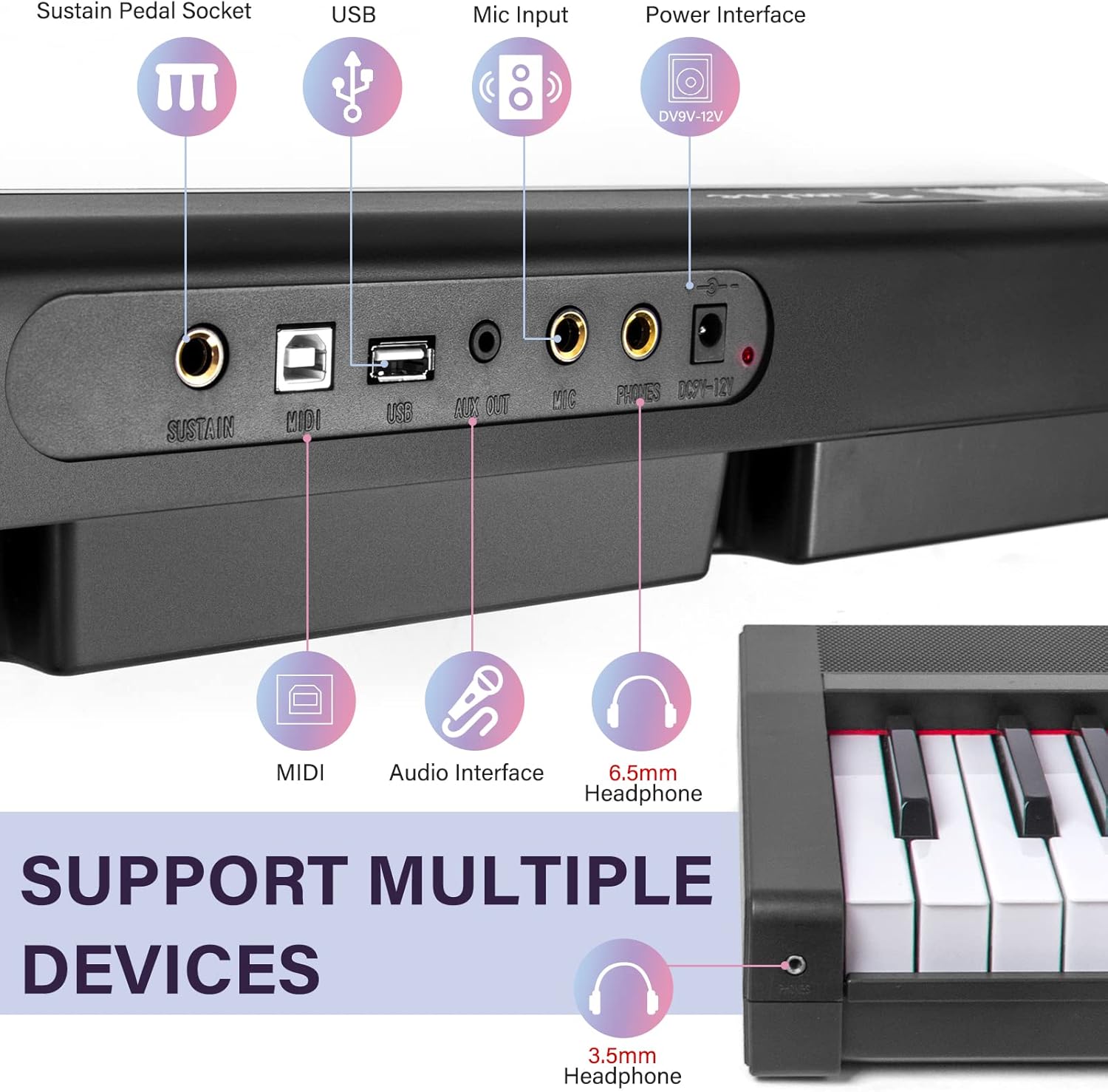
Figure 3: Bluetooth connection process for smart teaching applications.
4.6 Dual Mode
The dual mode allows for teaching scenarios or duet playing, splitting the keyboard into two identical ranges. Refer to the full manual for activation and usage details of this mode.
Video 1: Demonstration of the Kmise digital piano's features, including semi-weighted keys, MIDI connection, Bluetooth, and dual mode for teaching or duets.
5. Maintenance and Care
- Cleaning: Use a soft, dry cloth to wipe the surface of the piano. Avoid using abrasive cleaners or solvents.
- Storage: Store the piano in a dry, dust-free environment away from direct sunlight and extreme temperatures.
- Handling: Avoid dropping or subjecting the piano to strong impacts.
6. Troubleshooting
- No Sound:
- Ensure the power is on and the volume is turned up.
- Check if headphones are plugged in; unplug them if you want sound from the built-in speakers.
- Verify all cables are securely connected.
- Keys Not Responding:
- Restart the piano.
- Ensure no foreign objects are lodged between the keys.
- Bluetooth Connection Issues:
- Ensure Bluetooth is enabled on both the piano and your device.
- Make sure the device is within range.
- Try unpairing and re-pairing the device.
7. Specifications
| Feature | Detail |
|---|---|
| Model Name | Digital Piano |
| Number of Keys | 88 |
| Key Type | Full-Size Semi-Weighted |
| Polyphony | 128 |
| Rhythms | 128 |
| Demo Songs | 20 |
| Connectivity | Bluetooth, MIDI In/Out, USB |
| Power Source | Battery Powered, Corded Electric |
| Product Dimensions | 5"D x 30"W x 13"H |
| Item Weight | 15.07 pounds |
| Skill Level | Beginner |
| Special Feature | Portable |
8. Warranty and Support
For warranty information and customer support, please refer to the documentation included with your purchase or visit the official Kmise website. Contact details for support are typically provided in the product packaging.