
1. Introduction
Thank you for choosing the UPERFECT Portable Monitor. This manual provides essential information for the safe and efficient use of your new device. Please read it thoroughly before operation and retain it for future reference.
2. Product Overview
2.1 Key Features
- FHD 1080P IPS Screen: 15.6-inch display with 1920 x 1080 resolution, 100% sRGB, and 178° viewing angle.
- Versatile Connectivity: Features Mini HDMI, full-function Type-C ports, and Micro USB (OTG) for broad compatibility.
- Hybrid Signal Solution: Type-C interface supports power, signal, and USB functions simultaneously.
- Enhanced Audio: Built-in dual stereo speakers for immersive sound.
- Eye Care Technology: Flicker-free backlight and blue light filter to minimize eye fatigue.
- Smart Cover & VESA Mountable: Includes a durable PU leather smart cover that doubles as a stand, and supports VESA 75x75mm mounting.
2.2 Package Contents
- UPERFECT Portable Monitor
- Smart Cover
- USB-C to USB-C Cable
- Mini HDMI to HDMI Cable
- USB-A to USB-C Power Cable
- Power Adapter
- User Manual (this document)
2.3 Product Diagram and Ports
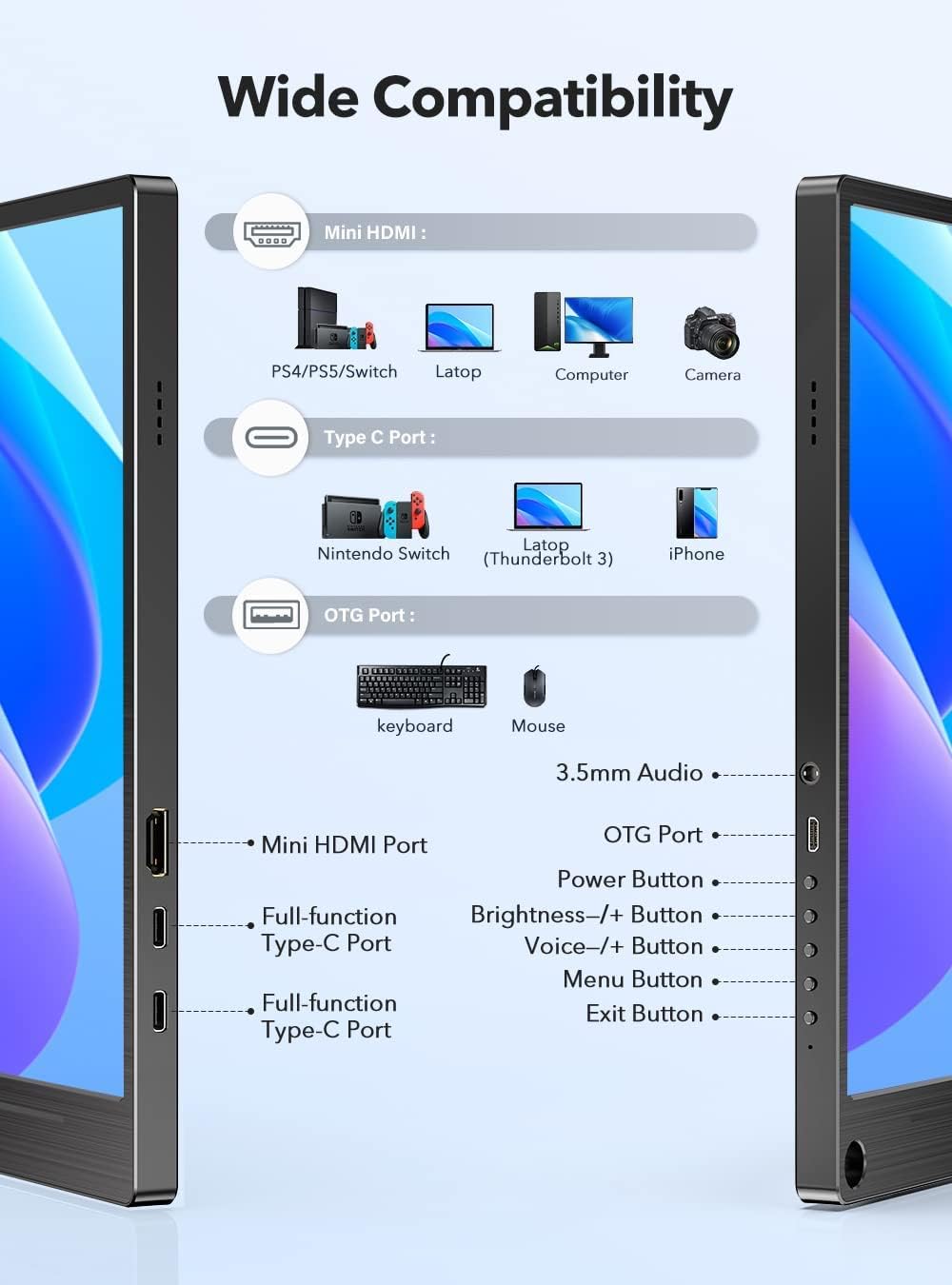
This image illustrates the various ports and buttons on the UPERFECT Portable Monitor, including Mini HDMI, two full-function Type-C ports, an OTG port, a 3.5mm audio jack, power button, brightness controls, and menu navigation buttons.
3. Setup
3.1 Initial Connection
- Power Connection: Connect the monitor to a power source using the provided USB-A to USB-C power cable and power adapter. Alternatively, if your device supports power delivery via Type-C, a single Type-C cable can provide both power and signal.
- Signal Connection:
- For Type-C Devices (e.g., Laptops, Phones with full-function Type-C): Use the USB-C to USB-C cable to connect your device to one of the monitor's full-function Type-C ports.
- For HDMI Devices (e.g., PCs, Gaming Consoles): Use the Mini HDMI to HDMI cable to connect your device's HDMI output to the monitor's Mini HDMI input.
3.2 Using the Smart Cover as a Stand

The smart cover can be folded to create a stable stand for the monitor, allowing for adjustable viewing angles.
The included smart cover is designed to protect your monitor and also functions as a versatile stand. Fold the cover along its creases to form a triangular support structure, then place the monitor into the groove to achieve your desired viewing angle.
3.3 VESA Mounting

The monitor features VESA mounting holes for attachment to compatible arms or wall mounts.
The UPERFECT Portable Monitor is equipped with VESA 75x75mm mounting holes (M4 screws) on the back. This allows you to attach the monitor to a compatible VESA arm or wall mount for a more permanent or ergonomic setup. Ensure that the mounting solution can support the weight of the monitor (approximately 2 kg).
4. Operating Instructions
4.1 Power On/Off
- To power on the monitor, press the Power button located on the side.
- To power off, press and hold the Power button for a few seconds until the screen turns off.
4.2 Menu Navigation
The monitor features intuitive buttons for navigating the On-Screen Display (OSD) menu:
- Menu Button: Press to open the OSD menu.
- Brightness +/- Buttons: Use to adjust brightness directly, or to navigate up/down within the OSD menu.
- Voice +/- Buttons: Use to adjust volume directly, or to navigate left/right within the OSD menu.
- Exit Button: Press to exit the OSD menu or go back to the previous level.
4.3 Display Settings
Within the OSD menu, you can adjust various display settings:
- Brightness/Contrast: Adjust the overall luminance and contrast ratio.
- Color Settings: Modify color temperature, hue, and saturation.
- Aspect Ratio: Switch between 16:9, 4:3, or auto.
- Input Source: Manually select between Type-C and Mini HDMI inputs.
- HDR Mode: Enable or disable High Dynamic Range.
- Language: Select the OSD menu language.
5. Maintenance
5.1 Cleaning the Monitor
- Always power off and unplug the monitor before cleaning.
- Use a soft, lint-free cloth slightly dampened with water or a non-abrasive screen cleaner.
- Do not spray liquid directly onto the screen or into any openings.
- Avoid using harsh chemicals, solvents, or abrasive materials.
5.2 Storage
When not in use, store the monitor in a cool, dry place, away from direct sunlight and extreme temperatures. Use the smart cover to protect the screen from dust and scratches.
6. Troubleshooting
If you encounter issues with your UPERFECT Portable Monitor, please refer to the following common problems and solutions:
| Problem | Possible Cause | Solution |
|---|---|---|
| No display/"No Signal" message | Incorrect input source selected; Loose cable connection; Device not outputting signal. | Check cable connections (Type-C/HDMI). Ensure the source device is powered on and configured to output to an external display. Use the OSD menu to manually select the correct input source. |
| Monitor not powering on | Insufficient power supply; Faulty power cable/adapter. | Ensure the monitor is connected to a stable power source. Use the provided power adapter and cable. If using a single Type-C cable, ensure your device provides sufficient power output. |
| Flickering or unstable display | Cable interference; Resolution/refresh rate mismatch. | Ensure cables are securely connected. Try a different cable. Adjust the resolution or refresh rate on your source device to match the monitor's specifications (1920x1080, 60Hz). |
| No sound from speakers | Volume too low; Audio output not routed to monitor. | Increase monitor volume using the OSD menu or dedicated buttons. Check audio settings on your source device to ensure sound is outputting to the monitor. |
If the problem persists after trying these solutions, please contact UPERFECT customer support for assistance.
7. Specifications
| Feature | Specification |
|---|---|
| Brand | UPERFECT |
| Model Number | M156A08/M156J03 |
| Screen Size | 15.6 Inches |
| Resolution | 1920 x 1080 Pixels (FHD 1080P) |
| Display Technology | IPS |
| Aspect Ratio | 16:9 |
| Refresh Rate | 60 Hz |
| Response Time | 10 Milliseconds |
| Connectivity | USB-C (Full-function), Mini HDMI, Micro USB (OTG) |
| Product Dimensions | 22 x 36 x 1 cm |
| Item Weight | 2 kg |
| VESA Mount | 75x75mm (M4) |
8. Warranty and Support
UPERFECT products are designed for reliability and performance. For warranty information, please refer to the warranty card included with your product or visit the official UPERFECT website. If you require technical assistance, have questions about your product, or need to report missing accessories, please contact UPERFECT customer support. Our support team is available to help you with any issues you may encounter.
Contact information can typically be found on the UPERFECT official website or through the retailer where you purchased the product.