
1. Introduction
This manual provides detailed instructions for the installation, operation, and maintenance of your SUNPIE 9 Inch RGBW Halo Lights with Fog Lights Combo. This product is designed to enhance vehicle lighting with customizable RGBW halo effects and improved illumination. Please read this manual thoroughly before installation and use to ensure proper function and safety.
2. Product Overview
The SUNPIE RGBW Halo Lights and Fog Lights Combo offers a comprehensive lighting upgrade for compatible vehicles. Key features include:
- RGBW Halos: Customizable colors (pure white, blue, red, yellow, purple, green, and custom colors) controlled via a dedicated app or remote.
- Enhanced Brightness: Significantly brighter than original equipment manufacturer (OEM) headlights, providing over 3,600 lumens for improved visibility.
- Durable Construction: IP68 waterproof rating ensures resistance to moisture, suitable for various weather conditions and off-road use.
- Control Modes: Includes Music Mode, over 20 Strobe Modes, and Voice Mode for dynamic lighting effects.
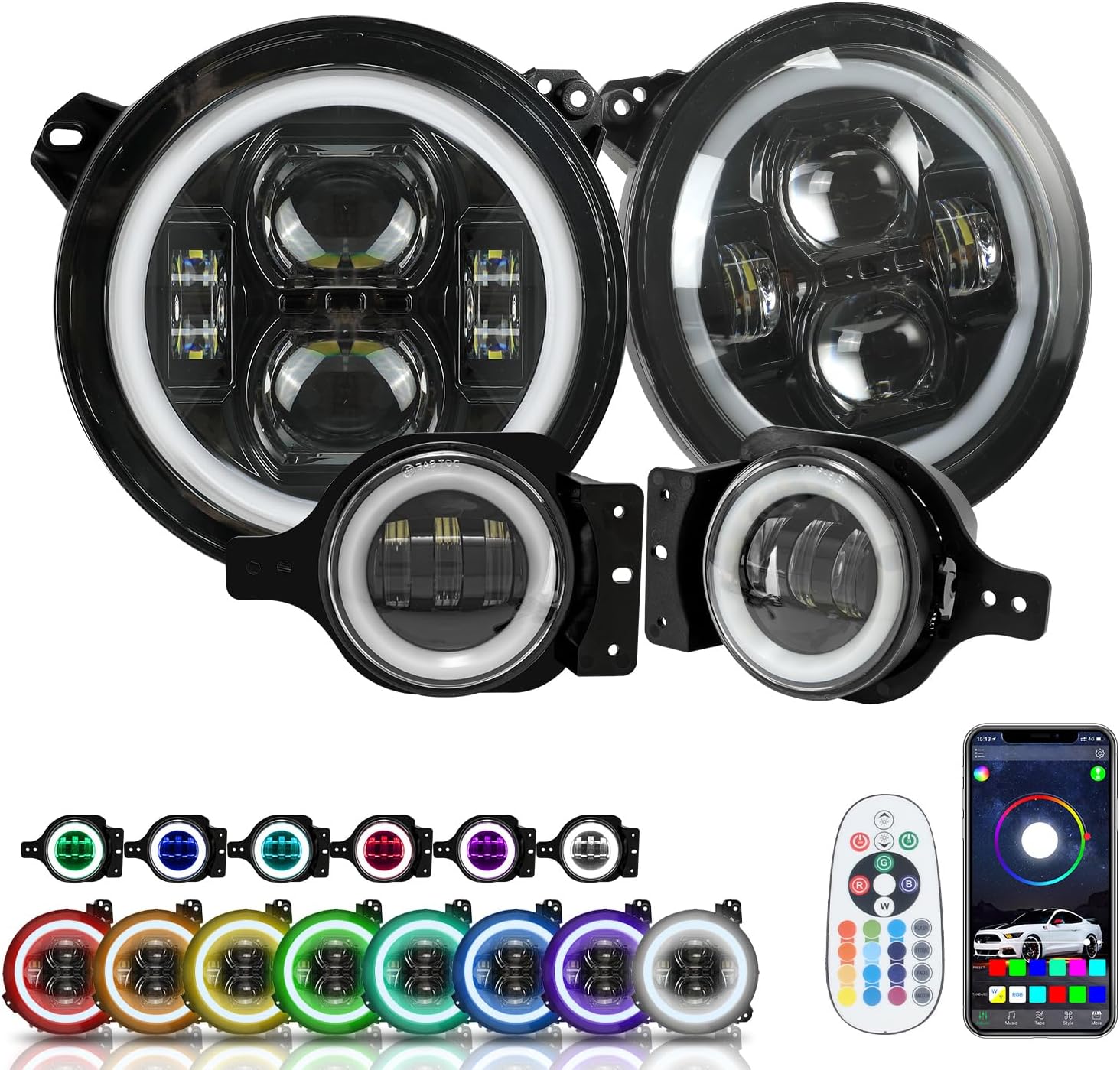
Image 2.1: Overview of the SUNPIE 9 Inch RGBW Halo Lights and Fog Lights Combo, including the remote control and a depiction of the mobile application interface.

Image 2.2: Illustration demonstrating the distinct high beam and low beam patterns produced by the SUNPIE headlights.
3. Package Contents
Please verify that all items are present before beginning installation:
- 2 x 9-inch RGBW Halo Headlights
- 2 x RGBW Halo Fog Lights
- 1 x Remote Control
- Necessary Wiring Harnesses and Connectors
- Instruction Manual (this document)
4. Safety Information
Observe the following safety precautions during installation and operation:
- Disconnect the vehicle's battery before starting any electrical work to prevent short circuits or electrical shock.
- Wear appropriate personal protective equipment, including safety glasses and gloves.
- Ensure all connections are secure and properly insulated to prevent moisture ingress and electrical issues.
- If you are unfamiliar with automotive electrical systems, it is recommended to seek professional installation.
- Do not look directly into the LED lights when they are active, as this may cause eye strain or damage.
5. Installation Instructions
This product is designed for compatibility with 2018-2025 JL/JLU/4XE and 2019-2025 JT models. Headlight installation is generally plug-and-play. Fog light wiring may require additional steps.
5.1. Tools Required
- Basic hand tools (wrenches, screwdrivers)
- Wire strippers/crimpers (for fog lights, if applicable)
- Electrical tape or heat shrink tubing
- Multimeter (optional, for verifying connections)
5.2. Headlight Installation
- Disconnect the negative terminal of your vehicle's battery.
- Remove the front grille and any necessary trim panels to access the OEM headlights.
- Unplug the electrical connector from the back of the OEM headlight.
- Remove the mounting screws or clips securing the OEM headlight and carefully remove it from the vehicle.
- Connect the new SUNPIE headlight to the vehicle's factory headlight connector. Ensure a secure fit.
- Mount the new SUNPIE headlight using the original mounting hardware.
- Repeat for the other headlight.
5.3. Fog Light Installation
Note: For vehicles with aftermarket bumpers, an additional fog light mount (ASIN: B094X69JJ1) may be required.
- Access the OEM fog lights, typically by removing bumper covers or working from underneath the vehicle.
- Disconnect the electrical connector and remove the OEM fog lights.
- The provided fog light wiring may require splicing into the OEM harness or using an adapter (not included) if the connectors do not match directly. Carefully identify the positive and negative wires for the fog lights.
- Connect the SUNPIE fog lights to the vehicle's wiring. Ensure proper polarity. Secure all connections with electrical tape or heat shrink tubing.
- Mount the new SUNPIE fog lights in their respective locations.
- Repeat for the other fog light.
5.4. RGB Halo Wiring
The RGB halo functionality requires a separate power connection for the control module.
- Connect the RGB control module's positive wire to a 12V power source. Options include:
- Direct to Battery: Allows halos to be used even when the vehicle is off. Ensure the app or remote is used to turn them off to prevent battery drain.
- Ignition Switched Power: Connect to a fuse in the fuse box that is only active when the ignition is on. This ensures the halos turn off with the vehicle.
- Connect the RGB control module's negative wire to a suitable ground point on the vehicle chassis.
- Route all wiring securely, away from moving parts and heat sources. Use zip ties to keep wires tidy.

Image 5.1: Visual comparison of a vehicle's front end before and after the installation of the SUNPIE RGBW Halo Lights, highlighting the activated purple halos.

Image 5.2: A vehicle equipped with SUNPIE headlights and fog lights, displaying the green halo illumination.
5.5. Final Steps
- Reconnect the vehicle's battery.
- Test all lighting functions: low beam, high beam, fog lights, and RGB halos.
- Reinstall any removed grille or trim panels.
- Adjust headlight aim if necessary to ensure proper road illumination and avoid blinding oncoming traffic.
6. App Control & Remote Operation
The RGBW halos can be controlled using the included remote or the dedicated mobile application.
6.1. Mobile App (Sunpie LED Light)
- Download the "Sunpie LED Light" app from your device's app store.
- Ensure your phone's Bluetooth is enabled.
- Open the app and follow the on-screen instructions to pair with the light control module.
- Once connected, you can select from a wide range of colors, adjust brightness, and choose various dynamic modes (e.g., Music Mode, Strobe Modes, Voice Mode).
6.2. Remote Control
The remote control provides quick access to basic functions:
- Power Button: Turns the halos on or off.
- Color Selection: Dedicated buttons for common colors (red, green, blue, white, etc.).
- Brightness Adjustment: Increase or decrease halo intensity.
- Mode Selection: Cycle through various dynamic lighting effects.

Image 6.1: Depiction of the Sunpie LED Light mobile application interface, illustrating options for color selection, music synchronization, and voice control.
7. Maintenance
Regular maintenance ensures optimal performance and longevity of your SUNPIE lights.
- Cleaning: Clean the lens surfaces periodically with a soft cloth and mild soap and water. Avoid abrasive cleaners or harsh chemicals that could damage the polycarbonate lens.
- Inspection: Regularly check all wiring connections for tightness and signs of wear or corrosion. Ensure the lights are securely mounted.
- Waterproofing: While rated IP68, avoid directing high-pressure water jets directly at the light housing during vehicle washing.
8. Troubleshooting
If you encounter issues with your SUNPIE lights, refer to the following common problems and solutions:
| Problem | Possible Cause | Solution |
|---|---|---|
| Headlights or Fog Lights not illuminating | Loose or incorrect wiring connection; Blown fuse; Faulty light unit. | Check all electrical connections. Verify vehicle fuses. Test light unit with a known good power source. |
| RGB Halos not working or stuck on one color | Control module not powered; Loose connection to module; Remote/App not paired; Faulty module. | Ensure the RGB control module has power and ground. Check connections. Re-pair remote/app. |
| Halos do not turn off with vehicle | RGB module wired directly to battery. | If desired, rewire the RGB module to an ignition-switched power source. Otherwise, use the app/remote to turn them off manually. |
| Fog lights require splicing/adapter | Incompatible OEM fog light connector. | Use the provided wiring for splicing or acquire a compatible adapter harness (e.g., Oracle harness adapter, if applicable for your vehicle). Professional installation recommended for splicing. |
| Moisture inside the light housing | Improper seal during installation; Damage to housing. | Inspect seals and housing for damage. Ensure proper installation. Contact customer service if issue persists. |
If these troubleshooting steps do not resolve the issue, please contact SUNPIE customer service for further assistance.
9. Specifications
- Brand: SUNPIE
- Model: JLJ00R
- Product Type: 9 Inch RGBW Halo Headlights & Fog Lights Combo
- Compatibility: 2018-2025 JL/JLU/4XE, 2019-2025 JT
- Wattage: 60 watts
- Special Feature: IP68 Waterproof
- Lens Material: Polycarbonate
- Lens Color: Clear
- Control: APP Control, Remote Control
- Item Weight: Approximately 4 pounds
- Package Dimensions: Approximately 20.7 x 16.4 x 5.7 inches

Image 9.1: Detail highlighting the enhanced light output of the projector LED headlights, stating '400% MORE LIGHT' and over 3,600 lumens.
10. Warranty and Support
SUNPIE stands behind its products. If you have any questions or encounter issues while using the product, please contact our customer service team. Refer to your purchase documentation for specific warranty terms and contact information.
