
Sunitact ST1476
Sunitact ST1476 Rechargeable LED Flashlight User Manual
Model: ST1476 | Brand: Sunitact

This image shows the Sunitact ST1476 rechargeable LED flashlight alongside its included accessories, neatly organized within a protective carrying case. The flashlight itself is black with blue indicator lights, and the kit includes a smaller COB keychain flashlight, charging cable, and other components.
1. Introduction
This user manual provides comprehensive instructions for the safe and effective operation, maintenance, and troubleshooting of your Sunitact ST1476 Rechargeable LED Flashlight. Please read this manual thoroughly before using the product to ensure optimal performance and longevity.
2. Package Contents
Verify that all items listed below are included in your package:
- 1 x Sunitact ST1476 Rechargeable Flashlight
- 1 x COB Keychain Flashlight
- 1 x USB Charging Cable
- 1 x Lanyard
- 1 x USB Flashlight Holster
- 1 x Operating Instructions Manual (this document)
- 1 x Gift Box
- 1 x Rechargeable Lithium Ion Battery (pre-installed or separate)
- 3 x AAA Batteries (for alternative power, if applicable)

This image displays the compact COB keychain flashlight, highlighting its small size and portability, often included as an accessory with the main flashlight.
3. Setup
3.1 Battery Installation
- Unscrew the tail cap of the flashlight by turning it counter-clockwise.
- If the rechargeable battery has a transparent protective film, carefully remove this film before installation. Do not remove any blue packaging on the battery itself.
- Insert the rechargeable Lithium Ion battery with the positive (+) end facing towards the head of the flashlight.
- Screw the tail cap back on clockwise until it is securely tightened.
- Alternatively, if using AAA batteries, insert them into the provided AAA battery holder (if included) and then insert the holder into the flashlight.

This diagram illustrates the process of installing the battery into the Sunitact ST1476 flashlight, showing the unscrewing of the tail cap, insertion of the battery, and re-securing the cap.
3.2 Initial Charging
Before first use, fully charge the flashlight. The flashlight features upgraded overcharge protection.
- Locate the USB charging port on the flashlight (usually covered by a rubber flap).
- Connect the provided USB charging cable to the flashlight's port.
- Connect the other end of the USB cable to a USB power source (e.g., wall adapter, computer USB port, power bank).
- The power indicator lights will illuminate to show charging progress. All lights will be solid when fully charged.

This image demonstrates how to charge the flashlight using the USB cable, showing the connection points and various power sources that can be used.
4. Operating Instructions
4.1 Main Flashlight Operation
- Power On/Off: Press the power button once to turn the flashlight on.
- Mode Selection: With the flashlight on, press the power button repeatedly to cycle through the 5 lighting modes: High → Medium → Low → Strobe → SOS.
- Quick Off: To turn off the flashlight from any mode, press and hold the power button for 3 seconds. This bypasses cycling through all modes.
- Zoom Function: To adjust the focus from a wide floodlight to a concentrated spotlight, gently pull or push the head of the flashlight.

This image illustrates the five distinct lighting modes of the Sunitact ST1476 flashlight: High, Medium, Low, Strobe, and SOS, showing their visual effect in different environments.

This image shows the zoom functionality of the Sunitact ST1476 flashlight, depicting how it can be adjusted from a wide floodlight for broader illumination to a focused spotlight for longer distances.
4.2 Power Indicator
The blue indicator lights above the power button display the remaining battery charge:
- 4 lights: 75%-100% charge
- 3 lights: 50%-75% charge
- 2 lights: 25%-50% charge
- 1 light: Below 25% charge (recharge soon)

This image illustrates the power indicator lights on the Sunitact ST1476 flashlight, showing how the number of illuminated blue dots corresponds to the remaining battery charge (25%, 50%, 75%, 100%).
4.3 Power Bank Function
The Sunitact ST1476 flashlight can also function as a power bank to charge other electronic devices in an emergency.
- Locate the USB output port (usually next to the charging input port).
- Connect your device's charging cable to the flashlight's USB output port.
- The flashlight will begin charging your device.

This image details the USB input and output capabilities of the Sunitact ST1476 flashlight, showing how it can be charged and also used to charge other devices like smartphones.
4.4 COB Keychain Flashlight Operation
The included COB keychain flashlight is a versatile accessory:
- Power On/Off: Press the power button on the COB flashlight to turn it on/off and cycle through its modes (High, Medium, Strobe).
- Magnetic Base: Utilize the strong magnet on the back to attach it to metal surfaces for hands-free lighting.
- Foldable Handle: The 180-degree foldable handle allows for various positioning angles or hanging.
- Bottle Opener: The integrated design includes a bottle opener for convenience.

This image showcases the COB keychain flashlight's features, including its multiple light modes, collapsible bracket, carabiner, built-in strong magnet, and bottle opener function.
5. Key Features
- Super Bright XHP70.2 LED Chip: Equipped with an advanced XHP70.2 LED chip, providing a powerful 990,000 lumens output, capable of illuminating large areas or long distances up to 1680 feet.
- Long Runtime: Offers up to 12 hours of runtime on a single charge, ensuring extended use.
- IP67 Waterproof & Durable Construction: Made from aviation-grade aluminum alloy, the flashlight is designed to be highly durable, shock-resistant (up to 10 feet impact), and IP67 waterproof, making it suitable for harsh environments and adverse weather conditions. It features a high tenacity sealing rubber waterproof ring.
- Adjustable Focus: Easily switch between a wide floodlight and a focused spotlight by extending or retracting the flashlight head.
- Multi-functional COB Keychain Light: The accessory COB light provides 800 lumens, features a strong magnetic base, a 180-degree foldable handle, and a carabiner/bottle opener for versatile utility.

This image provides a detailed view of the upgraded XHP70.2 LED chip, highlighting the core light-emitting component of the flashlight.

This image visually confirms the IP67 waterproof rating of the Sunitact ST1476 flashlight, showing it in a wet environment, and illustrates its robust construction with examples of resistance to impact and compression.
6. Maintenance
- Cleaning: Wipe the flashlight body with a clean, soft cloth. For stubborn dirt, use a slightly damp cloth. Do not use abrasive cleaners or solvents.
- Lubrication: Periodically apply a thin layer of silicone grease to the O-rings and threads to maintain waterproof integrity and smooth operation.
- Battery Care:
- Store the flashlight with a partially charged battery if not used for extended periods (e.g., 50%-75% charge).
- Avoid fully discharging the battery frequently, as this can reduce its lifespan.
- If the flashlight will not be used for several months, remove the battery to prevent potential leakage.
- Storage: Store the flashlight in a cool, dry place away from direct sunlight and extreme temperatures.
7. Troubleshooting
| Problem | Possible Cause | Solution |
|---|---|---|
| Flashlight does not turn on. |
|
|
| Flashlight is dim or flickers. |
|
|
| Flashlight not charging. |
|
|
8. Specifications
| Feature | Detail |
|---|---|
| Model Number | ST1476 |
| Light Source | XHP70.2 LED Chip |
| Brightness | 990,000 Lumens |
| Light Path Distance | Up to 1680 Feet |
| Light Modes | High, Medium, Low, Strobe, SOS (5 modes) |
| Battery Type | 1 x Lithium Ion (included), also supports 3 x AAA (with adapter) |
| Runtime | Up to 12 hours |
| Charging | USB Rechargeable (USB Input/Output) |
| Waterproof Rating | IP67 |
| Material | Aviation Grade Aluminum Alloy |
| Dimensions | 4.29 x 4.29 x 18 cm |
| Weight | 45 g |
| Special Features | Adjustable Focus, Power Indicator, Power Bank Function, COB Keychain Flashlight Accessory |
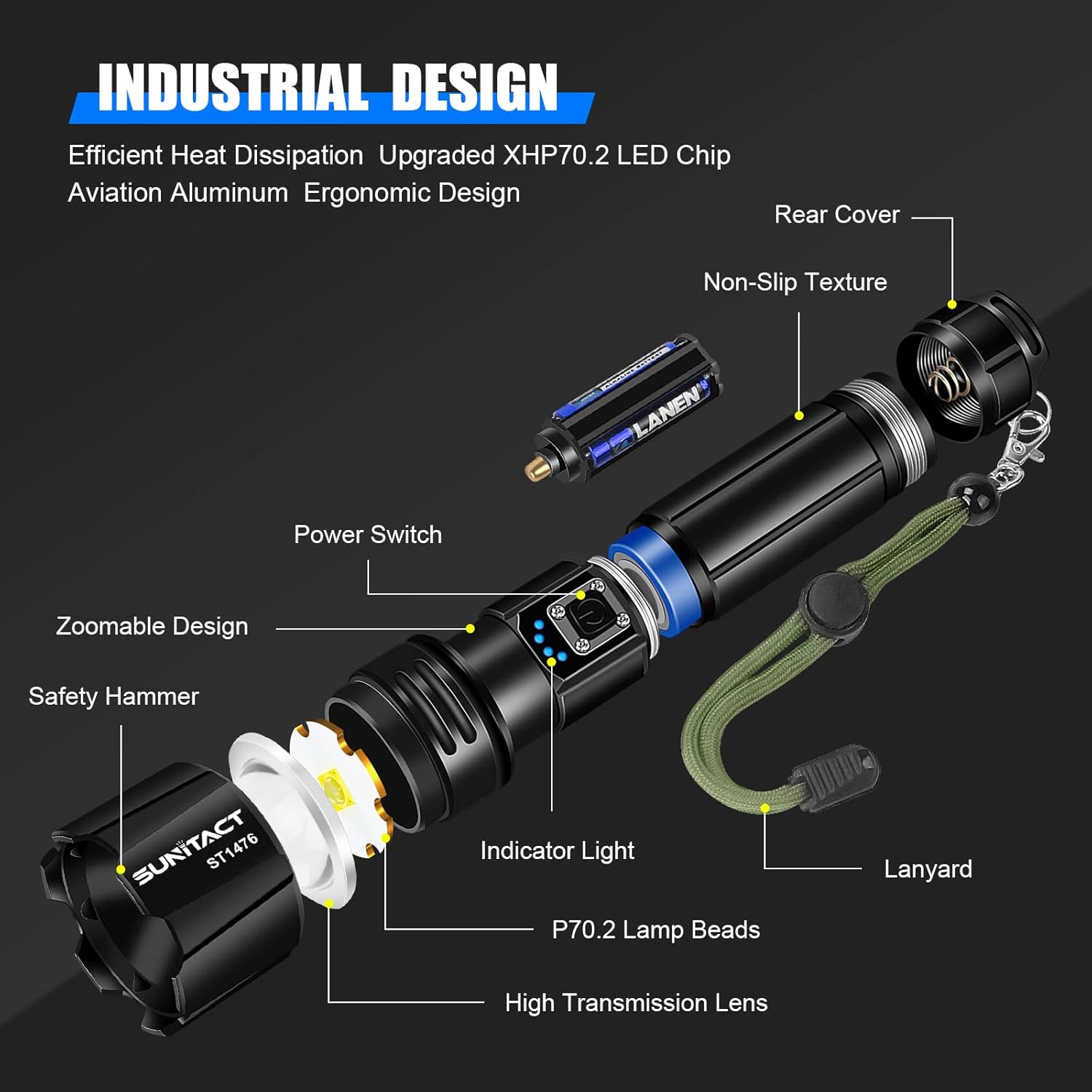
This diagram provides an exploded view of the Sunitact ST1476 flashlight, detailing its internal components such as the P70.2 lamp beads, high transmission lens, power switch, indicator light, and non-slip texture.
9. Warranty and Support
Sunitact offers a Lifetime Warranty for the ST1476 Rechargeable LED Flashlight, demonstrating our commitment to quality and customer satisfaction.
If you encounter any issues or have questions regarding your Sunitact flashlight, please contact our professional after-sales service team. We are dedicated to providing prompt and helpful support.
For support, please refer to the contact information provided on the product packaging or the official Sunitact website.
Ask a question about this manual
Ask about setup, troubleshooting, compatibility, parts, safety, or missing instructions. Manuals+ will review the question and use this page’s manual context to help answer it.