
Raycon RBE745-23E
Raycon Fitness Bluetooth True Wireless Earbuds User Manual
Model: RBE745-23E
Introduction
Thank you for choosing the Raycon Fitness Bluetooth True Wireless Earbuds. This manual provides essential information for setting up, operating, maintaining, and troubleshooting your earbuds to ensure optimal performance and longevity. These earbuds are designed for active lifestyles, featuring IPX7 water resistance, long battery life, and versatile sound modes.
What's in the Box
- Raycon Fitness Earbuds
- Charging Capsule (Protective Case)
- USB-C Cable
- Lanyard
- User Manual
- Four additional gel tips and ear stabilizers
Setup
Initial Charging
Before first use, ensure your charging capsule is fully charged. Connect the provided USB-C cable to the charging port on the capsule and to a power source. The LED indicator on the front of the capsule will show amber or green when charging.
Pairing with a Device
To pair your Raycon Fitness Earbuds with a Bluetooth device:
- Delete "The Fitness Earbuds" from the Bluetooth settings on your device if previously paired.
- Place both earbuds back into the charging capsule.
- While the earbuds are in the case, hold the center Reset button for 5 seconds or until the capsule LED flashes yellow three times.
- Close the capsule to complete the reset function.
- On your device, go to Bluetooth settings and search for "The Fitness Earbuds".
- Select "The Fitness Earbuds" to complete the pairing process.
- The earbuds support Bluetooth 5.3 and multipoint pairing, allowing connection to up to two devices simultaneously.
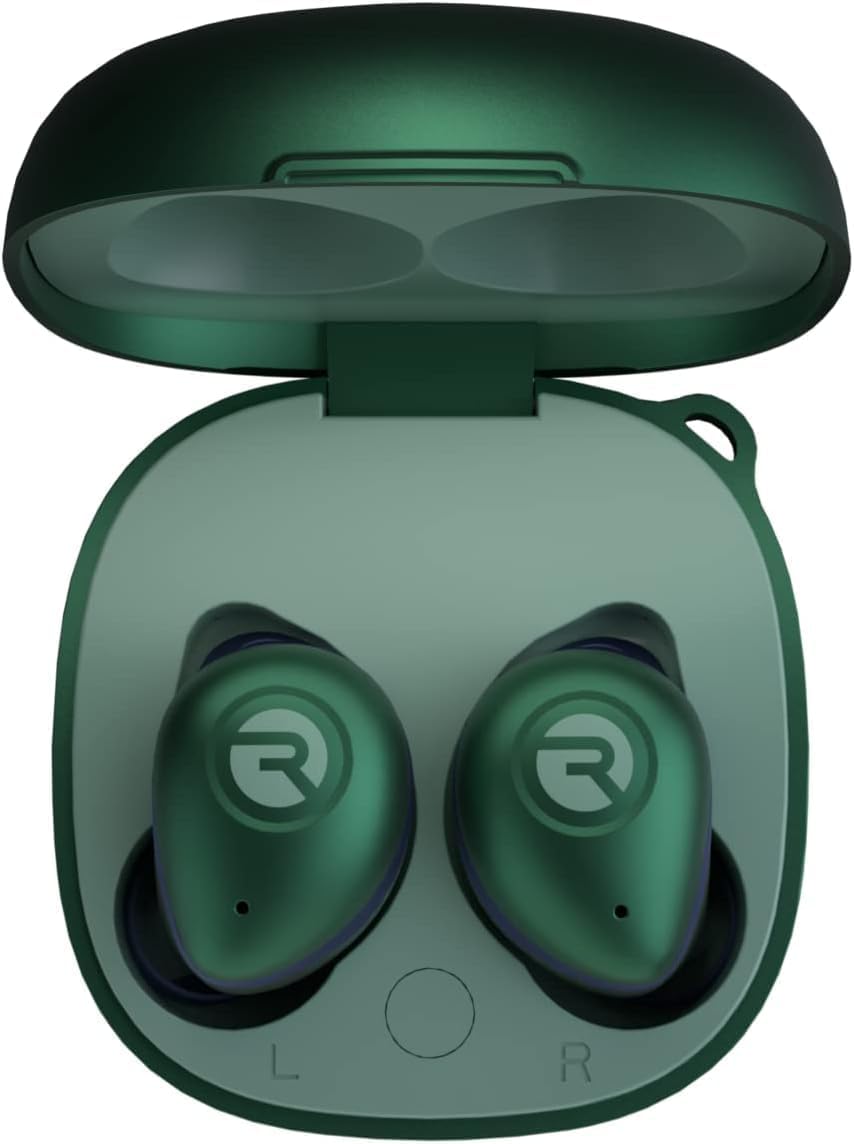
Image: Raycon Fitness Earbuds in their open charging case, ready for setup.
Operating Your Earbuds
Comfort and Fit
The earbuds come with four additional gel tips and ear stabilizers to ensure a tailored and secure fit, preventing them from falling out during intense activities.

Image: A person running, showcasing the secure fit of the Raycon Fitness Earbuds during physical activity.
Sound Profiles (EQ Modes)
The Raycon Fitness Earbuds offer multiple sound profiles to enhance your listening experience:
- Balanced Sound: Provides a leveled audio experience.
- Bass Sound: Offers a bass-boosted audio profile.
- Pure Sound: Delivers refined sound for clarity.
To toggle between these EQ profiles, hold the left earbud for 3 seconds.
Active Noise Cancellation (ANC) & Awareness Mode
Manage your audio environment with ANC and Awareness Mode:
- Active Noise Cancellation (ANC): Reduces ambient noise, allowing you to focus on your audio.
- Awareness Mode: Allows you to hear your surroundings while still enjoying your audio, useful for safety or when interacting with others.
To toggle between Active Noise Cancellation and Awareness Mode, hold the right earbud for 3 seconds.

Image: Visual representation of Active Noise Cancellation, showing a user immersed in sound.
Touch Controls
Easily manage your music, sound profiles, and voice assistant using the touch-sensitive "R" pad on the earbuds.

Image: Close-up of an earbud demonstrating the touch control functionality.
Maintenance
Cleaning Gel Tips
Remove the gel tips from the earbuds. Wash them with mild detergent and water, then rinse thoroughly. Ensure they are completely dry before reattaching them to the earbuds. Avoid using harsh chemicals.
Cleaning Earbud Nozzles
Use a soft-bristled brush or a dry cotton swab to gently remove any visible debris or earwax from the earbud nozzles. Do not use liquid or wet cleaning agents, as they can damage the internal electronics.
Cleaning Charging Capsule
Wipe the surface of the charging capsule gently with a soft, dry cloth or a slightly damp cloth. Avoid harsh chemicals, water, or excessive moisture, which can damage the electronic components.
Troubleshooting
Resetting Your Earbuds (Connectivity & Audio Issues)
If you experience connectivity or audio issues:
- Delete "The Fitness Earbuds" from the Bluetooth settings on your device.
- Place both earbuds back into the charging capsule.
- While the earbuds are in the case, hold the center Reset button for 5 seconds or until the capsule LED flashes yellow three times.
- Close the capsule to complete the reset function.
Earbuds Will Not Charge (Charging Issues)
If your earbuds are not charging:
- Ensure the charging capsule is charged; the LED on the front should show amber or green.
- Confirm there is nothing blocking the earbuds from connecting to the case's charging pins.
- Insert earbuds into the case and check for a blinking amber LED, which indicates that the earbuds are charging.
Bluetooth Connection Troubleshooting (Connectivity & Audio Issues)
For persistent Bluetooth connection problems:
- Ensure earbuds are within 33 feet (10 meters) of a connected Bluetooth device.
- Check the battery level of both the earbuds and the connected device. Low battery can cause weak or dropped connections.
- If one earbud doesn’t work, ensure it is clean and properly connected to the charging case.
Noise Cancellation & Awareness Mode Issues
If ANC or Awareness modes are not functioning correctly:
- Ensure both earbuds are charged.
- Verify that the earbud firmware is updated (refer to the Raycon app or website for firmware update instructions).
Multipoint Not Working?
If multipoint pairing is not functioning as expected:
- Confirm both earbuds are charged.
- Ensure they are disconnected from any other Bluetooth device.
- Confirm earbuds are in pairing mode and then reconnect devices to Bluetooth.
Video: A user demonstrating how to use and troubleshoot the Raycon Fitness Earbuds, including pairing and feature toggling.
Specifications
| Model Name | The Fitness Earbuds |
| Model Number | RBE745-23E |
| Connectivity Technology | Wireless (Bluetooth 5.3) |
| Bluetooth Range | 10 Meters (33 feet) |
| Noise Control | Active Noise Cancellation |
| Battery Life (Total with Case) | Up to 56 Hours |
| Water Resistance Level | IPX7 Water Resistant |
| Control Method | Touch |
| Compatible Devices | Cellphones, Gaming Consoles, Laptops, Tablets |
| Dimensions | 1.95 x 1.93 x 1.19 inches |
| Item Weight | 4.2 ounces |
| Manufacturer | Raycon |
| UPC | 811162031586 |
Warranty & Support
For warranty information, product registration, and additional support, please visit the official Raycon website or contact their customer service.
You can also visit the Raycon Store on Amazon for more products and information.
Ask a question about this manual
Ask about setup, troubleshooting, compatibility, parts, safety, or missing instructions. Manuals+ will review the question and use this page’s manual context to help answer it.