
Introduction
This manual provides essential instructions for the setup, operation, and maintenance of your Team Associated Enduro Trail Truck Sendero HD Titanium RTR. Please read this manual thoroughly before operating your vehicle to ensure safe and optimal performance.
Safety Information
Operating remote-controlled vehicles requires caution. Failure to operate this product in a safe manner could result in injury or damage to the product or property. Always follow these safety guidelines:
- Keep hands, hair, and loose clothing away from moving parts.
- Do not operate near people, pets, or obstacles.
- Ensure batteries are charged and installed correctly.
- Always turn off the vehicle and transmitter when not in use.
- Adult supervision is recommended for users under 14 years of age.
- This product contains chemicals known to the State of California to cause cancer and birth defects or other reproductive harm (Proposition 65 warning).
What's in the Box
Your Team Associated Enduro Trail Truck Sendero HD Titanium RTR package includes the following components:
- Team Associated Enduro Trail Truck Sendero HD Titanium RTR Vehicle
- Stealth X Gearbox With Adjustable Overdrive Gears
- LED headlights
- Ocho beadlock wheels
- Reedy Power SC480X electronic speed controller
- Reedy Power high-torque 1320MG metal gear servo
- Steel servo horn
- Adjustable width rock sliders
- Box diorama
- Adjustable front injection-molded bumper
- Removable injection-molded fairlead
- Note: Battery and charger are sold separately.
Key Features
- BTA (Behind The Axle) Steering: Improves steering angle and reduces scrub radius for enhanced maneuverability.
- Threaded Aluminum Shock Bodies: Provides smooth suspension action and allows for precise ride height and damping adjustments.
- Adjustable Front And Rear Bumper Mounts: Offers flexibility for customizing approach and departure angles, and accommodating various accessories.
- Adjustable Rear Shock Tower Mount Positions: Allows fine-tuning of suspension geometry for different terrains and driving styles.
- Stealth X Gearbox With Adjustable Overdrive Gears: Enables adjustment of front and rear drive ratios for improved crawling performance.
- Cab-only design with injection-molded utility bed: Realistic scale appearance with functional utility.
- Clear windows, molded grill, replaceable headlight lenses, pivoting side mirrors: Enhances scale realism.
- Reedy Power SC480X Electronic Speed Controller: Provides reliable power delivery and control.
- Reedy Power high-torque 1320MG metal gear servo: Durable and powerful steering response.
- Steel servo horn: Ensures robust connection and durability for the steering system.
- Adjustable width rock sliders: Protects the chassis and body during challenging off-road maneuvers.
- Ocho beadlock wheels: Secure tire mounting without glue, allowing for easy tire changes.
Setup Guide
1. Battery Installation
The vehicle requires a suitable RC battery pack (not included). Ensure the battery is fully charged before installation. Connect the battery to the Electronic Speed Controller (ESC) following the polarity markings. Secure the battery in its designated compartment.
2. Transmitter Preparation
Install fresh batteries into your transmitter. Power on the transmitter first, then the vehicle. Ensure proper binding between the transmitter and receiver. Refer to your transmitter's specific manual for detailed binding instructions if necessary.
3. Initial Inspection
Before first use, inspect all screws, linkages, and moving parts to ensure they are secure and free from obstruction. Check that the wheels are properly attached and the tires are seated correctly on the beadlock wheels.
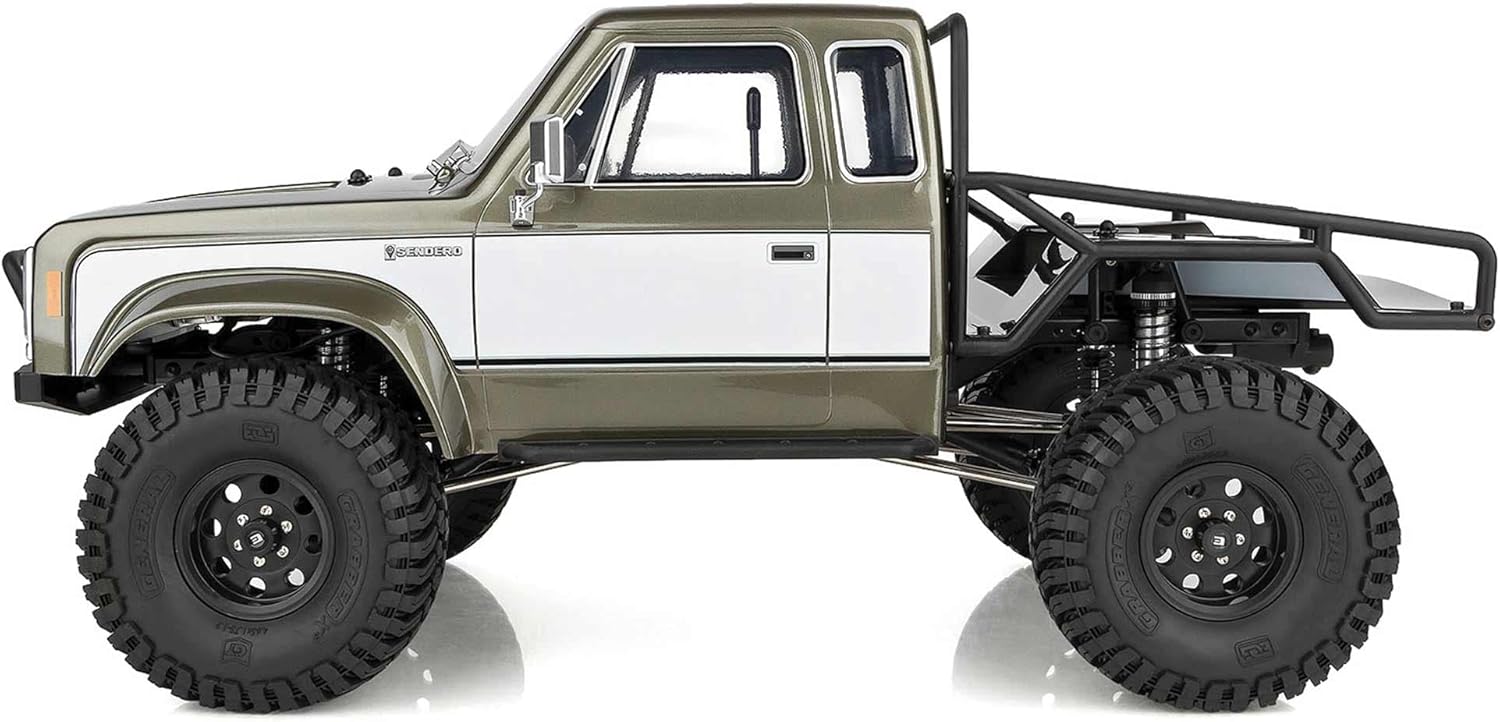
Image: Side view of the Team Associated Enduro Trail Truck Sendero HD Titanium RTR, highlighting the cab-only body and robust chassis.
Operating Instructions
Basic Operation
With the transmitter and vehicle powered on, gently apply throttle to move forward or backward. Use the steering wheel on the transmitter to control direction. Practice in an open area to familiarize yourself with the vehicle's handling characteristics.
Trail Crawling Tips
- Slow and Steady: For optimal crawling, use smooth and controlled throttle inputs. Avoid sudden movements.
- Weight Distribution: Experiment with adding weight to the front of the vehicle to improve climbing ability and stability on inclines.
- Tire Pressure: While not applicable to solid RC tires, ensure your beadlock wheels are properly assembled for maximum grip.
- Line Choice: Observe the terrain and plan your path to navigate obstacles efficiently.

Image: Front view of the Enduro Trail Truck, showcasing the detailed grille and bumper.
Video: Overview of the Team Associated Enduro Trail Truck, demonstrating its features and capabilities. (Duration: 2:45)
Maintenance
Regular Cleaning
After each use, especially in dirty or wet conditions, clean your vehicle. Use a soft brush or compressed air to remove dirt and debris from the chassis, suspension, and drivetrain. Avoid using water directly on electronics.
Component Inspection
- Shocks: Check for leaks or damage to the threaded aluminum shock bodies. Ensure smooth operation.
- Drivetrain: Inspect gears and universal joints for wear or damage. Keep moving parts free of debris.
- Steering Servo: Verify the Reedy Power high-torque 1320MG metal gear servo operates smoothly and the steel servo horn is secure.
- Wheels and Tires: Check beadlock wheels for tightness and tires for cuts or excessive wear.

Image: Detailed view of the front suspension and BTA steering system.

Image: View of the Reedy Power motor and electronic speed controller.
Troubleshooting
| Problem | Possible Cause | Solution |
|---|---|---|
| Vehicle does not respond to transmitter. | Low battery in vehicle or transmitter; not bound; power switch off. | Charge/replace batteries; re-bind transmitter and receiver; ensure power switches are on. |
| Poor slow crawling performance. | Insufficient weight distribution; ESC settings not optimized. | Consider adding weight to the front of the chassis. Consult ESC manual for advanced settings. |
| Vehicle does not turn off without unplugging battery. | Design characteristic of the ESC/vehicle. | Always disconnect the battery after use to power off the vehicle completely. |
| Unusual noises from drivetrain. | Debris in gears; worn gears; loose components. | Inspect and clean gears; replace worn parts; tighten all screws. |
Specifications
- Model Number: EL40120
- Product Dimensions: 17.64 x 9.06 x 7.87 inches
- Item Weight: 1 pounds
- Manufacturer: Team Associated
- Recommended Age: 14+ years
- Scale: 1/10 Off-Road
- Power Source: Electric (Battery not included)
Warranty and Support
Team Associated products are manufactured to high standards. For warranty information or technical support, please visit the official Team Associated website or contact their customer service department. Keep your proof of purchase for warranty claims.
Official Website: www.associatedelectrics.com


