
Introduction
The ThreeH Vibration Sensor Alarm is a compact and effective security device designed to detect vibrations on doors, windows, and other entry points. Upon detecting significant vibration, it emits a loud 125dB alarm and activates an LED flash to deter intruders and alert occupants. Its slim design and adjustable sensitivity make it suitable for various applications in homes, offices, and personal belongings.
Product Features
- Easy Installation: No complex wiring or setup required. Simply attach the sensor to the desired surface.
- Adjustable Sensitivity: Customize the vibration detection level to minimize false alarms.
- Versatile Protection: Suitable for doors, windows, apartments, offices, stores, garages, dormitory rooms, and RVs.
- Low Battery Warning: Alerts you when batteries need replacement.
- Loud 125dB Alarm: Deters intruders with a powerful siren and LED flash.
Package Contents
- ThreeH Window Vibration Alarm (2 units for 2-pack)
- User Manual
- 3 x LR44 Batteries (pre-installed in each alarm unit)
Specifications
| Brand | ThreeH |
| Model Number | H-HG07 |
| Alarm Volume | 125dB |
| Alarm Duration | 30 seconds (stops automatically or when turned off) |
| Power Source | 3 x LR44 Batteries (included) |
| Product Size | 7.2 x 0.95 cm / 2.83 x 0.37 inches |
| Installation Type | Self-Adhesive |
| Connectivity Technology | Wireless |
| Recommended Use | Indoor/Outdoor (protected areas) |
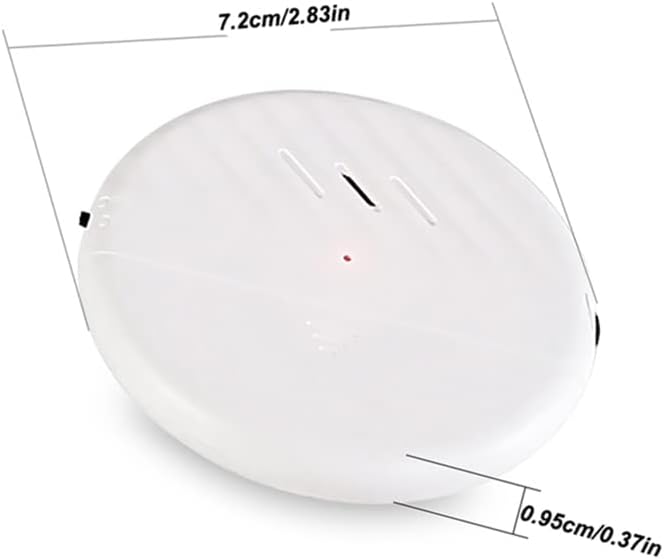
Figure 1: Product Dimensions. The alarm measures 7.2 cm (2.83 inches) in length and 0.95 cm (0.37 inches) in thickness, highlighting its slim profile.
Setup Instructions
Follow these steps to install and activate your ThreeH Vibration Sensor Alarm:
- Prepare the Surface: Ensure the surface where you intend to mount the alarm (e.g., door, window frame) is clean, dry, and smooth.
- Peel Off Sticker: Carefully peel off the protective film from the adhesive backing on the rear of the alarm unit.
- Attach Alarm: Choose your desired position and firmly press the alarm onto the surface. Ensure it is securely attached.
- Turn On: Locate the power switch on the side of the alarm and slide it to the "ON" position. A small LED indicator may briefly light up.
- Adjust Sensitivity: Use the sensitivity adjustment switch (often labeled High/Low or with a slider) to set the desired level of vibration detection. Start with a lower sensitivity and increase if needed.

Figure 2: Installation Steps. This image visually guides you through peeling the adhesive, attaching the alarm, turning it on, and adjusting sensitivity.
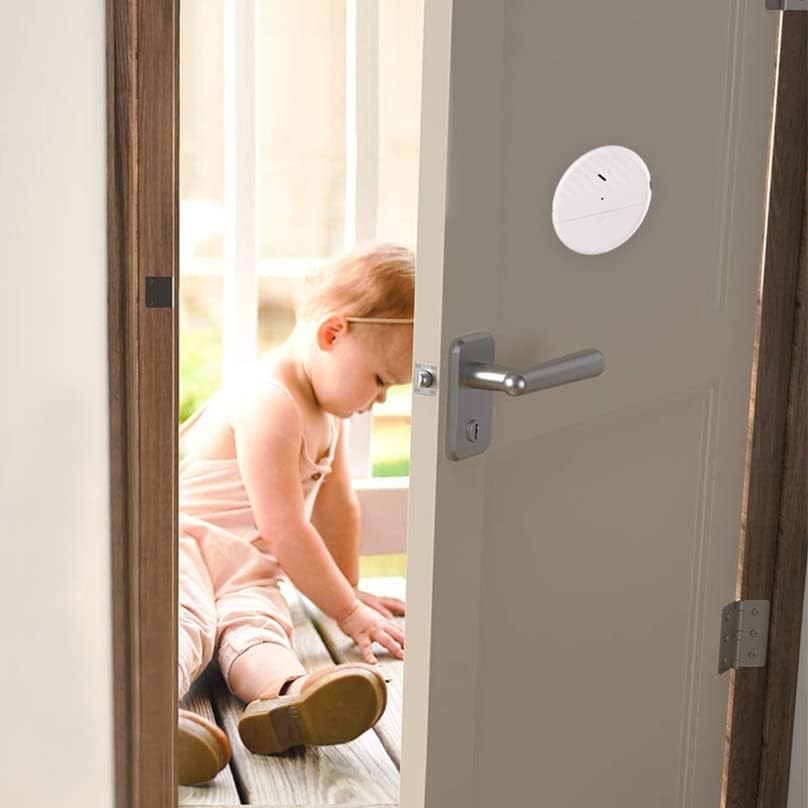
Figure 3: Example Placement. The alarm is shown discreetly mounted on a door, demonstrating typical installation.
Operating Instructions
Once installed and turned on, the ThreeH Vibration Sensor Alarm operates as follows:
- Arming: The alarm is armed when the power switch is in the "ON" position.
- Triggering the Alarm: If the alarm detects significant vibration (e.g., from an attempted forced entry, window breaking), it will immediately activate.
- Alarm Response: The alarm will emit a loud 125dB siren and an LED indicator light will flash simultaneously.
- Alarm Duration: The siren and LED flash will continue for approximately 30 seconds before automatically stopping.
- Disarming: To stop the alarm before the 30-second cycle completes, slide the power switch to the "OFF" position.

Figure 4: Alarm Activation Example. The alarm is shown detecting an attempted break-in through a window.

Figure 5: Intruder Deterrence. The alarm's loud sound is designed to scare away potential intruders.
Maintenance
- Battery Replacement: The alarm is powered by 3 x LR44 batteries. When the low battery warning activates (e.g., a specific LED pattern or weaker alarm sound), replace all three batteries. To replace, carefully open the battery compartment, remove old batteries, and insert new ones, ensuring correct polarity.
- Cleaning: Wipe the alarm unit with a soft, dry cloth. Do not use abrasive cleaners or immerse the unit in water.
- Adhesive Check: Periodically check the adhesive to ensure the alarm remains securely attached to the surface. Re-apply if necessary.
Troubleshooting
- Alarm Not Sounding:
- Ensure the power switch is in the "ON" position.
- Check the batteries. Replace them if they are low or depleted.
- Verify the alarm is securely mounted and receiving sufficient vibration to trigger.
- Adjust the sensitivity to a higher setting.
- False Alarms:
- Adjust the sensitivity to a lower setting.
- Ensure the mounting surface is stable and not subject to minor, unintentional vibrations (e.g., strong winds, passing heavy vehicles).
- Alarm Sound is Weak:
- This typically indicates low batteries. Replace all three LR44 batteries.
Warranty Information
According to the product specifications, there is no applicable manufacturer warranty for this device. Please refer to the retailer's return policy for details on returns or exchanges.
Support
For further assistance or inquiries regarding your ThreeH Vibration Sensor Alarm, please contact the retailer where the product was purchased. You may also visit the official ThreeH store page for additional product information and support resources.
ThreeH Store: https://www.amazon.ca/stores/ThreeH/page/2217C15A-8FAD-41DA-89A1-234D7750908C