
Benetech GM3123
GM3123 High Voltage Insulation Tester User Manual
Model: GM3123 | Brand: Benetech
1. Introduction
The Benetech GM3123 is a digital high voltage insulation resistance tester designed for accurate and safe measurement of insulation resistance. It incorporates advanced features for reliable performance in various electrical testing environments.
Key Features:
- Automatic discharge function for enhanced operational safety.
- LCD backlight for clear digital reading display in various lighting conditions.
- Live circuit warning symbols with audible alerts to prevent accidental contact.
- Automatic power-off function after 10 minutes of inactivity to conserve battery life.
- Timer measurement function for precise testing durations.
- Low battery indicator to ensure uninterrupted operation.
- Polarization Index (PI) measurement capability.
- Compatible with 12V DC adapter (12V/1A).

Image: The GM3123 High Voltage Insulation Tester (right) shown alongside the GM3125 model (left), highlighting the automatic discharge function for safer operation.
2. Product Overview
Familiarize yourself with the components and controls of the GM3123 Insulation Tester.

Image: Detailed diagram illustrating the various parts and controls of the GM3123 High Voltage Insulation Tester.
Panel Introduction:
- LCD display
- Time set button
- Backlight button
- Test button
- Function switch (Rotary dial for selecting test voltage and AC.V)
- Time choose button
- Red high voltage test wire socket (LINE)
- Green protective test wire socket (GUARD)
- Black test wire socket (EARTH)
- DC input interface (12V/1A)
- Black test wire and alligator clip
- Green protective test wire and alligator clip
- Red Hi-volt test wire
3. Setup
Battery Installation:
The GM3123 requires 8 x 1.5V LR14 batteries for operation (not included). To install the batteries:
- Locate the battery compartment on the rear of the device.
- Open the battery compartment cover.
- Insert 8 LR14 batteries, ensuring correct polarity (+/-).
- Close the battery compartment cover securely.
Alternatively, the device can be powered by a 12V/1A DC adapter via the DC input interface (10).
Connecting Test Leads:
- Connect the red high voltage test wire (13) to the red LINE socket (7).
- Connect the green protective test wire (12) to the green GUARD socket (8).
- Connect the black test wire (11) to the black EARTH socket (9).
- Ensure all connections are firm and secure before proceeding with any tests.
4. Operating Instructions
Insulation Resistance Measurement:
- Ensure the device is powered on.
- Rotate the function switch (5) to the desired test voltage (500V, 1000V, or 2500V).
- Connect the test leads to the circuit or component under test according to standard safety procedures (e.g., Red to Live/Phase, Black to Earth/Ground, Green to Guard if applicable).
- Press and hold the "PRESS TO TEST" button (4) to initiate the measurement. The LCD display (1) will show the insulation resistance value.
- Release the "PRESS TO TEST" button to stop the measurement. The device will automatically discharge any residual voltage.
- Observe the LCD display for the measured resistance value.
AC/DC Voltage Measurement:
- Rotate the function switch (5) to "AC.V".
- Connect the test leads to the voltage source.
- The LCD display (1) will show the measured AC or DC voltage.
Using the Timer Function:
- Press the "TIME SET" button (2) to set the desired test duration.
- Use the "TIME CHOOSE" button (6) to adjust the time.
- Initiate the insulation resistance test as described above. The timer will count down, and the measurement will be taken over the set duration.
Backlight Function:
Press the "BACKLIGHT" button (3) to turn the LCD backlight on or off for improved visibility in low-light conditions.
5. Maintenance
- Cleaning: Wipe the device with a dry, soft cloth. Do not use abrasive cleaners or solvents.
- Storage: When not in use for extended periods, remove the batteries to prevent leakage. Store the device in a cool, dry place, away from direct sunlight and extreme temperatures.
- Battery Replacement: Replace batteries when the low battery indicator appears on the display to ensure accurate measurements.
- Calibration: For professional use, periodic calibration by qualified personnel is recommended to maintain accuracy.
6. Troubleshooting
| Problem | Possible Cause | Solution |
|---|---|---|
| Device does not power on. | Dead or incorrectly installed batteries. | Check battery polarity, replace with new batteries, or use DC adapter. |
| Inaccurate readings. | Low battery, poor test lead connection, or environmental factors. | Replace batteries, ensure secure connections, test in stable environmental conditions. Consider professional calibration if issues persist. |
| "OL" (Overload) displayed. | Measurement exceeds the selected range. | Switch to a higher test voltage range if applicable, or verify the circuit is not shorted. |
| No backlight. | Backlight function is off. | Press the "BACKLIGHT" button (3) to activate. |
7. Specifications
General Specifications:
- Model: GM3123
- Brand: Benetech
- Power Source: Battery operated (8x 1.5V LR14 batteries, not included) or 12V DC adapter.
- Minimum Operating Voltage: 12V
- Product Size: 153 x 96 x 220 mm
- Product Weight: 1108g (without batteries and test wires)
- Operable Altitude: Less than 2000m (Indoor use)
- Operation Circumstance: Temperature 0~40°C, Humidity <= 85%
- Storage Circumstance: Temperature -20~60°C, Humidity <= 90%
- Battery's Life: Approx. 15 hours
- First Available Date: April 5, 2023
Insulation Resistance Tester Parameters:
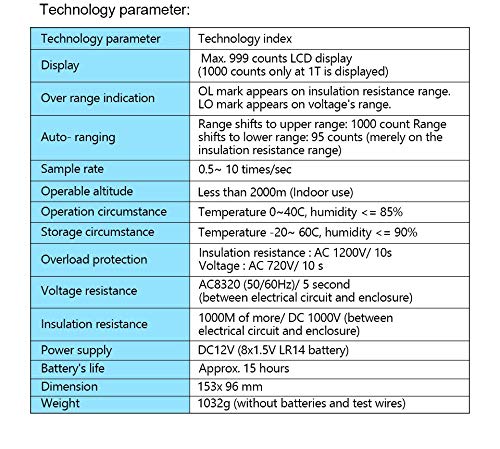
Image: Table detailing the insulation resistance testing parameters of the GM3123.
| Parameter | 500V | 1000V | 2500V | 5000V (Note: GM3123 supports up to 2500V) |
|---|---|---|---|---|
| Rated voltage | 500V | 1000V | 2500V | 5000V |
| Test range | 0.0~99.9MΩ, 100~999MΩ | 0.0~99.9MΩ, 100~999MΩ, 1.00~1.99GΩ | 0.0~99.9MΩ, 100~999MΩ, 1.00~1.99GΩ, 0.0~99.9GΩ | 0.0~99.9MΩ, 100~999MΩ, 1.00~1.99GΩ, 0.0~1000GΩ |
| Open circuit voltage | DC 500V +30%, -0% | DC 1000V +20%, -0% | DC 2500V +20%, -0% | DC 5020V +20%, -0% |
| Rated current | 0.5MΩ loading 1mA~1.2mA | 1MΩ loading 1mA~1.2mA | 2.5MΩ loading 1mA~1.2mA | 5MΩ loading 1mA~1.2mA |
| Short-circuit current | Approx. 1.3mA | |||
| Accuracy | ±5%rdg ±3dgt (0~99.9GΩ), ±20%rdg ±3dgt (above 100GΩ) | |||
Voltage Tester Parameters:
| Measuring range | DV | AV |
|---|---|---|
| 30-600V | ±30~±600V | 30~600V (50/60Hz) |
| Resolution | 1V | |
| Accuracy | ±2%rdg ±3dgt | |
Technology Parameters:
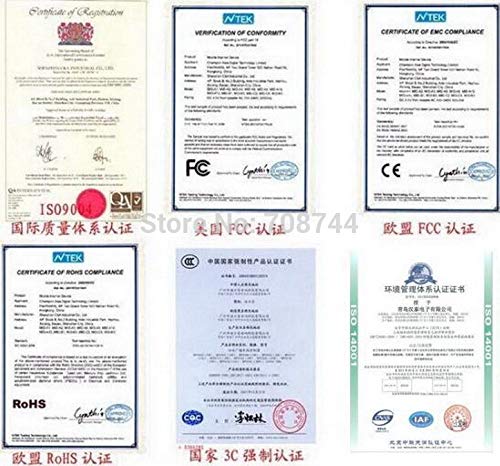
Image: Table outlining the technology parameters and general specifications of the GM3123.
| Technology parameter | Technology index |
|---|---|
| Display | Max. 999 counts LCD display (1000 counts only at 1T is displayed) |
| Over range indication | OL mark appears on insulation resistance range. LO mark appears on voltage's range. |
| Auto-ranging | Range shifts to upper range: 1000 count Range shifts to lower range: 95 counts (merely on the insulation resistance range) |
| Sample rate | 0.5 ~ 10 times/sec |
| Overload protection | Insulation resistance: AC 1200V/ 10s; Voltage: AC 720V/ 10s |
| Voltage resistance | AC8320V (50/60Hz)/ 5 second (between electrical circuit and enclosure) |
| Insulation resistance | 1000MΩ or more/ DC 1000V (between electrical circuit and enclosure) |
8. Package Contents
The standard package for the GM3123 High Voltage Insulation Tester includes:
- 1 x GM3123 Insulation Resistance Tester
- 1 x English Language User Manual
- Test leads (Red Hi-volt, Green protective, Black common)
- Carrying bag

Image: All items included in the GM3123 High Voltage Insulation Tester package, neatly arranged.
9. Safety Information
Always adhere to the following safety guidelines when operating the GM3123 High Voltage Insulation Tester:
- Do not operate the device if it appears damaged or if the test leads are compromised.
- Ensure the circuit under test is de-energized and safely discharged before connecting test leads for insulation resistance measurements.
- Always wear appropriate personal protective equipment (PPE), such as insulated gloves and safety glasses, when working with high voltages.
- Do not touch the test leads or the circuit under test during a measurement.
- The device performs automatic discharge after testing; however, always verify the circuit is safe before handling.
- Do not expose the device to moisture or extreme environmental conditions.
- Refer to local electrical safety regulations and standards for proper testing procedures.
10. Warranty and Support
For warranty information and technical support, please refer to the contact details provided by your retailer or the manufacturer, Benetech. Keep your purchase receipt as proof of purchase for any warranty claims.
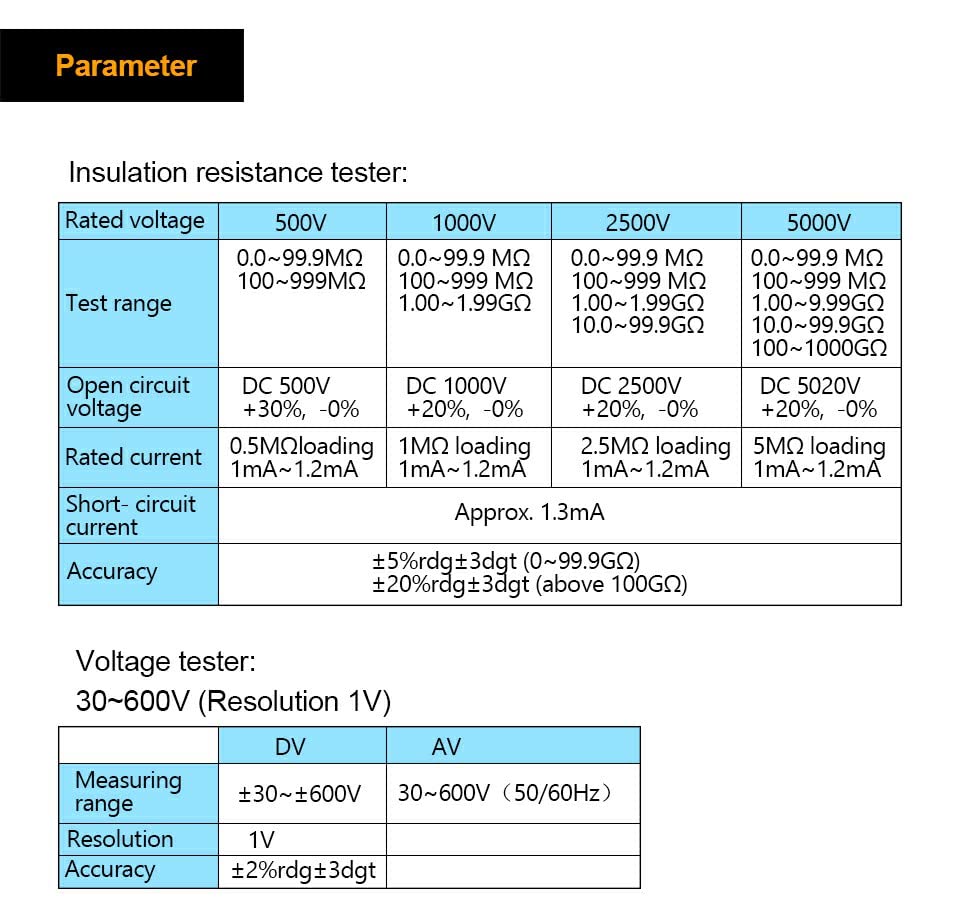
Image: Examples of product certifications, including ISO9001, FCC, CE, and RoHS compliance.
Related documentsGM3123


Ask a question about this manual
Ask about setup, troubleshooting, compatibility, parts, safety, or missing instructions. Manuals+ will review the question and use this page’s manual context to help answer it.