
1. Introduction
Thank you for purchasing the Team Associated Reedy Blackbox 610R Competition Electronic Speed Controller (ESC). This manual provides essential information for the proper setup, operation, and maintenance of your ESC. To ensure safe and efficient use, please read this entire instruction manual carefully before operating the product. Familiarizing yourself with all features and warnings will help prevent damage to the product, personal property, and potential injury.
2. Safety Guidelines
Operating this sophisticated hobby product requires caution, common sense, and basic mechanical ability. Failure to operate the product correctly can result in damage, personal property loss, or serious injury. Adhere to the following safety guidelines:
- Read the Entire Manual: Before operation, read and understand all instructions and warnings provided in this manual.
- Adult Supervision: This product is not intended for use by children without direct adult supervision.
- Compatible Components: Do not use the ESC with incompatible components. Only use parts and accessories recommended by Team Associated.
- No Alterations: Do not alter this product in any way outside of the instructions provided by Team Associated. Unauthorized modifications can lead to malfunction and void the warranty.
- Proper Handling: Always handle the ESC with care. Avoid exposing it to moisture, extreme temperatures, or excessive vibration.
- Battery Safety: Ensure proper battery connection and disconnection. Use only recommended battery types and configurations.
3. Product Overview
The Reedy Blackbox 610R is a competition-grade electronic speed controller designed for RC vehicles. It provides precise motor control and efficient power delivery. The package includes the Reedy Blackbox 610R Competition ESC itself.
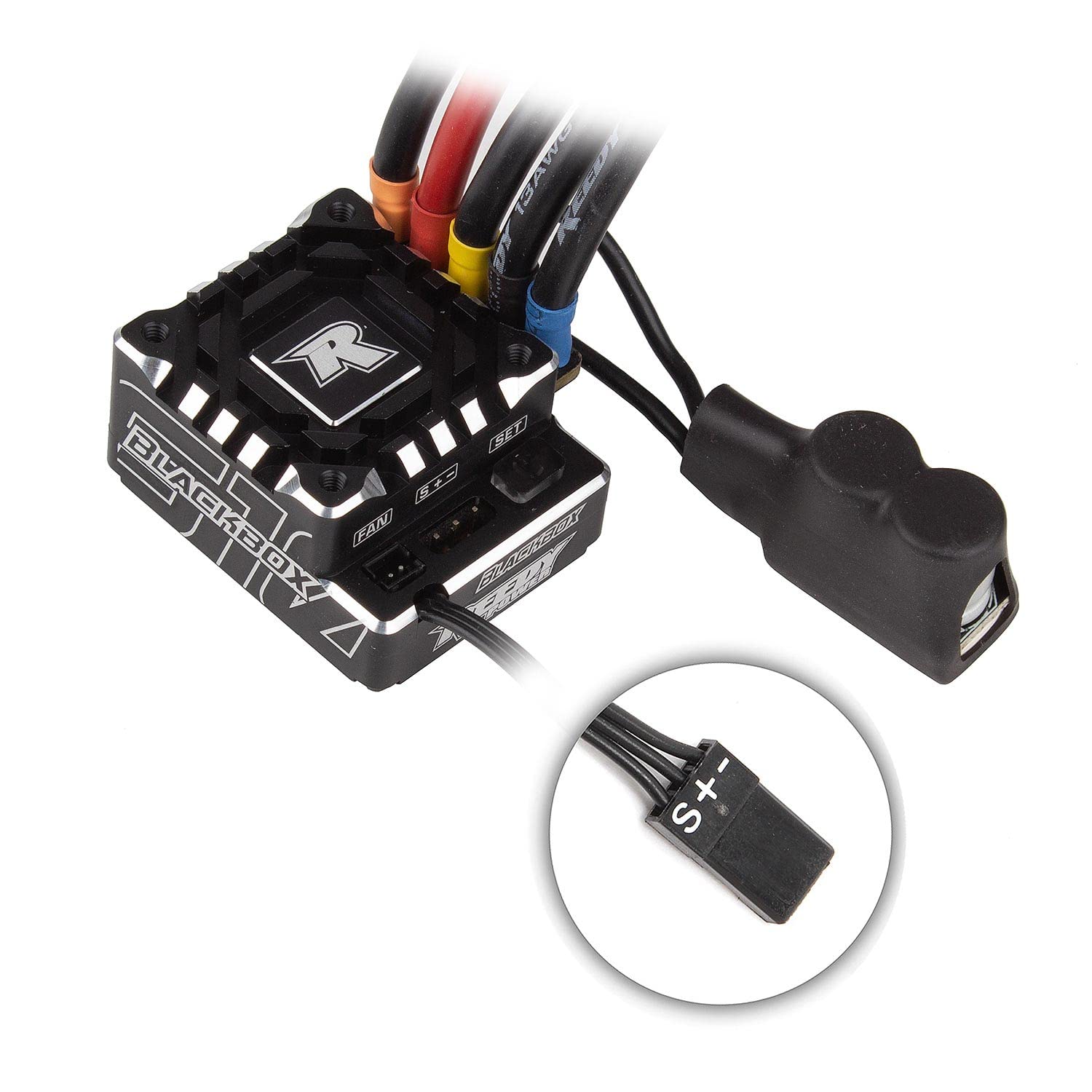
Figure 1: Team Associated Reedy Blackbox 610R Competition ESC. This image shows the compact design of the electronic speed controller, typically featuring cooling fins and various ports for motor, battery, and receiver connections.
4. Setup
The Reedy Blackbox 610R ESC comes pre-assembled and does not require additional assembly. Follow these general steps for initial setup:
- Mounting: Securely mount the ESC in your RC vehicle chassis using appropriate double-sided tape or mounting hardware. Ensure adequate airflow for cooling.
- Motor Connection: Connect the ESC's motor wires to your brushless motor. Ensure correct phase matching (A-A, B-B, C-C) for proper rotation.
- Receiver Connection: Plug the ESC's receiver lead into the throttle channel (typically channel 2) of your RC receiver.
- Battery Connection: Connect a fully charged 2-cell Lithium Polymer (LiPo) battery pack to the ESC's battery input. Ensure correct polarity.
- Calibration: Refer to your radio system's manual and the ESC's specific programming instructions for throttle range calibration. This step is crucial for proper operation.
5. Operating Instructions
The Reedy Blackbox 610R ESC operates in an automatic mode, detecting various parameters for optimal performance. Once properly set up and calibrated, follow these general operating procedures:
- Power On Sequence: Always turn on your radio transmitter first, then connect the battery to the ESC.
- Pre-Run Check: Before driving, perform a quick check of all controls (throttle, steering) to ensure they respond correctly.
- Driving: Operate your RC vehicle responsibly. Avoid prolonged full-throttle operation without adequate cooling, especially in high-load situations.
- Power Off Sequence: Disconnect the battery from the ESC first, then turn off your radio transmitter.
- Monitoring: Pay attention to the ESC's temperature during operation. If it becomes excessively hot, allow it to cool down before further use.
6. Maintenance
Regular maintenance helps ensure the longevity and optimal performance of your Reedy Blackbox 610R ESC:
- Cleaning: After each use, gently clean the ESC to remove dirt, dust, and debris. Use a soft brush or compressed air. Avoid using liquids directly on the ESC.
- Inspection: Periodically inspect all wires, connectors, and solder joints for signs of wear, damage, or corrosion. Replace damaged components as necessary.
- Cooling Fan: If your ESC includes a cooling fan, ensure it is free of obstructions and operating correctly. Clean any dust buildup.
- Storage: Store the ESC in a clean, dry environment away from direct sunlight and extreme temperatures when not in use.
7. Troubleshooting
If you encounter issues with your Reedy Blackbox 610R ESC, consider the following common troubleshooting steps:
- No Power:
- Check battery connection and ensure the battery is charged.
- Verify all power wires are securely connected and not damaged.
- No Motor Response:
- Ensure the ESC is properly calibrated to your radio transmitter.
- Check motor wire connections for correct phasing.
- Verify the receiver is powered and the ESC's receiver lead is plugged into the correct channel.
- Inspect motor and ESC for any visible damage.
- Erratic Operation:
- Recalibrate the ESC throttle range.
- Check for radio interference.
- Ensure all connections are secure.
- Overheating:
- Ensure adequate ventilation around the ESC.
- Check motor gearing; excessive gearing can cause overheating.
- Verify the motor is not overloaded or damaged.
If problems persist after attempting these steps, contact Team Associated customer support for further assistance.
8. Specifications
| Brand | Team Associated |
| Model Name | Reedy Blackbox 610R Competition ESC |
| Model Number | ASC27016 |
| UPC | 784695270169 |
| Item Weight | 4 ounces |
| Item Dimensions | 4.4 x 3.7 x 2 inches |
| Material Type | Plastic |
| Power Source | Battery Powered |
| Battery Description | 2-cell Lithium Polymer battery pack |
| Operation Mode | Automatic |
| Included Components | Reedy Blackbox 610R Competition ESC |
9. Warranty and Support
For detailed warranty information, please refer to the documentation provided with your purchase or visit the official Team Associated website. Warranty terms and conditions typically cover manufacturing defects for a specified period.
If you require technical assistance, spare parts, or have questions not covered in this manual, please contact Team Associated customer support. Contact information can usually be found on their official website or on the product packaging.
Team Associated Official Website: www.associatedelectrics.com
