
Introduction
This manual provides essential instructions for the setup, operation, and maintenance of your BoxWave AquaProof USB Keyboard. Designed for durability and hygiene, this keyboard is compatible with devices such as the Samsung Galaxy Book3 360 (15.6 in).
The AquaProof USB Keyboard features a waterproof design, allowing for easy cleaning and disinfection. Its robust construction includes rubberized gaskets and UV coating to protect internal electronics, ensuring longevity and reliable performance.

Figure 1: BoxWave AquaProof USB Keyboard shown with a compatible laptop.
Setup
- Unpacking: Carefully remove the AquaProof USB Keyboard from its packaging.
- Connection: Locate an available USB port on your device (e.g., Samsung Galaxy Book3 360). Insert the 6-foot long USB plug from the keyboard into the USB port. The keyboard utilizes a universal Plug-N-Play USB protocol, requiring no additional drivers for most operating systems.
- Additional USB Devices: The keyboard includes two extra USB extension plugs. These can be used to connect other USB devices, such as a mouse, directly through the keyboard.
- Positioning: Place the keyboard on a stable surface. Adjust the tilt legs located on the underside of the keyboard to your preferred typing angle for optimal comfort. The rubberized feet will help prevent slipping.

Figure 2: Key features of the AquaProof USB Keyboard, including the USB cable and adjustable legs.
Operating Instructions
The BoxWave AquaProof USB Keyboard functions as a standard full-size keyboard. Simply begin typing after connecting it to your device.
- Standard Typing: Use the keys as you would with any conventional keyboard.
- Multimedia Keys: The keyboard may include 12 multimedia keys for quick access to functions such as volume control, media playback, and more. Refer to your operating system's documentation for specific functionality if needed.
- Key Durability: The high-quality mechanical switches are designed for durability, rated for over 8 million clicks.
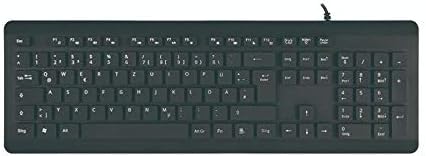
Figure 3: Top-down view of the keyboard layout.
Maintenance
One of the primary advantages of the AquaProof USB Keyboard is its ease of cleaning. Regular cleaning helps maintain a hygienic workspace.
- Disconnection: Before cleaning, always disconnect the keyboard from your device.
- Washing: The keyboard can be washed with soap and water. You may rinse it under a faucet or submerge it for a thorough cleaning.
- Disinfection: For disinfection, you can spray the keyboard with appropriate disinfectant solutions.
- Drying: After washing, ensure the keyboard is completely dry before reconnecting it to your device. The design allows for quick drying.
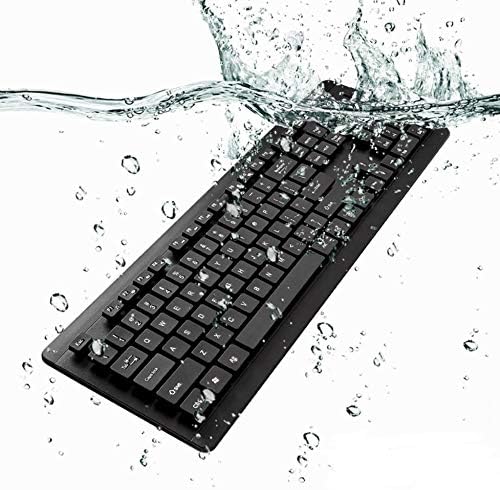
Figure 4: The AquaProof USB Keyboard is designed to be fully washable.

Figure 5: Demonstrating the ease of cleaning the keyboard under running water.
Troubleshooting
- Keyboard Not Responding:
- Ensure the USB cable is securely connected to your device's USB port.
- Try connecting the keyboard to a different USB port on your device.
- If using a USB hub, try connecting the keyboard directly to the computer.
- Restart your computer or device.
- Keys Not Functioning Correctly:
- Disconnect and reconnect the keyboard.
- Perform a thorough cleaning as described in the Maintenance section, ensuring no debris is lodged under the keys.
Specifications
| Feature | Detail |
|---|---|
| Product Dimensions | 450 x 144 x 27 mm (17.72 x 5.67 x 1.06 inches) |
| Item Weight | 1.12 pounds (approx. 508 grams) |
| Connectivity Technology | USB-A (Plug-N-Play) |
| Cable Length | 6 feet (approx. 1.8 meters) |
| Special Feature | Waterproof, Washable |
| Color | Jet Black |
| Material | Acrylonitrile Butadiene Styrene (ABS) |
| Key Switch Durability | Over 8 million clicks |
| Compatible Devices | Laptop (e.g., Samsung Galaxy Book3 360 (15.6 in)) |

Figure 6: Physical dimensions of the keyboard.
Warranty and Support
BoxWave provides limited third-party technical support for the AquaProof USB Keyboard. This support includes up to three inquiries via electronic messaging.
For support inquiries, please refer to the contact information provided with your purchase or visit the official BoxWave website. Please note that this product is not affiliated with or endorsed by Samsung.