
Aspen ASTF-A40-BLK
Aspen 40-inch Washable Tower Fan User Manual
Model: ASTF-A40-BLK
1. Introduction
Thank you for purchasing the Aspen 40-inch Washable Tower Fan. This manual provides important information regarding the safe operation, installation, maintenance, and troubleshooting of your new fan. Please read this manual thoroughly before use and retain it for future reference.
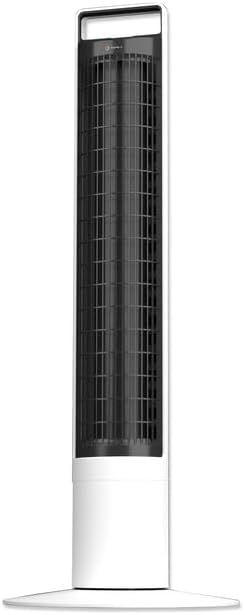
Image: Front view of the Aspen 40-inch Washable Tower Fan.
2. Safety Information
Always follow basic safety precautions when using electrical appliances to reduce the risk of fire, electric shock, and injury to persons.
- Do not operate any fan with a damaged cord or plug.
- Do not run cord under carpeting. Do not cover cord with throw rugs, runners, or similar coverings. Arrange cord away from traffic area and where it will not be tripped over.
- Always unplug the fan before moving, cleaning, or performing maintenance.
- Do not immerse the main unit (base) in water or other liquids. Only the detachable tower is designed for washing.
- Ensure the fan is completely dry before reassembling and plugging in after cleaning.
- This fan is for indoor use only.
3. Package Contents
Verify that all components are present in the package:
- Aspen 40-inch Tower Fan (Main Unit and Detachable Tower)
- Base Assembly (2 parts)
- Remote Control (with 1 CR2 battery included)
- User Manual (this document)
4. Setup
Follow these steps to assemble and set up your tower fan:
- Base Assembly: Connect the two halves of the base assembly. Align the fan tower with the assembled base and twist clockwise to secure it. A screwdriver may be needed for initial base assembly.
- Placement: Place the fan on a firm, level surface. Ensure there is adequate space around the fan for proper airflow and oscillation.
- Power Connection: Plug the power cord into a standard electrical outlet.

Image: Illustration of the fan base assembly process.
5. Operating Instructions
Your Aspen Tower Fan can be operated using the control panel on top of the unit or the included magnetic RF remote control.
Control Panel and Remote Functions:

Image: Close-up of the fan's top control panel and the magnetic remote control, showing button functions.
- Power On/Off: Press the power button (⏻) to turn the fan on or off.
- Fan Speed: Cycle through 4 fan speeds (Low, Medium, High, Turbo) by pressing the fan speed button (⇋).
- Oscillation: Press the oscillation button (↻) to activate or deactivate the 60-degree narrow-angle oscillation feature. This provides a consistent, focused breeze.

Image: Visual representation of the fan's 60-degree narrow-angle oscillation, showing airflow.
- Timer: Set the auto-off timer for up to 8 hours by pressing the timer button (◷). Each press adds an hour to the timer.
- Nightlight: Activate the 3-color LED nightlight by pressing the nightlight button (💡). Cycle through colors or turn off the light.

Image: The Aspen Tower Fan with its base illuminated by the built-in nightlight.
Convenient Features:
- Carry Handle: The integrated handle on top of the fan allows for easy transport.

Image: A hand holding the fan by its convenient top carry handle.
- Magnetic Remote: The remote control magnetically attaches to the top of the fan for convenient storage.
6. Maintenance
The Aspen Tower Fan features an easy-wash design for convenient cleaning. Regular cleaning ensures optimal performance and extends the life of your fan.
Cleaning the Detachable Fan Tower:
- Remove Remote: First, remove the magnetic remote control from the top of the fan.
- Detach Tower: Twist the fan tower counter-clockwise from the base and gently pull it up to detach.
- Wash: The detached fan tower can be washed or rinsed with soap and water. You can soak it or spray it with a water nozzle.
- Dry Completely: Allow the fan tower to dry completely before reassembling. Ensure no moisture remains inside.
- Reassemble: Align the line on the fan tower with the unlock symbol on the base, then push down and twist clockwise to lock it into place. Reinsert the remote.

Image: A person rinsing the detached fan tower with a shower head in a bathtub.

Image: A visual sequence showing a dusty fan, the rinsing process, and a clean, fresh fan.
Instructional Video:
Video: Official Aspen video demonstrating how to clean the tower fan. This video shows the steps for detaching the tower, washing it, and reassembling it.
7. Troubleshooting
If you encounter issues with your Aspen Tower Fan, refer to the following common problems and solutions:
| Problem | Possible Cause | Solution |
|---|---|---|
| Fan does not turn on. | No power, loose connection, remote battery low. | Check power cord connection. Ensure outlet is working. Replace remote battery (CR2). |
| Reduced airflow. | Dust buildup in tower. | Clean the detachable fan tower as per Maintenance section. |
| Fan makes unusual noise. | Obstruction, improper assembly. | Ensure no foreign objects are inside. Check if the tower is securely locked into the base. |
| Remote control not working. | Battery depleted, obstruction between remote and fan. | Replace the CR2 battery in the remote. Ensure no objects are blocking the signal path. |
If the problem persists after trying these solutions, please contact Aspen customer support.
8. Specifications
| Feature | Detail |
|---|---|
| Brand | Aspen |
| Model Name | Aspen Tower Fan Black (ASTF-A40-BLK) |
| Product Dimensions | 12"D x 12"W x 41"H |
| Item Weight | 9.9 pounds |
| Color | White |
| Power Source | Corded Electric |
| Number of Power Levels | 4 Speeds |
| Control Method | Remote |
| Special Features | Lightweight, Oscillating, Detachable for Washing, 3-Color Nightlight, 4 Timers, Magnetic RF Remote |
| Room Type | Bedroom, Living Room, Home Office |
| Included Components | Remote |
| Indoor/Outdoor Usage | Indoor |
| Batteries | 1 CR2 battery required (included) |
9. Warranty and Support
Specific warranty details are not provided in this manual. For warranty information, product support, or to purchase replacement parts, please contact Aspen customer service.
You can visit the official Aspen store on Amazon for more information: Aspen Store
Related documentsASTF-A40-BLK


Ask a question about this manual
Ask about setup, troubleshooting, compatibility, parts, safety, or missing instructions. Manuals+ will review the question and use this page’s manual context to help answer it.