
1. Introduction and Overview
The Deeyaple Wireless Bluetooth Speaker with Cell Phone Stand and Loud Alarm Clock (Model S207) is a versatile device designed to enhance your audio experience and daily routine. It combines a high-quality Bluetooth speaker, a convenient cell phone stand, and a functional alarm clock with a 12-hour display. This manual provides detailed instructions for setup, operation, and maintenance to ensure optimal performance and user satisfaction.

Image: The Deeyaple speaker seamlessly integrates into various daily environments, serving multiple purposes.
2. What's Included
Please check the package contents to ensure all items are present:
- Deeyaple Wireless Bluetooth Speaker (Model S207)
- Power Plug
- User Manual (this document)
- Power Cable (USB Type C)
3. Key Features
The Deeyaple S207 offers a range of features for convenience and high-quality audio:
- Multi-functional Design: This device serves as a wireless Bluetooth speaker, a foldable cell phone/tablet stand, and a digital alarm clock with a 12-hour display.
- High-Quality Audio: Equipped with advanced digital signal processing technology and a full-range speaker system, it delivers clear, powerful sound with minimal distortion.
- Bluetooth 5.3 Connectivity: Ensures quick, stable, and easy pairing with your smartphone, tablet, or laptop.
- Integrated Microphone: Allows for hands-free conversations when connected to a phone.
- TF Card Reader: Supports playback directly from a TF (microSD) card.
- Loud Alarm Clock: Designed for deep sleepers, the alarm gradually increases volume up to 100 decibels.
- Adjustable Phone Stand: The integrated stand offers multi-angle adjustment for both horizontal and vertical viewing, providing strong stability.
- Long Battery Life: Provides 12-21 hours of music playback at 50% volume on a single charge.
- Automatic Time Synchronization: When connected to an iPhone, the clock automatically syncs with your phone's time.
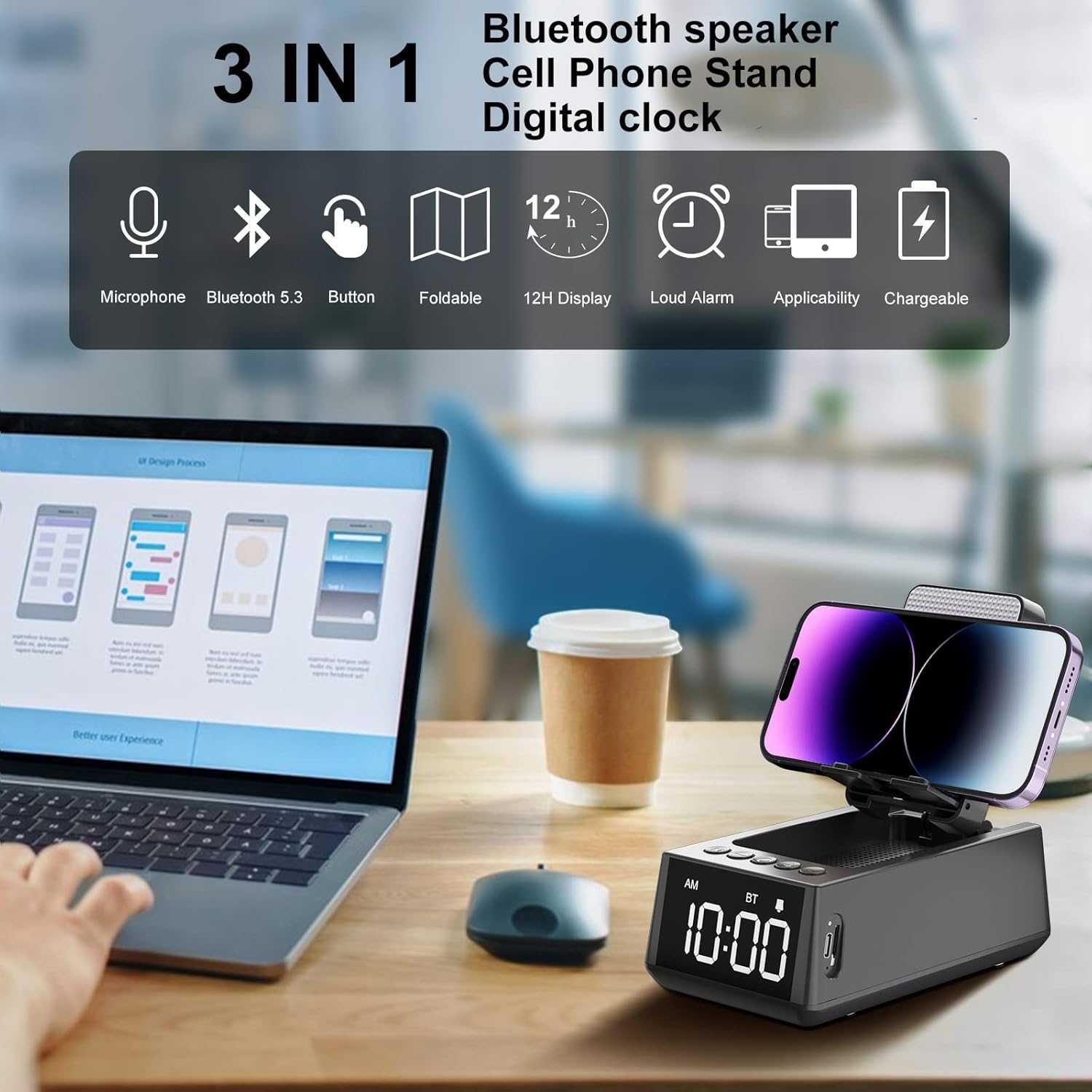
Image: Overview of the speaker's key features, highlighting its versatility.
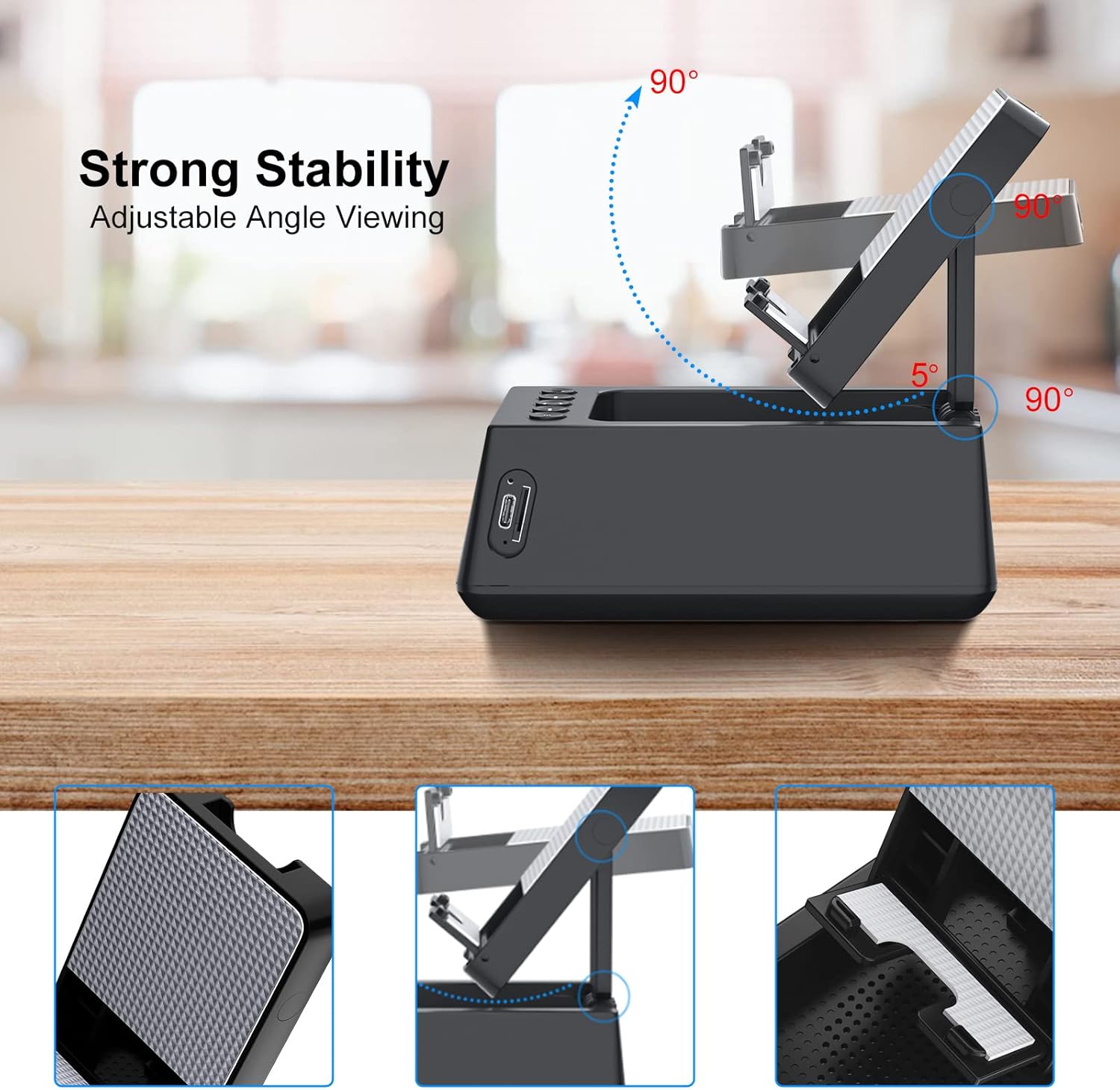
Image: The phone stand offers multi-angle adjustment for optimal viewing.
4. Setup Guide
4.1 Bluetooth Connection
Follow these steps to connect your device via Bluetooth:
- Ensure your smartphone, tablet, or computer has Bluetooth turned on.
- Press and hold the "O" button on the speaker for 2-3 seconds until the display lights up to activate Bluetooth mode.
- On your device, search for Bluetooth devices and select "Magic Arm" from the list to pair.
- Once connected, the speaker's time display will automatically synchronize with your mobile phone's time (Note: This feature is primarily for iPhone users).

Image: The Deeyaple speaker with a phone on its stand, ready for Bluetooth connection.
Bluetooth Setup Video Tutorial
Video: This tutorial provides detailed steps on how to set up the Bluetooth connection for your Deeyaple speaker, including pairing with your mobile device and automatic time synchronization.
4.2 Setting the Time
To manually set the time on your speaker:
- Short press the "SET" button to enter the time setting mode. The hour display will begin to flash.
- Use the "+" and "-" buttons to adjust the hour, including AM/PM for the 12-hour display.
- Short press the "SET" button again to move to the minute setting. The minute display will flash.
- Use the "+" and "-" buttons to adjust the minutes.
- Short press the "SET" button one more time to confirm and complete the time setting.
Time Setting Video Tutorial
Video: This tutorial demonstrates how to manually set the time on your Deeyaple speaker, guiding you through adjusting hours and minutes.
4.3 Setting the Alarm
To set an alarm on your speaker:
- Long press the "SET" button to enter the alarm setting mode. The alarm hour display will begin to flash.
- Use the "+" and "-" buttons to adjust the alarm hour.
- Short press the "SET" button again to move to the alarm minute setting. The minute display will flash.
- Use the "+" and "-" buttons to adjust the alarm minutes.
- Short press the "SET" button one more time to confirm and complete the alarm setting.
Alarm Setting Video Tutorial
Video: This tutorial guides you through the process of setting an alarm on your Deeyaple speaker, including adjusting the hour and minute settings.
5. Operating Instructions
5.1 Adjusting Volume
To adjust the Bluetooth audio volume, short press the "+" button to increase volume or the "-" button to decrease volume.
5.2 Turning Time Display On/Off
Short press the "M" button to toggle the time display on or off.
5.3 Snooze Function
When the alarm sounds, press any button except the "SET" key to activate the snooze mode. The alarm will sound again after five minutes.
5.4 Charging the Device
The speaker features a USB Type C port on the side for convenient charging. Connect the provided power cable to the speaker and a suitable power source to charge the internal battery. A small hole is set at the bottom of the mobile phone holder, which can be used for charging your phone while it is on the stand.
Product Display Video Tutorial
Video: This video showcases the Deeyaple speaker's physical features, including the adjustable phone stand and charging capabilities.
6. Maintenance
To ensure the longevity and optimal performance of your Deeyaple speaker, follow these maintenance guidelines:
- Cleaning: Use a soft, dry cloth to wipe the surface of the speaker. Avoid using abrasive cleaners, solvents, or strong chemicals, as they may damage the finish.
- Storage: Store the speaker in a cool, dry place away from direct sunlight and extreme temperatures.
- Battery Care: To prolong battery life, avoid completely discharging the battery frequently. Charge the device regularly, even if not in use for extended periods.
- Avoid Water: This device is not waterproof. Keep it away from water, moisture, and high humidity to prevent damage.
7. Troubleshooting
If you encounter any issues with your Deeyaple speaker, please refer to the following common problems and solutions:
| Problem | Possible Cause | Solution |
|---|---|---|
| Device does not power on | Low battery; Power cable not connected properly | Charge the device fully; Ensure power cable is securely connected. |
| No sound from speaker | Volume too low; Device not paired; Incorrect audio source | Increase volume on speaker and connected device; Re-pair Bluetooth; Check if TF card is inserted correctly. |
| Bluetooth not connecting | Speaker not in pairing mode; Device Bluetooth off; "Magic Arm" not found | Press and hold "O" button to enter pairing mode; Ensure Bluetooth is enabled on your device; Refresh device list and select "Magic Arm". |
| Alarm not sounding | Alarm not set; Alarm volume too low | Verify alarm settings (Section 4.3); Ensure speaker volume is adequate. |
| Time display is incorrect | Time not set; Not synced with iPhone | Manually set the time (Section 4.2); Ensure Bluetooth is connected to an iPhone for auto-sync. |
8. Specifications
Detailed technical specifications for the Deeyaple Wireless Bluetooth Speaker (Model S207):
- Model Number: S207
- Product Dimensions: 5.68 x 3.52 x 2.16 inches
- Item Weight: 15.5 ounces
- Brand: Deeyaple
- Color: Black
- Hardware Interface: USB Type C
- Total USB Ports: 1
- Number of Ports: 1
- Batteries: 1 Lithium Ion battery required (included)
- Compatible Devices: Cell Phones (iPhone 14, 14Plus, 14 Pro Max, 14 Pro, iPhone 13 Mini, 13, 13 Pro, 13 Pro Max, iPhone 12 Mini, 12, 12 Pro, 12 Pro Max, iPhone 11/11 Pro/11 Pro Max/X/Xs/Xs Max/8/8Plus, Samsung Galaxy S23/S22/S21 Plus/S10/S10e/S9/S8/Note 10, Pixel 3/2/XL, LG, One Plus, Motorola), Smartphones, iPads, Kindles, Mobile Phones, Smart Phones, Tablets, Desktops, Small Laptops, Small Palmtops (iPad Pro 9.7, iPad Pro 10.5/9.7, iPad Air 2/9.7, iPad mini 4/3/2/9.7, Kindle, Kindle Oasis, New Kindle, Kindle Paperwhite 3/2/1, Kindle Voyage, Kindle Touch, Kindle dx/dxg, Kindle fire 1/2, Kindle hd/hdx).

Image: The speaker is compatible with a wide range of mobile devices and tablets.

Image: The USB-C charging port for convenient power input.
9. Warranty and Support
Deeyaple is committed to providing quality products and responsive services. For any product-related inquiries, technical support, or warranty claims, please contact Deeyaple customer service through the platform where you purchased the product. Please refer to your purchase documentation for specific warranty terms and conditions.
