
Sophinique HCR-18
Sophinique HCR-18 Window Cleaning Robot User Manual
Model: HCR-18
1. Introduction
Thank you for choosing the Sophinique HCR-18 Window Cleaning Robot. This manual provides essential information for the safe and efficient operation, maintenance, and troubleshooting of your device. Please read it thoroughly before first use and keep it for future reference.
2. Safety Instructions
WARNING: Failure to follow these safety instructions may result in electric shock, fire, or serious injury.
- Always connect the safety rope and secure it to a sturdy object before operating the robot.
- Ensure the power cable is securely connected and not damaged.
- Do not use the robot on cracked or broken glass.
- Keep hands, hair, and loose clothing away from moving parts.
- Do not operate the robot in rainy or extremely humid conditions.
- This appliance is not intended for use by persons (including children) with reduced physical, sensory or mental capabilities, or lack of experience and knowledge, unless they have been given supervision or instruction concerning use of the appliance by a person responsible for their safety.
- Only use accessories and replacement parts specified by the manufacturer.
- Unplug the robot from the power outlet before cleaning or performing maintenance.
3. Product Overview
Familiarize yourself with the components of your Sophinique HCR-18 Window Cleaning Robot.

Figure 3.1: Sophinique HCR-18 Window Cleaning Robot, remote control, and cleaning pads.

Figure 3.2: Product dimensions and included accessories (packing list).
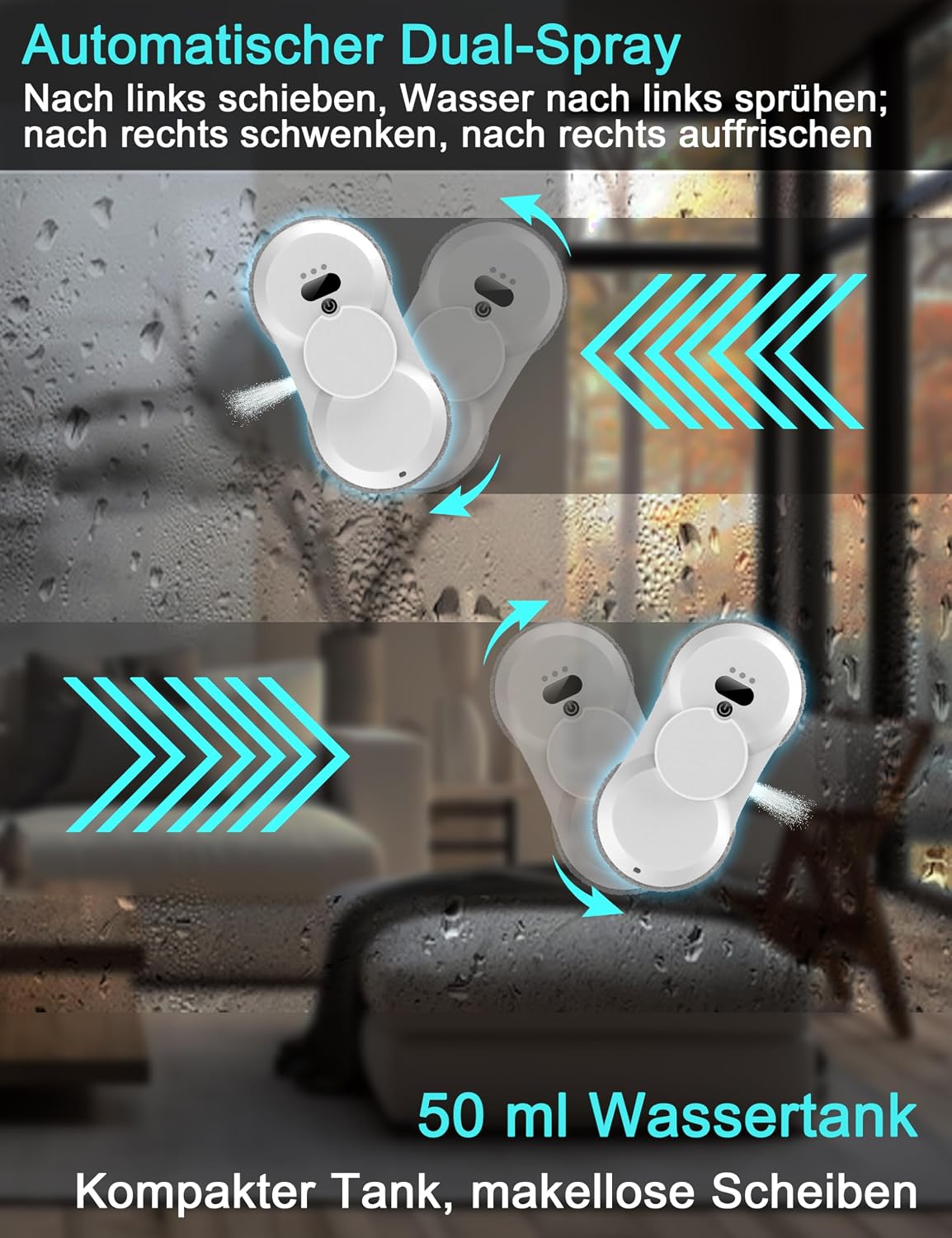
Figure 3.3: Automatic Dual-Spray System with 50ml water tank for flawless cleaning.

Figure 3.4: High suction power (5600 Pa) and UPS Anti-Power Failure System providing 20 minutes of backup power and an alarm.

Figure 3.5: Three automatic independent cleaning paths for comprehensive coverage and remote control for manual operation.

Figure 3.6: Ultra-thin body (6.2 cm) with intelligent detection for window frames, also suitable for frameless glass.

Figure 3.7: Soft Microfiber Pads for effective cleaning.

Figure 3.8: 5-meter power cable for extended reach.
4. Setup
- Charge the Robot: Before first use, fully charge the robot's internal battery. Connect the power adapter to the robot and a power outlet. The charging indicator light will show the charging status.
- Attach Cleaning Pads: Securely attach the clean microfiber pads to the two rotating cleaning wheels on the underside of the robot. Ensure they are centered and flat.
- Fill Water Tank: Open the water tank cap and fill it with clean water or a suitable window cleaning solution. Close the cap tightly.
- Connect Safety Rope: Attach one end of the safety rope to the robot and the other end to a sturdy, immovable object (e.g., a heavy piece of furniture, a window frame anchor) to prevent the robot from falling.
- Connect Power Cable: Connect the robot's power cable to the power adapter and then to a power outlet. The robot requires continuous power during operation.
5. Operation
- Power On: Press and hold the power button on the robot or the remote control to turn on the device. The indicator lights will illuminate.
- Place on Window: Carefully place the robot on the window surface. Ensure the suction cups are fully engaged with the glass. The robot will automatically create a strong vacuum seal.
- Start Cleaning: Press the 'Start' button on the robot or the remote control to begin the automatic cleaning cycle. The robot will detect the window edges and plan its cleaning path.
- Automatic Dual-Spray: The robot features an automatic dual-spray system that dispenses cleaning solution as it moves, ensuring thorough cleaning.
- Manual Control (Optional): Use the directional buttons on the remote control to manually guide the robot if specific areas require more attention.
- Completion: Once cleaning is complete, the robot will return to its starting position and emit an audible alert.
- Power Off and Remove: Press the power button to turn off the robot. Carefully detach it from the window by releasing the vacuum seal (refer to specific instructions in the full manual if available).
6. Maintenance
- Cleaning Pads: After each use, remove the microfiber cleaning pads and wash them with mild detergent. Allow them to air dry completely before reattaching.
- Robot Body: Wipe the robot's exterior with a soft, damp cloth. Do not use abrasive cleaners or immerse the robot in water.
- Sensors: Regularly clean the edge detection sensors and suction ports to ensure optimal performance.
- Storage: Store the robot in a cool, dry place away from direct sunlight when not in use.
7. Troubleshooting
| Problem | Possible Cause | Solution |
|---|---|---|
| Robot does not power on. | Low battery; Power cable not connected. | Charge the robot; Ensure power cable is securely connected. |
| Robot loses suction or falls. | Dirty cleaning pads; Uneven surface; Power interruption. | Clean or replace pads; Ensure surface is flat; Check power connection. The UPS provides 20 minutes of backup power. |
| Poor cleaning performance. | Dirty pads; Insufficient cleaning solution; Obstruction. | Clean or replace pads; Refill water tank; Remove any obstructions. |
| Robot does not detect edges. | Dirty sensors. | Clean the edge detection sensors. |
8. Specifications
| Feature | Specification |
|---|---|
| Model Number | HCR-18 |
| Brand | Sophinique |
| Color | White-hc-09 |
| Dimensions (Package) | 30.7 x 24.8 x 13.6 cm |
| Item Weight | 2.28 Kilograms |
| Suction Power | 5600 Pa |
| Water Tank Capacity | 50 ml |
| Power Source | Corded Electric |
| Battery Composition | Lithium |
| Battery Life | 2 years (estimated) |
| UPS Backup | 20 minutes power-off protection |
| UPC | 735294986593 |
9. Warranty and Support
The Sophinique HCR-18 Window Cleaning Robot comes with a 12-month warranty from the date of purchase. This warranty covers manufacturing defects and malfunctions under normal use.
For any questions, technical support, or warranty claims, please contact Sophinique customer service. We offer 24-hour online customer service and a friendly replacement policy for product-related issues.
Please refer to your purchase documentation for specific contact details or visit the official Sophinique website.
Ask a question about this manual
Ask about setup, troubleshooting, compatibility, parts, safety, or missing instructions. Manuals+ will review the question and use this page’s manual context to help answer it.