
1. Introduction
The Huawei Smart Power Sensor DDSU666-H is a single-phase energy meter designed for precise power monitoring and energy measurement. It provides real-time data on various electrical parameters, including voltage, current, active and reactive power, frequency, and energy consumption. This device is essential for systems requiring export limitation or when a home battery is connected to a Huawei inverter, offering valuable insights into energy generation and consumption.
2. Product Overview
The DDSU666-H Smart Power Sensor kit includes the main sensor unit, a Current Transformer (CT), and an RS485 communication cable. The sensor unit features a clear display for easy reading of measurements. The CT is used to measure current flow, and the RS485 cable facilitates communication with compatible Huawei inverters.

Image: The Huawei Smart Power Sensor DDSU666-H unit, a current transformer (CT), and associated cables, including the RS485 communication cable.
3. Package Contents
Verify that all items listed below are present in your package:
- 1 x Huawei Smart Power Sensor DDSU666-H (1PH - 100A)
- 1 x RS485 Cable (10 meters)
- 1 x Current Transformer (CT) 100 A / 40 mA (with 5-meter cable)
- 1 x Quick Guide / User Manual

Image: A detailed view of the 'List Of Accessories' paper, confirming the inclusion of the Power Sensor, CT, RS485 Cable, and Quick Guide.

Image: The components of the Huawei Smart Power Sensor kit, including the sensor, CT, and cables, neatly packaged within the box.
4. Specifications
The Huawei Smart Power Sensor DDSU666-H offers robust performance for energy measurement. Key specifications include:
- Type: Single-phase (1PH)
- Current Rating: 100A
- Communication: RS485
- Measurement Accuracy: Class 1
- Dimensions (L x P x H): 100 x 36 x 65.5 mm
- Installation Type: DIN35 Rail
- Weight (cables included): 1.2 kg
- Input Power: 1P2W
- Voltage Range: 176 Vac - 288 Vac
- Current Range: 0 - 100 A
- Operating Temperature: -25°C to +60°C
- Operating Humidity: 5%RH - 95%RH (non-condensing)
For a comprehensive list of technical specifications, refer to the image below:
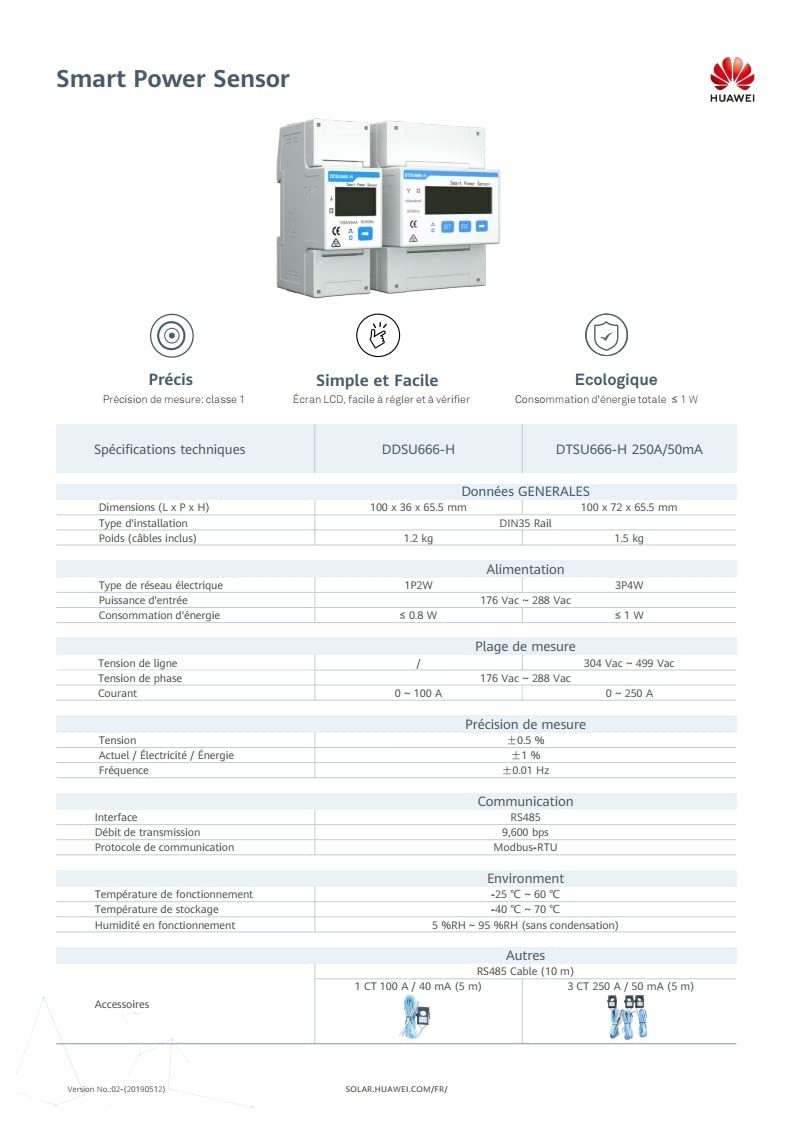
Image: A detailed table outlining the technical specifications of the Huawei DDSU666-H and DTSU666-H Smart Power Sensors, including dimensions, power, measurement range, accuracy, communication, environment, and accessories.
5. Setup and Installation
Proper installation is crucial for the accurate operation of the Smart Power Sensor. It is recommended that the Smart Power Sensor be installed in the original residential power distribution unit. If this is not feasible, it can also be installed independently. Always ensure power is disconnected before beginning installation.
5.1. Connecting Battery Cables (if applicable)
If connecting to a battery system, follow the specific wiring diagrams provided in the quick guide. Ensure correct polarity and secure connections to prevent damage.

Image: Page 1 of the Quick Guide, illustrating the product introduction and the initial steps for connecting battery cables to the SUN2000L inverter and Smart Power Sensor.

Image: Page 2 of the Quick Guide, providing detailed instructions and diagrams for connecting battery cables to the battery pack and the SUN2000L inverter, including safety warnings.
5.2. Smart Power Sensor Cables Connection (DDSU666-H)
Connect the AC output cable between the Smart Power Sensor and the SUN2000L inverter. Also, connect the RS485 communication cables (485A and 485B) to ensure data exchange. The shield layer of the communications cable should be connected to the PE terminal of the SUN2000L.

Image: Page 3 of the Quick Guide, detailing Scenario 1 for connecting the DDSU666-H Smart Power Sensor cables to the SUN2000L inverter and the home load/power grid.
Note: The Quick Guide also includes Scenario 2 for the DTSU666-H model. Ensure you follow the instructions specific to your DDSU666-H model.

Image: Page 4 of the Quick Guide, illustrating Scenario 2 for connecting the DTSU666-H Smart Power Sensor cables, which is relevant for the DTSU666-H model, not the DDSU666-H.
6. Operation
Once installed and connected, the Huawei Smart Power Sensor DDSU666-H automatically begins monitoring power and energy flow. It measures energy flow from and to the grid, providing critical data for energy management. The sensor's display shows real-time parameters. For detailed data logging and analysis, the sensor integrates seamlessly with Huawei inverters, allowing you to view comprehensive energy statistics through the inverter's monitoring interface or associated applications.
7. Maintenance
The DDSU666-H Smart Power Sensor is designed for low maintenance. Regular checks should include:
- Visual Inspection: Periodically inspect the sensor and cables for any signs of physical damage, wear, or loose connections.
- Cleaning: Keep the sensor unit clean and free from dust. Use a soft, dry cloth for cleaning. Do not use abrasive cleaners or solvents.
- Environmental Conditions: Ensure the operating environment remains within the specified temperature and humidity ranges to prevent performance degradation.
8. Troubleshooting
If you encounter issues with your Smart Power Sensor, consider the following common troubleshooting steps:
- No Display/Power: Check the power supply to the sensor. Ensure all power connections are secure and correctly wired.
- Incorrect Readings: Verify that the Current Transformer (CT) is installed correctly and oriented in the right direction according to the installation diagrams. Ensure the CT is properly connected to the sensor.
- Communication Issues: Check the RS485 cable connections between the sensor and the inverter. Ensure the cable is not damaged and is securely plugged in at both ends. Verify the communication settings on the inverter, if applicable.
- Sensor Not Detected by Inverter: Confirm that the inverter firmware is up to date and compatible with the DDSU666-H sensor. Refer to your inverter's manual for specific sensor detection procedures.
If problems persist after performing these checks, contact Huawei customer support or a certified technician.
9. Warranty and Support
For information regarding product warranty, technical support, and service, please refer to the official Huawei website or contact your local Huawei authorized dealer. Keep your purchase receipt and product serial number handy when seeking support.
Official Huawei Support Website: solar.huawei.com/eu/