
ODK ZJZ-SBWJDDD
ODK Reversible Gaming Desk User Manual
Model: ZJZ-SBWJDDD
1. Introduction
Thank you for choosing the ODK Reversible Gaming Desk. This L-shaped desk is designed to provide a versatile and ergonomic workspace for gaming, work, and study. It features integrated LED lighting, convenient power outlets, USB charging ports, and ample storage. This manual provides detailed instructions for assembly, operation, maintenance, and troubleshooting to ensure optimal use and longevity of your desk.
2. Safety Instructions
- Read all instructions carefully before assembly and use.
- Keep all small parts and packaging materials away from children and pets to prevent choking hazards.
- Ensure all screws and fasteners are securely tightened before use. Periodically check and re-tighten as necessary.
- Do not overload the desk or shelves. Refer to specifications for weight limits.
- Place the desk on a flat, stable surface to prevent tipping.
- Do not expose the desk to excessive moisture or direct sunlight, as this may damage the material and electronic components.
- Only use the integrated power outlets and USB ports with compatible devices and within specified voltage/current limits.
- If any part is damaged or missing, do not attempt to assemble or use the desk. Contact customer support immediately.
3. Package Contents
Before beginning assembly, verify that all components listed below are present and undamaged. If any parts are missing or damaged, please contact ODK customer service.
- Desk Panels (Main, Side, Monitor Shelf)
- Metal Frame Components
- Integrated Power Outlet with 2 AC Sockets and 2 USB Ports
- LED Light Strip with Remote Control
- Adjustable Storage Shelves (2-tier)
- Assembly Hardware (Screws, Bolts, Allen Wrench, etc.)
- Instruction Manual
Note: The exact number and type of fasteners may vary slightly. Refer to the included assembly diagram for precise details.
4. Setup and Assembly
The ODK Gaming Desk features a reversible design, allowing you to configure the L-shape to either the left or right side to best suit your room layout. Follow the steps below for assembly.
4.1 Reversible Design
The desk can be assembled with the longer section on either the left or right side. Decide your preferred orientation before starting assembly.

Figure 4.1: Reversible design and key dimensions (168cm x 120cm x 88.7cm height). The monitor shelf is 13cm high.
4.2 Assembly Steps
- Unpack and Identify Parts: Lay out all components on a clean, soft surface to prevent scratches. Identify each part using the labels or diagrams in the included assembly guide.
- Assemble Frame: Begin by assembling the metal frame components according to the step-by-step instructions provided in the separate assembly manual. Ensure all connections are secure but do not fully tighten screws until all parts are aligned.
- Attach Desk Panels: Secure the main desk panels to the assembled frame. Pay attention to the orientation for the reversible design.
- Install Monitor Shelf: Attach the elevated monitor shelf to the main desk surface. This shelf is designed to improve ergonomic posture.
- Integrate Power Outlet: Carefully install the built-in power outlet and USB charging module into the designated cutout on the desk surface. Connect the power cable.
- Attach Storage Shelves: Install the two-tier storage shelves on the side of the desk. These shelves are adjustable in height to accommodate various items.
- Final Tightening: Once all parts are correctly aligned, fully tighten all screws and fasteners.
- Cable Management: Utilize the provided cable management features (if any) to organize power cords and device cables for a tidy setup.
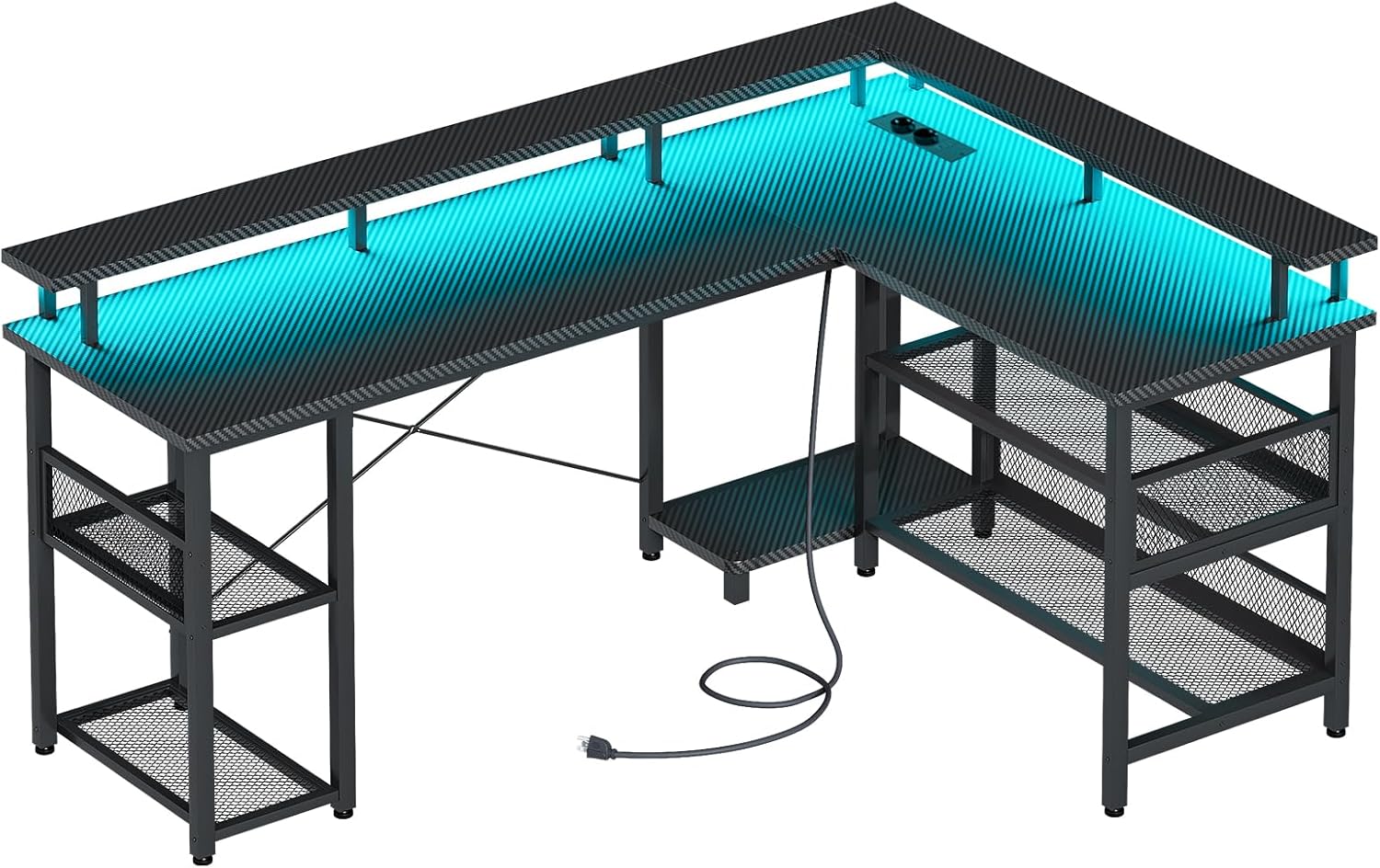
Figure 4.2: Assembled ODK Gaming Desk with LED lighting and power features.
5. Operating Instructions
5.1 LED Lighting System
The desk is equipped with an LED light strip offering various lighting modes and colors to enhance your environment.
- Power On/Off: Use the included remote control or the button on the LED strip controller to turn the lights on or off.
- Mode Selection: Cycle through 13 different lighting modes using the remote control. These modes may include static colors, flashing, fading, and dynamic effects.
- Color Change: Select from 7 distinct color variations to match your preference or mood.
- Brightness Adjustment: Adjust the brightness level of the LEDs using the remote control.

Figure 5.1: Integrated power hub and LED color options.
5.2 Integrated Power Outlets and USB Ports
The desk includes 2 standard AC power outlets and 2 USB charging ports for convenient access to power for your devices.
- AC Outlets: Plug in your computer, monitor, or other electronic devices into the 220-250V/15A AC outlets.
- USB Ports: Use the 5V/2.1A USB ports to charge smartphones, tablets, and other USB-powered devices.
- Power Cable: Ensure the 150cm power cable is securely plugged into a wall outlet.
5.3 Storage Shelves
The desk features multi-functional two-tier storage shelves. The height of these shelves is adjustable to suit your storage needs.
- Adjusting Shelf Height: Refer to the assembly manual for specific instructions on how to adjust or re-position the shelves. This typically involves removing and re-inserting fasteners into different pre-drilled holes.
- CPU Tower Placement: The design allows for a dedicated space for a CPU tower, either on the floor or on a lower shelf, depending on your configuration.
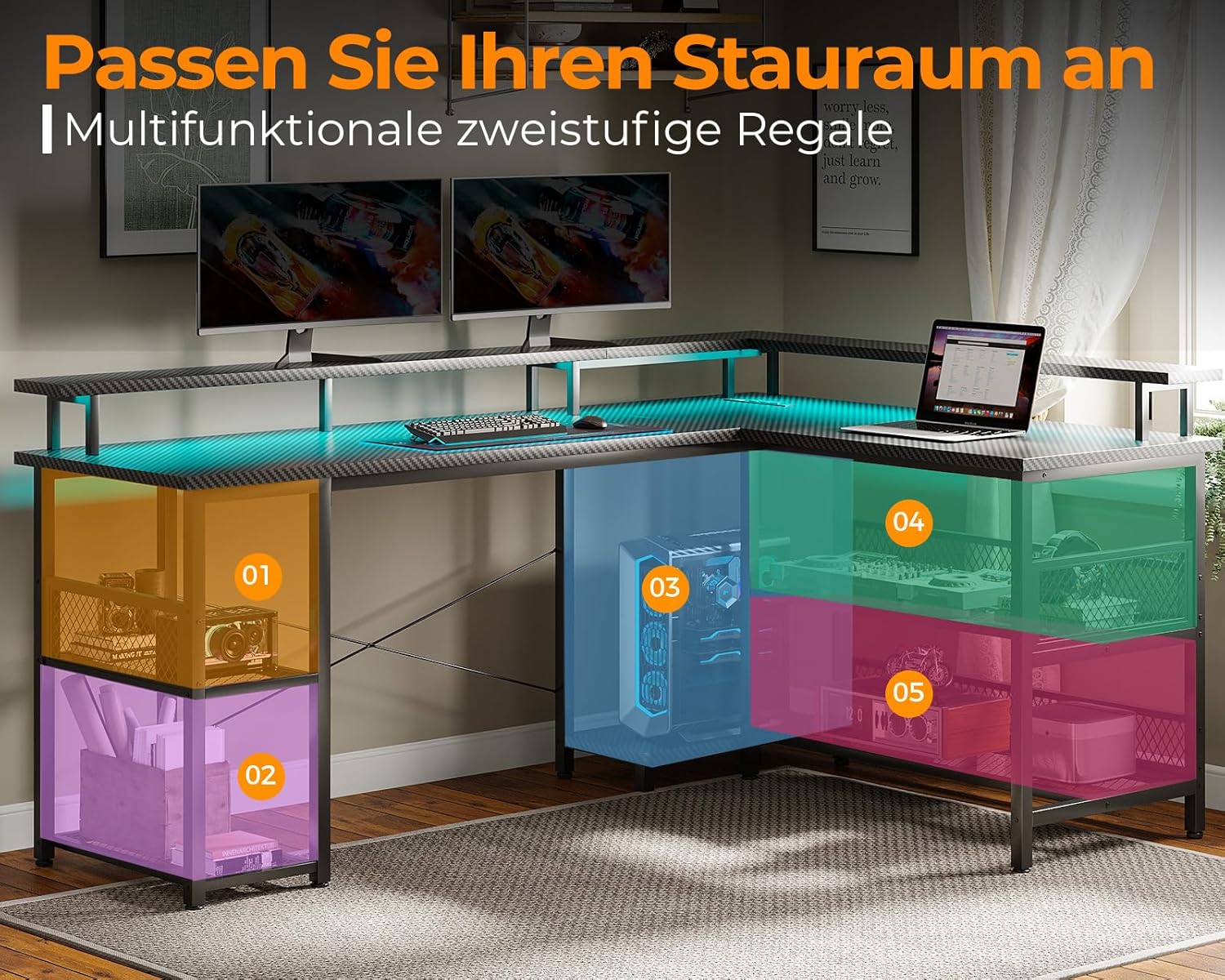
Figure 5.2: Optimized storage and organization areas.
6. Maintenance
Proper maintenance will ensure the longevity and appearance of your ODK Gaming Desk.
- Cleaning: Regularly wipe the desk surfaces with a soft, damp cloth. Avoid using harsh chemicals or abrasive cleaners, as these can damage the carbon fiber finish.
- Sunlight Exposure: Protect the desk from direct sunlight to prevent fading or material degradation.
- Liquid Spills: Immediately wipe up any liquid spills to prevent damage to the desk surface or electronic components.
- Fastener Check: Periodically check all screws and fasteners to ensure they remain tight. Re-tighten if necessary to maintain stability.
7. Troubleshooting
| Problem | Possible Cause | Solution |
|---|---|---|
| Desk is wobbly/unstable. | Loose fasteners; uneven floor. | Ensure all screws are fully tightened. Adjust leveling feet (if present) or place shims under legs on uneven surfaces. |
| LED lights are not working. | Power cable disconnected; remote control battery low; LED strip damaged. | Check if the desk's power cable is securely plugged into a wall outlet. Ensure the LED strip is properly connected. Replace remote control battery. If issues persist, contact support. |
| Power outlets/USB ports not functioning. | Desk power cable disconnected; circuit breaker tripped; faulty device. | Verify the desk's main power cable is plugged in. Check your household circuit breaker. Test with a different device to rule out device malfunction. |
| Difficulty assembling parts. | Incorrect orientation; missing/damaged parts. | Review the assembly manual carefully for correct part orientation. Do not force parts. If parts are missing or damaged, contact customer support. |
8. Specifications
| Brand | ODK |
| Model Number | ZJZ-SBWJDDD |
| Color | Carbon Fiber Black |
| Product Dimensions | 168 x 120 x 88.7 cm (L x W x H) |
| Item Weight | 24.8 Kilograms |
| Material | Wood (Carbon Fiber finish) |
| Power Outlets | 2 x AC (220-250V/15A) |
| USB Charging Ports | 2 x USB (5V/2.1A) |
| LED Lighting | 13 Lighting Modes, 7 Color Variations |
| Special Features | Reversible Design, Height Adjustable Monitor Shelf, Built-in Power Strip |
| Recommended Use | Work, Gaming |
9. Warranty and Support
ODK is committed to providing high-quality products and customer satisfaction. For any questions regarding assembly, missing parts, product defects, or operational issues, please contact ODK customer support.
Please have your model number (ZJZ-SBWJDDD) and purchase information ready when contacting support to facilitate faster service.
For more information, visit the official ODK store or contact your retailer.
Note: Specific warranty terms and conditions may vary by region and retailer. Please refer to your purchase documentation for detailed warranty information.
Related documentsZJZ-SBWJDDD


Ask a question about this manual
Ask about setup, troubleshooting, compatibility, parts, safety, or missing instructions. Manuals+ will review the question and use this page’s manual context to help answer it.