
Product Overview
The DEERC D65 Drone is a lightweight, foldable GPS quadcopter designed for both beginners and experienced pilots. It features a 4K UHD camera with 2-axis mechanical gimbal and Electronic Image Stabilization (EIS) for stable, high-quality aerial photography and videography. Weighing under 249g, it offers intelligent flight modes and robust performance with brushless motors.
- 4K EIS Camera with 2-Axis Gimbal: Captures cinematic shots with reduced shake and distortion, even in windy conditions.
- Ultra-Lightweight & Foldable: Weighs under 249g, making it highly portable and easy to transport.
- GPS Positioning & Smart Return-to-Home: Ensures precise hovering and automatic return to the takeoff point in case of signal loss or low battery.
- Intelligent Flight Modes: Includes Follow Me, Waypoint Flight, and Orbit modes for creative and hands-free filming.
- Brushless Motors & Wind Resistance: Provides smoother outdoor flights and enhanced durability with Level-4 wind resistance.
Setup Guide
1. Package Contents
Before starting, ensure all components are present in the package. The DEERC D65 drone comes with the drone unit, remote controller, batteries, charging cables, spare propellers, and a carrying case.
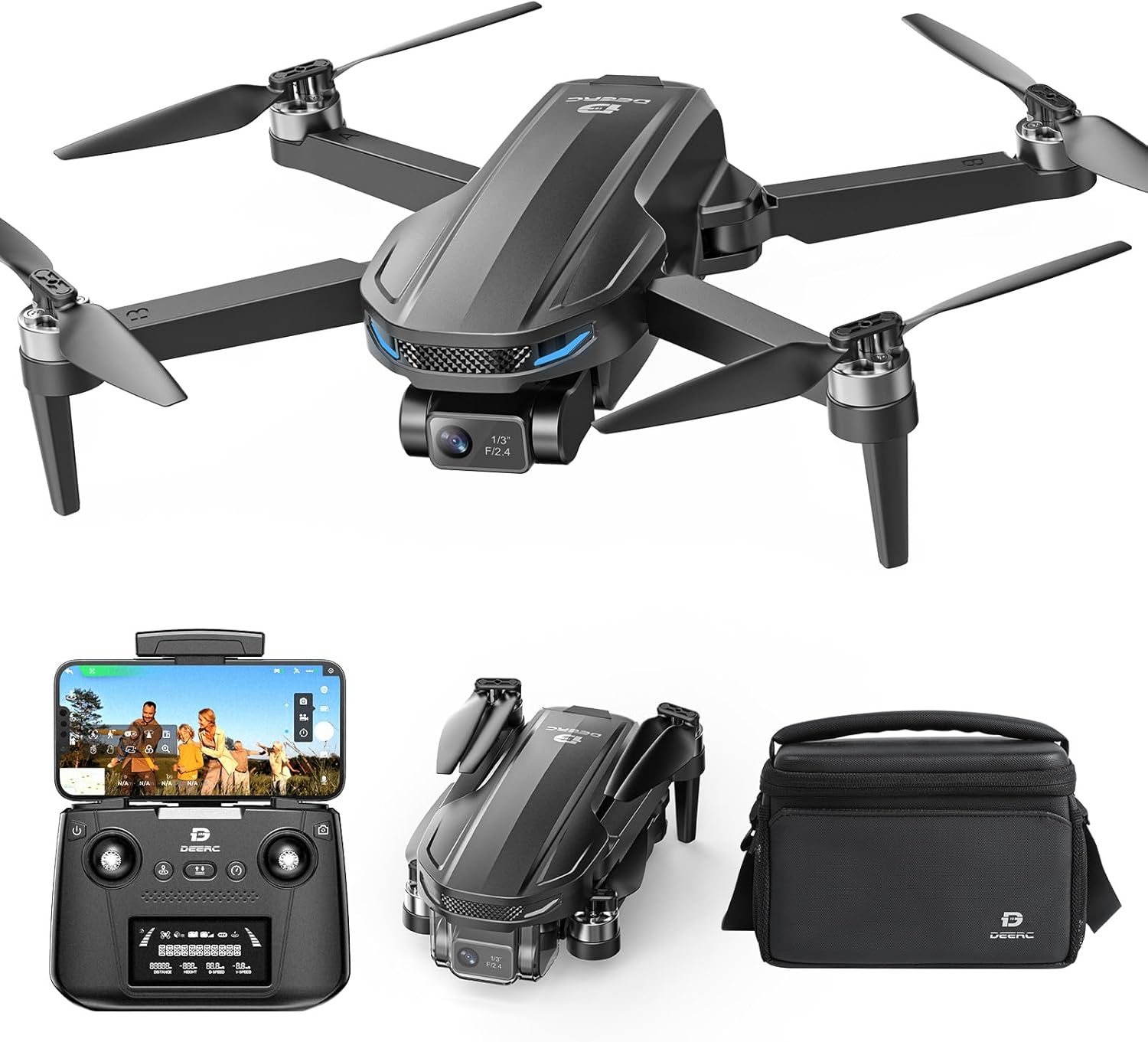
Image: The DEERC D65 drone, remote controller, batteries, charging cables, and carrying case.

Image: All items included in the DEERC D65 drone package, neatly arranged.
2. Battery Installation and Charging
Insert the fully charged battery into the drone's designated slot. Ensure it clicks securely into place. The remote controller is rechargeable via USB. The drone batteries are charged using the provided USB chargers. It is recommended to fully charge all batteries before the first flight.
Video: A demonstration of the DEERC GPS Drone with 4K 2-axis Gimbal, highlighting its features and ease of use. This video shows the drone and its components, including battery installation and charging.
3. Propeller Installation
The drone's propellers are designed to fold for portability. Gently unfold the propellers before flight. If replacement is needed, use the provided screwdriver and spare propellers, ensuring correct orientation (A and B propellers match A and B arms).
4. Remote Controller Setup
The remote controller features foldable antennas and a retractable phone holder. Extend these components before use. The controller is rechargeable via USB. Ensure your smartphone is securely placed in the holder and connected via the appropriate cable (USB-C, Lightning, or Micro USB) for optimal signal stability and live feed.
Video: A short clip demonstrating the DEERC D65 4K Drone, including the remote controller's features and how to set it up with a smartphone.
5. App Connection and Calibration
Download the official DEERC drone application to your smartphone. Connect your phone to the remote controller using the provided cable. Power on the drone and the remote controller. Follow the on-screen prompts in the app to establish a connection and perform any necessary calibrations (e.g., compass calibration) before your first flight. The app provides a live view from the drone's camera and access to various flight settings.
Operating Instructions
1. Basic Flight Controls
Familiarize yourself with the remote controller's joysticks and buttons. The left joystick typically controls altitude and yaw (rotation), while the right joystick controls forward/backward and left/right movement. The drone features altitude hold for stable hovering, making it easier for beginners to control.
2. Intelligent Flight Modes
The DEERC D65 offers several intelligent flight modes to enhance your flying and filming experience:
- Follow Me: The drone will automatically follow your movement, keeping you in the frame.
- Waypoint Flight: Plan a custom flight path on the app's map, and the drone will autonomously follow it.
- Orbit Mode: The drone will circle around a designated point or subject, capturing dynamic footage.
3. GPS Positioning and Return-to-Home (RTH)
The built-in GPS ensures precise positioning and stable flight, especially in open areas. The Smart Return-to-Home function allows the drone to automatically fly back to its takeoff point under various conditions:
- One-Key RTH: Initiated manually by pressing the RTH button on the remote.
- Signal Lost RTH: The drone returns automatically if the control signal is lost.
- Low Battery RTH: The drone returns automatically when the battery level is critically low.

Image: Visual representation of the DEERC D65 Drone's GPS Intelligent Return features, including One-key RTH, Signal Lost RTH, and Low Battery RTH.
4. Camera Operation
The DEERC D65 is equipped with a 4K EIS camera and a 2-axis mechanical gimbal. The gimbal helps stabilize the camera, reducing shake and distortion for smoother video and sharper photos. The camera angle can be adjusted via the remote controller. The drone supports 4K video capture and 8 MP still resolution.

Image: Illustration of the DEERC D65 Drone's 2-axis mechanical stabilization gimbal and EIS, showing how it provides stable and clear images compared to standard drones.

Image: Detailed view of the DEERC D65 Drone's 4K EIS camera, highlighting its 4K/30fps, 100° FOV, 70° Rudder Adjustment, and 2.5k Recording capabilities.
5. Wind Resistance
The DEERC D65 is built with efficient brushless motors and is rated for up to Level-4 wind resistance. This allows for steadier control and more reliable performance in breezy outdoor conditions.
Maintenance
Regular maintenance ensures the longevity and optimal performance of your DEERC D65 drone.
- General Care: Keep the drone clean and free from dust and debris. Store it in its carrying case when not in use to protect it from damage.
- Propeller Replacement: Inspect propellers regularly for any signs of damage (cracks, bends). Replace damaged propellers immediately using the provided spare parts and screwdriver.
- Battery Care: Always use the original charging cables and adapters. Do not overcharge or completely drain the batteries. Store batteries in a cool, dry place.
Troubleshooting
If you encounter issues with your DEERC D65 drone, refer to the following common troubleshooting tips:
- Drone Not Powering On: Ensure the battery is fully charged and correctly inserted. Check the power button for proper function.
- Remote Controller Not Connecting: Verify that both the drone and remote controller are powered on. Ensure your smartphone is correctly connected to the remote via cable and the app is open. Re-pair the remote and drone if necessary following the app's instructions.
- Unstable Flight/Drifting: Perform a compass calibration as instructed in the app. Ensure you are flying in an open area away from strong magnetic interference. Check for damaged propellers and replace if needed.
- GPS Signal Issues: Fly in open outdoor areas with a clear view of the sky. Avoid flying near tall buildings or dense foliage that can obstruct GPS signals.
- Return-to-Home (RTH) Failure: Ensure your RTH altitude settings in the app are appropriate for your flying environment to avoid obstacles. If the drone flies away, it may indicate a critical RTH system failure, which should be reported to customer support.
- Camera Feed Issues: Check the Wi-Fi connection between your phone and the drone. Ensure the camera lens is clean and free from obstructions.
Specifications
| Feature | Detail |
|---|---|
| Brand | DEERC |
| Model Name | RM (D65) |
| Special Features | 2-Axis Mechanical Gimbal, Brushless Motors, EIS Anti-Shake Stabilization, Follow Me, GPS Assisted Flight / GPS Auto Return |
| Color | Black |
| Video Capture Resolution | 4K |
| Effective Still Resolution | 8 MP |
| Connectivity Technology | Radio Frequency |
| Video Capture Format | MP4 |
| Control Type | Remote Control |
| Material | Plastic Or Nylon |
| Item Weight | 2.55 pounds |
| Product Dimensions | 11.5"L x 8"W x 2"H |
| Batteries | 2 Nonstandard Battery batteries required. (included) |
Warranty & Support
For warranty information, technical support, or service inquiries, please refer to the contact information provided in your product packaging or visit the official DEERC website. Keep your purchase receipt as proof of purchase for warranty claims.

