
1. Introduction
Thank you for choosing the wangpeng Cooling Fan. This manual provides essential information for the proper installation, operation, and maintenance of your new cooling fan, designed specifically for Mechrevo Plus 7 Z3 Pro Umi PRO Series Laptops. Please read these instructions carefully before proceeding with installation to ensure optimal performance and longevity of your device.
2. Product Overview
This cooling fan is a high-quality replacement component designed to maintain optimal operating temperatures within your compatible laptop. Proper cooling is crucial for preventing overheating, which can lead to performance degradation and potential damage to internal components.
Key Features:
- 100% Brand New And High Quality construction.
- Designed for efficient heat dissipation.
- Manufactured to meet original equipment specifications.
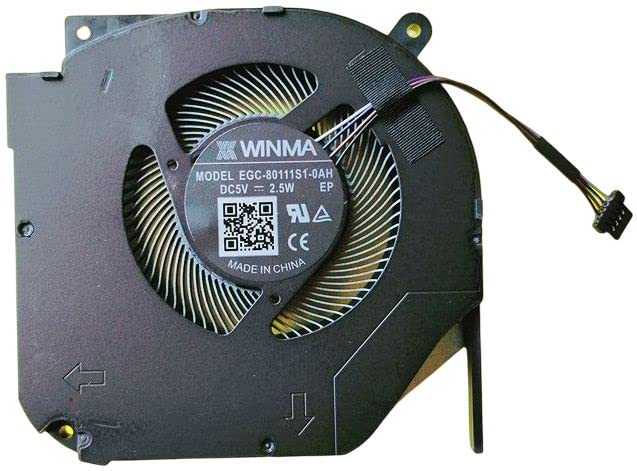
Figure 1: The wangpeng cooling fan. This image displays the fan unit, typically including the fan blades, motor, and housing, ready for installation into a compatible laptop.
3. Compatibility
This cooling fan is specifically designed for the following laptop models:
- Mechrevo Plus 7 Series Laptop
- Mechrevo Z3 Pro Series Laptop
- Mechrevo Umi PRO Series Laptop
Important: Please check both your laptop's model number and compare the physical appearance of your existing fan with the product image before purchase and installation to ensure full compatibility.
4. Installation (Setup)
Installing a laptop cooling fan requires careful handling of internal components. If you are not comfortable performing this procedure, it is highly recommended to seek assistance from a qualified technician.
Required Tools (Not Included):
- Small Phillips head screwdriver
- Plastic prying tool (spudger)
- Anti-static wrist strap (recommended)
General Installation Steps:
- Power Off and Disconnect: Completely power off your laptop and disconnect it from the power adapter. Remove the battery if it is external.
- Discharge Static Electricity: Wear an anti-static wrist strap or touch a grounded metal object to discharge any static electricity from your body.
- Open Laptop Casing: Carefully open the laptop's bottom casing. Refer to your laptop's specific service manual or online guides for precise instructions on how to access the internal components.
- Locate and Remove Old Fan: Identify the existing cooling fan. Disconnect its power cable from the motherboard and unscrew any retaining screws. Carefully lift out the old fan.
- Install New Fan: Place the new wangpeng cooling fan into position. Secure it with the screws removed earlier. Connect the fan's power cable to the corresponding port on the motherboard, ensuring a firm connection.
- Reassemble Laptop: Carefully reattach the laptop's bottom casing, ensuring all screws are tightened appropriately.
- Test Functionality: Reconnect the battery (if applicable) and power adapter. Turn on the laptop and verify that the new fan operates correctly and quietly. Monitor temperatures using system monitoring software.
Disclaimer: Improper installation can damage your laptop. Proceed with caution or consult a professional.
5. Operation
The wangpeng cooling fan operates automatically, controlled by your laptop's internal temperature sensors and operating system. It will activate and adjust its speed as needed to dissipate heat generated by the CPU and GPU, maintaining optimal system performance and stability.
No user intervention is typically required for the fan's operation once correctly installed. Ensure that the laptop's vents are not obstructed to allow for proper airflow.
6. Maintenance
Regular maintenance can extend the life of your cooling fan and improve your laptop's thermal performance.
Recommended Maintenance:
- Dust Removal: Periodically (every 3-6 months, depending on usage environment) use compressed air to gently blow dust out of the laptop's air vents. Do not insert objects into the vents.
- Internal Cleaning: If dust accumulation is severe, or if you notice reduced airflow or increased fan noise, consider opening the laptop casing (following the installation guidelines) to carefully clean the fan blades and heatsink fins with a soft brush or compressed air.
- Avoid Obstruction: Always use your laptop on a hard, flat surface to ensure proper airflow to the bottom vents. Avoid using it on soft surfaces like beds or couches that can block ventilation.
7. Troubleshooting
If you encounter issues with your cooling fan, refer to the following troubleshooting tips:
| Problem | Possible Cause | Solution |
|---|---|---|
| Fan not spinning | Loose connection, faulty fan, software issue, low temperature |
|
| Excessive fan noise | Dust accumulation, worn bearings, loose fan |
|
| Laptop overheating | Blocked vents, fan not working, thermal paste issue, heavy workload |
|
If these steps do not resolve the issue, please contact customer support.
8. Specifications
| Feature | Detail |
|---|---|
| Brand | wangpeng |
| Model Number | FAOT2333118143219 |
| Compatible Devices | Mechrevo Plus 7, Z3 Pro, Umi PRO Series Laptops |
| Material | Copper |
| UPC | 615431813541 |
| ASIN | B0C14V4H74 |
| GTIN | 615431813541 |
| Number of Items | 1 |
9. Warranty and Support
This wangpeng cooling fan comes with a 3-month warranty from the date of purchase. This warranty covers manufacturing defects and ensures the product is free from material and workmanship flaws under normal use.
The warranty does not cover damage caused by improper installation, misuse, accidents, unauthorized repairs, or normal wear and tear.
For warranty claims, technical support, or any questions regarding your product, please contact the seller or manufacturer directly through the platform where the purchase was made. Please have your purchase details and model number (FAOT2333118143219) ready when contacting support.