
Gospell GR-228BP
GOSPELL GR-228BP Portable DRM AM FM Radio Receiver User Manual
Model: GR-228BP
Introduction
This manual provides detailed instructions for the operation and maintenance of your GOSPELL GR-228BP Portable DRM AM FM Radio Receiver. Please read this manual thoroughly before using the device to ensure proper function and to prevent damage.

Figure 1: GOSPELL GR-228BP Portable DRM AM FM Radio Receiver. This image shows the front and top view of the black radio, featuring a digital display, control knobs, and buttons.
Key Features
- Full band DRM30 (MW/SW), DRM+(FM) and analog AM/FM stereo reception.
- External antenna connection for enhanced signal reception.
- Operates on internal rechargeable battery or AC adapter.
- Bluetooth connectivity for music streaming and hands-free calling.
- Integrated USB and Micro SD/TF card player for versatile audio playback.
- DRM Journaline and scrolling text message display.
- DRM Emergency Warning reception capability.
- FM RDS station name display.
- 60 station memory presets for quick access to your favorite stations.
- Automatic scan tuning for easy station discovery.
- Alarm timer and snooze function for convenience.
Setup
Unpacking and Initial Inspection
Carefully remove the radio from its packaging. Inspect the device for any signs of damage. Ensure all included components, such as the user manual, are present.
Powering the Device
The GR-228BP can be powered in two ways:
- Internal Rechargeable Battery: The radio comes with a built-in rechargeable battery. For first use, it is recommended to fully charge the battery.
- AC Adapter: Connect the provided AC adapter to the DC input port on the radio and plug it into a standard wall outlet. The radio will operate and charge the internal battery simultaneously.
Antenna Connection
For optimal radio reception, extend the telescopic antenna fully. For stronger signals, an external antenna can be connected to the designated external antenna jack.
Operating Instructions
Turning On/Off and Volume Control
Press the Power button to turn the radio on or off. Rotate the Volume knob to adjust the sound level.
Selecting Radio Bands (AM/FM/DRM)
Press the Band button to cycle through available radio bands: AM, FM, DRM30 (MW/SW), and DRM+(FM).
Tuning and Presets
- Manual Tuning: Use the tuning knob or arrow buttons to manually adjust the frequency.
- Automatic Scan: Press the Scan button to automatically search for and store available stations.
- Saving Presets: Once a station is tuned, press and hold a preset number button to save it.
- Recalling Presets: Briefly press a preset number button to recall a saved station. The radio supports up to 60 station memory presets.
Bluetooth Operation
To use the Bluetooth function:
- Switch the radio to Bluetooth mode.
- Enable Bluetooth on your smartphone or other compatible device.
- Search for "GR-228BP" in your device's Bluetooth settings and pair.
- You can now stream music or make hands-free calls through the radio.
USB and Micro SD/TF Card Playback
Insert a USB drive or Micro SD/TF card into the respective slot. The radio will automatically switch to playback mode. Use the navigation buttons to select tracks and control playback.
Alarm Timer and Snooze
Refer to the detailed instructions in the full user manual for setting the alarm timer and using the snooze function. These features allow you to set the radio to turn on or off at specific times.
Maintenance
Cleaning
Wipe the radio with a soft, dry cloth. Do not use abrasive cleaners or solvents, as they may damage the surface. For stubborn dirt, a slightly damp cloth can be used, followed by a dry cloth.
Storage
When not in use for extended periods, store the radio in a cool, dry place away from direct sunlight and extreme temperatures. Ensure the battery is partially charged before storage to prolong its lifespan.
Battery Care
To maintain battery health, avoid fully discharging the battery frequently. Recharge the battery regularly, even if the radio is not in constant use.
Troubleshooting
| Problem | Possible Cause | Solution |
|---|---|---|
| No power | Battery discharged; AC adapter not connected or faulty. | Charge the battery; ensure AC adapter is properly connected and functional. |
| Poor radio reception | Antenna not extended; weak signal; interference. | Extend the telescopic antenna; try connecting an external antenna; move the radio away from electronic devices causing interference. |
| Bluetooth pairing failure | Radio not in Bluetooth mode; device too far; incorrect pairing procedure. | Ensure radio is in Bluetooth mode; bring devices closer; follow pairing instructions carefully. |
| USB/SD card not recognized | Incorrect file format; card/drive corrupted; improper insertion. | Ensure audio files are in a supported format; try a different card/drive; reinsert properly. |
If the problem persists after attempting these solutions, please contact customer support.
Specifications
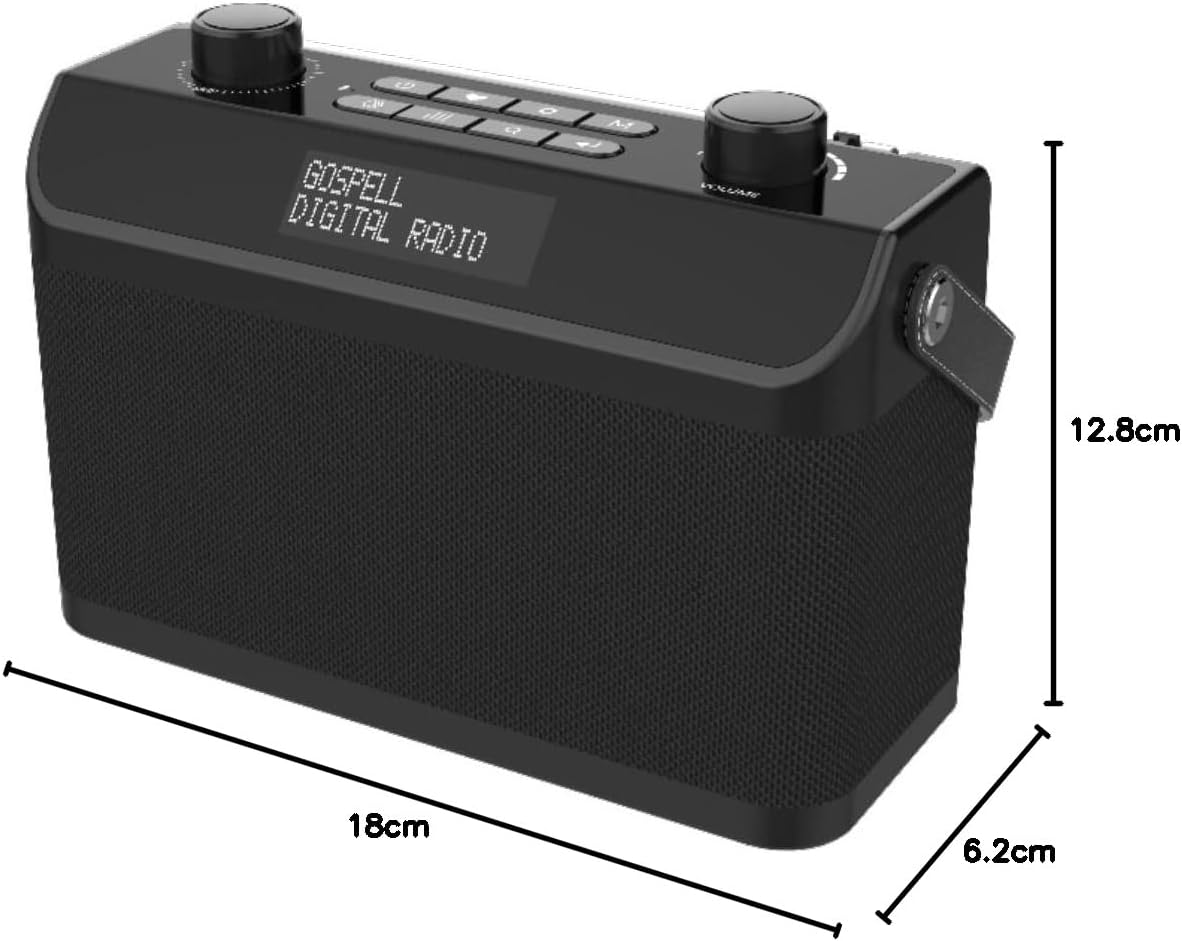
Figure 2: GOSPELL GR-228BP Portable DRM AM FM Radio Receiver with indicated dimensions. The radio measures approximately 18 cm in length, 6.2 cm in width, and 12.8 cm in height.
| Feature | Detail |
|---|---|
| Brand | Gospell |
| Model | GR-228BP |
| Tuner Technology | Digital |
| Supported Radio Bands | FM, AM, DRM30 (MW/SW), DRM+(FM) |
| Connectivity | Bluetooth, USB |
| Hardware Interface | MicroSD |
| Power Source | Battery-Powered (Internal Rechargeable), AC Adapter |
| Display Type | LCD |
| Special Features | Portable, Alarm Timer, Snooze, Journaline, Emergency Warning Reception |
| Dimensions (L x W x H) | 18 x 6.2 x 12.8 cm |
| Color | Black |
| Water Resistance Level | Waterproof |
Warranty Information
Specific warranty details for the GOSPELL GR-228BP are not available in the provided product data. Please refer to the warranty card included with your product or contact the manufacturer directly for warranty terms and conditions.
Customer Support
For technical assistance, troubleshooting beyond this manual, or service inquiries, please contact Gospell customer support. Contact information is typically provided in the product packaging or on the manufacturer's official website.
Note: This manual is a general guide. Features and specifications are subject to change without notice.
Related documentsGR-228BP

Ask a question about this manual
Ask about setup, troubleshooting, compatibility, parts, safety, or missing instructions. Manuals+ will review the question and use this page’s manual context to help answer it.