
Introduction
Thank you for choosing the INNOREL F10 Tripod Fluid Head. This compact and portable fluid head is designed for smooth and precise camera movements, ideal for video recording and photography with DSLR, mirrorless, and compact video cameras. Constructed from CNC aluminum alloy, it offers durability and a textured feel. This manual provides detailed instructions for setup, operation, and maintenance to ensure optimal performance and longevity of your fluid head.
What's in the Box
- F10 Main Body x 1
- Extra Arca Swiss Quick Release Plate x 1
- Fluid Head Handle x 1
- Magic Arm & Phone Clip x 1
- 3/8" to 1/4" Screw Adapter x 1 (located in the bottom hole of the head)
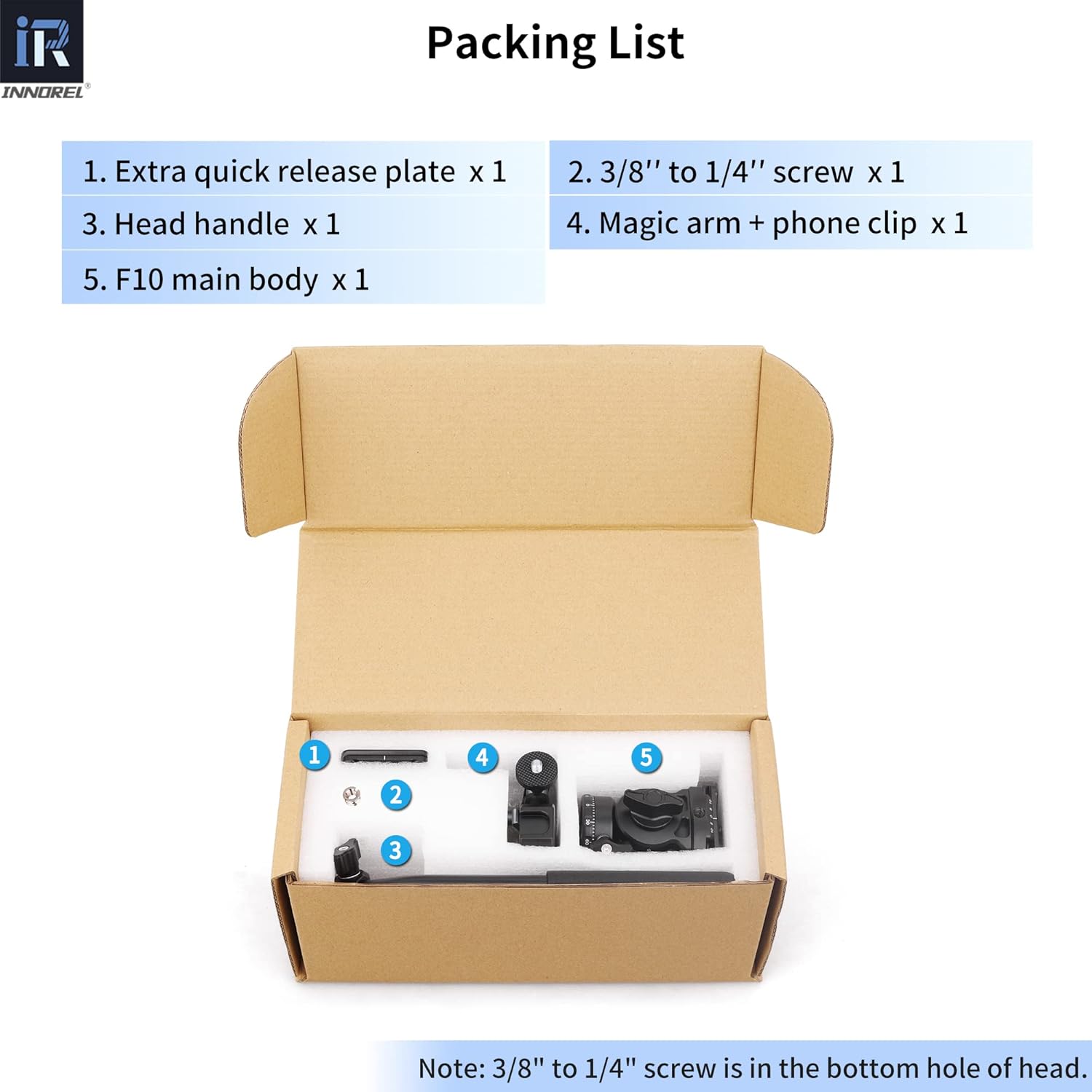
Image: Contents of the INNOREL F10 package, showing the main fluid head, handle, quick release plate, magic arm, and phone clip.
Product Overview
The INNOREL F10 Fluid Head features a robust design with intuitive controls for precise camera positioning. Familiarize yourself with the components below.

Image: Detailed diagram of the INNOREL F10 Fluid Head, highlighting key components such as the 1/4" screw, sponge sleeve, spirit level, handle locking lever, panoramic scale, 3/8" & 1/4" screw hole, main knob, and pan locking lever.
Key Components:
- 1/4" Screw: For attaching your camera to the quick release plate.
- Sponge Sleeve: Provides a comfortable grip on the handle.
- Spirit Level: Helps ensure your camera is perfectly level.
- Handle Locking Lever: Secures the handle in position.
- Panoramic Scale: Allows for precise 360° panoramic adjustments.
- 3/8" & 1/4" Screw Hole: Located at the base for mounting the fluid head onto a tripod or monopod.
- Main Knob: Controls the tilt friction and locking mechanism.
- Pan Locking Lever: Locks the 360° panoramic rotation.
- Vertical Scale: Indicates the tilt angle.

Image: Visual representation of the INNOREL F10 Fluid Head's compact dimensions (height 77mm, bottom diameter 44mm) and the quick release plate (50x38mm), along with a view of the D-type handle and safety screws on the quick release plate.
Setup
1. Attaching the Fluid Head to a Tripod
- Ensure your tripod has a 3/8" mounting screw. If your tripod has a 1/4" screw, use the included 3/8" to 1/4" screw adapter.
- Align the bottom screw hole of the F10 fluid head with the mounting screw on your tripod.
- Rotate the fluid head clockwise until it is securely fastened to the tripod. Ensure it is tight to prevent wobbling.
2. Attaching the Quick Release Plate to Your Camera
- Locate the 1/4" screw on the quick release plate.
- Screw the quick release plate onto the 1/4" tripod socket at the bottom of your camera. Tighten it firmly using a coin or screwdriver if necessary.
- Ensure the safety screws on the quick release plate are engaged to prevent accidental camera slippage.
3. Mounting Your Camera onto the Fluid Head
- Loosen the quick release plate clamp knob on the fluid head.
- Slide the quick release plate (with your camera attached) into the clamp on the fluid head.
- Once the camera is balanced, tighten the quick release plate clamp knob securely.
4. Attaching the Handle
- Insert the handle into the designated slot on the fluid head.
- Tighten the handle locking lever to secure the handle in place.
- The handle can be positioned for left-hand or right-hand operation.

Image: Illustration demonstrating how to exchange the handle for left-hand or right-hand use on the INNOREL F10 Fluid Head.
5. Attaching the Magic Arm & Phone Clip (Optional)
- The fluid head features a 1/4" screw hole on the clamp side.
- Screw the magic arm into this 1/4" screw hole.
- Attach the phone clip to the magic arm.
- Secure your smartphone in the phone clip for multi-device photography or monitoring.

Image: Various usage scenarios for the INNOREL F10 Fluid Head, including outdoor photography, studio use, slider mounting, and multi-device setup with a phone clip.
Operating Instructions
1. Pan Movement (360° Rotation)
- To enable panoramic rotation, loosen the Pan Locking Lever.
- Gently rotate the fluid head horizontally to achieve your desired panoramic view. The panoramic scale at the base assists with precise positioning.
- Once the desired position is reached, tighten the Pan Locking Lever to secure the head.
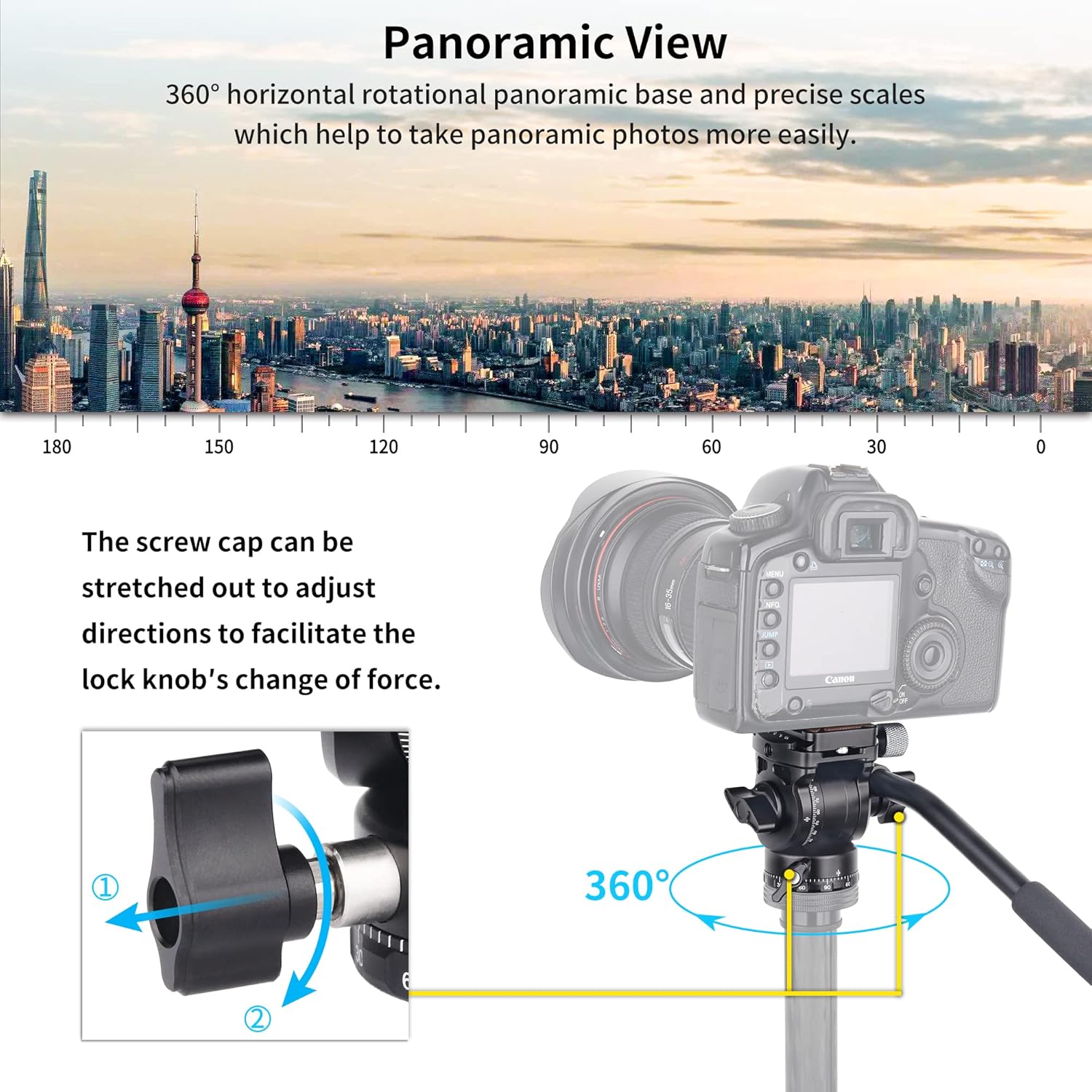
Image: Demonstrates the 360° horizontal rotation capability of the INNOREL F10 Fluid Head and how the screw caps on locking levers can be adjusted for better grip and leverage.
2. Tilt Movement (-90° to 90°)
- To adjust the tilt angle, loosen the Main Knob.
- Gently tilt your camera up or down. The fluid head allows for a tilt range from -90° to +90°.
- Once the desired tilt angle is achieved, tighten the Main Knob to lock the position.

Image: Illustrates the multi-angle shooting capabilities of the INNOREL F10 Fluid Head, showing horizontal, vertical, upward, and downward camera positions with a tilt range of -90° to +90°.
3. Using the Spirit Level
- The integrated Spirit Level helps ensure your camera is perfectly horizontal.
- Adjust your tripod legs or the fluid head's leveling base (if applicable) until the bubble in the spirit level is centered.
4. Adjusting Locking Lever Directions
- The screw caps of the pan and handle locking levers can be pulled out and rotated to adjust their direction. This facilitates easier tightening and loosening, especially in confined spaces or for ergonomic preference.
Maintenance
- Cleaning: Wipe the fluid head with a soft, dry cloth after each use to remove dust and dirt. For stubborn grime, use a slightly damp cloth and then dry thoroughly. Avoid harsh chemicals or abrasive materials.
- Lubrication: The fluid damping system is factory-sealed and does not require user lubrication. Do not attempt to disassemble the fluid head for lubrication.
- Storage: Store the fluid head in a dry, cool place, away from direct sunlight and extreme temperatures. It is recommended to store it in its original packaging or a protective bag to prevent scratches and damage.
- Inspection: Periodically check all screws and levers to ensure they are tight. Do not overtighten, as this can cause damage.
Troubleshooting
Issue: Fluid head movements are not smooth.
- Solution: Ensure all locking levers (pan and tilt) are sufficiently loosened. Check for any obstructions or debris around the moving parts. If the issue persists, contact customer support.
Issue: Camera is not securely mounted.
- Solution: Verify that the quick release plate is firmly attached to your camera and that the quick release plate clamp knob on the fluid head is fully tightened. Ensure the safety screws on the quick release plate are engaged.
Issue: Fluid head wobbles on the tripod.
- Solution: Confirm that the fluid head is securely screwed onto the tripod's mounting screw. If using an adapter, ensure it is also tight. Check that your tripod legs are fully extended and locked.
Specifications
| Feature | Specification |
|---|---|
| Brand | INNOREL |
| Model | F10 |
| Material | Aluminum alloy |
| Net Weight | 341g / 0.75lb |
| Maximum Load Capacity | 4kg / 8.8lb |
| Height | 77mm / 3.03in |
| Bottom Diameter | 44mm / 1.73in |
| Bottom Screw Thread | 3/8" + 1/4" (with adapter) |
| Quick Release Plate Size | 50mm x 38mm / 1.97in x 1.50in |
| Tilt Range | -90° to +90° |
| Pan Rotation | 360° |
| Compatible Devices | Digital SLR cameras, Mirrorless cameras, Compact video cameras |
Warranty and Support
Warranty Information
The INNOREL F10 Tripod Fluid Head comes with a 2-Year Warranty from the date of purchase. This warranty covers manufacturing defects and material flaws under normal use. It does not cover damage caused by misuse, accidents, unauthorized modifications, or normal wear and tear.
Please retain your proof of purchase for warranty claims.
Customer Support
For technical assistance, warranty claims, or any questions regarding your INNOREL F10 Tripod Fluid Head, please contact INNOREL customer support through the retailer where you purchased the product or visit the official INNOREL website for contact information.