
Introduction
This manual provides detailed instructions for the assembly, operation, and maintenance of your VIHELM MD5090 Metal Detector. Designed for detecting various metal objects buried underground, this versatile and easy-to-use equipment is ideal for treasure hunting, material checks, and security applications. Please read this manual thoroughly before using the device to ensure proper function and safety.
Product Components
The VIHELM MD5090 Metal Detector typically includes the following main components:
- Control Box: Houses the electronics, display, and controls.
- Search Coil: The circular disc that detects metal objects.
- Adjustable Stem: Connects the search coil to the control box and allows for length adjustment.
- Armrest: Provides support and comfort during use.
- Headphone Jack: For connecting headphones (not supplied).
- Battery Compartment: For power supply.

Figure 1: Fully assembled VIHELM MD5090 Metal Detector, showcasing its main components including the search coil, adjustable stem, control box, and armrest.

Figure 2: The VIHELM MD5090 Metal Detector shown with optional headphones, highlighting the control panel and search coil.
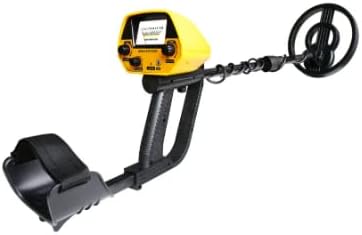
Figure 3: Side view of the VIHELM MD5090 Metal Detector, illustrating the ergonomic design of the armrest and handle.
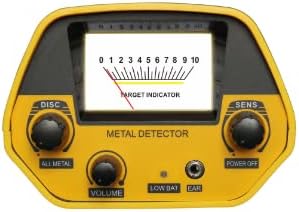
Figure 4: Close-up of the MD5090 control panel, showing the target indicator meter, DISC and SENS controls, volume, low battery indicator, and earphone jack.
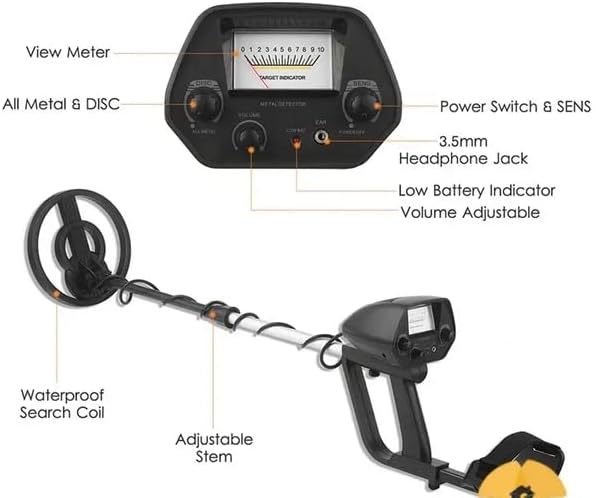
Figure 5: Detailed diagram labeling the key parts of the MD5090 Metal Detector, including the view meter, controls, waterproof search coil, and adjustable stem.
Setup and Assembly
Follow these steps to assemble your MD5090 Metal Detector:
- Install Batteries: Open the battery compartment (usually located on the control box) and insert two 9V (6F22) batteries, ensuring correct polarity. Close the compartment securely.
- Attach Search Coil: Connect the search coil to the lower stem. Ensure it is securely fastened.
- Assemble Stem: Connect the lower stem to the middle stem, and then connect the middle stem to the upper stem (which includes the control box and armrest).
- Adjust Stem Length: Loosen the locking collar on the adjustable stem and extend or retract the stem to a comfortable length that allows the search coil to be parallel to the ground when you are standing upright. Tighten the locking collar. The adjustable stem allows for lengths between 30.7 and 42.1 inches.
- Secure Cable: Wrap the search coil cable neatly around the stem and secure it with any provided clips or ties to prevent tangling and false signals.
- Connect Headphones (Optional): If using headphones, plug them into the 3.5mm earphone jack on the control box.

Figure 6: Illustrative diagram showing the adjustable length of the MD5090 Metal Detector, ranging from 830mm (32.68in) to 1130mm (44.49in), and the 200mm (7.87in) diameter of the search coil.

Figure 7: Dimensions of the black VIHELM MD5090 Metal Detector, indicating the control box size (130mm x 90mm) and search coil diameter (200mm).
Operating Instructions
Powering On and Basic Operation
- Power On: Turn the "POWER OFF" knob clockwise to power on the detector. The meter pointer will swing to the right, indicating the unit is active.
- Volume Adjustment: Adjust the "VOLUME" knob to a comfortable listening level.
- Operating Modes: The MD5090 offers two primary operating modes:
- ALL METAL Mode: This mode detects all types of metal objects. Turn the "DISC" knob fully counter-clockwise to activate this mode. This is ideal for general treasure hunting when you want to find all metals.
- DISC (Discrimination) Mode: This mode allows you to discriminate against certain types of metal, typically iron, to avoid unwanted targets. Turn the "DISC" knob clockwise to gradually eliminate unwanted metals. As you turn the knob, the detector will ignore smaller or less conductive metals first.
- Sensitivity Adjustment: Adjust the "SENS" knob to control the detector's sensitivity. Higher sensitivity allows for deeper detection but may also increase false signals from ground mineralization or electrical interference. Start with a medium sensitivity and adjust as needed.
- Sweeping the Search Coil: Hold the detector with the search coil parallel to the ground, about 1-2 inches above the surface. Sweep the coil slowly from side to side in overlapping motions.
- Target Indication: When a metal object is detected, the meter pointer will swing to the right, and an audible tone will be emitted. The strength of the signal (how far the pointer swings) and the tone can indicate the size and proximity of the object.
Understanding the Display
The control panel features a meter and various indicators:
- View Meter and Pointer: The meter pointer swings to the right when metal is found. The extent of the swing indicates signal strength.
- Low Battery Indicator: An indicator light or a specific reading on the meter will alert you when the batteries are low and need replacement.
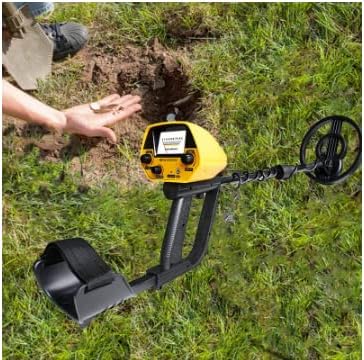
Figure 8: The MD5090 Metal Detector being used outdoors, demonstrating the typical posture and search coil position during operation.
Maintenance and Care
Proper maintenance will extend the life and performance of your metal detector:
- Cleaning: After each use, wipe down the detector with a damp cloth. Do not use abrasive cleaners or solvents.
- Search Coil: The search coil is waterproof and can be submerged in shallow water for short periods. However, the control box is NOT waterproof and must be kept dry.
- Battery Care: Remove batteries if the detector will not be used for an extended period to prevent leakage.
- Storage: Store the detector in a dry, cool place, away from extreme temperatures and direct sunlight.
- Cable Inspection: Regularly check the search coil cable for any signs of damage or fraying.
Troubleshooting
If you encounter issues with your MD5090 Metal Detector, refer to the following common problems and solutions:
| Problem | Possible Cause | Solution |
|---|---|---|
| No power/Detector does not turn on. | Dead or incorrectly installed batteries. | Check battery polarity. Replace with fresh 9V batteries. |
| Constant false signals/Chattering. | High sensitivity setting, electrical interference, mineralized ground, loose cable. | Reduce "SENS" setting. Move away from power lines or other electronics. Ensure search coil cable is tightly wound and secured. |
| Detector beeps but meter doesn't move. | Minor interference or very small/deep target. | Sweep slower and closer to the ground. Adjust sensitivity. |
| Poor detection depth. | Low sensitivity, low batteries, highly mineralized ground. | Increase "SENS" setting. Replace batteries. Try "ALL METAL" mode. |
| Cannot discriminate unwanted metals. | "DISC" knob not adjusted correctly. | Ensure you are in DISC mode and gradually turn the "DISC" knob clockwise to eliminate targets. |
Specifications
The following are the technical specifications for the VIHELM MD5090 Metal Detector:
- Power: 2 x 9V (6F22) batteries
- Frequency: 5.0 KHz
- Current: Standby: 10mA, Max: 70mA
- Operating Voltage: 7.2-9.6V
- Operating Temperature: Not specified (general range for electronics is 0°C to 40°C)
- Sensitivity: US 25 Cent: 150mm (approximately 5.9 inches)
- Indication Mode: Mechanical Indicator Mode, Sound Mode
- Stretch Length: 30.7-42.1 inches (780-1070mm)
- Detector Diameter: 6.5 inches (200mm)
- Color: Gold (referring to the control box color, product is primarily black/yellow)
- Net Weight: 0.85kg (1.87 lbs)
- Gross Weight: 1.25kgs (2.76 lbs)
- Product Dimensions: 6 x 2 x 1 inches (Control Box)
- Package Size: 21(L) x 8.6(W) x 4.3(H) inches
- Item Model Number: MD5090
- UPC: 797427714022
- Country of Origin: China

Figure 9: Manufacturer's provided text detailing the MD5090's features, application, and technical specifications.
Warranty and Support
For warranty information and customer support, please refer to the seller's policies or contact VIHELM directly through their official channels. Keep your purchase receipt as proof of purchase.
This product is sold by factory direct selling company. For specific return policies or support inquiries, please visit the seller's page on Amazon or contact Amazon customer service.
Protection plans are available for this product: