
VILTROX VT-FR1001
VILTROX DC-550 Pro 4K External Monitor User Manual
Model: DC-550 Pro (VT-FR1001)
1. Introduction
The VILTROX DC-550 Pro is a high-brightness 5.5-inch 4K external field monitor designed for professional camera setups. It features a Full HD 1920x1080 IPS display with 1200 Nits brightness, 3D LUT support, and HDMI 1.4 input/output, making it an ideal tool for precise monitoring during video production.
1.1 Package Contents
Verify that all items listed below are included in your package. If any items are missing or damaged, please contact your retailer.
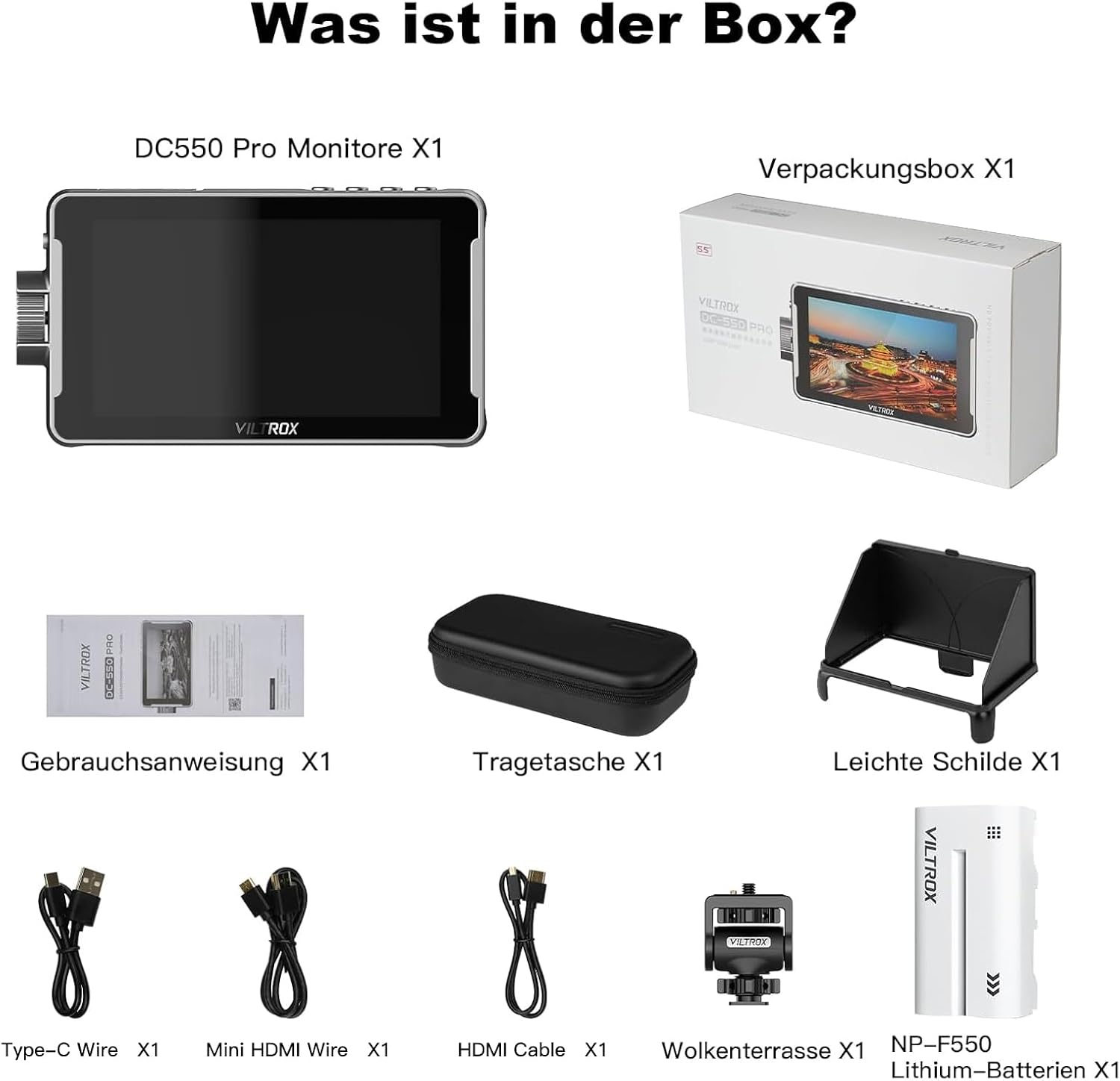
Image: Contents of the VILTROX DC-550 Pro package, including the monitor, carrying case, sun hood, user manual, Type-C cable, Mini HDMI cable, HDMI cable, hot shoe mount, and NP-F550 battery.
- DC-550 Pro Monitor x1
- Carrying Case x1
- Sun Hood x1
- User Manual x1
- Type-C Cable x1
- Mini HDMI Cable x1
- HDMI Cable x1
- Hot Shoe Mount x1
- NP-F550 Lithium-ion Battery x1
2. Key Features
- High Brightness & Full HD Display: 5.5-inch IPS screen with 1920x1080 resolution and 1200 Nits brightness for clear viewing in various lighting conditions.
- Professional Monitoring Tools: Features include 3D LUT, Parade Waveform, Vector Graph, Brightness Histogram, Focus Assist, Audio Column, Image Flip, False Color, and more.
- 4K HDMI Input/Loop Out: Supports 4K 30Hz signal input and output for lossless HD transmission.
- Accurate Color Reproduction: Conforms to the international REC.709 color standard for precise color rendering.
- Detachable Sun Hood: Quick-release design to effectively block light interference.
- Touchscreen Interface: Intuitive full-screen touch control for easy navigation and settings adjustment.
2.1 Display Quality

Image: Comparison showing the clarity of 1920x1080 resolution and the wide 178-degree viewing angle of the VILTROX DC-550 Pro monitor.
The monitor's 1920x1080 Full HD resolution ensures that every detail is accurately restored, providing high-definition monitoring. The IPS panel offers a wide 178-degree viewing angle, maintaining consistent image quality from various perspectives.
2.2 Professional Monitoring Software
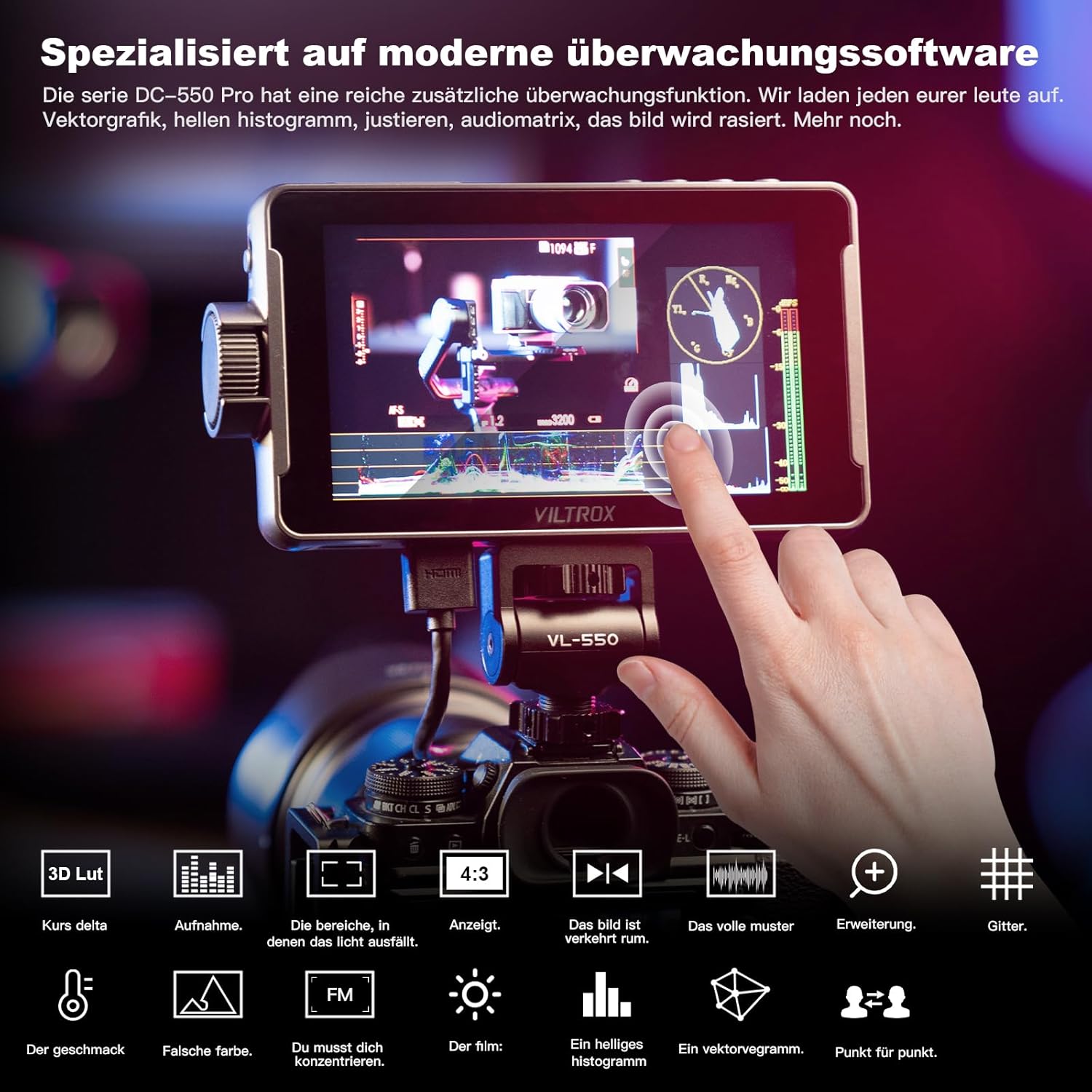
Image: Screenshot of the VILTROX DC-550 Pro display showing various monitoring tools such as 3D LUT, waveform, histogram, and focus assist.
The DC-550 Pro series is equipped with a comprehensive suite of monitoring functions. These tools assist photographers and videographers in achieving precise exposure, focus, and color accuracy during shooting.
2.3 Color Accuracy
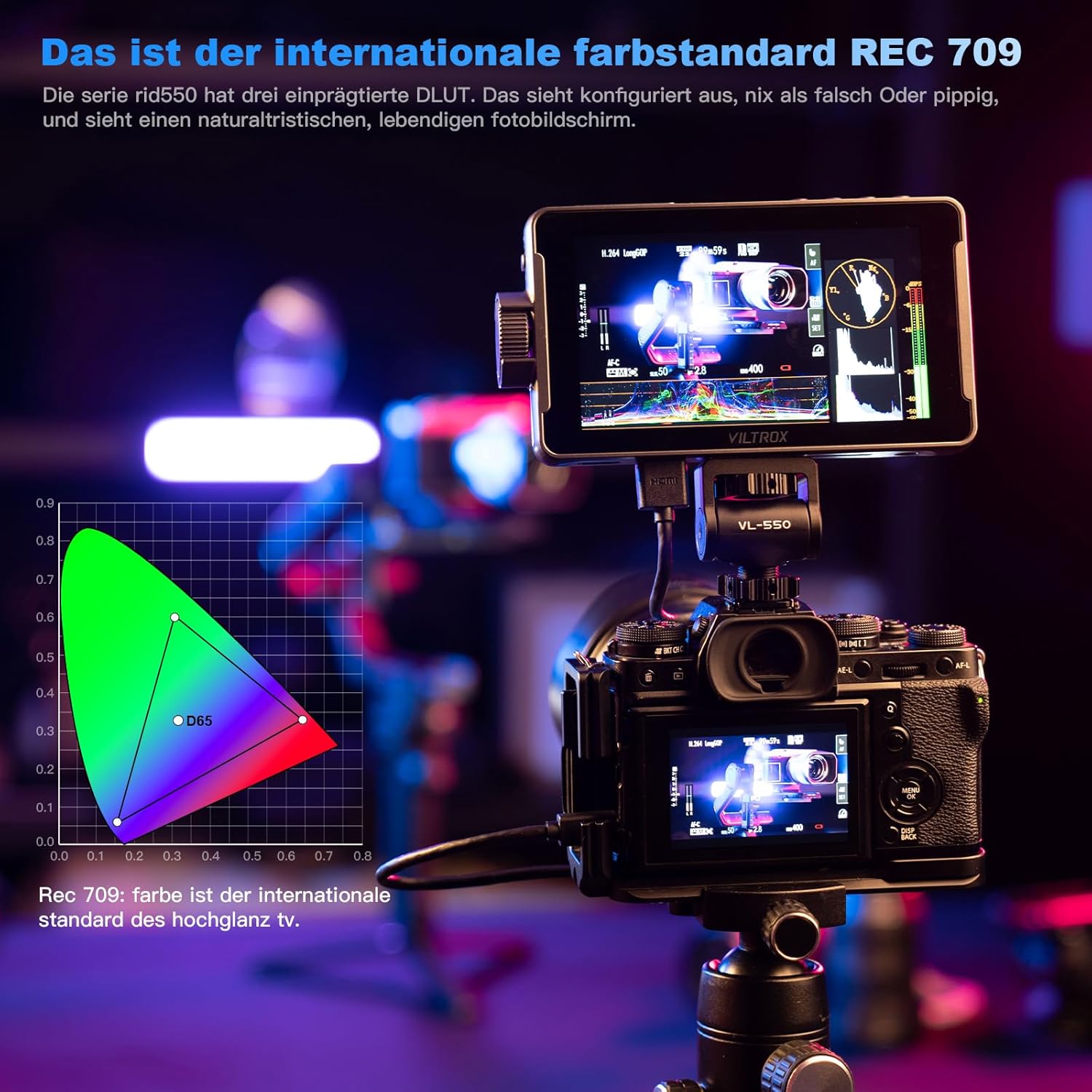
Image: Diagram illustrating the REC.709 color standard, which the VILTROX DC-550 Pro adheres to for accurate color reproduction.
Adhering to the international REC.709 color standard, the DC-550 Pro ensures accurate color reproduction without distortion or color cast, providing a natural and realistic visual experience.
3. Setup and Connections
3.1 Physical Overview and Ports

Image: Detailed diagram showing the dimensions and port layout of the VILTROX DC-550 Pro monitor, including power input, HDMI ports, SD card slot, and control buttons.
The DC-550 Pro features a compact design with essential ports and controls for easy integration into your camera rig. Refer to the diagram above for port identification:
- Cooling Air Intake
- Battery Release Button
- Next Button (F1/F2)
- Shortcut/Back Button (F4)
- SD Card Slot
- Type-C Port
- Cooling Air Intake
- Battery Release Button
- Street Interface (likely a typo, refers to a general interface/port)
- On/Off Switch
- Knob (for navigation/selection)
3.2 Powering the Monitor
The monitor can be powered by the included NP-F550 battery or via a DC 12V-18V power adapter (not included) connected to the DC IN port. Ensure the battery is fully charged before use.
3.3 Connecting to a Camera
Use the provided HDMI or Mini HDMI cable to connect your camera's HDMI output to the monitor's HDMI input. The monitor supports 4K 30Hz signal input.
- Mount the monitor onto your camera rig using the hot shoe mount.
- Insert a charged NP-F series battery into the battery slot, or connect an external DC power source.
- Connect an HDMI cable from your camera's HDMI output to the HDMI input port on the DC-550 Pro.
- Turn on the monitor using the On/Off switch.
4. Operation
4.1 Basic Navigation and Touchscreen Control

Image: A hand interacting with the touchscreen of the VILTROX DC-550 Pro, demonstrating its intuitive touch interface for quick adjustments.
The DC-550 Pro features a responsive touchscreen for intuitive control. Tap on screen elements to select options, swipe to navigate menus, and pinch-to-zoom for image inspection.
4.2 Using Monitoring Functions
Access various monitoring tools through the on-screen menu. These functions are designed to assist with exposure, focus, and composition.
- 3D LUT: Apply custom Look Up Tables for real-time color grading preview.
- Waveform/Vector Scope/Histogram: Analyze video signals for exposure and color balance.
- Focus Assist (Peaking): Highlights in-focus areas for precise manual focusing.
- False Color: Displays exposure levels using a color overlay.
- Image Flip: Adjusts the image orientation for different mounting positions.
4.3 Importing 3D LUTs

Image: The VILTROX DC-550 Pro monitor displaying the interface for importing 3D LUT files from an SD card, with a comparison of original and LUT-applied images.
The DC-550 Pro allows users to import custom 3D LUTs via an SD card. This enables photographers to achieve various creative effects during post-editing and to monitor footage with any camera's Log mode.
- Save your .cube LUT files to an SD card.
- Insert the SD card into the monitor's SD card slot.
- Navigate to the LUT management menu on the monitor.
- Select the desired LUT files to import.
- Once imported, you can apply these LUTs to your live feed.
5. Maintenance and Care
- Cleaning: Use a soft, dry cloth to clean the monitor's body. For the screen, use a microfiber cloth specifically designed for electronics displays. Do not use liquid cleaners or abrasive materials.
- Storage: When not in use, store the monitor in its carrying case in a cool, dry place away from direct sunlight and extreme temperatures.
- Battery Care: Remove the battery if the monitor will not be used for an extended period. Store batteries in a cool, dry place.
- Sun Hood: The detachable sun hood can be easily removed for cleaning or storage.
6. Troubleshooting
| Problem | Possible Cause | Solution |
|---|---|---|
| Monitor does not power on. | Battery is low or not inserted correctly; power cable is loose or faulty. | Ensure battery is charged and correctly inserted. Check power cable connection. Try external power source if available. |
| No image displayed. | HDMI cable is loose or faulty; camera output settings are incorrect; monitor input is not selected. | Check HDMI cable connection. Verify camera's HDMI output settings. Ensure correct input source is selected on the monitor. |
| Image is distorted or flickering. | HDMI cable issue; signal incompatibility; monitor settings. | Try a different HDMI cable. Check camera's output resolution and frame rate. Reset monitor settings to default. |
| Touchscreen is unresponsive. | Temporary software glitch; screen protector interference. | Restart the monitor. Ensure the screen is clean and free of debris. If a screen protector is installed, ensure it is properly applied. |
6.1 Firmware Updates
Important Notice:
Due to frequent firmware updates for the DC-550 Pro series monitor, please contact VILTROX customer service to obtain the latest firmware update file. Do not download and install firmware from unofficial websites.
7. Specifications
| Feature | Detail |
|---|---|
| Model | VT-FR1001 (DC-550 Pro) |
| Display Size | 5.5 inches |
| Display Type | IPS |
| Resolution | 1920 x 1080 (Full HD) |
| Brightness | 1200 Nits |
| Contrast Ratio | 3000:1 |
| Aspect Ratio | 16:9 |
| Connectivity | HDMI 1.4 (Input/Loop Out) |
| Max Supported Resolution | 3840x2160 (4K) @ 30Hz, 4096x2160 @ 24/25/30Hz |
| Special Features | Touchscreen, 3D LUT, Waveform, Vector Scope, Histogram, Focus Assist, False Color |
| Power Source | NP-F series battery (NP-F550 included) or DC 12V-18V |
| Dimensions (L x W x H) | 165mm x 91mm x 28.5mm |
| Weight | 970 grams |
| Country of Origin | China |
8. Warranty and Support
8.1 Warranty Information
VILTROX products distributed by PhoZoom E come with a one-year warranty. Please retain your proof of purchase for warranty claims.
8.2 Customer Support
For any questions, technical assistance, or issues, please contact the PhoZoom E support team. Emails are typically responded to within 2 hours.
Contact Information: Please refer to your purchase documentation or the official VILTROX/PhoZoom E website for the most current contact details.

Image: VILTROX brand logo.
PhoZoom E is an official EU distributor for VILTROX products, ensuring genuine products and dedicated support.
Related documentsVT-FR1001


Ask a question about this manual
Ask about setup, troubleshooting, compatibility, parts, safety, or missing instructions. Manuals+ will review the question and use this page’s manual context to help answer it.