
Y DIANS S HXA-X01
Instruction Manual
Y DIANS S Solar Strobe Light
Model: HXA-X01
Product Overview
The Y DIANS S Solar Strobe Light HXA-X01 is a double-sided security alarm light designed for various applications including traffic, road construction, farms, and yards. It features high-brightness LED beads, a monocrystalline silicon solar panel for efficient charging, and robust IP65 waterproof and dustproof construction.

Figure 1: Overview of the Y DIANS S Solar Strobe Light HXA-X01.
Key Features:
- Durable Construction: Shell made of high-quality engineering PVC material for pressure and impact resistance.
- Efficient Solar Panel: Monocrystalline silicon solar panel (6.6W rated power, 9.2V voltage) ensures reliable operation and charges the built-in 4500mAH battery for use in various weather conditions and at night.
- High Brightness: Features 160 LED beads and a highly transparent, aging-resistant GPPS material lampshade, providing a night visibility distance of up to 1000 meters.
- Dual Control Switches: Equipped with a power switch for overall control and a photoelectric switch for automatic day/night operation.
- Weatherproof: IP65 high-performance protection ensures resistance to rain and dust.
What's in the Box
Upon unboxing, please ensure all components are present and undamaged:
- Solar panel
- Strobe lights unit
Note: Mounting bracket is not included and must be acquired separately.
Setup and Installation
Proper installation is crucial for optimal performance and safety. This device is designed for bottom mounting.
1. Mounting Location Selection:
- Choose a location that receives direct sunlight for the majority of the day to ensure the solar panel can efficiently charge the battery.
- Ensure the mounting surface is stable and can support the weight of the unit (approximately 24.2 pounds).
- Consider the visibility requirements for the strobe light's intended warning purpose.
2. Attaching the Mounting Bracket (Not Included):
The strobe light unit attaches to a mounting pole or bracket via the bottom mounting position. Use appropriate M10*25 Hexagonal screws for secure attachment.
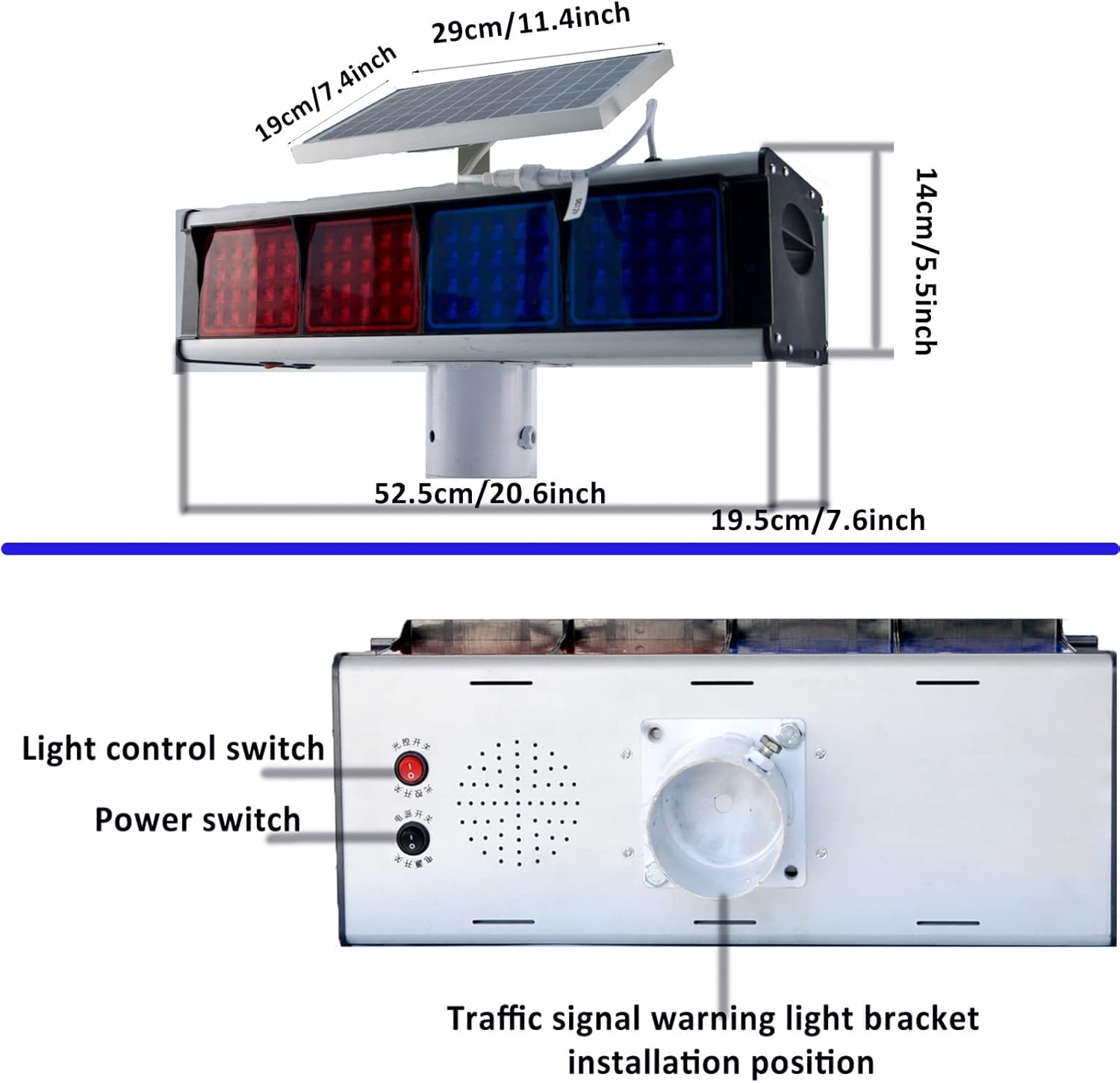
Figure 2: Product dimensions and mounting bracket installation position. Note the power switch and light control switch locations on the back panel.
3. Solar Panel Connection:
Connect the solar panel to the main strobe light unit. Ensure the connection is secure and weatherproof. The solar panel can be adjusted to face the sun for maximum exposure.
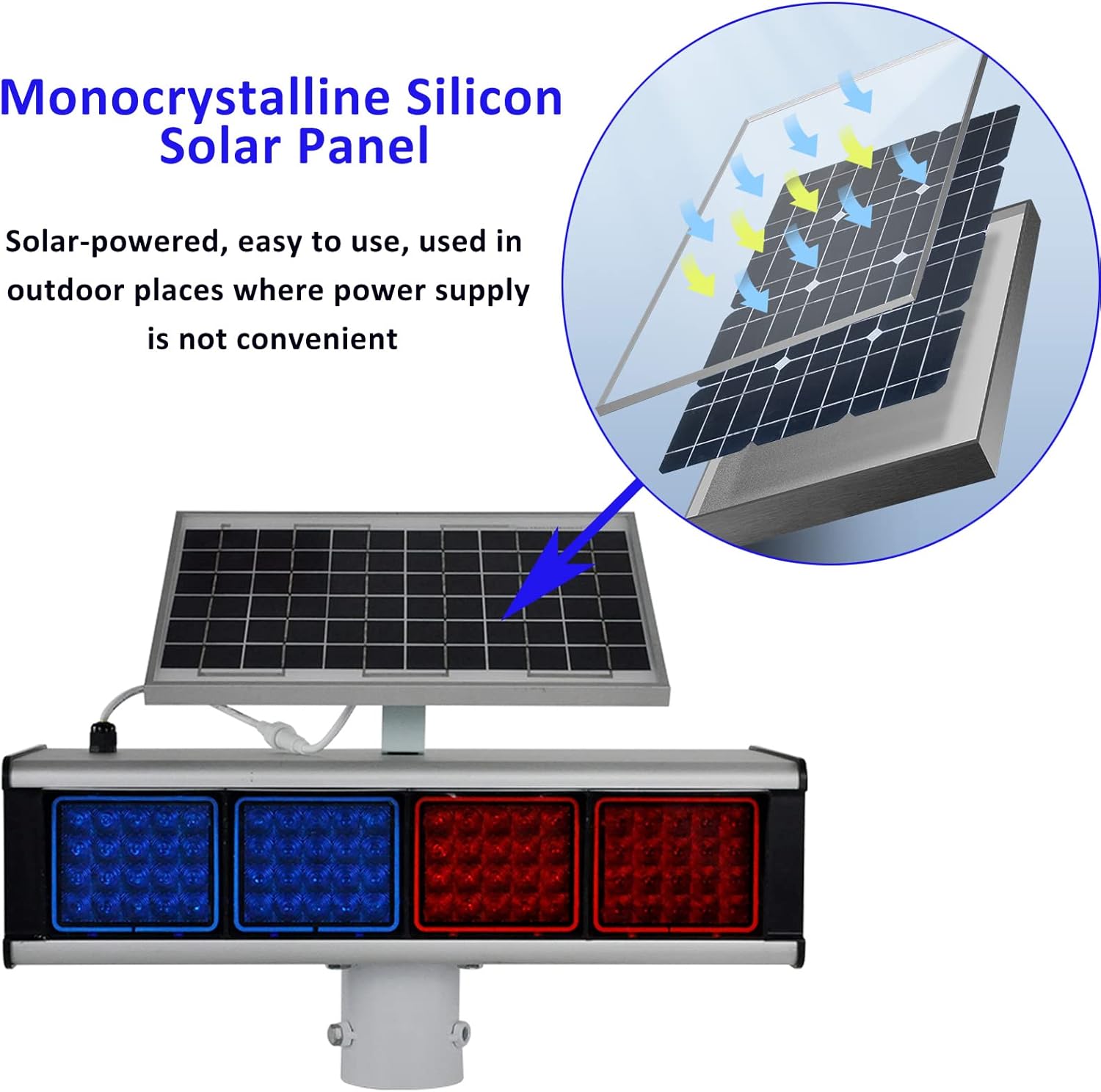
Figure 3: Detail of the monocrystalline silicon solar panel, designed for efficient outdoor charging.
Operating Instructions
The Solar Strobe Light HXA-X01 features two main switches for controlling its operation:
- Power Switch: This switch controls the overall power to the solar flashing warning light.
- To turn the unit ON, flip the power switch to the 'ON' position.
- To turn the unit OFF, flip the power switch to the 'OFF' position.
- Photoelectric Switch (Light Control Switch): This switch determines the light's operational mode based on ambient light conditions.
- Photoelectric Switch ON: In this mode, the warning light will automatically activate and flash during nighttime hours and remain off during the day. This conserves battery life and ensures operation when visibility is low.
- Photoelectric Switch OFF: In this mode, the warning light will flash continuously for 24 hours a day, regardless of ambient light conditions. This is suitable for situations requiring constant visibility.
Video 1: Demonstration of the Solar Strobe Alarm Light in various operational scenarios, including daytime and nighttime warning effects at construction sites and roads.

Figure 5: High brightness flashing beacon warning light in action, showcasing its 160 LED light beads.

Figure 6: The light demonstrating its IP65 waterproof and dustproof capabilities under simulated rain.

Figure 7: The double-sided red and blue flashing warning lights, visible from a long distance.
Maintenance
To ensure the longevity and optimal performance of your Solar Strobe Light, follow these maintenance guidelines:
- Clean the Solar Panel: Regularly wipe the surface of the solar panel with a soft, damp cloth to remove dust, dirt, leaves, or snow. A clean panel ensures maximum sunlight absorption and charging efficiency.
- Inspect for Damage: Periodically check the unit for any physical damage, loose connections, or signs of wear. Address any issues promptly.
- Battery Care: While the unit has a built-in battery, prolonged periods of low sunlight or storage may affect its charge. Ensure the unit receives adequate sunlight exposure.
- Clear Obstructions: Ensure no new obstructions (e.g., growing tree branches, new structures) block sunlight from reaching the solar panel.
Troubleshooting
If your Solar Strobe Light is not functioning as expected, consider the following common issues and solutions:
| Problem | Possible Cause | Solution |
|---|---|---|
| Light does not flash at night. |
|
|
| Light flashes during the day. |
|
|
| Reduced brightness or short operation time. |
|
|
If problems persist after trying these solutions, please contact customer support.
Specifications
| Attribute | Detail |
|---|---|
| Model Number | HXA-X01 |
| Color | Red and Blue |
| Shape | Rectangular Prism |
| Material | GPPS, Monocrystalline silicon, Polyvinyl Chloride (PVC) |
| Light Source Type | Light Emitting Diode (LED) |
| Number of Light Sources | 160 |
| Power Source | Solar Powered |
| Rated Power (Solar Panel) | 6.6 Watts |
| Voltage | 9.2 Volts |
| Battery Description | Lead Acid/Gel (4500mAH capacity) |
| Waterproof Rating | IP65 |
| Item Weight | 24.2 Pounds |
| Product Dimensions (L x W x H) | 20.6" x 7.6" x 5.5" |
| Mounting Type | Bottom mounting |
| Manufacturer | Hangzhou YASONG Electronic Co.,Ltd. |
Warranty and Support
Specific warranty details for the Y DIANS S Solar Strobe Light HXA-X01 are typically provided with your purchase documentation or can be obtained directly from the manufacturer or seller.
For technical support, troubleshooting assistance beyond this manual, or warranty claims, please refer to the contact information provided by your retailer or the manufacturer, Hangzhou YASONG Electronic Co.,Ltd.
You may also visit the Y DIANS S Store on Amazon for additional product information and support resources.
Ask a question about this manual
Ask about setup, troubleshooting, compatibility, parts, safety, or missing instructions. Manuals+ will review the question and use this page’s manual context to help answer it.