
1. Product Overview
Welcome to your new ODK L-shaped desk. This premium furniture piece is designed to enhance your workspace, offering a blend of functionality and style. Its reversible design allows for flexible placement, whether freestanding or positioned against a wall to optimize your space. The desk features generous storage compartments and an integrated power supply with USB ports for convenient device charging.

Figure 1.1: The ODK L-Shaped Gaming Desk, highlighting its ample surface area and integrated features.

Figure 1.2: The desk integrated into a home office or gaming setup, demonstrating its aesthetic appeal and practical use.
2. Safety Warnings
Please read and adhere to the following safety guidelines to ensure safe use and longevity of your ODK desk:
- Electrical Outlets: Use the integrated electrical outlets and USB ports with extreme care.
- Damage/Moisture: Do not use the electrical components if they are damaged or wet. Ensure the desk and its electrical parts are kept dry.
- Assembly: Always follow the provided assembly instructions precisely to ensure the stability and structural integrity of the product. Improper assembly can lead to instability and potential hazards.
- Weight Capacity: Do not exceed the recommended weight capacity for the desk surface and shelves. Distribute weight evenly.
- Placement: Place the desk on a flat, stable surface to prevent wobbling or tipping.
3. Key Features
- Flexible Reversible Design: The L-shaped configuration can be adjusted to suit your space, allowing for either a left-hand or right-hand setup. This adaptability makes it perfect for various room layouts and user preferences.
- Generous Storage Space: Equipped with 5 spacious storage compartments, the desk provides ample room for gaming accessories, work materials, books, and binders. The shelf height is individually adjustable, allowing for customized organization.
- Integrated Power Supply: The desk includes a built-in power strip with 2 AC outlets and 2 USB charging ports (5V/2.1A), allowing for convenient charging of electronic devices directly on the desktop. The power cord is 200cm long.
- Spacious Work Surface: The large table surface (168 x 120 cm) provides ample room for multiple monitors, keyboards, mice, and other peripherals, promoting freedom of movement and a comfortable working or gaming environment.

Figure 3.1: Illustration of the desk's reversible L-shape, demonstrating how it can be configured for left or right orientation.

Figure 3.2: Detailed view of the adjustable storage shelves, highlighting their capacity and flexibility for various items.

Figure 3.3: The integrated power hub, illustrating its convenience for charging devices without needing external power strips.
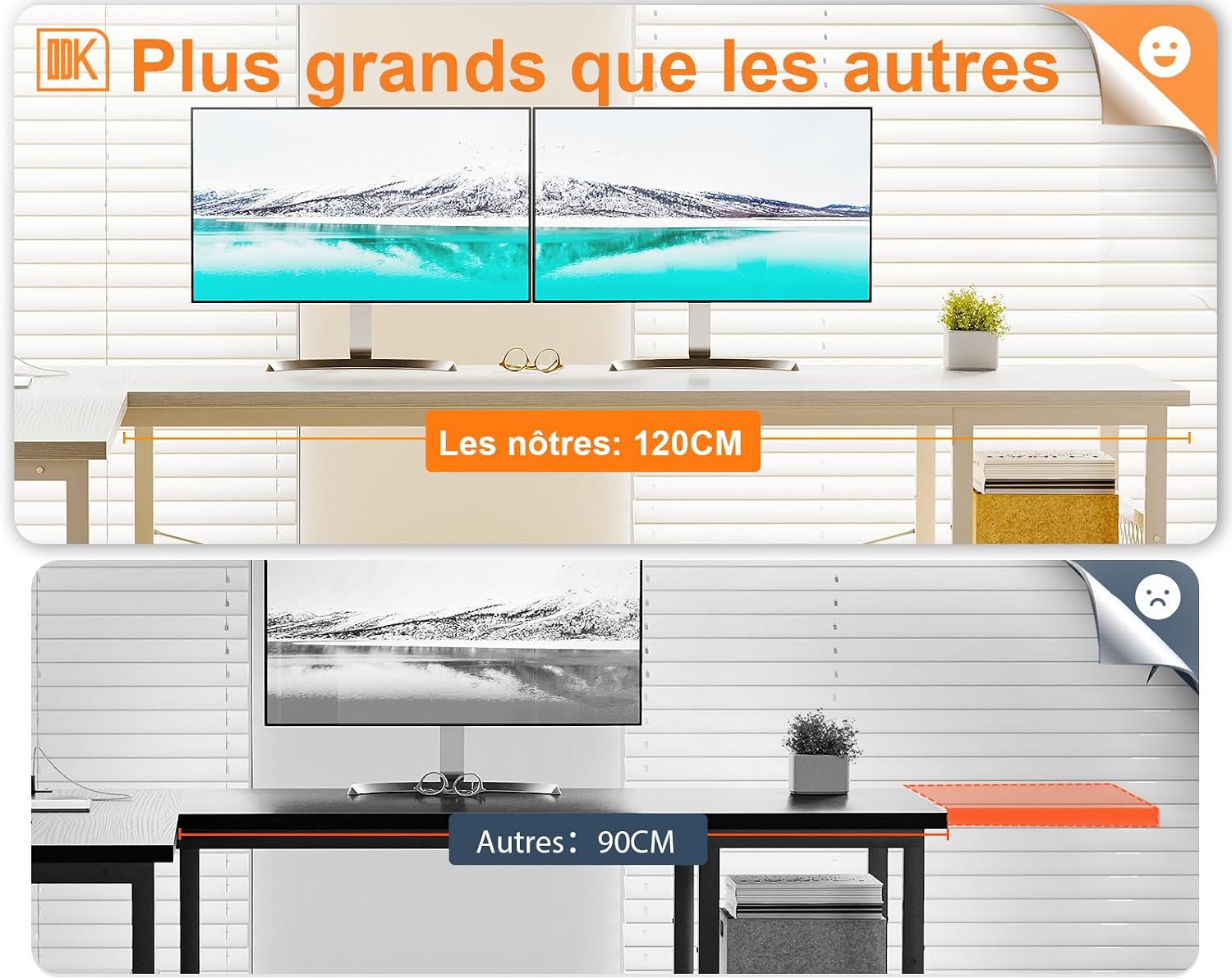
Figure 3.4: Visual comparison emphasizing the generous depth of the ODK desk's surface, providing more space than standard desks.
4. Setup and Assembly
Assembly of the ODK L-shaped desk requires careful attention to the included instructions. All necessary hardware and tools are typically provided. Please follow these general steps:
- Unpack Components: Carefully unpack all parts and hardware. Verify that all components listed in the assembly manual are present.
- Identify Orientation: Decide on the desired L-shape orientation (left or right) before beginning assembly, as this will dictate the placement of certain components.
- Assemble Frame: Begin by assembling the metal frame components according to the step-by-step diagrams. Ensure all screws are tightened securely but do not overtighten until the entire frame is assembled.
- Attach Desktop Panels: Secure the desktop panels to the assembled frame.
- Install Storage Shelves: Attach the storage shelves, adjusting their height as desired.
- Integrate Power Unit: Install the integrated power strip into its designated slot on the desktop.
- Final Tightening: Once all components are in place, go back and fully tighten all screws and fasteners to ensure maximum stability.

Figure 4.1: Dimensional drawing of the desk, crucial for understanding component placement during assembly.
For detailed, step-by-step instructions, please refer to the dedicated assembly manual included in your product packaging. It is highly recommended to assemble the desk with two people for ease and safety.
5. Operating Instructions
The ODK L-shaped desk is designed for straightforward operation, primarily focusing on its integrated power features.
- Connecting to Power: Plug the desk's main power cord into a standard wall outlet (220-250V/15A). Ensure the outlet is easily accessible and not overloaded.
- Using AC Outlets: Once connected, you can plug in your devices (e.g., monitors, lamps, computer towers) into the two integrated AC outlets on the desktop.
- Using USB Charging Ports: Connect your USB-powered devices (e.g., smartphones, tablets, gaming controllers) to the two USB ports (5V/2.1A) for convenient charging.
- Power Management: It is recommended to unplug the desk from the wall outlet when not in use for extended periods or during electrical storms.
Always ensure that devices plugged into the desk's power unit do not exceed the maximum rated power output to prevent electrical hazards.
6. Care and Maintenance
Proper care and maintenance will help preserve the appearance and functionality of your ODK desk for years to come.
- Cleaning the Surface: Wipe the desktop and shelves with a soft, damp cloth. For stubborn marks, a mild, non-abrasive cleaner can be used. Avoid harsh chemicals or abrasive materials that could damage the finish.
- Dusting: Regularly dust all surfaces with a dry, soft cloth to prevent dust buildup.
- Spills: Immediately wipe up any spills to prevent liquid from seeping into the material or damaging electrical components.
- Heat and Moisture: Avoid placing hot items directly on the desk surface. Use coasters for drinks. Keep the desk away from excessive moisture or direct sunlight to prevent warping or discoloration.
- Hardware Check: Periodically check all screws and fasteners to ensure they remain tight. Retighten if necessary to maintain stability.
7. Troubleshooting
If you encounter any issues with your ODK L-shaped desk, consider the following common troubleshooting steps:
- Instability/Wobbling:
- Ensure the desk is on a flat, level surface.
- Check all assembly screws and bolts. Tighten any loose connections.
- Power Outlets/USB Ports Not Working:
- Verify that the desk's main power cord is securely plugged into a functioning wall outlet.
- Check if the wall outlet itself is working by plugging in another device.
- Ensure the power unit on the desk is not damaged or wet. If it appears damaged, discontinue use immediately.
- Avoid overloading the outlets. Unplug some devices and try again.
- Missing Parts During Assembly:
- Carefully re-check all packaging materials. Small parts can sometimes be overlooked.
- Refer to the assembly manual's parts list to confirm what is missing.
If these steps do not resolve the issue, please contact ODK customer support for further assistance.
8. Product Specifications
| Attribute | Detail |
|---|---|
| Brand | ODK |
| Model Number | ZJZ-SBWJCZ |
| Color | White |
| Dimensions (L x W x H) | 168 x 120 x 75.7 cm |
| Item Weight | 22.1 Kilograms |
| Material (Tabletop) | Resin-coated wood (Engineered Wood) |
| Material (Base) | Metal |
| Special Feature | Integrated USB Port, Integrated AC Outlets |
| Power Outlets | 2 AC outlets (220-250V/15A) |
| USB Ports | 2 USB ports (5V/2.1A) |
| Power Cord Length | 200 cm |
| Country of Origin | China |
9. Warranty and Support
ODK stands behind the quality of its products. For information regarding warranty coverage, claims, or technical support, please refer to the warranty card included with your purchase or visit the official ODK website. Please have your model number (ZJZ-SBWJCZ) and purchase details ready when contacting support.
For any questions or assistance, please reach out to ODK customer service. Contact details can typically be found on the product packaging or the manufacturer's official website.


