
Aptkdoe IS07
Aptkdoe IS07 Wireless Earbuds User Manual
Model: IS07 | Brand: Aptkdoe
1. Introduction
Thank you for choosing the Aptkdoe IS07 Wireless Earbuds. These Bluetooth 5.3 headphones are designed to provide a high-fidelity stereo sound experience with clear call capabilities. Featuring a long playtime, touch controls, LED display, and IPX7 waterproofing, they are suitable for various activities and compatible with iOS, Android, and laptop devices. This manual provides detailed instructions for setup, operation, maintenance, and troubleshooting to ensure optimal performance and longevity of your earbuds.
2. What's in the Box
Upon opening your Aptkdoe IS07 Wireless Earbuds package, you should find the following items:
- Bluetooth headphones (1 pair)
- Charging case (1)
- User manual (1)
- USB-C charging cable (1)
- Earplugs (3 sizes: S/M/L)

Image: Aptkdoe IS07 Wireless Earbuds in their charging case, showing the LED display.
3. Specifications
| Model Name | IS07 |
| Connectivity Technology | Wireless (Bluetooth 5.3) |
| Audio Driver Size | 13.4 mm |
| Battery Life (Earbuds) | 6-8 hours (single use) |
| Total Playtime (with Charging Case) | Up to 48 hours |
| Charging Time | 1.5 Hours |
| Water Resistance Level | IPX7 Waterproof |
| Control Type | Touch Control |
| Compatible Devices | Smartphones, Laptops, Tablets, Smart Speakers (iOS, Android, Windows) |
| Material | Plastic, Silicone |
| Item Weight | 3.52 ounces |
4. Setup
4.1 Charging the Earbuds and Case
Before first use, ensure both the earbuds and the charging case are fully charged.
- Place the earbuds into the charging case.
- Connect the USB-C charging cable to the charging port on the case and plug the other end into a USB power source.
- The LED digital display on the charging case will show the battery percentage. Each bar represents 25% of the power. The LED lights will flash during charging.
- A full charge takes approximately 1.5 hours.
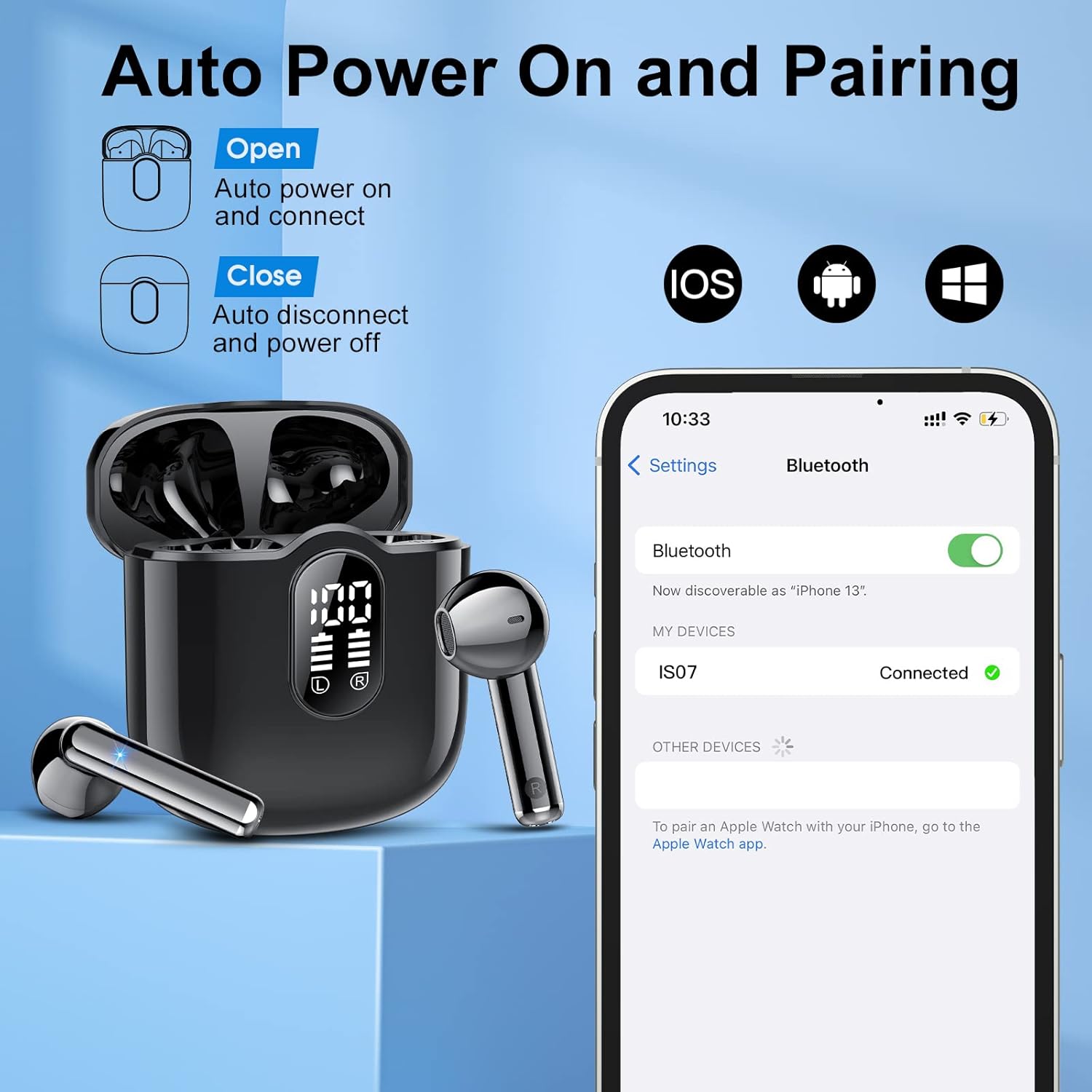
Image: The charging case with earbuds, showing the LED battery display and USB-C charging port.
4.2 Pairing with Your Device
The Aptkdoe IS07 earbuds feature automatic power on and pairing for convenience.
- Open the charging case. The earbuds will automatically power on and enter pairing mode.
- On your device (smartphone, laptop, tablet), go to the Bluetooth settings.
- Search for available devices and select "IS07" from the list.
- Once connected, you will hear a confirmation sound, and the device will show "Connected".
- To disconnect, simply place the earbuds back into the charging case and close the lid. They will automatically power off.

Image: Illustration of the earbuds automatically powering on and connecting to a smartphone via Bluetooth.
5. Operating Instructions
5.1 Touch Controls
The Aptkdoe IS07 earbuds feature intuitive touch controls on each earbud for easy management of music and calls.
- Play/Pause: Tap once (L/R earbud).
- Volume Up: Tap once (R earbud).
- Volume Down: Tap once (L earbud).
- Next Track: Tap twice (R earbud).
- Previous Track: Tap twice (L earbud).
- Answer Call: Tap once (L/R earbud).
- Hang Up Call: Press and hold for 2 seconds (L/R earbud).
- Reject Call: Press and hold for 2 seconds (L/R earbud).
- Activate Digital Assistant: Tap 3 times (L/R earbud).

Image: Diagram illustrating the various touch control functions on the earbuds.
5.2 Audio Quality and Calls
The earbuds are equipped with 13.4mm graphene membranes for powerful bass and balanced sound. The built-in high-quality microphone ensures crystal clear calls.

Image: Exploded view of an earbud showing internal components responsible for high-quality stereo sound, including the 13mm driver and Bluetooth 5.3 chip.

Image: Illustration demonstrating the clear call quality with 40dB noise reduction, showing "Before Noise Reduction" and "After Noise Reduction" sound waves.
6. Maintenance
6.1 Waterproofing (IPX7)
The Aptkdoe IS07 earbuds are IPX7 waterproof, meaning they can withstand submersion in up to 1 meter of water for 30 minutes. This makes them suitable for workouts and outdoor activities where they might be exposed to sweat or rain.
Important: While IPX7 rated, the charging case is not waterproof. Do not expose the charging case to water or moisture. Ensure earbuds are dry before placing them back into the charging case.

Image: A person exercising with water splashing on the earbuds, demonstrating their IPX7 waterproof capability.
6.2 Cleaning and Storage
- Regularly clean the earbuds and charging contacts with a soft, dry, lint-free cloth.
- Avoid using abrasive materials, solvents, or aerosol sprays.
- Store the earbuds in their charging case when not in use to protect them and keep them charged.
- Keep the earbuds and case away from extreme temperatures and direct sunlight.
7. Troubleshooting
| Problem | Possible Cause | Solution |
|---|---|---|
| Earbuds not pairing/connecting. | Earbuds not in pairing mode, Bluetooth off on device, out of range. |
|
| Only one earbud working. | One earbud not connected, low battery on one earbud. |
|
| Low volume or poor sound quality. | Earbuds not properly seated, low battery, dirty ear tips. |
|
| Charging case not charging. | Faulty cable, power source issue, dirty charging port. |
|
8. Warranty and Support
Aptkdoe is committed to providing high-quality products and customer service.
8.1 Quality Assurance
If you encounter any problems that cannot be resolved through this manual or Amazon customer service, please contact Aptkdoe directly. We are dedicated to assisting you and ensuring your satisfaction. We provide product protection for all buyers to safeguard your rights and interests.
8.2 Contact Information
For support inquiries, please refer to the contact details provided on the product packaging or the official Aptkdoe store page on Amazon. Our team aims to reply within 24 hours to assist with any product-related issues.
Online Resources:
9. Product Overview Video
Watch this official product video for a visual guide to the Aptkdoe IS07 Wireless Earbuds, showcasing key features and design.
Video: Aptkdoe IS07 Wireless Earbuds product overview, demonstrating features like high-sensitivity microphone, Bluetooth 5.3, powerful bass, fast charging, ergonomic design, and IPX7 waterproofing.
Related documentsIS07

Ask a question about this manual
Ask about setup, troubleshooting, compatibility, parts, safety, or missing instructions. Manuals+ will review the question and use this page’s manual context to help answer it.