
SMAEL 1237 Digital Watch User Manual
Model: 1237
1. Product Overview
The SMAEL 1237 is a robust digital wristwatch designed for active use. It features a large LED display, chronograph functions, and is water-resistant up to 50 meters. This manual provides instructions for setting up and operating your watch.

Figure 1: Watch Face and Button Identification
This diagram identifies the key features and control buttons on your SMAEL 1237 digital watch. The buttons are typically located on the sides of the watch case, and the display shows time, date, week, and other functions.
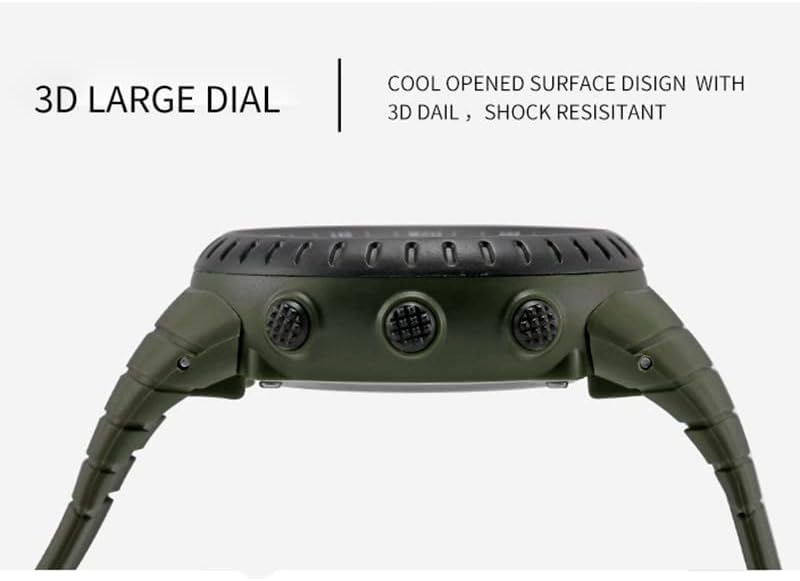
Figure 2: Side Profile and Button Placement
A side profile of the SMAEL 1237 watch, illustrating its robust case design and the placement of the control buttons.
2. Setup and Initial Configuration
2.1 Removing Protective Films
Before first use, carefully remove any protective films from the watch face, case back, and strap. This ensures clear visibility and prevents residue buildup.
2.2 Setting Time and Date
Refer to Figure 1 for button identification. The exact procedure may vary slightly, but generally involves the following steps:
- Press the Mode Switch button (typically bottom-left) repeatedly until the time setting mode is activated. Digits may flash.
- Use the Function Adjust button (typically top-right) to cycle through the settings (hours, minutes, year, month, day).
- Use the Assist Adjust button (typically bottom-right) to change the flashing value.
- Once all settings are correct, press the Mode Switch button again to exit the setting mode.
2.3 Using the Backlight
To illuminate the display in low-light conditions, press the Back Light button (typically top-left). The backlight will remain active for a few seconds.
3. Operating the Watch Functions
3.1 Chronograph (Stopwatch)
To use the chronograph function:
- Press the Mode Switch button until the chronograph display appears (usually indicated by 'ST' or 'CH').
- Press the Function Adjust button to start the stopwatch.
- Press the Function Adjust button again to pause/resume.
- Press the Assist Adjust button to reset the stopwatch to zero.
- Press the Mode Switch button to return to time display.
3.2 Alarm Function
To set and activate the alarm:
- Press the Mode Switch button until the alarm setting mode appears (usually indicated by 'AL').
- Use the Function Adjust button to select hours or minutes.
- Use the Assist Adjust button to set the desired alarm time.
- Press the Mode Switch button to confirm and exit.
- To turn the alarm on or off, typically press the Assist Adjust button while in alarm mode. An alarm icon will appear/disappear.
4. Maintenance and Care
4.1 Water Resistance
Your SMAEL 1237 watch is water-resistant up to 50 meters (5 ATM), making it suitable for everyday use, splashes, and short periods of swimming. However, please observe the following precautions:
- Do not press any buttons underwater. This can compromise the water resistance seals.
- Avoid exposing the watch to hot water or steam (e.g., hot showers, saunas), as this can damage the waterproof ring.
- After exposure to saltwater, rinse the watch with fresh water and dry it thoroughly.
4.2 Cleaning
To clean your watch, wipe it with a soft, dry cloth. For stubborn dirt, a slightly damp cloth can be used, followed by immediate drying. Avoid using chemical cleaners or solvents.
4.3 Battery Replacement
When the display becomes dim or the watch stops functioning, the battery may need replacement. Battery replacement should ideally be performed by a qualified watch technician to ensure proper sealing and maintain water resistance.
5. Troubleshooting
5.1 Display is Blank or Dim
- Check if the battery needs replacement.
- Ensure the watch has not been exposed to extreme temperatures.
5.2 Buttons are Unresponsive
- Ensure the watch is not in a locked mode (if applicable).
- Avoid pressing buttons with excessive force.
- If the watch was recently exposed to water, ensure it is completely dry.
5.3 Time is Inaccurate
- Re-set the time and date according to Section 2.2.
- If inaccuracy persists, the battery may be low, or the movement may require servicing.
6. Specifications
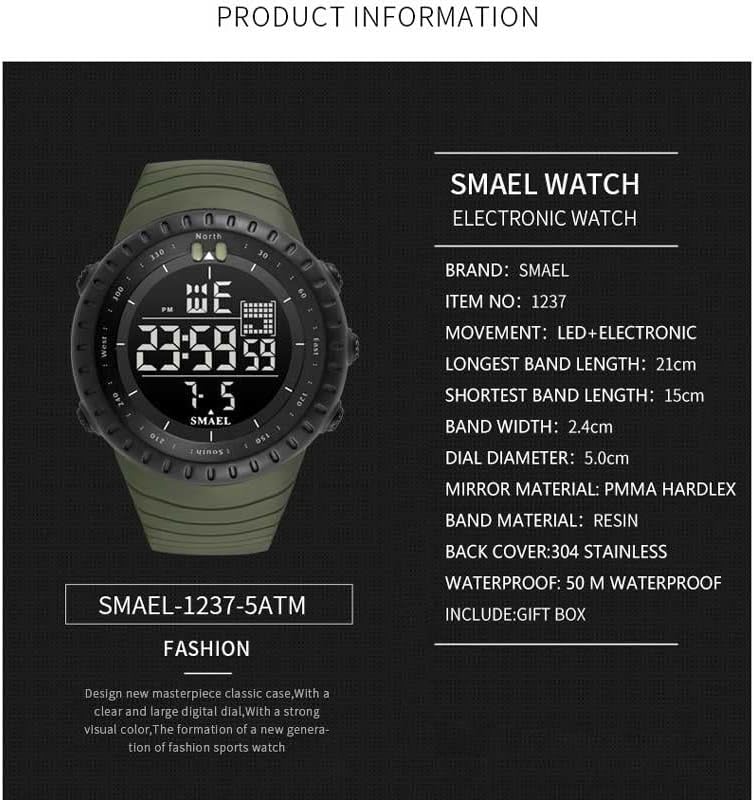
Figure 3: SMAEL 1237 Product Information
This image provides a summary of the SMAEL 1237 watch's technical specifications.
| Feature | Detail |
|---|---|
| Brand | SMAEL |
| Model Number | 1237 |
| Movement | LED + Electronic (Japan Original Digital Movement) |
| Water Resistance | 50M (5 ATM) - Suitable for swimming, not hot water. |
| Dial Diameter | Approx. 5.0 cm |
| Band Width | Approx. 2.4 cm |
| Strap Material | Strong PU (Polyurethane) |
| Case Material | Strong Rubber |
| Mirror Material | PMMA Hardlex (High Strength Hardened Glass) |
| Back Cover | 304 Stainless Steel |
| Clasp Type | Buckle |
| Functions | LED Backlight, Time, Date, Week, Chronograph, Alarm |
7. Warranty and Support
For information regarding warranty coverage, returns, or technical support, please refer to the documentation provided at the time of purchase or contact your retailer. Specific warranty terms may vary by region and seller.


