
Drive Medical 102662-T
Drive Medical Nitro Sprint Tall Foldable Rollator Walker with Seat - Instruction Manual
This manual provides essential information for the safe and effective use of your Drive Medical Nitro Sprint Tall Foldable Rollator Walker with Seat.
1. Product Overview
The Drive Medical Nitro Sprint Rollator is a mobility aid designed to provide support and assistance for individuals requiring walking assistance. It features a lightweight aluminum frame, a comfortable seat, and an advanced braking system for enhanced safety and control.

Figure 1: Drive Medical Nitro Sprint Tall Rollator Walker (Red)
This image shows the Drive Medical Nitro Sprint Tall Rollator Walker in its fully assembled, unfolded state. It is red with black accents, featuring a padded seat, backrest, and a storage bag beneath the seat. The large wheels are visible, indicating its design for various terrains.
Key Features:
- Tall Height Design: Specifically designed for users 6 feet and taller, supporting up to 350 pounds.
- Foldable Frame: Lightweight aluminum frame folds side-to-side with one hand for easy transport and storage.
- Enhanced Braking System: Unique system with three modes (free, slowdown, park) and an integrated slowdown brake for downhill control.
- Comfortable Seating: Features a large, padded seat and an extra-large, contoured backstrap with a viewing window.
- Large Wheels: 10-inch front casters for navigating diverse terrain and bumps.
- Versatile Storage: Spacious storage bag can be mounted in three positions (handlebars, front under seat, back under seat).
- Accessory Mount: Built-in mount for optional accessories like cup, cane, or phone holders.
2. Safety Information
Read all instructions before use. Failure to follow warnings and instructions could result in serious injury.
- WARNING: Do not use this product without first reading and understanding the instructions in this manual.
- WARNING: Ensure all locking mechanisms are engaged before use.
- WARNING: Do not exceed the maximum weight capacity of 350 pounds.
- WARNING: Always engage the parking brakes before sitting on the seat.
- WARNING: Do not sit on the seat while the rollator is in motion.
- WARNING: Regularly inspect brakes, wheels, and frame for wear or damage.
- CAUTION: Be aware of your surroundings and potential obstacles.
3. Setup and Assembly
The Drive Medical Nitro Sprint Rollator arrives fully assembled. Only the storage bag needs to be attached.
- Unfolding the Rollator:
Place the rollator on a flat, stable surface. Gently pull the handlebars outwards until the frame fully extends and locks into place. Ensure the folding mechanism is securely latched.
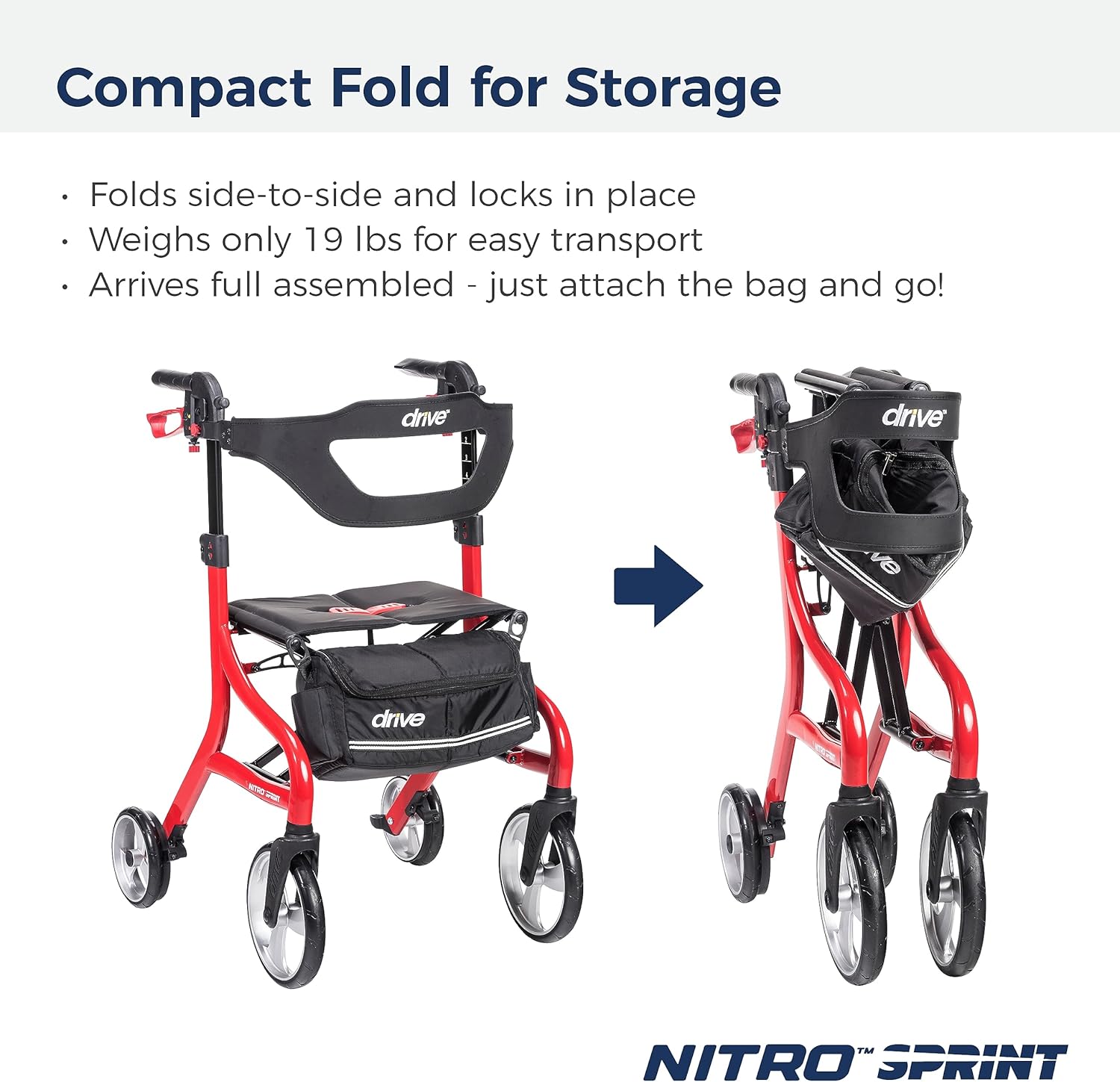
Figure 2: Unfolded and Folded Rollator Comparison
This image illustrates the compact folding capability of the Nitro Sprint rollator. On the left, the rollator is fully open and ready for use. On the right, it is shown in its folded, compact state, demonstrating how it can be easily stored or transported.
- Attaching the Storage Bag:
The spacious storage bag can be attached in three positions:
- Handlebars: Use the integrated loops to hang the bag from the handlebars.
- Under Seat (Front): Secure the bag to the frame beneath the front of the seat.
- Under Seat (Rear): Secure the bag to the frame beneath the rear of the seat.

Figure 3: Storage Bag Positions
This image displays a user walking with the rollator, highlighting the versatility of the storage bag. Three smaller images show the bag attached to the handlebars, under the front of the seat, and under the rear of the seat, providing options for user convenience.
- Adjusting Handle Height:
Press the adjustment buttons on the side of the handlebars and slide the handles up or down to the desired height. Ensure both handles are at the same height and the buttons click securely into place.
- Adjusting Backrest Height:
The backrest height can be adjusted for optimal comfort. Loosen the adjustment knobs, slide the backrest to the desired position, and re-tighten the knobs securely.
4. Operating Instructions
Braking System:
The Nitro Sprint features a unique braking system with three modes for enhanced control and safety.
- Free Mode: The rollator rolls freely without resistance. This is the standard walking mode.
- Slow Mode: Provides resistance, making it safer for going downhill or when more control is desired.
- Park Mode: Engages the brakes to prevent the rollator from rolling. Always use this mode when sitting on the seat or when the rollator is stationary.

Figure 4: Braking System Modes
This image visually explains the three braking modes of the Nitro Sprint rollator. Inset diagrams show the brake lever positions for "Free" (no resistance), "Slow" (controlled resistance for downhill), and "Park" (locked for sitting or stability). A person is shown using the rollator on a paved path, demonstrating practical application.
Folding for Transport and Storage:
To fold the rollator, pull the strap on the seat upwards. The rollator will fold side-to-side and lock in place, making it compact for storage or transport.
Using the Seat:
Before sitting, ensure the rollator is on a level surface and the parking brakes are fully engaged. Sit centrally on the padded seat. Do not attempt to move the rollator while seated.

Figure 5: Using the Seat and Backrest
This image depicts a man comfortably seated on the rollator, highlighting the padded seat and the extra-large backrest. An inset image provides a closer view of the backrest's design, emphasizing its contoured shape and viewing window for improved comfort and support.
5. Maintenance and Care
- Cleaning: Wipe the frame and seat with a damp cloth and mild detergent. Do not use abrasive cleaners.
- Inspection: Regularly check all nuts, bolts, and screws for tightness. Ensure the brakes are functioning correctly and the wheels roll smoothly.
- Storage: Store the rollator in a dry place, away from extreme temperatures.
- Brake Adjustment: If brakes feel loose or too tight, consult a qualified technician or refer to the detailed brake adjustment instructions provided with the product packaging (if applicable).
6. Troubleshooting
| Problem | Possible Cause | Solution |
|---|---|---|
| Rollator does not fold/unfold easily. | Folding mechanism may be stiff or obstructed. | Ensure no items are obstructing the folding mechanism. Apply light lubricant to moving parts if necessary. |
| Brakes are not engaging or are too loose/tight. | Brake cables may need adjustment. | Refer to the brake adjustment section in the full product manual or contact customer support. Do not attempt to adjust if unsure. |
| Wheels are not rolling smoothly. | Debris in wheels or worn bearings. | Clean wheels of any debris. If problem persists, contact customer support. |
| Handles are not staying at desired height. | Adjustment buttons not fully engaged. | Ensure adjustment buttons click securely into the height adjustment holes. |
7. Specifications
- Model Number: 102662-T
- Brand: Drive Medical
- Material: Aluminum
- Color: Red
- Product Dimensions (Unfolded): 34.25 x 28.94 x 9.65 inches (approximate)
- Item Weight: 19.51 Pounds
- Weight Capacity: Up to 350 pounds
- Recommended User Height: 6'2" and above (for Tall model)
- Wheel Size: 10-inch front casters

Figure 6: Recommended User Height and Dimensions
This diagram provides visual specifications for the Tall Nitro Sprint Rollator, including overall height (up to 39.5 inches), seat height (18 inches), and wheel size (10 inches). It also indicates that the rollator is ideal for users 6'2" and above and supports up to 350 lbs.
8. Warranty and Support
The Drive Medical Nitro Sprint Rollator is backed by a limited lifetime warranty from Drive Medical. For specific warranty details, claims, or technical support, please contact Drive Medical customer service.
Contact Information:
- Website: www.drivemedical.com
- Phone: Refer to the official Drive Medical website for the most current contact numbers.
Please have your model number (102662-T) and purchase date available when contacting support.
Related documents102662-T


Ask a question about this manual
Ask about setup, troubleshooting, compatibility, parts, safety, or missing instructions. Manuals+ will review the question and use this page’s manual context to help answer it.