
Introduction
Thank you for choosing the ATOVANKA Y610 Bike Rear View Camera System. This system is designed to enhance your cycling safety by providing a clear, real-time view of what's behind you. Featuring a 4.3-inch HD 1080P monitor, a 115-degree wide-angle camera with color night vision, and a durable design, this manual will guide you through the installation, operation, and maintenance of your new device.
Package Contents
Please verify that all items listed below are included in your package:
- 1 x 4.3-inch Monitor
- 1 x Camera with Cable
- 1 x Adjustable Display Mounting Bracket
- 1 x Camera Bracket
- 1 x Micro-USB Charging Cable
- Tape and Gasket
- Plastic Ties
- Instruction Manual

Setup and Installation
The ATOVANKA Y610 system is designed for easy installation without the need for extra tools or power supply. Follow these steps to set up your device:
- Install the Monitor Bracket: Loosen the screws on the adjustable display mounting bracket. Position the bracket on your bicycle handlebar. Tighten the screws securely to ensure the monitor remains stable during your ride. The bracket supports handlebars with diameters between 18mm and 42mm.
- Mount the Monitor: Slide the 4.3-inch monitor onto the installed bracket until it clicks into place. Adjust the monitor angle for optimal viewing. The upgraded nylon bracket is designed to minimize shaking.
- Install the Camera Bracket: Attach the camera bracket to a suitable location on your bike, such as the seat post or rear rack, ensuring a clear view of the rear. Secure it firmly.
- Mount the Camera: Attach the camera to its bracket. The camera features a 360-degree adjustable stand, allowing you to fine-tune its angle for the best rear view.
- Connect the Camera to the Monitor: Plug the camera cable into the designated port on the monitor. Ensure the connection is firm.
- Initial Charge: Before first use, fully charge the monitor using the provided Micro-USB charging cable. Connect the cable to the monitor's charging port and a standard USB power source (e.g., computer, USB wall adapter).


Installation Video Guide
Video 1: Official video demonstrating the installation and features of the ATOVANKA bike rear view camera system.
Operating Instructions
Once installed and charged, your ATOVANKA Y610 system is ready for use.
Powering On/Off
- To power on, press and hold the power button on the monitor until the screen illuminates.
- To power off, press and hold the power button again until the screen turns off.
Real-Time Rear View
The 4.3-inch HD monitor provides a real-time, stable 1080P video feed from the rear camera. This eliminates the need to turn your head, allowing you to maintain focus on the road ahead.

Wide-Angle View
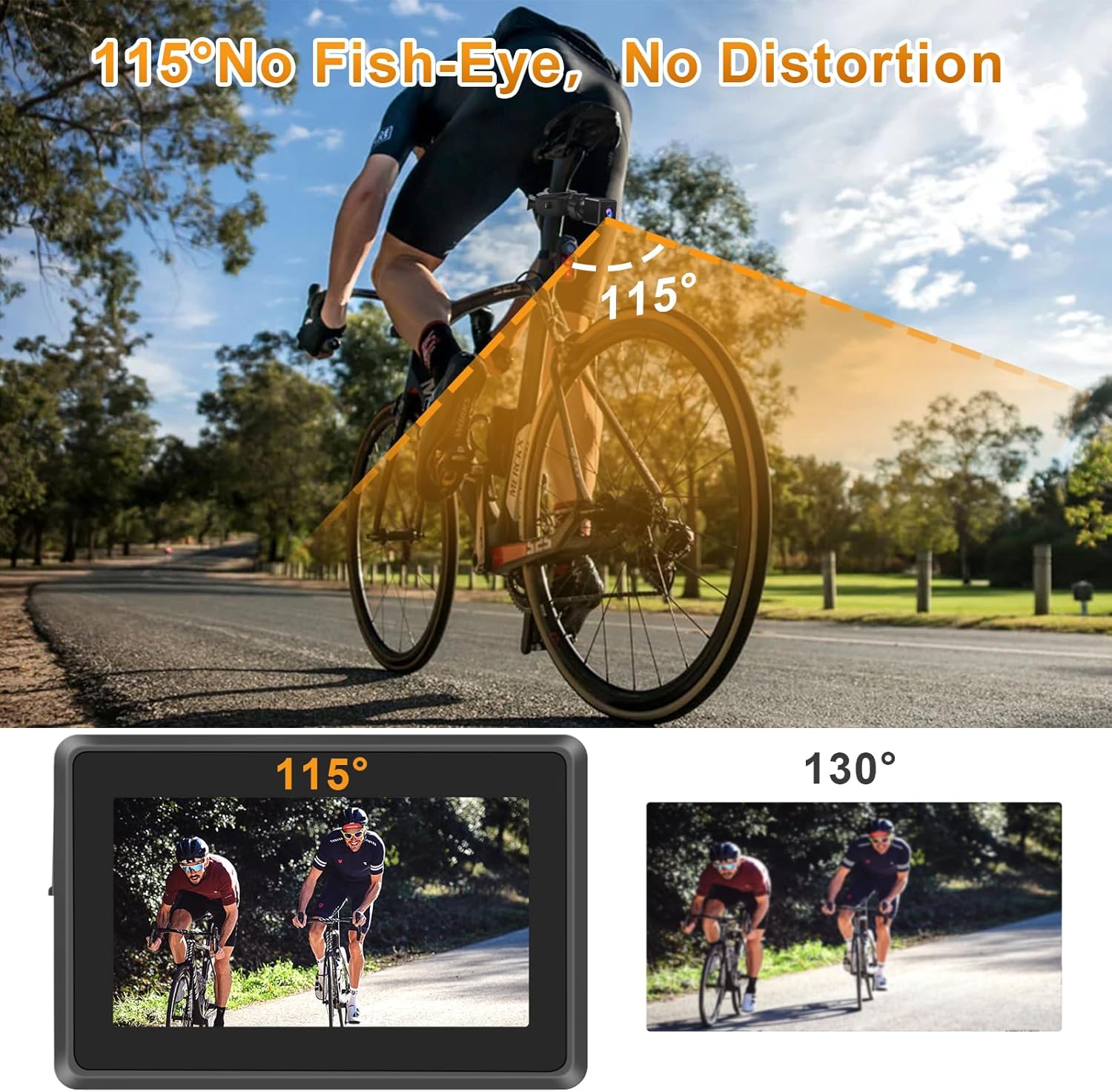
The camera features a 115-degree wide field of view, providing comprehensive coverage of the area behind you without significant distortion or a 'fish-eye' effect.
Night Vision
The system includes color night vision, which automatically activates in low-light conditions. This feature ensures that the monitor display remains clear and visible, appearing like daytime even at night, significantly improving safety during evening rides.

Battery Life and Charging
The built-in 5000 mAh rechargeable battery provides approximately 4-5 hours of runtime on a full charge. To charge, connect the Micro-USB cable to the monitor and a power source. The battery indicator on the screen will show charging status.

Monitor Settings
Use the buttons on the side of the monitor to navigate the menu and adjust settings such as brightness, contrast, and saturation to optimize your viewing experience in various lighting conditions.
Maintenance
Proper maintenance ensures the longevity and optimal performance of your ATOVANKA Y610 system.
- Cleaning: Use a soft, dry cloth to clean the monitor screen and camera lens. For stubborn smudges, a slightly damp cloth with mild, non-abrasive cleaner can be used, followed by drying. Avoid harsh chemicals.
- Water Resistance: The system is rated IP68 waterproof, meaning it is protected against dust and can withstand immersion in water up to 1.5 meters for up to 30 minutes. However, avoid prolonged submersion or high-pressure water jets. Ensure all ports are dry before charging.
- Battery Care: To maximize battery life, avoid fully discharging the battery frequently. Charge the device regularly, and if storing for an extended period, charge it to about 50% every few months.
- Storage: Store the device in a cool, dry place away from direct sunlight and extreme temperatures when not in use.
Troubleshooting
If you encounter issues with your ATOVANKA Y610, refer to the following common problems and solutions:
| Problem | Possible Cause | Solution |
|---|---|---|
| Monitor does not power on. | Low battery; loose connection; faulty power button. | Charge the monitor fully. Ensure the camera cable is securely connected. Try pressing the power button firmly for several seconds. |
| Blue screen or no image. | Camera not connected; camera malfunction; cable damage. | Check the camera cable connection to the monitor. Restart the device. Inspect the cable for any visible damage. |
| Screen glare in bright sunlight. | Direct sunlight on the screen. | Adjust the monitor angle to minimize direct sunlight. Utilize the monitor's brightness settings to increase visibility. |
| Battery drains quickly. | Aging battery; frequent use of high brightness; incomplete charging. | Ensure the device is fully charged. Reduce screen brightness if possible. If the battery is old, consider contacting support for replacement options. |
| Image is blurry or distorted. | Dirty camera lens; incorrect camera angle; physical damage. | Clean the camera lens with a soft cloth. Adjust the camera's 360-degree stand to ensure a clear, level view. |
Specifications
Key technical specifications for the ATOVANKA Y610 Bike Rear View Camera System:
| Feature | Detail |
|---|---|
| Brand | ATOVANKA |
| Model Number | Y610 |
| Monitor Size | 4.3 Inches |
| Video Capture Resolution | 1080p |
| Field Of View | 115 Degrees |
| Battery Capacity | 5000 mAh |
| Battery Type | Lithium Ion |
| Connectivity Technology | USB |
| Mounting Type | Handlebar Mount |
| Waterproof Rating | IP68 |
| Compatible Vehicle Types | City bikes, Mountain bikes, Road bikes, Trailer bikes, Electric bikes |
| Item Weight | 0.56 Kilograms |

Warranty and Support
For warranty information, please refer to the documentation provided with your purchase or visit the official ATOVANKA website. If you require technical assistance or have questions not covered in this manual, please contact ATOVANKA customer support through their official channels. Keep your purchase receipt for warranty claims.