
1. Important Safety Information
Please read all instructions carefully before assembly and use. Retain this manual for future reference.
- Do not stand on the chair.
- Do not use the chair if any parts are damaged or missing.
- Ensure all bolts and screws are securely tightened before use. Periodically check and re-tighten as necessary.
- Keep children and pets away during assembly. Small parts may be a choking hazard.
- Do not expose the chair to direct sunlight or extreme temperatures.
- The Bluetooth speakers contain a built-in battery. Do not use the speakers while charging.
- Maximum weight capacity: Information not explicitly provided, but general gaming chair limits are usually around 120-150kg. Users should refer to product packaging or official website for exact limits.
2. Package Contents
Verify that all components are present before beginning assembly. If any parts are missing or damaged, contact customer support.
- Backrest
- Seat Cushion
- Armrests (Left & Right)
- Legs/Base
- Assembly Hardware (Screws, Washers, Allen Key)
- Power Adapter for Bluetooth Speakers
- Lumbar Support Cushion (with vibration function)
- Headrest Cushion
3. Setup and Assembly
Follow these steps to assemble your GTRACING Gaming Chair. It is recommended to have two people for assembly.
- Attach the Base: Secure the chair legs/base to the bottom of the seat cushion using the provided hardware.
- Install Armrests: Attach the armrests to the sides of the seat cushion.
- Connect Backrest: Align the backrest with the seat cushion and secure it using the bolts.
- Important Note for Lumbar Support: If your model includes integrated side speakers, ensure these are properly positioned and connected before fully securing the backrest, as this may affect the fit of the lumbar support cushion. Some users have reported difficulty fitting the lumbar support if the side speakers are not attached first.
- Attach Headrest and Lumbar Support: Place the headrest and lumbar support cushions as desired. The lumbar support cushion has a vibration function.
- Final Check: Ensure all connections are tight and the chair is stable before use.
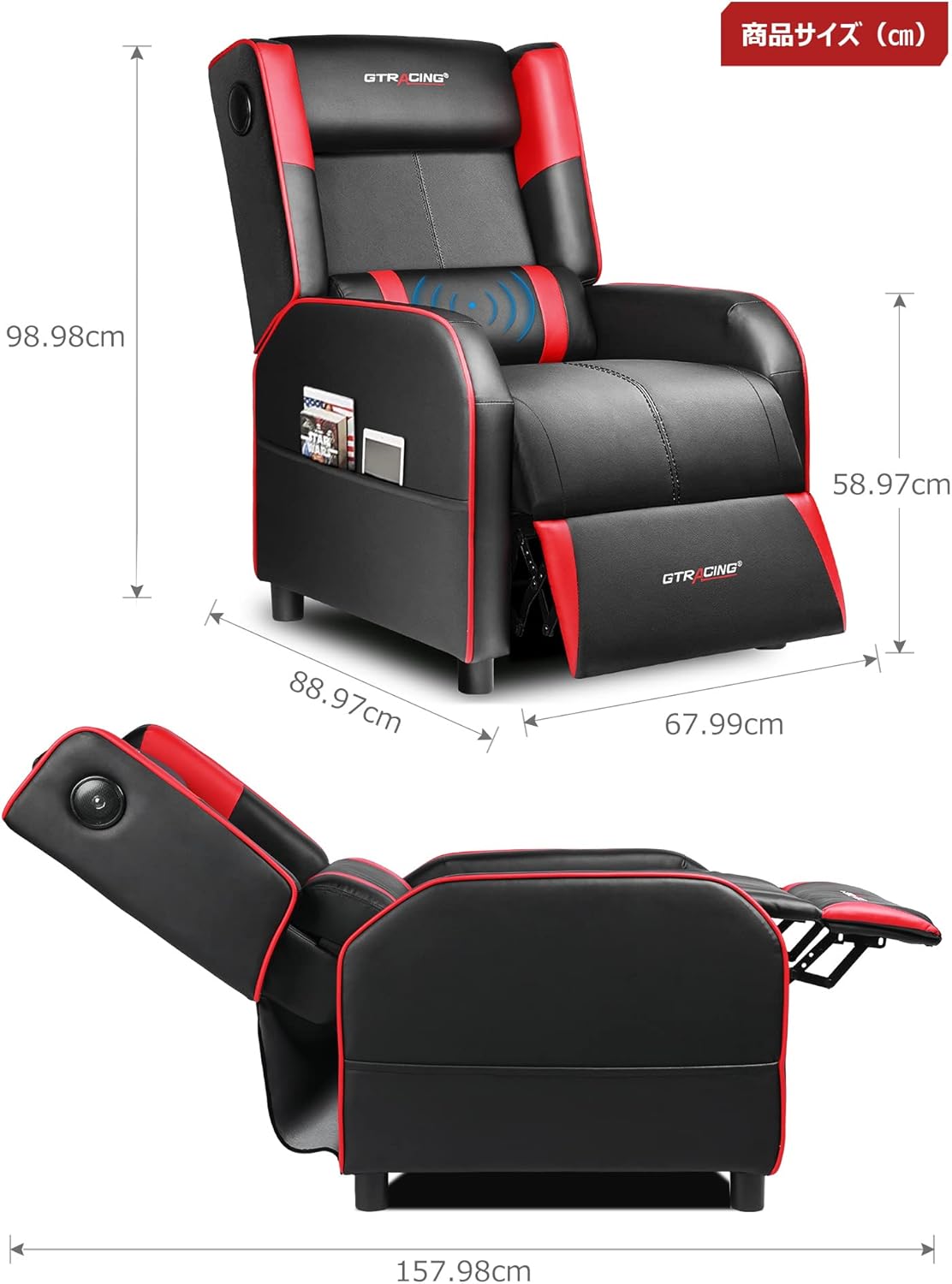
Image: Overall dimensions of the GTRACING Gaming Chair, showing height, width, and depth in both upright and reclined positions.
4. Operating Instructions
4.1 Bluetooth Speaker Operation
Your GTRACING Gaming Chair features integrated Bluetooth 5.1 speakers for an immersive audio experience.
- Power On/Off: Locate the power button on the speaker control panel (usually on the side of the chair). Press and hold to power on or off.
- Pairing: Once powered on, the speakers will enter pairing mode. On your device (PC, smartphone, tablet), search for Bluetooth devices and select "GTRACING Speaker" (or similar name) to connect.
- Connection Range: The speakers support a wireless connection range of approximately 15 meters (49 feet).
- Battery Life: The built-in battery provides up to 15 hours of continuous playback on a full charge.
- Charging: Connect the provided power adapter to the charging port on the speaker control panel. Note: The speakers cannot be used while charging.
- Console Compatibility: For PS4, PS5, XBOX, or SWITCH consoles, a dedicated USB adapter (sold separately) is required for low-latency connection (approx. 0.1 seconds delay).

Image: A user enjoying a game while seated in the GTRACING Gaming Chair, highlighting the integrated Bluetooth speakers located in the backrest for an immersive audio experience.
4.2 Reclining Function
Adjust the backrest to your preferred angle for various activities.
- Adjustment Range: The backrest can recline from 95° to 150°.
- Reclining Mechanism: To recline, push the lever (usually on the right side of the chair) and lean back. Release the lever to lock the position.
- Integrated Ottoman: The ottoman extends and retracts in synchronization with the backrest, providing continuous leg support as you recline.
- Recommended Modes:
- 90° Game/Work Mode: Upright position for focused tasks.
- 115° Entertainment Mode: Slightly reclined for watching movies or casual browsing.
- 150° Nap Mode: Fully reclined for short rests or naps.
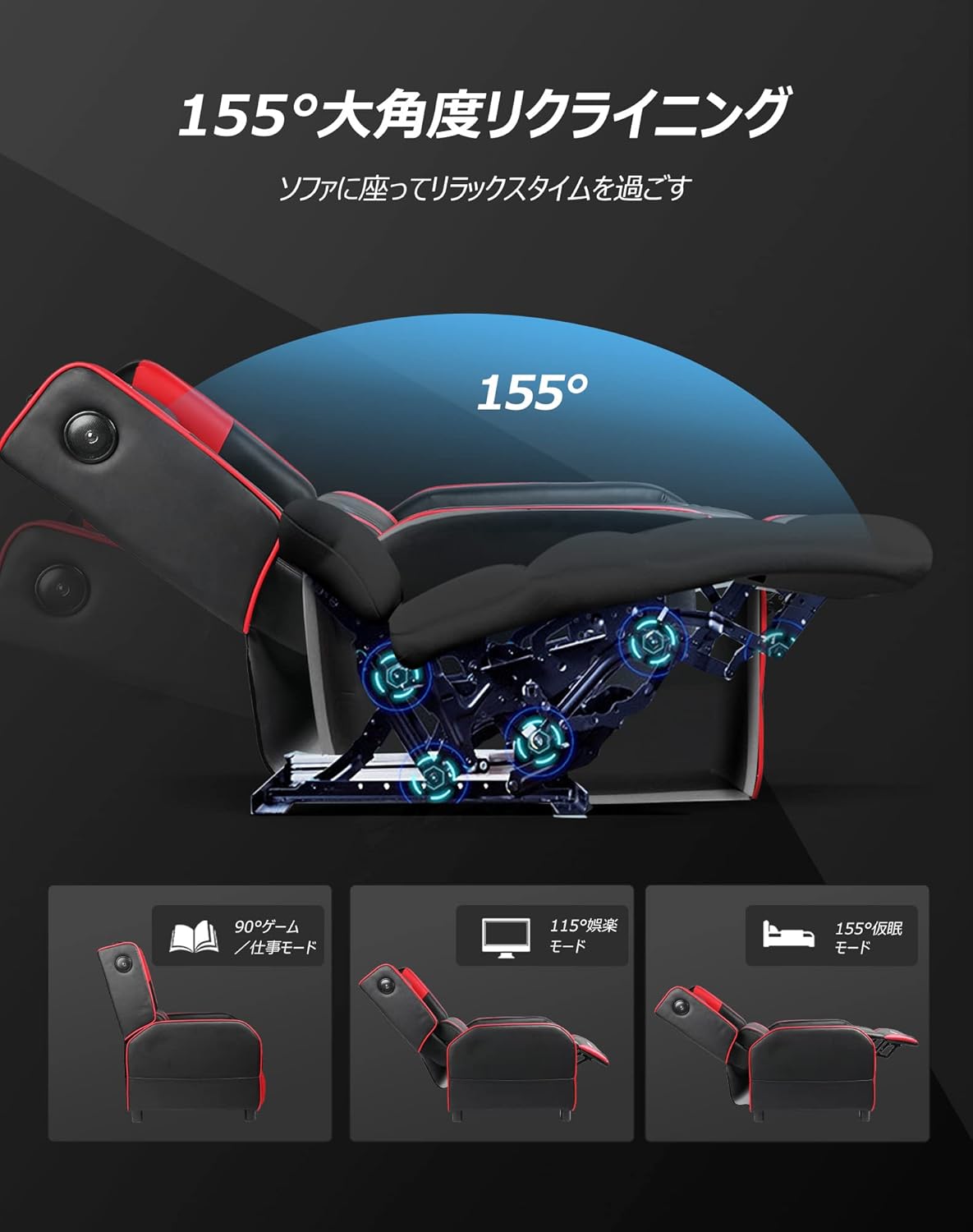
Image: Diagram illustrating the reclining function of the GTRACING Gaming Chair, showing the chair in upright (90°), entertainment (115°), and nap (155°) positions, with the ottoman extending accordingly.
4.3 Vibration Lumbar Support
The lumbar support cushion features a vibration function designed to alleviate lower back discomfort during prolonged sitting.
- Activation: Connect the lumbar support's USB cable to a power source (e.g., USB port on a computer, power bank, or wall adapter).
- Benefits: The vibration helps to distribute pressure, reducing stress on the pelvis, lumbar spine, and sacrum.
4.4 Seat Comfort Features
The seat cushion is engineered for superior comfort and support.
- Integrated Urethane Cushion: The seat uses a highly elastic, integrated molded urethane cushion.
- Internal Spring System: Springs are incorporated within the urethane for enhanced elasticity and durability.
- Thick Backrest and Seat: The generous padding of both the backrest and seat cradles the body, providing a sofa-like seating experience.

Image: Cross-section view of the GTRACING Gaming Chair's seat cushion, detailing the layers of high-quality PU leather, high-rebound urethane, high-density urethane, internal pocket coils, and integrated molded urethane for optimal comfort and support.
5. Maintenance
Proper care will extend the life and appearance of your gaming chair.
- Cleaning: Wipe clean with a soft, damp cloth. Avoid harsh chemicals or abrasive cleaners.
- Spills: Blot spills immediately with a clean, dry cloth.
- Sunlight Exposure: Avoid prolonged exposure to direct sunlight to prevent fading and material degradation.
- Hardware Check: Periodically check and tighten all screws and bolts to ensure stability.
6. Troubleshooting
If you encounter any issues, refer to the following common solutions.
- Bluetooth Speakers Not Connecting:
- Ensure the speakers are powered on and in pairing mode.
- Check that Bluetooth is enabled on your device.
- Move your device closer to the chair (within 15m).
- Forget the device from your Bluetooth settings and try pairing again.
- Ensure the speakers are not currently charging.
- Lumbar Support Not Fitting During Assembly:
- As noted in the assembly section, ensure any integrated side speakers are attached before fully securing the backrest, as this can impact the fit of the lumbar support cushion.
- Reclining Mechanism Not Working Smoothly:
- Check for any obstructions around the reclining mechanism.
- Ensure the lever is fully engaged or disengaged.
- Verify that all assembly bolts related to the backrest are securely tightened.
7. Specifications
| Model Number | GT208M |
| Brand | GTRACING |
| Material | Faux Leather (PU Leather) |
| Color | Red |
| Product Dimensions (Upright) | Approx. 80 cm (Depth) x 80 cm (Width) x 80 cm (Height) |
| Product Weight | 30 kg |
| Package Dimensions | 77 cm x 69 cm x 52 cm |
| Package Weight | 28 kg |
| Reclining Angle | 95° to 150° |
| Bluetooth Version | 5.1 |
| Speaker Battery Life | Up to 15 hours (continuous playback) |
| Speaker Charging | Not usable while charging |
| Care Instructions | Wipe clean |
8. Warranty and Support
For warranty information or technical support, please refer to the official GTRACING website or contact their customer service directly.
GTRACING offers after-sales support for their products. Please retain your proof of purchase for any warranty claims.
You can often find support contact details on the manufacturer's website or through the retailer where you purchased the product.


