
Introduction
The Aveek V8 Wireless Karaoke Microphone system provides clear, crisp, and interference-free audio for various applications. Designed for ease of use, this system features automatic pairing and a stable wireless connection, making it suitable for home karaoke, parties, weddings, speeches, and small performances.
Key Features:
- High-Quality Sound: Enjoy clear, crisp, and interference-free audio, suitable for both indoor and outdoor use.
- Stable Wireless Connection: Experience smooth signal transmission with a range of up to 100 feet in open areas, minimizing delays or drops.
- Plug and Play: Simple setup with automatic pairing for a hassle-free experience.
What's in the Box
Please verify that all components are present in your package:
- 2 × Wireless Microphones
- 1 × 6.35mm Port Receiver
- 1 × USB Charging Cable for Receiver
- 1 × 6.35 mm (1/4'') to 3.5 mm (1/8'') Converter
- 2 × Anti-slip Rings
- 1 × User Manual
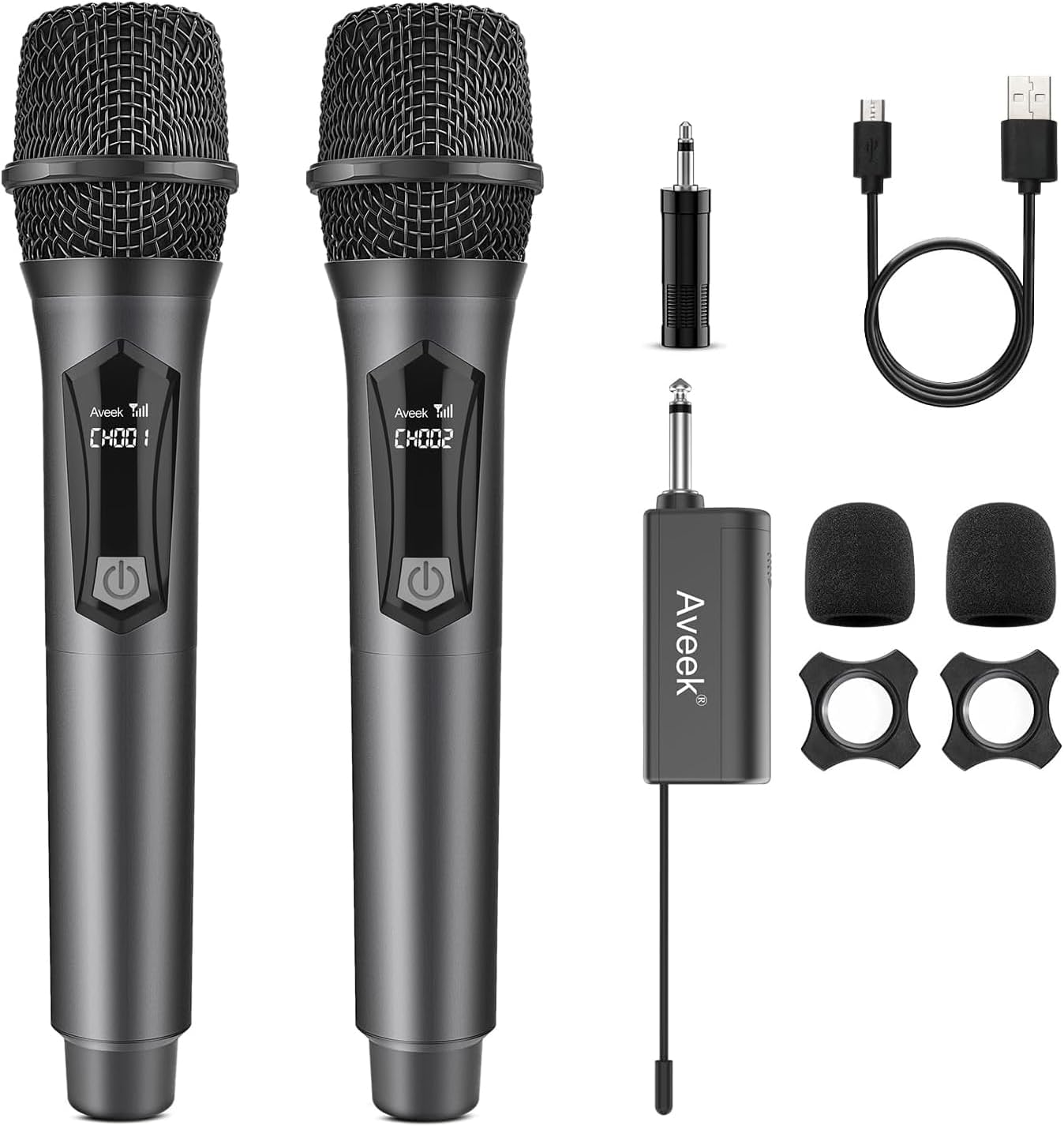
Image: All components included in the Aveek Wireless Karaoke Microphone package.
Setup Instructions
- Install Microphone Batteries: Unscrew the bottom part of each wireless microphone and insert 2 AA batteries (not included), ensuring correct polarity. Reattach the bottom part.
- Install Receiver Battery: Open the receiver's battery compartment and insert the provided rechargeable battery. Close the compartment.
- Power On Receiver: Slide the power switch on the receiver to the 'ON' position. The indicator light will illuminate.
- Connect Receiver to Audio Equipment: Plug the 6.35mm receiver directly into the microphone input jack of your powered speaker, amplifier, PA system, or mixer. If your equipment has a 3.5mm input, use the included 6.35mm to 3.5mm adapter. Do not plug the receiver into an AUX port.
- Power On Microphones: Press the power button on each microphone. The display will light up.
- Automatic Pairing: The microphones and receiver will automatically pair. A stable connection is indicated when the receiver's light stops blinking and the microphone display shows a channel.

Image: Visual guide for connecting the microphone and receiver.
Video: A detailed demonstration on how to set up and use the Aveek Wireless Microphone system.
Operating Instructions
Once the microphones and receiver are paired, you can begin using the system:
- Volume Control: Adjust the volume directly on your connected audio equipment (speaker, amplifier, mixer).
- Optimal Distance: For best performance, maintain a distance of up to 100 feet between the microphone and receiver in open areas. Avoid obstructions that may interfere with the signal.
- Usage Scenarios: The system is ideal for various events including karaoke parties, meetings, religious events, classroom use, and public speaking.

Image: Illustration of the wireless transmission range.

Image: Examples of suitable environments for using the microphone system.
Compatibility
The Aveek V8 Wireless Karaoke Microphone system is designed for broad compatibility with professional audio equipment:
- Compatible with: Powered speakers, amplifiers, PA systems, and mixers that have a 6.35mm (1/4") or 3.5mm (1/8") microphone input.
- Not Compatible with: Bluetooth speakers, phones, laptops, smart TVs, PCs, or tablets.
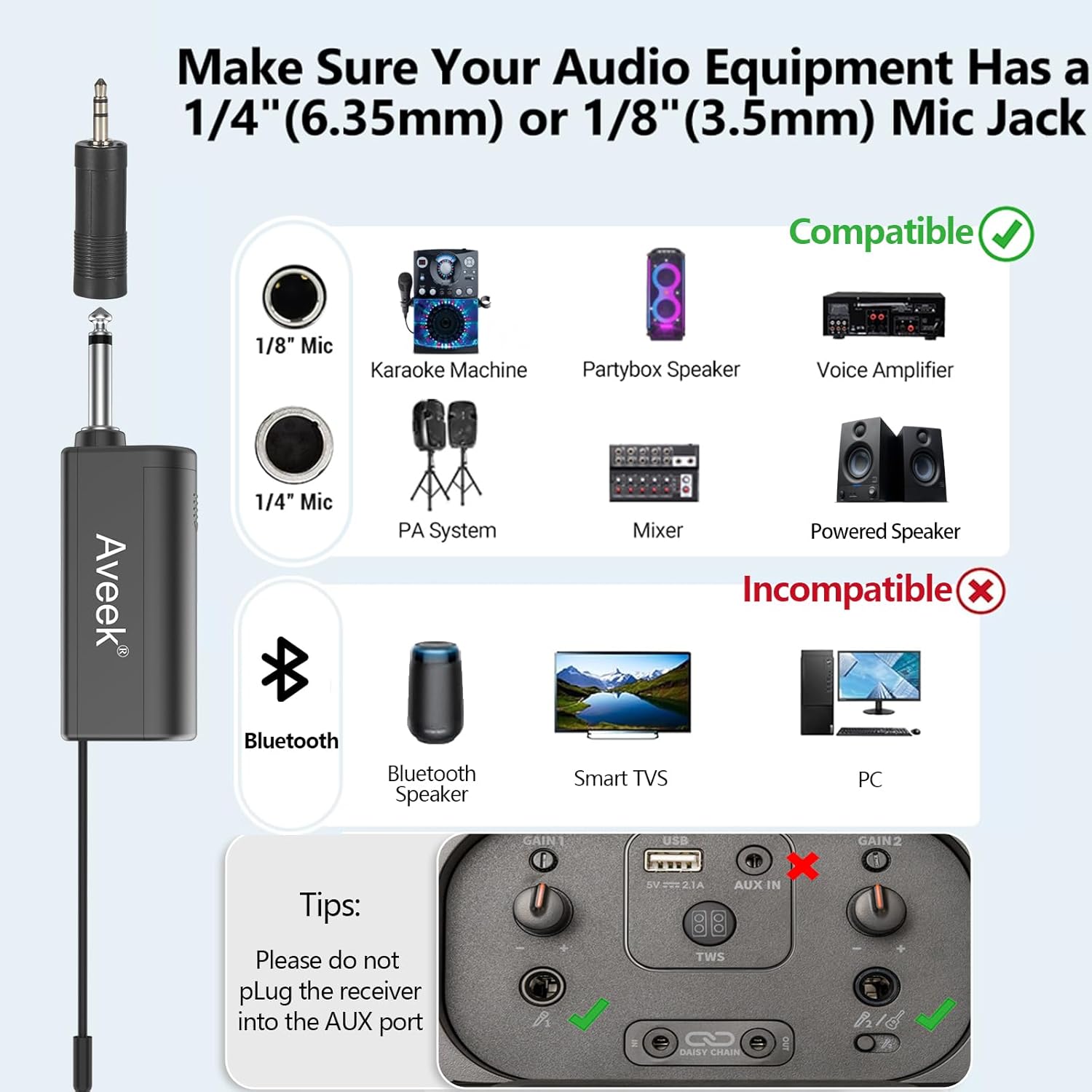
Image: Visual guide to compatible and incompatible devices.
Charging and Battery Information
- Receiver: The receiver features a rechargeable battery. It typically charges in approximately 5 hours and provides up to 6 hours of continuous use. Use the included USB charging cable.
- Microphones: Each microphone operates on 2 AA batteries (not included). For optimal performance and longevity, use high-quality alkaline batteries and ensure they are inserted with correct polarity.

Image: Charging the receiver and installing microphone batteries.
Specifications
| Feature | Specification |
|---|---|
| Model Number | V8 |
| Item Weight | 29 Grams (1.02 ounces) |
| Microphone Form Factor | Handheld |
| Dimensions (L x W x H) | 10.5 x 2.1 x 3.5 inches |
| Power Source | Battery Powered |
| Receiver Battery | 1 Lithium Polymer battery (rechargeable) |
| Microphone Batteries | 2 AA batteries per microphone (not included) |
| Material | Metal, Plastic |
| Signal-to-Noise Ratio | 96 dB |
| Hardware Platform | Karaoke Machine |
| Number of Channels | 2 |
| Connectivity Technology | VHF |
| Connector Type | 3.5 mm Jack, 6.35 mm Jack |
| Special Feature | Battery Indicator Light, Portable |
| Compatible Devices | Speaker |
| Polar Pattern | Unidirectional |
| Audio Sensitivity | 85 Decibels |
Troubleshooting
If you encounter issues with your Aveek V8 Wireless Karaoke Microphone system, please refer to the following common solutions:
- No Sound:
- Ensure both microphones and the receiver are powered on.
- Check that the receiver is securely plugged into the correct microphone input (6.35mm or 3.5mm) on your audio equipment, not an AUX port.
- Verify that the volume on your audio equipment is turned up.
- Confirm that the microphones and receiver are successfully paired (indicator lights should be stable).
- Interference or Poor Sound Quality:
- Ensure the microphone and receiver are within the optimal operating range (up to 100 feet in open areas).
- Minimize obstructions between the microphone and receiver.
- Move away from other wireless devices or strong electromagnetic fields that might cause interference.
- Check microphone batteries and replace if low.
- Receiver Not Charging:
- Ensure the USB charging cable is properly connected to the receiver and a power source.
- Verify the power source is active.
- Turn off the receiver when charging to ensure proper battery replenishment.
- Microphone Not Turning On:
- Replace the AA batteries in the microphone with fresh ones, ensuring correct polarity.
Maintenance
To ensure the longevity and optimal performance of your Aveek V8 Wireless Karaoke Microphone system, follow these maintenance guidelines:
- Cleaning: Use a soft, dry cloth to clean the microphones and receiver. Avoid using liquid cleaners or abrasive materials.
- Storage: Store the system in a cool, dry place away from direct sunlight and extreme temperatures when not in use. Remove AA batteries from microphones if storing for extended periods.
- Battery Care: Fully charge the receiver's battery regularly, even if not in frequent use, to maintain battery health.
- Handling: Handle the microphones and receiver with care to prevent physical damage. Avoid dropping them or exposing them to excessive moisture.
Warranty and Support
For warranty information or technical support, please refer to the documentation included with your purchase or contact Aveek customer service through their official channels. Keep your purchase receipt as proof of purchase for any warranty claims.
Aveek Customer Service:
- Visit the Aveek Store on Amazon for more information and support resources.