
Introduction
This manual provides detailed instructions for the proper use, setup, and maintenance of your Mobo AUDIFONOS Bluetooth One Blanco. Please read this manual thoroughly before using the product to ensure optimal performance and longevity.
Product Overview
The Mobo AUDIFONOS Bluetooth One Blanco are True Wireless Stereo (TWS) earbuds designed for music listening and calls. They feature Bluetooth wireless connectivity and come with a charging case.

This image displays the Mobo Bluetooth One earbuds resting inside their open charging case. The earbuds are white, and the case has the "MOBO" brand logo clearly visible on the front. The internal components of the case, including charging contacts, are visible.
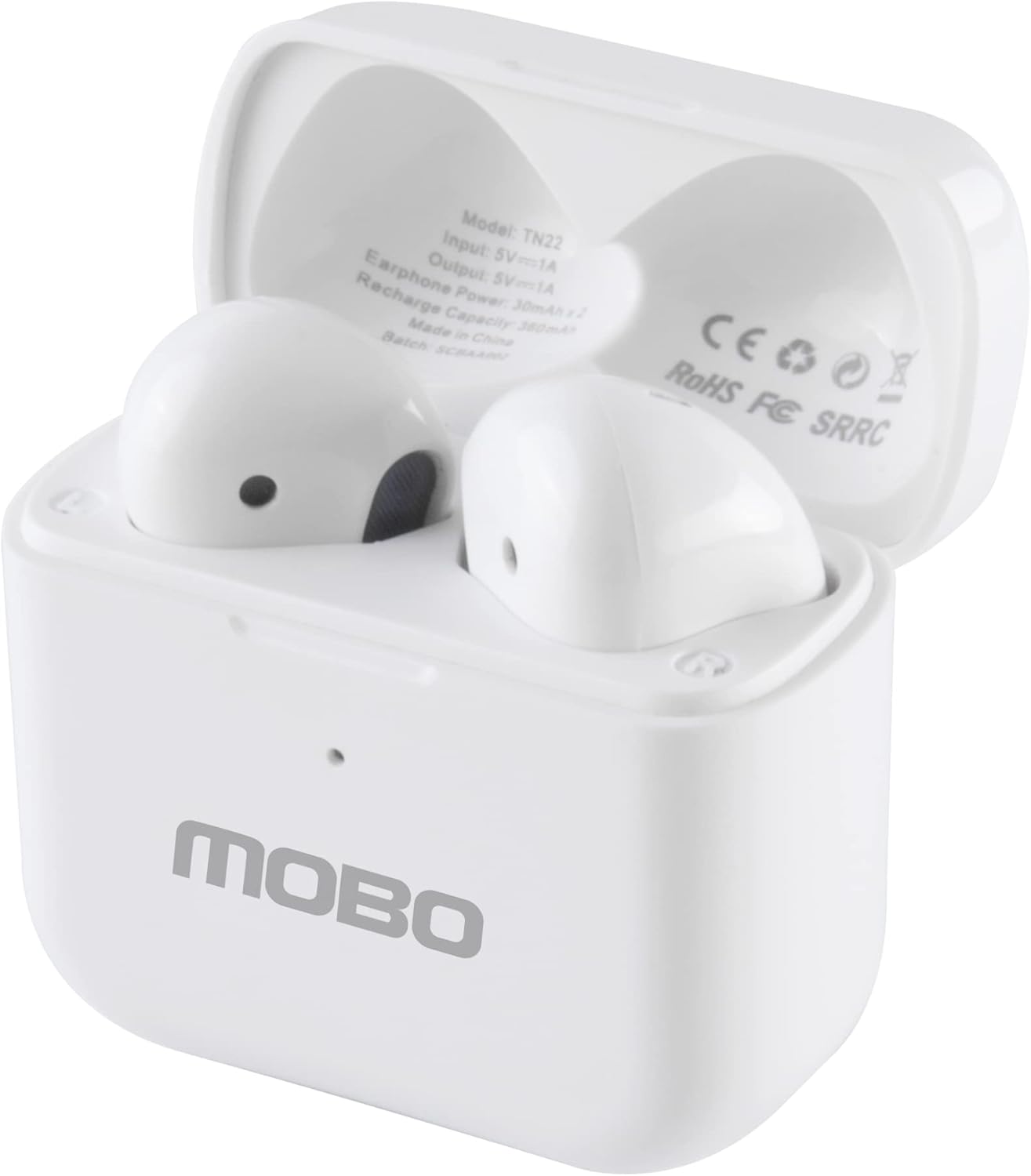
This image shows the Mobo Bluetooth One earbuds within their open charging case from a slightly elevated angle. Visible text inside the case includes "Model: TN22", "Input: 5V=1A", "Output: 5V=1A", "Earphone Power: 30mAh x 2", and "Recharge Capacity: 380mAh". Regulatory marks like CE, RoHS, FC, and SRRC are also present.

A close-up view of the Mobo Bluetooth One earbuds inside their open charging case. The details of the model number (TN22) and power specifications (Input: 5V=1A, Output: 5V=1A, Earphone Power: 30mAh x 2, Recharge Capacity: 380mAh) are clearly legible, along with "Made in China" and regulatory certifications.

This image shows the Mobo Bluetooth One charging case with its lid open and the earbuds removed. The empty charging slots are visible, highlighting the design of the case interior where the earbuds are stored and charged.

A view of the individual Mobo Bluetooth One earbuds, separated from their charging case. The image clearly shows the design of both the left (L) and right (R) earbuds, including the speaker grilles and the charging contacts at the bottom of the stems.
Package Contents
- Mobo AUDIFONOS Bluetooth One Blanco Earbuds (Left and Right)
- Charging Case
- USB Charging Cable
- User Manual (this document)
Setup
1. Charging the Earbuds and Case
Before first use, fully charge the earbuds and the charging case.
- Place both earbuds into the charging case. Ensure they are properly seated in their respective slots.
- Connect the charging case to a USB power source (e.g., computer USB port, wall adapter) using the provided USB cable.
- The indicator light on the charging case will illuminate to show charging status. A full charge takes approximately 60 minutes for the earbuds.
- Once fully charged, disconnect the charging cable.
2. Pairing with a Bluetooth Device
The Mobo Bluetooth One earbuds use Bluetooth wireless technology for connection.
- Ensure the earbuds are charged.
- Open the charging case. The earbuds will automatically enter pairing mode, indicated by a flashing light on one or both earbuds.
- On your mobile phone or other compatible device, enable Bluetooth.
- Search for available Bluetooth devices. You should see "Mobo One" or a similar name appear in the list.
- Select "Mobo One" to connect. Once connected, the earbud indicator lights will stop flashing.
- If pairing fails, place the earbuds back into the case, close the lid, wait a few seconds, then open the lid and try again.
Operating Instructions
Basic Functions
- Power On: Open the charging case. The earbuds will automatically power on.
- Power Off: Place the earbuds back into the charging case and close the lid. They will automatically power off and begin charging.
- Play/Pause: Tap either earbud once.
- Next Track: Double-tap the right earbud.
- Previous Track: Double-tap the left earbud.
- Answer/End Call: Tap either earbud once.
- Reject Call: Press and hold either earbud for 2 seconds.
- Activate Voice Assistant (Siri, Google Assistant): Triple-tap either earbud.
Volume Control
Volume control is typically managed directly from your connected device (mobile phone, tablet, etc.).
Maintenance
Proper maintenance ensures the longevity and performance of your Mobo Bluetooth One earbuds.
- Cleaning: Use a soft, dry, lint-free cloth to clean the earbuds and charging case. Do not use harsh chemicals or abrasive materials.
- Storage: When not in use, store the earbuds in their charging case to protect them and keep them charged.
- Avoid Water: The product is not water-resistant. Avoid exposure to water, rain, or excessive moisture.
- Temperature: Do not expose the product to extreme temperatures (hot or cold).
- Charging: Only use the provided charging cable or a certified equivalent.
Troubleshooting
| Problem | Possible Cause | Solution |
|---|---|---|
| Earbuds not pairing/connecting. | Low battery; out of range; pairing mode not active; previously paired device interfering. | Charge earbuds and case. Ensure device Bluetooth is on and within 10 meters. Place earbuds back in case, close, then reopen to re-enter pairing mode. Forget "Mobo One" from your device's Bluetooth list and re-pair. |
| Only one earbud working. | One earbud not charged; earbuds not properly synced. | Ensure both earbuds are charged. Place both earbuds back in the case, close the lid, wait 5 seconds, then open. This often re-syncs them. |
| No sound or low volume. | Volume on device too low; earbuds not connected; dirty speaker grille. | Increase volume on your connected device. Reconnect earbuds. Gently clean the speaker grille with a dry cotton swab. |
| Microphone not working during calls. | Microphone blocked; device settings. | Ensure nothing is obstructing the microphone. Check your device's Bluetooth settings to confirm "Mobo One" is selected for calls. |
Specifications
- Model Name: AUDIFONOS BLUETOOTH MOBO ONE BLANCO
- Model Number: AUDBONEBLA
- Connectivity Technology: Wireless
- Wireless Communication Technology: Bluetooth
- Earphone Power: 30mAh x 2
- Recharge Capacity (Case): 380mAh
- Charging Time: Approximately 60 minutes
- Compatible Devices: Mobile Phones
- Control Type: Siri, Google Assistant
- Special Features: Microphone included, Fast charging
- Material: Plastic
- Water Resistance Level: Not water-resistant
- Dimensions (Package): 21.7 x 15.7 x 3.4 cm; 90 g
Warranty and Support
For warranty information and customer support, please refer to the official Mobo website or contact your point of purchase. Keep your proof of purchase for warranty claims.
Note: The product is covered by a standard warranty against manufacturing defects. Damage caused by misuse, accident, or unauthorized modification is not covered.
Safety Information
- Do not disassemble, repair, or modify the product.
- Keep out of reach of children and pets.
- Avoid listening at high volumes for extended periods to prevent hearing damage.
- Do not use the earbuds in situations where inability to hear ambient sounds could be dangerous (e.g., driving, cycling, walking in traffic).