
HassoKon XFa-DT201DF
HassoKon Portable Digital TV User Manual
Model: XFa-DT201DF
1. Introduction
Thank you for choosing the HassoKon Portable Digital TV. This device is designed to provide high-quality digital television and radio reception, along with multimedia playback capabilities, in a compact and portable form factor. Featuring a 7-inch HD touchscreen, DVB-T2 and DAB+ support, and a built-in rechargeable battery, it is ideal for use in various environments such as caravans, cars, camping, kitchens, bedrooms, or during travel.
This manual provides detailed instructions on how to set up, operate, maintain, and troubleshoot your HassoKon Portable Digital TV to ensure optimal performance and longevity.

Figure 1.1: The HassoKon Portable Digital TV in use, showcasing its display capabilities.
2. Product Overview and Features
The HassoKon Portable Digital TV combines multiple entertainment functions into one device. Key features include:
- 7-inch HD Touchscreen: A vibrant 1080x600 resolution display for clear viewing and intuitive navigation.
- DVB-T2 Tuner: Supports H.265 Freeview DVB-T2 digital television broadcasting, compatible with DVB-T2 countries.
- DAB+ and FM Radio: Enjoy digital audio broadcasting (DAB+) and traditional FM radio stations.
- USB Multimedia Player: Play your favorite movies, music, and photos directly from a USB storage device.
- Built-in Rechargeable Battery: Integrated 2000 mAh Li-polymer battery provides up to 4 hours of playback.
- Dual Front Speakers: Delivers clear stereo sound for an enhanced audio experience.
- 3.5mm Headphone Jack: For private listening.

Figure 2.1: The device features dual front-facing speakers for clear audio output.

Figure 2.2: The portable design and built-in battery make it suitable for outdoor use, offering extended playback time.
3. Setup Guide
3.1. Unboxing and Package Contents
Carefully unpack all items from the box. Please check that all components listed below are present and in good condition:
- HassoKon Portable Digital TV Unit
- Type-C 3.0 USB Cable (for fast charging)
- TV Antenna
- Remote Control
- User Manual (this document)

Figure 3.1: All items included in the product package.
3.2. Charging the Device
Before first use, fully charge the device. Connect the provided Type-C USB cable to the USB-C port on the back of the TV and the other end to a compatible USB power adapter (not included) or a computer USB port. The Power LED indicator will show charging status.
3.3. Connecting Antennas and Peripherals
Locate the various ports on the back of the unit:
- DAB+ Antenna: Extend the built-in telescopic antenna for DAB+ radio reception.
- TV Antenna Jack: Connect the external TV antenna provided for DVB-T2 reception.
- Power Input: For connecting the USB-C charging cable.
- Headphone Jack: Connect 3.5mm headphones for private audio.
- USB Port: Insert a USB flash drive for multimedia playback.
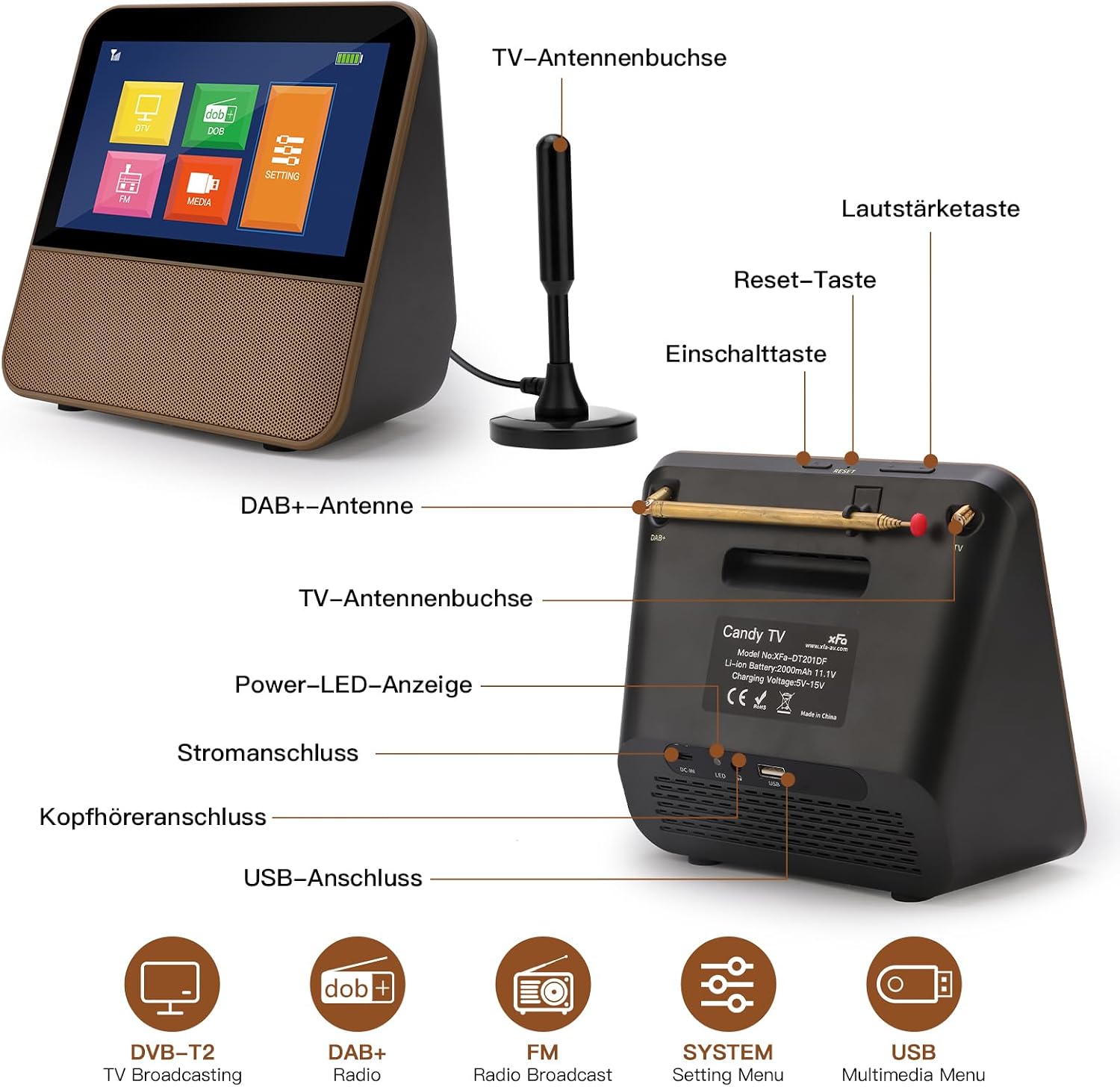
Figure 3.2: Rear view of the TV with labeled ports and controls.
3.4. Initial Power On
Press and hold the Power button on the back of the unit or on the remote control to turn on the TV. The device will boot up and display the main menu.
4. Operating Instructions
4.1. Navigating the Interface
The HassoKon Portable Digital TV features a touchscreen for easy navigation. Tap on icons to select functions or options. You can also use the provided remote control for navigation.
4.2. DVB-T2 TV Function
To watch digital television:
- Ensure the external TV antenna is connected and positioned for optimal signal reception.
- From the main menu, select the "DTV" or "TV" icon.
- If it's the first time using the TV function or if you've moved to a new location, perform an automatic channel scan. Navigate to the settings menu, find "Channel Scan" or "Auto Tune," and initiate the scan.
- Once the scan is complete, you can browse available channels using the channel up/down buttons on the remote or by selecting them from the channel list on the screen.

Figure 4.1: The TV function can be used for entertainment or as a background display, while the DAB+ radio offers clear digital audio.
4.3. DAB+ and FM Radio Function
To listen to radio:
- Extend the built-in DAB+ antenna for better reception.
- From the main menu, select the "DAB+" or "FM" icon.
- Perform a channel scan for DAB+ or FM stations if needed.
- Select your desired station from the list.
4.4. USB Multimedia Playback
To play media from a USB device:
- Insert a USB flash drive into the USB port on the back of the TV.
- From the main menu, select the "MEDIA" or "USB" icon.
- Navigate through the folders and files on your USB drive to select the desired video, audio, or image file.
- Press play to start playback.

Figure 4.2: Enjoy multimedia content via USB or listen to FM radio with family.
5. Maintenance
Proper maintenance ensures the longevity and optimal performance of your device.
5.1. Cleaning
- Always turn off and unplug the device before cleaning.
- Use a soft, dry, lint-free cloth to wipe the screen and exterior surfaces.
- For stubborn marks, slightly dampen the cloth with water or a mild, non-abrasive screen cleaner. Do not spray liquid directly onto the screen or device.
- Avoid using harsh chemicals, abrasive cleaners, or solvents.
5.2. Battery Care
- To maximize battery life, avoid fully discharging the battery frequently.
- If storing the device for an extended period, charge the battery to about 50% and store it in a cool, dry place. Recharge every few months to prevent deep discharge.
- Do not expose the device to extreme temperatures (hot or cold), as this can degrade battery performance.
5.3. Storage
When not in use, store the TV in a clean, dry environment, away from direct sunlight, dust, and moisture. Use the original packaging or a protective case if available.
6. Troubleshooting
If you encounter any issues with your HassoKon Portable Digital TV, please refer to the following troubleshooting guide before contacting customer support.
| Problem | Possible Cause | Solution |
|---|---|---|
| No Power | Battery depleted; Power adapter not connected or faulty; Device frozen. | Charge the device; Check power connections; Perform a soft reset (press and hold power button for 10 seconds or use reset pinhole if available). |
| No TV Signal / Poor Reception | Antenna not connected or positioned correctly; Weak signal in your area; No channel scan performed. | Ensure antenna is securely connected and fully extended; Reposition the antenna; Perform a channel scan; Check DVB-T2 coverage in your area. |
| No Sound | Volume too low or muted; Headphones connected; Audio settings incorrect. | Increase volume; Check mute status; Disconnect headphones; Verify audio settings in the menu. |
| USB Media Not Playing | Unsupported file format; USB drive not recognized; Corrupted files. | Ensure media files are in supported formats (e.g., MP4, AVI, MP3, JPEG); Try a different USB drive; Reformat USB drive (backup data first). |
7. Specifications
The following table outlines the key technical specifications of the HassoKon Portable Digital TV (Model XFa-DT201DF).
| Feature | Detail |
|---|---|
| Model Number | XFa-DT201DF |
| Screen Size | 7 inches |
| Display Technology | LCD |
| Resolution | 1080p (1080x600 HD) |
| Aspect Ratio | 16:9 |
| Special Feature | Touchscreen |
| Tuner Support | DVB-T2 (H.265 Freeview), DAB+, FM |
| Battery Type | Lithium-ion |
| Battery Capacity | 2000 mAh (up to 4 hours playback) |
| Connectivity | USB-C (charging), USB (multimedia), 3.5mm Headphone Jack |
| Dimensions (L x W x H) | 18 x 8 x 18 cm (approx. 7.09 x 3.15 x 7.09 inches) |
| Color | Gold |
8. Warranty and Support
HassoKon products are manufactured to high-quality standards. For information regarding warranty coverage and terms, please refer to the warranty card included with your purchase or contact your retailer. Keep your proof of purchase for warranty claims.
Customer Support
If you require further assistance or have questions not covered in this manual, please contact HassoKon customer support through the retailer's platform or the official HassoKon website. Please have your model number (XFa-DT201DF) and purchase details ready when contacting support.
Ask a question about this manual
Ask about setup, troubleshooting, compatibility, parts, safety, or missing instructions. Manuals+ will review the question and use this page’s manual context to help answer it.