
1. Introduction
Thank you for choosing the TUXING PCP Air Compressor, Model GPET021. This portable, oil-free, and water-free high-pressure air compressor is designed for convenient and efficient inflation of PCP air guns, pistols, and paintball tanks. It features a built-in transformer, allowing operation from either a 110V AC household power outlet or a 12V car battery. This manual provides essential information for the safe and proper use, setup, operation, maintenance, and troubleshooting of your compressor.
2. Safety Information
Please read and understand all safety warnings and instructions before operating this compressor. Failure to follow these instructions may result in electric shock, fire, serious injury, or property damage.
- Always operate the compressor in a well-ventilated area to prevent overheating.
- Do not operate the compressor near flammable liquids or gases.
- Ensure the compressor is placed on a stable, level surface during operation.
- Never exceed the maximum pressure rating of the air gun or tank being filled. The compressor features an adjustable pressure gauge with automatic shut-off.
- Monitor the temperature gauge during operation. If the temperature exceeds 70°C (158°F), stop the compressor immediately and allow it to cool down.
- Disconnect power before performing any maintenance or when the compressor is not in use.
- Keep children and unauthorized persons away from the operating compressor.
- Use only approved accessories and replacement parts.
- Always wear appropriate eye protection when operating or maintaining the compressor.
- Do not modify the compressor in any way.
3. Package Contents
Verify that all items are present and undamaged upon unpacking.
- TUXING PCP Air Compressor GPET021 Unit
- AC Power Cord (for 110V household use)
- DC Power Cables with Alligator Clips (for 12V car battery use)
- High-Pressure Hose with Quick Connector
- Spare O-rings and Filters
- User Manual

4. Product Overview
Familiarize yourself with the components of your TUXING PCP Air Compressor.

- Portable Handle: For easy transport of the unit.
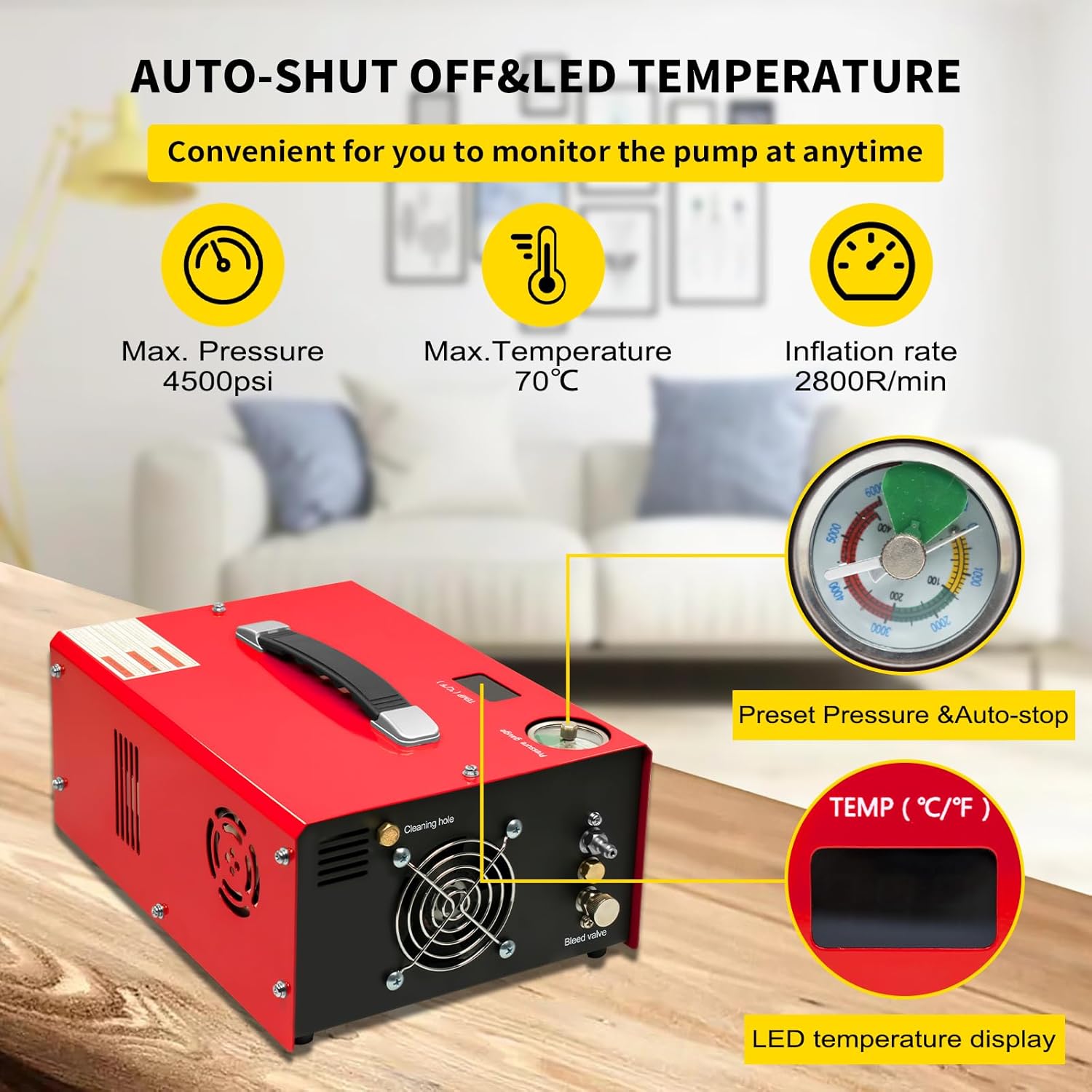
- Set Pressure Gauge: Allows you to pre-set the desired pressure. The compressor will automatically shut off when this pressure is reached.
- Temperature Gauge (LED Display): Displays the internal operating temperature of the compressor.
- High Pressure Air Outlet: Connection point for the high-pressure hose to your air gun or tank.
- Bursting Disc: A safety feature designed to release pressure if it exceeds safe limits.
- Bleed Valve: Used to release residual pressure from the system after inflation.
- Cooling Fan: Provides active cooling for the compressor.
- Power Input (AC/DC): Connects to either 110V AC or 12V DC power sources.
- Fuse: Electrical safety component.
5. Setup
5.1 Power Connection
The GPET021 compressor can be powered by two methods:
5.1.1 110V AC Household Power
- Ensure the compressor's power switch is in the OFF position.
- Connect the AC power cord to the compressor's AC power input.
- Plug the other end of the AC power cord into a standard 110V AC wall outlet.

5.1.2 12V DC Car Battery Power
- Ensure the compressor's power switch is in the OFF position.
- Connect the DC power cables (with alligator clips) to the compressor's DC power input.
- Connect the red alligator clip to the positive (+) terminal of a 12V car battery and the black alligator clip to the negative (-) terminal. Ensure a secure connection.

5.2 Connecting to Air Gun/Tank
- Attach the high-pressure hose to the High Pressure Air Outlet on the compressor. Ensure it is securely tightened.
- Connect the other end of the high-pressure hose (with the quick connector) to the fill port of your PCP air gun or paintball tank. Ensure a firm connection to prevent air leaks.
6. Operating Instructions
6.1 Setting Desired Pressure
Before starting the compressor, rotate the knob on the Set Pressure Gauge to your desired fill pressure. The compressor will automatically shut off once this pressure is reached.
6.2 Starting and Monitoring
- Ensure all connections are secure and the bleed valve is closed.
- Turn the compressor's power switch to the ON position. The cooling fan will start, and the compressor will begin to fill.
- Continuously monitor the pressure gauge and the LED temperature display. The maximum recommended operating temperature is 70°C (158°F).
- The compressor will automatically stop when the pre-set pressure is reached.
6.3 Cooling Recommendations
To ensure optimal performance and longevity of the compressor, it is recommended to let the machine rest for 20 minutes after continuously operating for 30 minutes, especially when filling larger tanks or in warmer environments.

6.4 After Inflation
- Once the compressor has stopped (either automatically or manually), turn the power switch to OFF.
- Slowly open the bleed valve to release any residual pressure from the hose.
- Once the pressure is fully released, disconnect the high-pressure hose from your air gun or tank.
7. Maintenance
Regular maintenance ensures the longevity and reliable operation of your compressor.
- Cleaning: Keep the compressor's exterior clean and free from dust and debris. Pay special attention to the cooling fan vents to ensure proper airflow.
- Filter Replacement: Periodically check and replace the active carbon filter and other O-rings as needed. Spare parts are included with your unit.
- Storage: Store the compressor in a cool, dry place away from direct sunlight and extreme temperatures.
- Oil-Free/Water-Free Design: This compressor is designed to be oil-free and water-free, eliminating the need for oil changes or water separation maintenance.
8. Troubleshooting
If you encounter issues with your compressor, refer to the following common problems and solutions:
| Problem | Possible Cause | Solution |
|---|---|---|
| Compressor does not start. | No power supply; Blown fuse; Power switch off. | Check power connection (AC or DC); Replace fuse if blown; Ensure power switch is ON. |
| Compressor runs but does not build pressure. | Loose hose connection; Bleed valve open; Internal leak. | Check and tighten all hose connections; Ensure bleed valve is fully closed; Contact customer support if internal leak is suspected. |
| Compressor overheats (temperature exceeds 70°C). | Continuous operation for too long; Blocked cooling vents; High ambient temperature. | Stop operation and allow to cool for 20 minutes; Clear any obstructions from cooling vents; Operate in a cooler environment if possible. |
| Automatic shut-off not working. | Pressure gauge setting incorrect; Faulty pressure sensor. | Verify the set pressure on the gauge; Contact customer support for sensor issues. |
9. Specifications
| Feature | Specification |
|---|---|
| Model | GPET021 |
| Brand | TUXING |
| Working Pressure | 300 bar / 4500 psi / 30 Mpa (Max) |
| Voltage | 110V AC or 12V DC |
| Power Source | Corded Electric (Built-in Transformer) |
| Maximum Power | 300 Watts |
| Cooling Way | Fan Cooling |
| Noise Level | 78 Decibels |
| Air Flow Capacity | 12 Liters Per Minute |
| Item Weight | 6.7 kg (14.74 pounds) |
| Product Dimensions | 12.99"L x 10.62"W x 13.38"H (40*20*30CM) |
| Material | Iron |
| Special Feature | Adjustable Pressure, Automatic Shut-off, Oil-Free, Water-Free |
10. Warranty and Support
The main parts of the TUXING PCP Air Compressor GPET021 are covered by a 1-year warranty from the date of purchase. This warranty covers manufacturing defects under normal use.
For technical support, warranty claims, or inquiries about replacement parts, please contact TUXING customer service through the retailer where the product was purchased or visit the official TUXING website for contact information.
Please retain your proof of purchase for warranty validation.


