
EIGIIS KE2
EIGIIS Smart Watch KE2 User Manual
Model: KE2 | Brand: EIGIIS
1. Introduction
The EIGIIS Smart Watch KE2 is a rugged military-grade smartwatch designed for outdoor enthusiasts and daily use. It features a 1.32-inch HD display, Bluetooth calling capabilities, comprehensive health monitoring, and multiple sports modes. This manual provides detailed instructions for setting up, operating, and maintaining your new smartwatch.

Figure 1.1: EIGIIS Smart Watch KE2 with its rugged design and vibrant display.
2. What's in the Box
Verify that all items are present in your product package:
- 1 x EIGIIS Military Smart Watch
- 1 x Watch Band (pre-installed)
- 1 x Charging Cable
- 1 x User Manual
- 1 x Retailed Box

Video 2.1: Unboxing and Band Attachment. This video demonstrates how to attach the watch band to the EIGIIS Smart Watch KE2 and provides a visual overview of the package contents.
3. Product Overview
The EIGIIS Smart Watch KE2 is built with durability and functionality in mind. It features a robust metal frame and a high-definition display.
3.1 Key Features
- Rugged Military Standard Design: Resistant to high/low temperatures, humidity, and salt spray.
- 1.32-inch HD Display: Clear and vibrant visuals with 360x360 pixel resolution.
- Bluetooth Calling: Built-in speaker and microphone for answering/making calls directly from the watch.
- 24/7 Health Monitoring: Tracks heart rate, blood oxygen, and sleep patterns.
- Multiple Sports Modes: Supports over 20 sports activities including running, climbing, cycling, and more.
- IP67 Water Resistance: Suitable for daily activities like hand washing (not for diving, sauna, or showering).
- Long Battery Life: Up to 4-6 days of working hours, 10 days standby time.

Figure 3.1: The watch's military standard certification highlights its resistance to extreme temperatures, collision, and IP67 waterproofing.

Figure 3.2: The 1.32-inch TFT full touch screen provides comprehensive records of sports data.
4. Setup
4.1 Initial Charging
Upon receiving your EIGIIS KE2 smart watch, please charge it for at least 2 hours to ensure the battery is fully charged before normal use. Use the provided charging cable.
4.2 App Installation (FitCloudPro)
To unlock the full potential of your smartwatch, download and install the FitCloudPro app on your smartphone. The app is available on both Google Play Store (for Android) and Apple App Store (for iOS).
4.3 Device Pairing
Follow these steps to pair your smartwatch with your phone:
- Turn on your phone's Bluetooth.
- Open the FitCloudPro app.
- In the app, navigate to the 'Device' section and select 'Add Device'.
- The app will search for nearby devices. Select 'KE2' from the list to connect.
- Once connected, enable the Bluetooth dial and answer calls function by going to your phone's Bluetooth settings and pairing with 'KE2 Call'.

Figure 4.1: Visual guide for connecting the EIGIIS Smart Watch KE2 to your smartphone via the FitCloudPro app.
Video 4.2: How to connect the KE2 smart watch. This video provides a step-by-step guide on pairing your EIGIIS Smart Watch KE2 with your smartphone and enabling call functions.
5. Operating Instructions
5.1 Basic Navigation
The smartwatch features a full touch screen for easy navigation. Swipe left, right, up, or down to access different functions and menus. Use the physical buttons on the side for quick access to specific features or to return to the home screen.
5.2 Raise to Wake
Simply raise your wrist to automatically wake the watch screen and view information.
5.3 Customizing Watch Faces
The EIGIIS KE2 offers over 100 personalized dial options. You can change your watch face directly on the device or through the FitCloudPro app to match your style or display preferred information.

Figure 5.1: Explore over 100 customizable watch faces to personalize your EIGIIS Smart Watch KE2.
5.4 Bluetooth Calling
With its built-in speaker and microphone, the watch allows you to make and answer calls directly. Access call records, contacts, or use the dial pad from your wrist.

Figure 5.2: Hands-free communication with Bluetooth call, built-in mic, and text/app notifications.
Video 5.3: EIGIIS Business Smart Watch KE2. This video showcases the various features of the smartwatch, including its Bluetooth calling capabilities, health monitoring, and smart notifications.
5.5 Message Notifications
Receive notifications from various apps like Skype, WhatsApp, Facebook, LINE, and more directly on your watch. This feature helps you stay connected without constantly checking your phone.
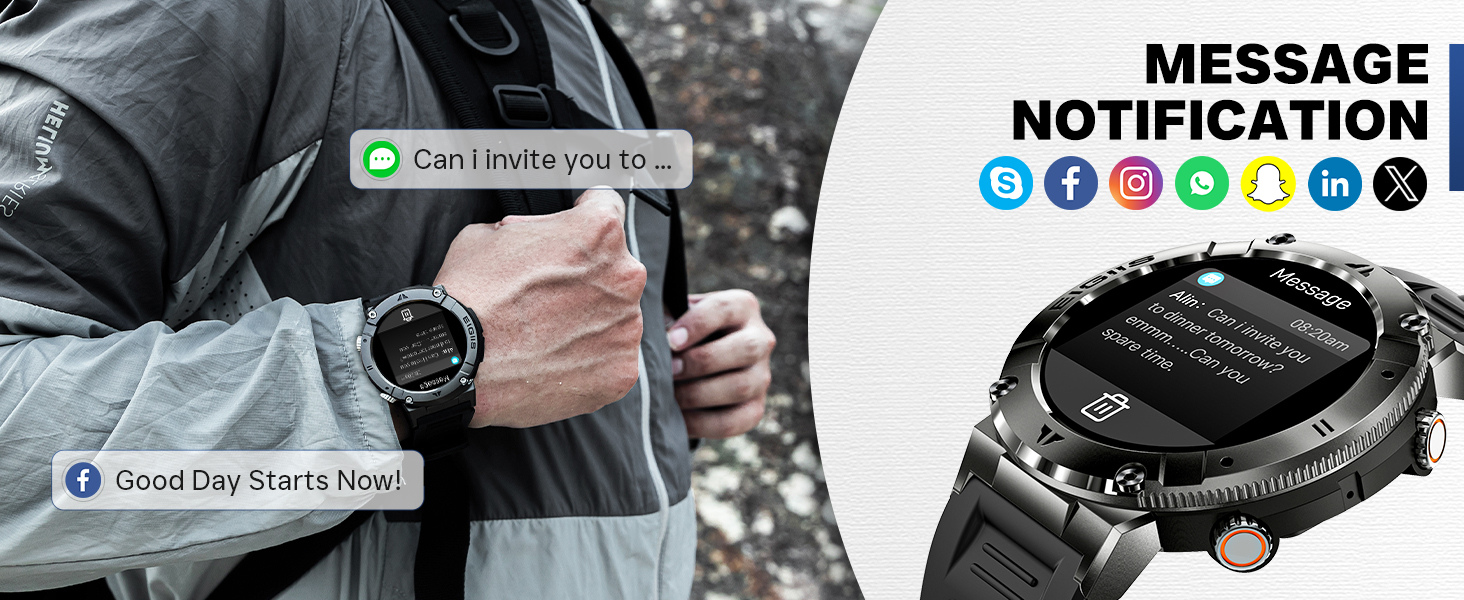
Figure 5.4: Stay updated with message notifications from your favorite social media and communication apps.
5.6 Music Control
Control your phone's music playback directly from your watch. Play, pause, skip tracks, and adjust volume without taking out your phone.
5.7 Remote Camera Control
Use your smartwatch as a remote shutter for your phone's camera, perfect for group photos or selfies.
5.8 Weather Forecast
Get real-time weather updates directly on your watch screen.
5.9 Alarm Clock & Find Your Phone
Set alarms on your watch. The 'Find Your Phone' feature helps you locate your misplaced smartphone by making it ring.

Figure 5.5: The watch offers multiple functions including calculator, camera control, music control, weather forecast, and stopwatch.
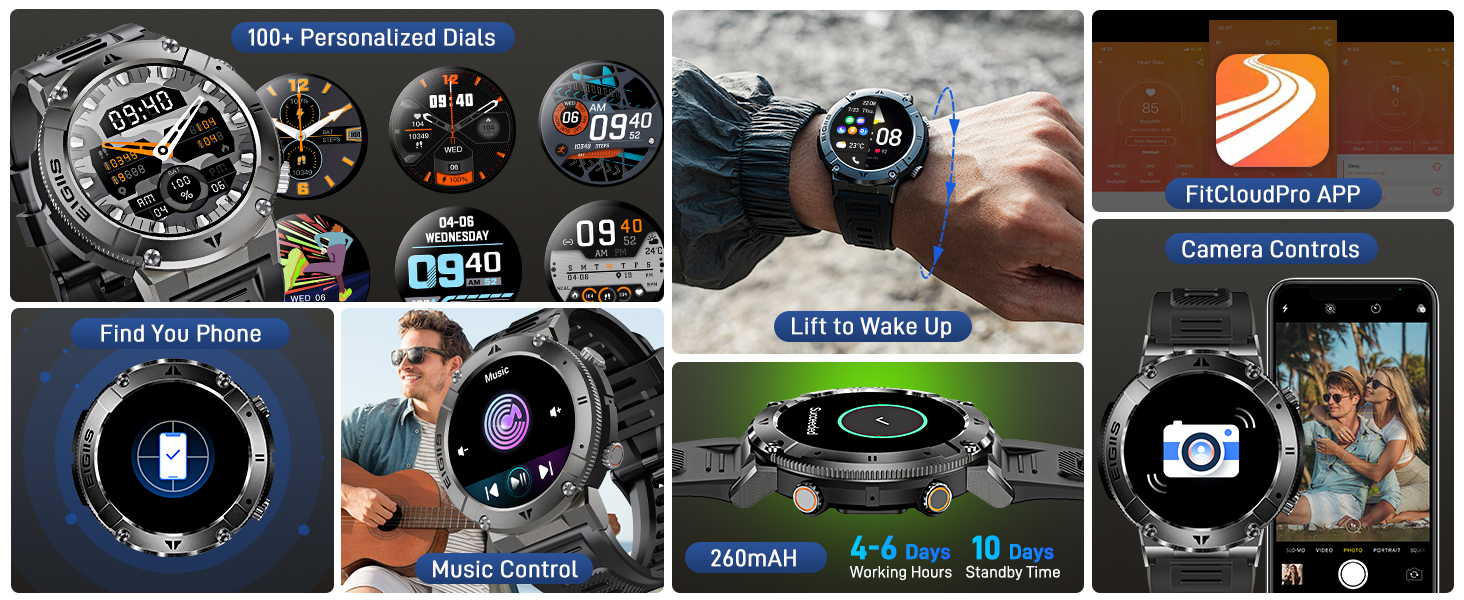
Figure 5.6: Additional smart features include 100+ personalized dials, find your phone, music control, camera controls, lift to wake, and battery status.
6. Health Monitoring
The EIGIIS KE2 smartwatch provides continuous health monitoring to help you stay informed about your body's condition. Note: The measurement data is FOR SPORTS OR AVIATION USE ONLY, NOT FOR MEDICAL USE.
6.1 Heart Rate Monitoring
The watch continuously monitors your heart rate 24/7, providing real-time data and historical trends in the FitCloudPro app.
6.2 Blood Oxygen Monitoring
Monitor your blood oxygen levels to gain insights into your respiratory health.
6.3 Sleep Tracking
The sleep tracker analyzes your sleep quality, including deep sleep, light sleep, and awake times, helping you develop healthier sleep habits.
6.4 Pedometer
Automatically records your daily steps, distance traveled, and calories burned.

Figure 6.1: The watch provides 24/7 heart rate and blood oxygen monitoring.

Figure 6.2: Detailed sleep tracking helps analyze deep sleep, light sleep, and awake periods.
Video 6.3: Smart Watch KE2. This video highlights the various smart features of the watch, including its health monitoring capabilities and daily activity tracking.
7. Sports Modes
The EIGIIS KE2 supports up to 20 sports modes, including Running, Climbing, Cycling, Basketball, Badminton, Football, Elliptical, Yoga, Pingpong, Rope Skipping, Tennis, Baseball, and more. During exercise, the watch automatically records steps, heart rate, and calories burned. You can review your exercise data in the FitCloudPro app.

Figure 7.1: The watch supports 20 different sport modes to track your fitness activities.
Video 7.2: EIGIIS Sports Smart Watch KE2. This video demonstrates the watch's sports tracking capabilities and how it helps improve athletic performance.
8. Maintenance & Care
8.1 Water Resistance (IP67)
The EIGIIS KE2 is IP67 water resistant, meaning it can withstand splashes, rain, and brief immersion in water. You can wash your hands or dishes with the watch on. However, do not use it while diving, in a sauna, or during a shower, as steam and high water pressure can damage the device.
8.2 Cleaning
Regularly clean your watch and strap with a soft, dry cloth. If necessary, use a slightly damp cloth and then dry thoroughly. Avoid using harsh chemicals or abrasive materials.
8.3 Battery Care
To prolong battery life, avoid exposing the watch to extreme temperatures. Charge the watch fully before its first use and when the battery is low. Do not leave the watch uncharged for extended periods.
9. Troubleshooting
If you encounter any issues with your EIGIIS Smart Watch KE2, please refer to the following common solutions:
- Watch not turning on: Ensure the watch is fully charged. Connect it to the charging cable and allow it to charge for at least 30 minutes before attempting to turn it on.
- Cannot pair with phone:
- Ensure Bluetooth is enabled on your phone.
- Make sure the watch is within range of your phone (typically 0.5 meters during initial pairing).
- Restart both your phone and the watch.
- Clear the Bluetooth cache on your phone (if applicable).
- Ensure the FitCloudPro app has necessary permissions (Bluetooth, location).
- Call function not working: Ensure you have paired both 'KE2' and 'KE2 Call' in your phone's Bluetooth settings.
- Inaccurate health data: Ensure the watch is worn snugly on your wrist, not too tight or too loose. Clean the sensor on the back of the watch. Remember, data is for reference only, not medical use.
- Notifications not appearing: Check app permissions for FitCloudPro to ensure it can access notifications. Verify notification settings within the FitCloudPro app for specific applications.
For further assistance, please contact EIGIIS customer support.
10. Specifications
| Product Dimensions | 10.1 x 1.8 x 0.5 inches |
| Item Weight | 7.1 ounces (200 Grams) |
| Model Name | EIGIIS Smartwatch KE2 |
| Screen Size | 1.32 Inches (Standing screen display size) |
| Operating System | Android (Compatible with Android 4.4 and above, IOS 8.0 and above) |
| Battery Capacity | 260 Milliamp Hours (Lithium Polymer) |
| Connectivity Technology | Bluetooth |
| Water Resistance | IP67 |
11. Warranty & Support
Your EIGIIS Smart Watch KE2 comes with a 12-month warranty from the date of purchase. If you have any questions or require assistance, please do not hesitate to contact EIGIIS customer support. Solutions will be offered within 24 hours.
For additional resources, you may refer to the official User Manual (PDF).
Related documentsKE2


Ask a question about this manual
Ask about setup, troubleshooting, compatibility, parts, safety, or missing instructions. Manuals+ will review the question and use this page’s manual context to help answer it.