
1. Introduction
Thank you for choosing the HIKMICRO HEIMDAL H4D Digital Night Vision Monocular. This device is designed for observation in low light and complete darkness, featuring a high-resolution sensor and AMOLED display for clear imaging.
Key Features:
- 1.39" AMOLED display with 454 x 454 resolution
- High-resolution 2560 x 1440 sensor
- Integrated 850 nm infrared illuminator with smart IR function
- Day/Night/Auto/Defog modes
- Electronic Image Stabilization (EIS)
- Detection range up to 200 meters
- Replaceable and rechargeable battery with over 4 hours of use
- Compact and portable design, waterproof and dustproof (IP67)
- Integrated 32 GB EMMC for storing recorded videos and photos
- Wireless connection via HIKMICRO Sight app, local album function
Package Contents:
- HIKMICRO HEIMDAL H4D Digital Night Vision Monocular
- Battery
- Dust cloth
- Protective bag
- Wrist strap
- USB-C cable
- Quick Guide
2. Product Overview
Familiarize yourself with the components and controls of your HIKMICRO HEIMDAL H4D monocular.
Device Layout
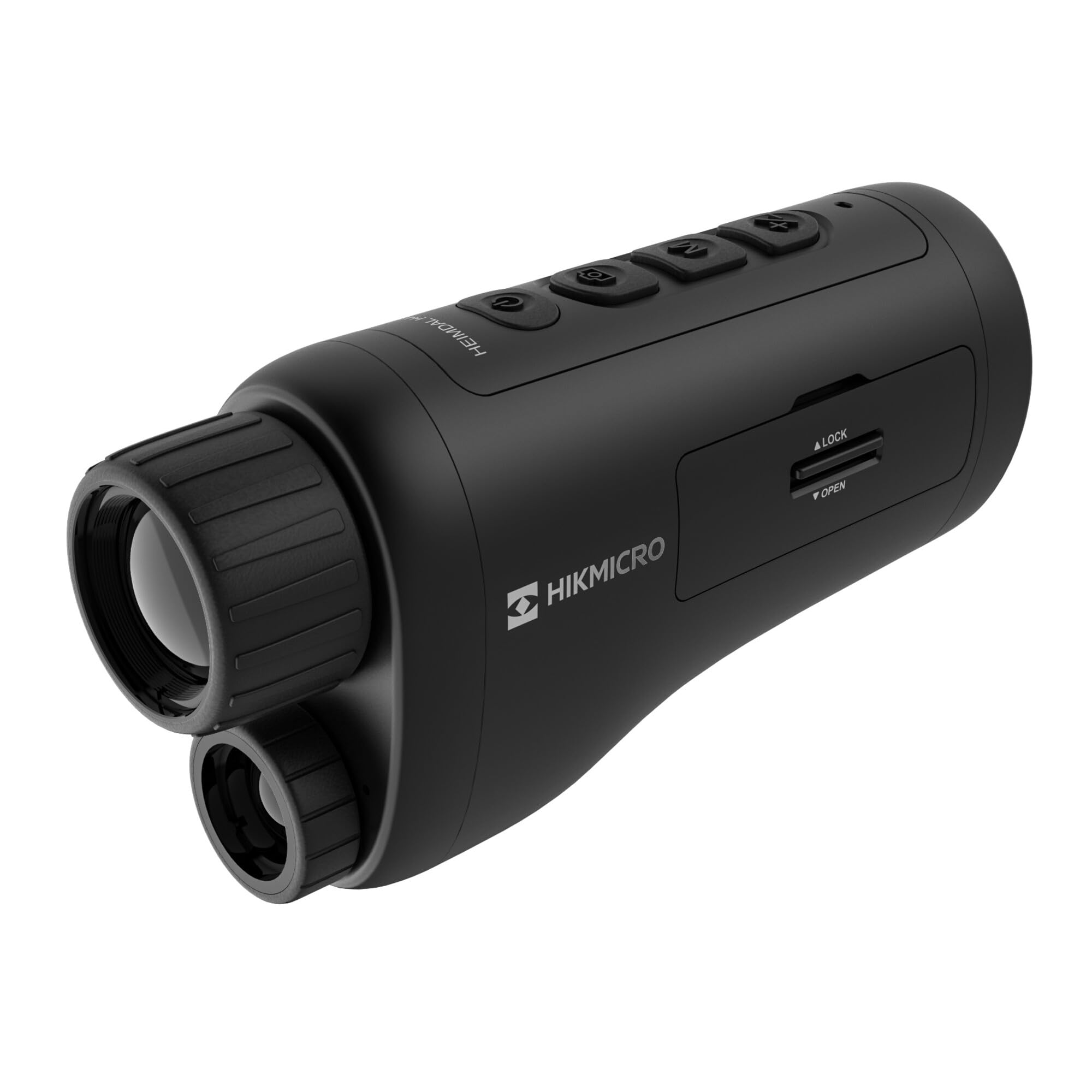
An angled view of the HIKMICRO HEIMDAL H4D monocular, showing its compact, ergonomic design and the main lens.
Controls and Buttons

Top view of the monocular showing the power button, photo/video record button, mode button, and zoom/IR adjustment buttons.
Lenses and Focus

Front view displaying the objective lens and the integrated infrared illuminator.
Battery Compartment

Side view showing the battery compartment with 'LOCK' and 'OPEN' indicators.
3. Setup
Battery Installation
- Locate the battery compartment on the side of the device.
- Slide the lock mechanism to the 'OPEN' position.
- Insert the rechargeable battery, ensuring correct polarity.
- Close the compartment and slide the lock mechanism to the 'LOCK' position.
Charging the Battery
Connect the device to a power source using the provided USB-C cable. The charging indicator will show the charging status.
Initial Power On
Press and hold the power button (usually marked with Ⓘ) until the HIKMICRO logo appears on the display.
4. Operating Instructions
Power On/Off
- Power On: Press and hold the power button for approximately 3 seconds.
- Power Off: Press and hold the power button for approximately 3 seconds until the device shuts down.
Focus Adjustment
Rotate the focus ring on the objective lens to achieve a clear image of your target.
Mode Selection
Press the 'M' (Mode) button to cycle through observation modes: Day, Night, Auto, and Defog.
Zoom and IR Adjustment
Use the '+' and '-' buttons to adjust the digital zoom level. These buttons also control the intensity of the infrared illuminator in night mode.
Photo and Video Recording
- Take Photo: Press the photo/video button (usually marked with 📷) once to capture an image.
- Record Video: Press and hold the photo/video button to start recording. Press again to stop.
Connecting to HIKMICRO Sight App
Download the HIKMICRO Sight app from your device's app store. Follow the in-app instructions to connect your monocular for live view, remote control, and media management.
5. Maintenance
Cleaning
- Use the provided dust cloth or a soft, lint-free cloth to clean the lenses.
- For stubborn dirt, use a lens cleaning solution specifically designed for optics.
- Wipe the device body with a soft, damp cloth. Do not use abrasive cleaners or solvents.
Storage
- Store the monocular in its protective bag in a cool, dry place when not in use.
- Remove the battery if the device will not be used for an extended period.
Battery Care
- Charge the battery regularly, even if not in frequent use, to maintain its lifespan.
- Avoid extreme temperatures during charging and storage.
6. Troubleshooting
Common Issues and Solutions
| Problem | Possible Cause | Solution |
|---|---|---|
| Device does not power on. | Battery is depleted or incorrectly installed. | Charge the battery. Ensure the battery is inserted with correct polarity. |
| Image is blurry. | Focus is not adjusted. | Rotate the focus ring on the objective lens until the image is clear. |
| Poor image quality in darkness. | IR illuminator is off or set to low intensity. | Activate the IR illuminator or increase its intensity using the '+' button. Ensure you are in Night mode. |
| Cannot connect to HIKMICRO Sight app. | Bluetooth/Wi-Fi is off on device or phone, or app is not updated. | Ensure Bluetooth/Wi-Fi is enabled on both devices. Restart the app and monocular. Check for app updates. |
| Device freezes or becomes unresponsive. | Temporary software glitch. | Perform a soft reset by holding the power button until the device restarts. If issue persists, contact support. |
7. Specifications
| Feature | Detail |
|---|---|
| Sensor Resolution | 2560 x 1440 |
| Display Type | AMOLED |
| Display Resolution | 454 x 454 |
| Display Size | 1.39 inches (3.5 cm) |
| Infrared Illuminator | Integrated 850 nm |
| Detection Range | Up to 200 meters |
| Storage | 32 GB EMMC (internal) |
| Battery Life | More than 4 hours (replaceable, rechargeable) |
| Waterproof Rating | IP67 |
| Dimensions | 153 mm x 50 mm x 80 mm (6.02" x 1.97" x 3.15") |
| Weight | 375 Grams (0.83 lbs) |
| Material | Plastic |
| Compatible Devices | Rifle, Compound Bow |
| Mounting Type | Picatinny mount |
| Sport Use | Camping, Hiking |
| Color | White |
8. Warranty and Support
HIKMICRO products are covered by a limited warranty. For detailed warranty information, please refer to the official HIKMICRO website or contact your local dealer.
For technical support, troubleshooting assistance, or service inquiries, please visit the official HIKMICRO support page or contact their customer service department.
Official Website: www.hikmicrotech.com


