Product Overview
This ALLIMITY replacement remote control is designed to operate various JTC LED TV models, including DVB73207, DVB824010, DVX4, GENESIS 40GD, and GPRC15926. It provides all the essential functions of your original remote control without requiring any complex programming.
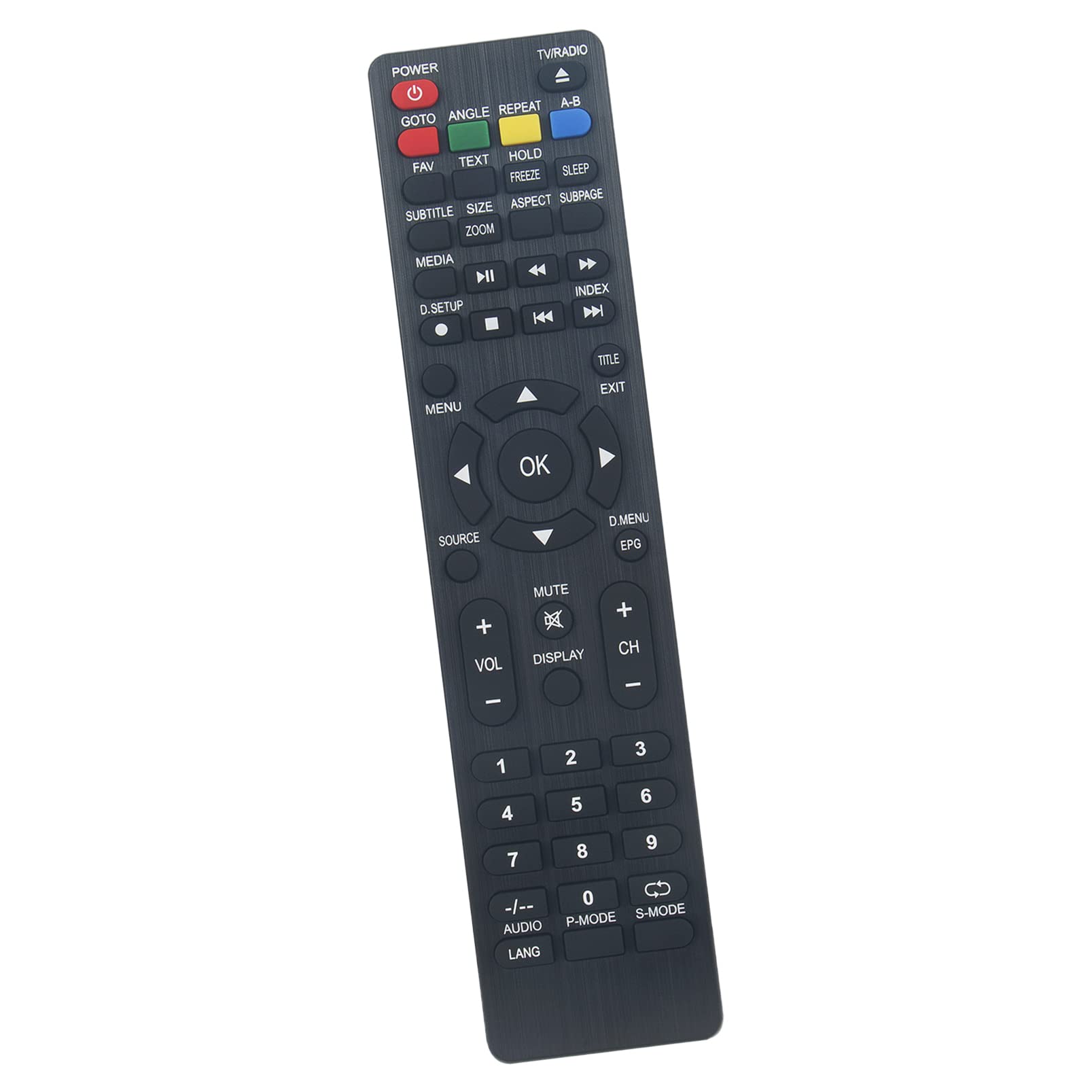
Image 1: Front view of the ALLIMITY replacement remote control, showing all buttons and their labels.
Setup
1. Battery Installation
- Locate the battery compartment on the back of the remote control.
- Slide the battery compartment cover downwards or press the latch and lift to open.
- Insert two new AAA alkaline batteries, ensuring the positive (+) and negative (-) terminals match the diagrams inside the compartment.
- Close the battery compartment cover securely.
No programming is required. The remote control is ready for use immediately after battery installation.

Image 2: Back view of the remote control, highlighting the battery compartment.
Operating Instructions
Point the remote control directly at your JTC LED TV. Ensure there are no obstructions between the remote and the TV's infrared receiver.
Key Functions:
- POWER: Turns the TV on or off.
- TV/RADIO: Switches between TV and Radio modes.
- GOTO: Jumps to a specific time in media playback.
- ANGLE: Changes the camera angle during DVD playback (if supported).
- REPEAT: Repeats current track/chapter/title.
- A-B: Repeats a specific section of media.
- FAV: Accesses favorite channels.
- TEXT: Displays teletext.
- HOLD: Holds the current teletext page.
- SLEEP: Sets the sleep timer.
- SUBTITLE: Selects subtitle language.
- SIZE/ZOOM: Adjusts screen aspect ratio or zooms in/out.
- ASPECT: Changes the aspect ratio of the display.
- SUBPAGE: Navigates teletext subpages.
- MEDIA: Accesses media player functions.
- Playback Controls (Play, Pause, Stop, Rewind, Fast Forward, Previous, Next): Controls media playback.
- D.SETUP: Accesses digital setup menu.
- INDEX: Displays index page.
- MENU: Opens the main menu.
- TITLE: Displays the title menu.
- EXIT: Exits the current menu or function.
- Navigation Buttons (Up, Down, Left, Right, OK): Navigates menus and confirms selections.
- SOURCE: Selects input source (HDMI, AV, etc.).
- D.MENU/EPG: Accesses digital menu or Electronic Program Guide.
- VOL +/-: Adjusts volume up or down.
- MUTE: Mutes or unmutes the sound.
- DISPLAY: Shows on-screen display information.
- CH +/-: Changes channels up or down.
- Numeric Keypad (0-9): Direct channel selection or data entry.
- -/--: Toggles between single and double-digit channel entry.
- AUDIO/LANG: Selects audio track or language.
- P-MODE: Selects picture mode.
- S-MODE: Selects sound mode.
Maintenance
Cleaning the Remote Control:
- Wipe the remote control with a soft, dry cloth.
- For stubborn dirt, slightly dampen the cloth with water or a mild cleaning solution. Do not use harsh chemicals or abrasive cleaners.
- Ensure no liquid enters the remote control's interior.
Battery Replacement:
- Replace batteries when the remote control's response becomes sluggish or stops working.
- Always replace both batteries at the same time with new AAA alkaline batteries.
- Do not mix old and new batteries, or different types of batteries.
- Remove batteries if the remote control will not be used for an extended period to prevent leakage.
Troubleshooting
- Remote not working:
- Check if the batteries are inserted correctly with the correct polarity (+/-).
- Replace the batteries with new ones.
- Ensure there are no obstructions between the remote control and the TV's infrared sensor.
- Make sure you are pointing the remote directly at the TV.
- Limited range:
- Ensure batteries are fresh.
- Check for strong light sources (like direct sunlight or bright fluorescent lights) that might interfere with the infrared signal.
- Specific buttons not responding:
- This remote is a direct replacement and should replicate all original functions. If a specific button does not work, ensure your TV model supports that function.
- Clean the remote control, especially around the unresponsive button, to remove any debris.
Specifications
| Brand | ALLIMITY |
| Model Number | QYSY-GARA-JC-QYSY |
| Connectivity Technology | Infrared (IR) |
| Compatible Devices | JTC LED TV models: DVB73207, DVB824010, DVX4, GENESIS 40GD, GPRC15926 |
| Maximum Range | 10 Meters (approximately 33 feet) |
| Batteries Required | 2 x AAA Alkaline Batteries (not included) |
Warranty and Support
Information regarding specific warranty terms or direct support contact for this ALLIMITY replacement remote control is not provided in the product details. For any issues or inquiries, please refer to the retailer or platform where the product was purchased for their return and support policies.
This remote control is designed to function out-of-the-box without programming for the specified JTC TV models. If you encounter persistent issues, please verify compatibility with your TV model.


