
Ultralux U100543
Ultralux 1x4 ft Surface Mount LED Ceiling Light Panel Instruction Manual
Model: U100543
Introduction
This manual provides detailed instructions for the safe installation, operation, and maintenance of your Ultralux 1x4 ft Surface Mount LED Ceiling Light Panel. Please read this manual thoroughly before installation and retain it for future reference.
Important Safety Information
- WARNING: Risk of electric shock. Disconnect power at the fuse or circuit breaker before installation or servicing.
- Installation must be performed by a qualified electrician in accordance with all local electrical codes.
- Ensure the supply voltage is compatible with the fixture (120 Volts).
- Do not install near any heat sources.
- Do not modify the fixture. Any modifications may void the warranty and create a safety hazard.
- Suitable for damp locations.
Package Contents
Verify that all components are present before beginning installation:
- 1x Ultralux 1x4 ft Surface Mount LED Ceiling Light Panel
- Mounting Hardware
Setup and Installation
Follow these steps for proper installation of your Ultralux LED Ceiling Light Panel:
- Prepare for Installation: Turn off power at the circuit breaker before starting.
- Install Surface Mount Plate: Secure the surface mount plate to the ceiling. Screws can be inserted directly into a junction box.
- Secure Light Panel: Use the provided safety cable to secure the light panel while making wire connections.
- Make Electrical Connections: Connect the fixture wires to the supply wires according to local electrical codes (typically black to black, white to white, ground to ground).
- Slide Light Panel: Easily slide the light panel into the surface mounting plate until it is securely in place.
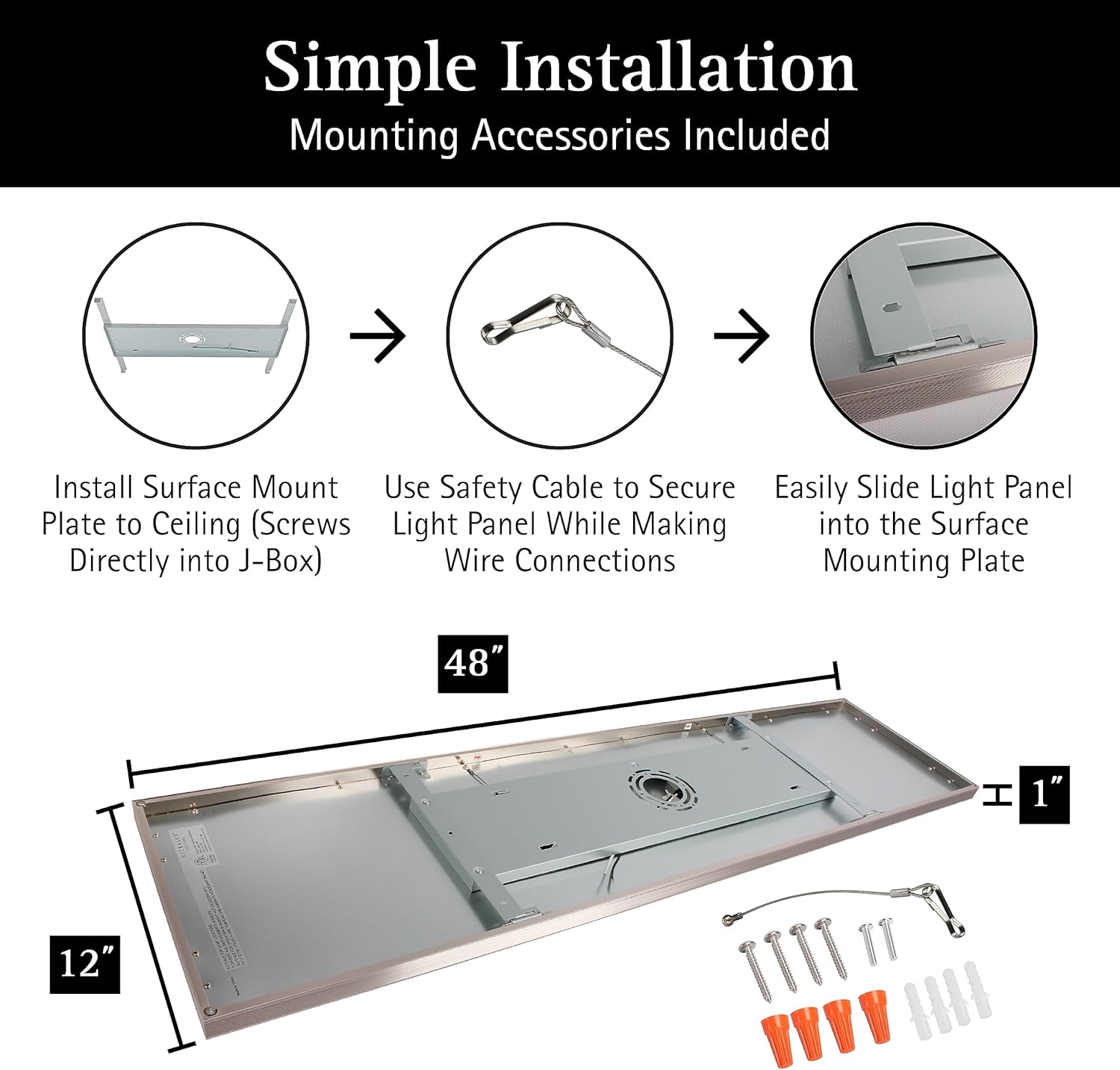
Image: Simple Installation Steps with Mounting Accessories.
Color Temperature Selection (3CCT)
Before final installation, select your desired color temperature using the internal switch located on the fixture. You can choose between 3000K (Soft White), 4000K (Cool White), or 5000K (Natural White).

Image: Choose Your Color Temperature (5000K, 4000K, 3000K) with internal switch location.
Dimmable Feature
This fixture is TRIAC dimmable, allowing for smooth light adjustment from 100% down to 10% with compatible dimmers (dimmer not included). Consult the compatible dimmer list for recommended models.

Image: Smooth TRIAC Dimming from 100%-10% with compatible dimmer list.
Product Application Examples
The Ultralux LED Ceiling Light Panel is versatile and suitable for various indoor applications, including kitchens, laundry rooms, and offices.

Image: Kitchen application.

Image: Laundry Room application.

Image: Office application.
Installation Video Guide
Video: Official Ultralux guide for surface mount LED panel installation. This video demonstrates the steps for installing the light panel, including mounting the plate, securing with a safety cable, and sliding the panel into place.
Operating Instructions
Once installed, operate the light panel using a standard wall switch. If a compatible TRIAC dimmer is installed, you can adjust the brightness level from 10% to 100% by manipulating the dimmer control.
The color temperature (3000K, 4000K, or 5000K) is set via an internal switch during installation and cannot be changed during normal operation without accessing the fixture.
Maintenance
The Ultralux LED Ceiling Light Panel requires minimal maintenance. Ensure power is disconnected before cleaning.
- Cleaning: Wipe the fixture with a soft, dry, or slightly damp cloth. Do not use abrasive cleaners or solvents.
- LED Lifespan: The integrated LED has a lifespan of over 50,000 hours, meaning no bulb replacement is necessary under normal use.
Troubleshooting
| Problem | Possible Cause | Solution |
|---|---|---|
| Light does not turn on. | No power supply; loose wiring; faulty switch. | Check circuit breaker. Ensure all wire connections are secure. Test the switch. |
| Light flickers or dims unexpectedly. | Incompatible dimmer; loose wiring; power fluctuations. | Ensure dimmer is TRIAC compatible. Check wiring connections. Consult an electrician if power fluctuations persist. |
| Incorrect color temperature. | CCT switch set incorrectly. | Turn off power, remove fixture, and adjust the internal CCT switch to the desired setting. |
If issues persist after attempting these solutions, please contact customer support.
Specifications
| Model Number: | U100543 |
| Dimensions (L x W x H): | 47.68"L x 11.89"W x 1.06"H |
| Brightness: | 3000 Lumens |
| Color Temperature (CCT): | 3000K (Soft White), 4000K (Cool White), 5000K (Natural White) - Adjustable |
| Dimmability: | TRIAC Dimmable (10%-100%) |
| Voltage: | 120 Volts |
| Wattage: | 15 Watts |
| Light Source: | Integrated LED |
| Lifespan: | > 50,000 Hours |
| Material: | Aluminum, Plastic |
| Finish: | Brushed Nickel |
| Indoor/Outdoor Usage: | Indoor (Suitable for Damp Locations) |
| Mounting Type: | Surface Mount, Flush Mount |
Warranty and Support
This Ultralux product is backed by a 5-year limited warranty. This warranty covers defects in materials and workmanship under normal use.
For warranty claims, technical assistance, or any questions regarding your product, please contact Ultralux customer support. You can typically find contact information on the product packaging or the official Ultralux website.
For purchases made through Amazon, you may also contact the seller, CLEANLIFE SUPPLY, for support.
Ask a question about this manual
Ask about setup, troubleshooting, compatibility, parts, safety, or missing instructions. Manuals+ will review the question and use this page’s manual context to help answer it.