
1. Introduction
This manual provides essential information for the safe and effective operation of your VIHELM GDX-8000 Underground Metal Detector. Please read these instructions thoroughly before assembly and use to ensure optimal performance and longevity of your device. The GDX-8000 is designed for detecting various metals underground, including gold, silver, and other precious metals, offering multiple search modes for diverse environments.
2. Product Overview and Components
The GDX-8000 metal detector system includes the main control unit, search coil, adjustable shaft, headphones, battery, charger, and a carrying harness. Familiarize yourself with all components before assembly.

Figure 2.1: The VIHELM GDX-8000 Metal Detector fully assembled, including headphones and the external control unit.

Figure 2.2: All components of the VIHELM GDX-8000 Metal Detector, including the main unit, search coil, headphones, control box, charger, and harness.
3. Setup and Assembly
- Assemble the Shaft: Connect the upper, middle, and lower shafts. Ensure all locking mechanisms are securely fastened.
- Attach the Search Coil: Secure the search coil to the lower shaft using the provided bolt and nut. Do not overtighten.
- Mount the Control Unit: Attach the main control unit to the upper shaft. Adjust its position for comfortable viewing and access to controls.
- Connect Cables: Plug the search coil cable into the designated port on the control unit. Ensure a firm connection.
- Install Batteries: The GDX-8000 requires batteries for operation. Insert the battery pack into its compartment, ensuring correct polarity.
- Connect Headphones: Plug the headphones into the audio jack on the control unit.
- Adjust Armrest and Shaft Length: Adjust the armrest and shaft length to a comfortable position for prolonged use.
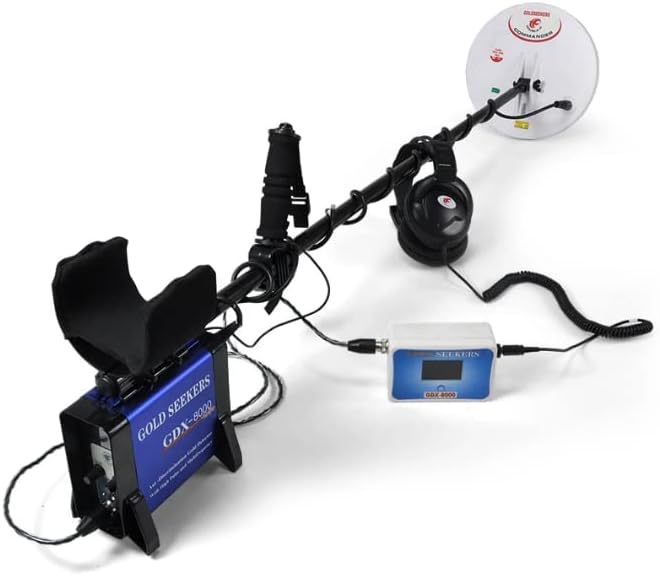
Figure 3.1: A side view of the fully assembled VIHELM GDX-8000 Metal Detector, ready for use.
4. Operation
4.1 Powering On/Off
To power on the device, locate the ON/OFF switch on the control unit and toggle it to the 'ON' position. The LCD display will illuminate. To power off, toggle the switch back to 'OFF'.
4.2 LCD Display
The GDX-8000 features an LCD backlit display for clear visibility, even in low-light conditions. It shows important information such as target volume, detection mode, and battery status.

Figure 4.1: Close-up view of the GDX-8000's LCD backlit display, showing 'TARGET VOLUME' at level 15.
4.3 Search Modes
The GDX-8000 offers six distinct search modes, allowing for optimized detection in various environments and for different target types. These modes can be customized to suit your preferences.
- All Metal Mode: Detects all types of metal without discrimination. This mode offers the deepest detection capability.
- Discrimination Mode: Allows the user to filter out unwanted metals (e.g., iron, trash) and focus on specific target types.
- Specialized Search Modes: Includes modes tailored for specific environments such as Jungle Treasure, Ancient House Treasure, Sand Treasure, and Mineralized Soil. These modes are designed to enhance detection in challenging conditions.

Figure 4.2: Illustration comparing the detection capabilities of All Metal Mode (detects all metals) and Discrimination Mode (filters out specific metals) at various depths.
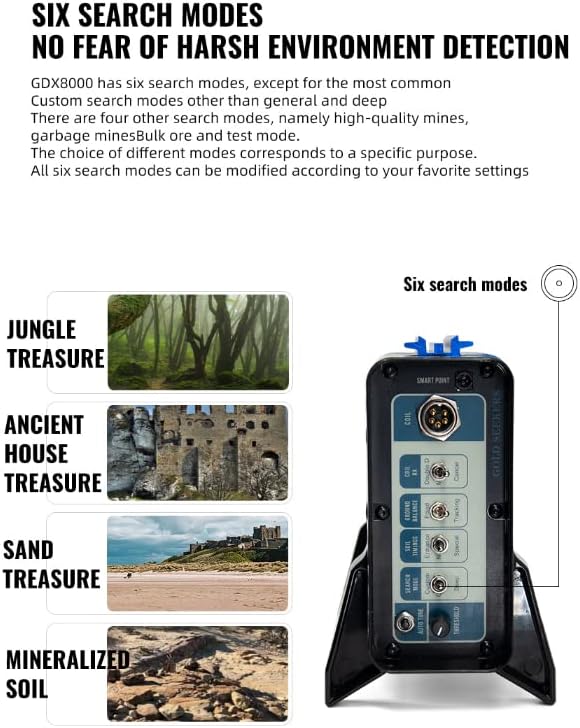
Figure 4.3: The control panel of the GDX-8000, highlighting the six search modes and examples of environments they are suited for, such as Jungle, Ancient House, Sand, and Mineralized Soil.
4.4 Ground Balance
The GDX-8000 features automatic ground balancing to eliminate interference from ground mineralization. This ensures stable operation and accurate detection signals, especially in highly mineralized soils.
5. Key Features
The VIHELM GDX-8000 is equipped with several advanced features to enhance your metal detecting experience:
- Automatic Ground Balance: Eliminates geomagnetic interference for stable detection.
- Enhanced Detection: Improved regulation mode to increase detection depth and signal strength.
- Metal Identification: Provides numeric and voice recognition for different metal types.
- Anti-Interference: Strong anti-interference capabilities to reduce false signals.
- High Sensitivity: Responsive to gold, silver, and other precious metals.
- Six Search Modes: Multiple modes for various detection purposes and environments.
- Target Tracking: Ability to track weak signals for precise target location.
- Long Endurance: Provides 8-10 hours of continuous operation on a single charge.
- USB Interface Fast Charge: Allows for quick charging using a USB power bank.
- Built-in Noise Reduction Speaker: Amplifies deep signals and reduces background noise for clearer detection.
- Wired and Bluetooth Headset Connectivity: Supports both 3.5mm wired headsets and Bluetooth headphones for improved audio monitoring.

Figure 5.1: Visual summary of key features including Automatic Ground Balance, Enhanced Detection, Metal Identification, Anti-Interference, High Sensitivity, Six Search Modes, Target Tracking, and Long Endurance.

Figure 5.2: Details on the GDX-8000's battery advantages, including USB fast charging, a built-in noise reduction speaker, and connectivity for both wired and Bluetooth headsets.
6. Maintenance
- Cleaning: After each use, wipe down the detector with a damp cloth. Avoid using abrasive cleaners or solvents. Ensure the search coil is free of dirt and debris.
- Storage: Store the detector in a dry, cool place away from direct sunlight and extreme temperatures. If storing for an extended period, remove the batteries.
- Battery Care: Recharge the battery regularly, even if not in use, to maintain its lifespan. Avoid fully discharging the battery.
- Water Resistance: The GDX-8000 has an International Protection Rating of IP54, meaning it is protected from dust ingress and splashing water from any direction. It is not designed for submersion. Avoid exposing the control unit to heavy rain or submerging any part of the detector beyond the search coil.
7. Troubleshooting
- No Power:
Solution: Check battery charge level. Ensure batteries are correctly installed and the power switch is in the 'ON' position. - Erratic Signals/False Alarms:
Solution: Perform ground balance. Move away from large metal objects or strong electromagnetic interference (e.g., power lines). Reduce sensitivity setting. - No Audio from Headphones:
Solution: Check headphone connection. Ensure headphone volume is adjusted. Test with another pair of headphones if available. - Shallow Detection Depth:
Solution: Ensure the search coil is parallel to the ground. Check battery level. Switch to 'All Metal Mode' for maximum depth. Adjust sensitivity settings.
8. Specifications
| Specification | Value |
|---|---|
| Brand | VIHELM |
| Model Number | GDX-8000 |
| Color | BLACK |
| Material | Metal |
| Power Source | Battery Powered |
| Batteries Required? | Yes |
| Display Type | LCD |
| Item Weight | 2 Pounds |
| International Protection Rating | IP54 |
| Recommended Uses | Metal Detection |
| UPC | 797427713605 |
| GTIN | 797427713605 |
| Unit Count | 1.0 Count |
| Warranty | 3 years |
9. Warranty and Support
The VIHELM GDX-8000 Metal Detector comes with a 3-year warranty from the date of purchase, covering manufacturing defects. This warranty does not cover damage caused by misuse, accidents, unauthorized modifications, or normal wear and tear.
For technical support, warranty claims, or service inquiries, please contact your retailer or the manufacturer directly. Please have your model number (GDX-8000) and proof of purchase ready when contacting support.