
Axis Communications A1610
AXIS A1610 Network Door Controller
Model: A1610
Product Overview
The AXIS A1610 Network Door Controller is a robust, edge-based solution designed for comprehensive access control in both small and large installations. It provides advanced control for up to two doors, integrating seamlessly within Axis end-to-end solutions and supported partner systems. This device is engineered for high performance and reliability, even in harsh environmental conditions.

Figure 1: Top view of the AXIS A1610 Network Door Controller.
Key Features
- Advanced Two-Door Control: Manages access for two doors with integrated reader connections and relays.
- Versatile Installation: Supports DIN rail mounting and features a plenum rating for flexible placement in various environments.
- Edge Intelligence: Capable of handling access control tasks locally, ensuring continuous operation even if network connectivity is lost.
- Robust Cybersecurity: Incorporates built-in features like Axis Edge Vault and EAL6+ Certified compute module for secure operation and data protection.
- Scalable Integration: Fully compatible with Axis end-to-end solutions and third-party systems, designed to grow with evolving security needs.
- Wide Temperature Range: Operates reliably in temperatures from -40 °C to 70 °C (-40 °F to 158 °F).
- PoE+ and DC Support: Flexible power options, including direct power to onboard locks via PoE+.
- Auxiliary I/O Ports: Six configurable ports for integration with external sensors and security systems.
Setup and Installation
Proper installation is crucial for the optimal performance and security of the AXIS A1610. Always refer to the detailed installation guide provided with the product for specific wiring diagrams and mounting instructions.
1. Mounting the Device
The AXIS A1610 supports DIN rail mounting for quick and secure installation on walls or within enclosures. Ensure the mounting surface is stable and can support the device's weight.
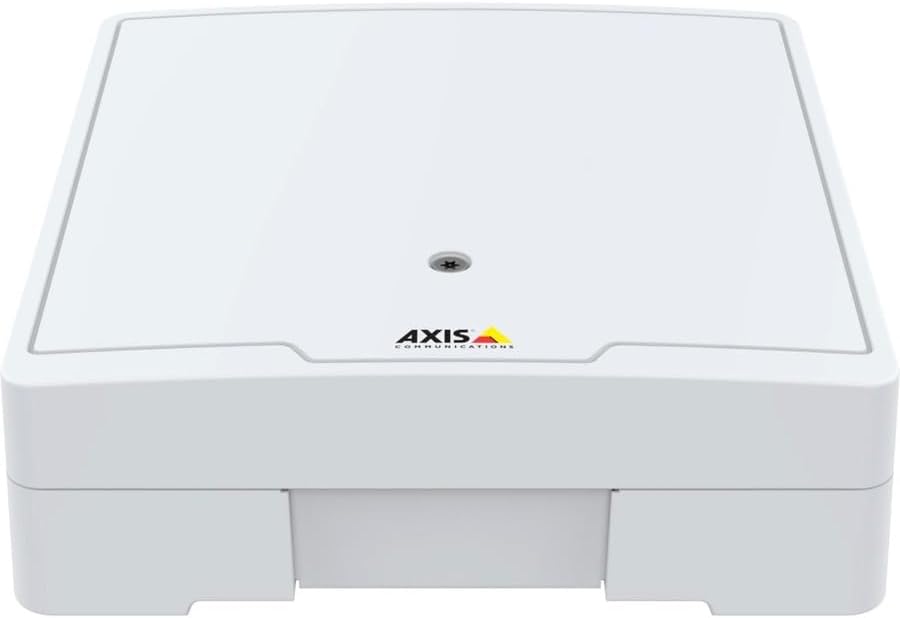
Figure 2: Front view of the AXIS A1610, showing mounting points.
2. Powering the Device
The device can be powered via Power over Ethernet Plus (PoE+) or a DC power supply. PoE+ simplifies installation by delivering both power and data over a single Ethernet cable. Ensure your network infrastructure supports PoE+.
3. Connecting Peripherals
Connect door readers, locks, and other security peripherals to the designated ports. The AXIS A1610 features four reader connections and two Form C relays for door locks. Utilize the six auxiliary I/O ports for integrating sensors (e.g., door contacts, motion sensors) or external alarm systems.

Figure 3: Side view of the AXIS A1610, illustrating connection ports.
4. Network Configuration
Once physically installed and powered, connect the device to your network. Access the device's web interface using its IP address for initial configuration, including network settings, user management, and access rules. Refer to the Axis product documentation for detailed software setup procedures.
Operating the AXIS A1610
The AXIS A1610 operates as the central control unit for your door access system. Its edge intelligence allows it to manage access decisions independently, even during network outages.
Access Control Management
Manage user credentials, access levels, and schedules through the integrated access control software. The system supports various credential types, including cards, PIN codes, QR codes, and license plates.
Event Logging
The device stores up to 250,000 event logs internally, providing a comprehensive audit trail of all access attempts and system activities. These logs can be retrieved and analyzed for security monitoring and compliance.
Integration with Security Systems
Leverage the auxiliary I/O ports to integrate the A1610 with other security components such as intrusion detection systems, fire alarms, or building management systems. This allows for coordinated responses to security events.
Maintenance
Regular maintenance ensures the longevity and reliable operation of your AXIS A1610 Network Door Controller.
- Firmware Updates: Periodically check for and apply the latest firmware updates from Axis Communications. Firmware updates often include security enhancements, bug fixes, and new features.
- Physical Inspection: Annually inspect the device and its connections for any signs of wear, damage, or loose wiring. Ensure proper ventilation and cleanliness around the unit.
- System Backup: Regularly back up your access control system's configuration and user databases. This is crucial for quick recovery in case of data loss or system malfunction.
- Log Review: Periodically review system event logs for unusual activity or recurring errors that might indicate underlying issues.
Troubleshooting
This section provides general guidance for common issues. For complex problems, consult the Axis Communications support resources.
Device Not Powering On
- Verify the PoE+ switch or DC power supply is active and providing adequate power.
- Check all power cable connections for secure fit.
No Network Connectivity
- Ensure the Ethernet cable is securely connected to both the device and the network switch.
- Verify network settings (IP address, subnet mask, gateway) are correctly configured.
- Check if the network switch port is active and configured for the device.
Door Not Unlocking/Locking
- Confirm that the door lock is receiving power and is correctly wired to the A1610's relays.
- Check the access control software for correct access permissions and schedules for the credential being used.
- Inspect the door reader for proper functionality and connection.
Specifications
| Attribute | Detail |
|---|---|
| Manufacturer | AXIS COMMUNICATIONS |
| Part Number | 02653-001 |
| Item Model Number | A1610 |
| Item Weight | 2.9 pounds |
| Product Dimensions | 2.54 x 9.25 x 8.45 inches |
| Color | White |
| Installation Method | DIN Rail Mountable |
| Usage | Emergency, Door, Lock, Sensor, Security System |
| Batteries Required? | No |
| Date First Available | April 28, 2023 |
Warranty and Support
The AXIS A1610 Network Door Controller comes with a 5-year manufacturer's warranty.
For technical support, product documentation, and software downloads, please visit the official Axis Communications website or contact their customer support team.
Axis Communications Official Website: www.axis.com
Related documentsA1610


Ask a question about this manual
Ask about setup, troubleshooting, compatibility, parts, safety, or missing instructions. Manuals+ will review the question and use this page’s manual context to help answer it.