
Armocity LGDR-LW
Armocity L-Shaped Gaming Desk User Manual
Model: LGDR-LW
Introduction
Thank you for choosing the Armocity L-Shaped Gaming Desk. This manual provides essential information for the assembly, operation, and maintenance of your new desk. Designed for versatility and functionality, this desk features integrated LED lighting, power outlets, and ample storage to enhance your gaming or work setup. Please read these instructions carefully before beginning assembly to ensure proper setup and safe use.
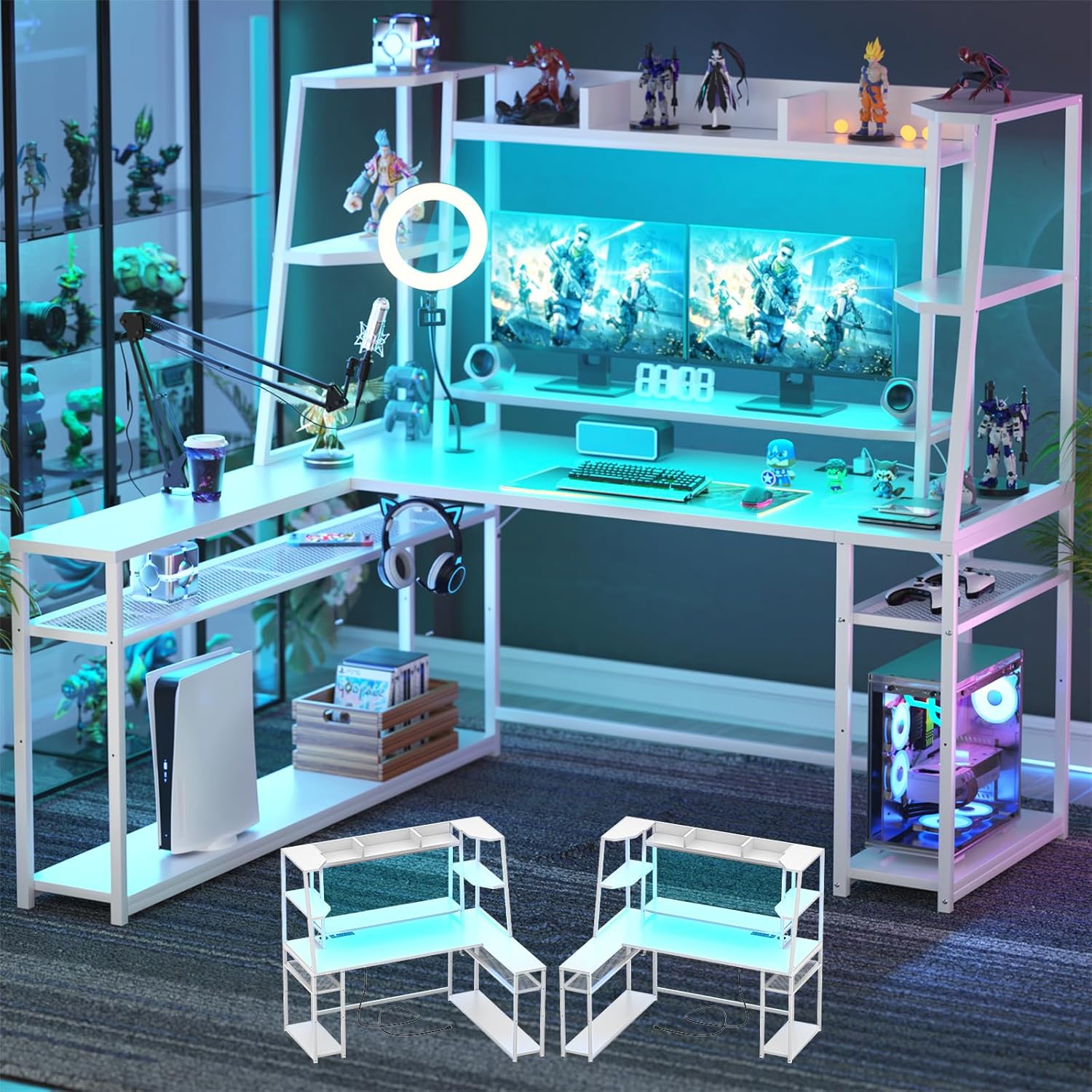
Figure 1: Armocity L-Shaped Gaming Desk (White, 63 inch)
Product Features
- L-Shape Design with Power Outlet: Features built-in power outlets (2 AC, 3 USB) for convenient charging of multiple devices directly from the desktop.
- Ample Storage Space: Provides extensive room with a hutch and storage shelves, ideal for PCs, consoles, peripherals, and decorative items.
- Reversible Configuration: The side storage rack can be assembled on either the left or right side to adapt to your space requirements.
- RGB LED Lighting: Integrated LED lights offer static and 20 dynamic modes, controllable via an app or remote, to customize your gaming environment.
- Ergonomic Monitor Stand: A built-in monitor stand elevates screens to an ergonomic height, reducing neck strain and accommodating two monitors.
- Convenient Accessories: Includes a reversible headphone hook and adjustable storage shelves for optimized organization.

Figure 2: Key features of the Armocity Gaming Desk including storage and ergonomic design.
Setup Instructions
Assembly of the Armocity L-Shaped Gaming Desk is designed to be straightforward. All necessary parts and hardware are clearly labeled and included. Please follow the detailed instructions provided in the separate assembly guide that accompanies your product. Ensure you have adequate space and, if possible, assistance for easier setup.
- Unpack all components and verify against the parts list in the assembly guide.
- Identify the main frame components and begin by assembling the base structure.
- Decide on the desired orientation for the reversible side storage rack (left or right) before attaching it.
- Secure all connections firmly using the provided tools.
- Install the monitor stand, hutch, and adjustable shelves as per the guide.
- Connect the LED light strips and power strip according to the electrical connection instructions.

Figure 3: Desk dimensions for planning your setup space.
Operating Instructions
LED Lighting System
The integrated RGB LED lights offer customizable illumination for your desk. Control the lighting via the included remote control or a dedicated smartphone application.
- Static Mode: Select from a variety of solid colors to match your preference.
- Dynamic Modes: Choose from 20 pre-programmed dynamic lighting effects.
- Music Sync: The lights can synchronize with music played through the app, creating an immersive experience.
- Brightness & Speed Adjustment: Adjust the intensity and speed of dynamic effects using the controls.

Figure 4: Examples of LED lighting options and controls.
Integrated Power Strip
The desktop features a built-in power strip with 2 standard AC outlets (120V/12A) and 3 USB ports (5V/2.1A) for convenient power access. A 6.57ft power cord is provided.
- Plug the desk's power cord into a grounded wall outlet.
- Connect your devices to the AC outlets or USB ports as needed.
- Ensure total power consumption does not exceed the rated capacity of the power strip.

Figure 5: Close-up of the integrated power strip with AC outlets and USB ports.
Monitor Stand and Storage
- The elevated monitor stand provides an ergonomic viewing height and can support two monitors.
- Utilize the hutch and side shelves for organizing books, collectibles, and gaming accessories.
- The side shelves are adjustable to two different heights, allowing for flexible storage solutions.
- The reversible headphone hook can be attached to either side of the desk for convenient headphone storage.
Maintenance
- Cleaning: Wipe surfaces with a soft, damp cloth. Avoid harsh chemicals or abrasive cleaners that may damage the finish.
- Hardware: Periodically check all screws and fasteners to ensure they remain tight. Retighten as necessary to maintain stability.
- Electrical Components: Keep the power strip and LED lights free from dust and moisture. Do not attempt to repair electrical components yourself.
- Weight Distribution: Distribute weight evenly across the desk surfaces and shelves. Do not exceed the maximum weight recommendation of 100 pounds.
Troubleshooting
| Problem | Possible Cause | Solution |
|---|---|---|
| LED lights not working or inconsistent colors. | Loose connection, power issue, or LED strip defect. | Check all LED connections. Ensure the power strip is plugged in. If issues persist, contact customer service. |
| Desk feels wobbly. | Loose fasteners or uneven floor. | Retighten all assembly screws. Adjust leveling feet if present, or place shims under legs on uneven surfaces. |
| Power outlets not functioning. | Power strip not plugged in, circuit overload, or internal defect. | Verify the desk's power cord is securely plugged into a working wall outlet. Reduce the number of devices plugged in. If still not working, contact customer service. |
For any parts that are wrong or defective, or if you encounter issues not listed here, please contact Armocity customer service for assistance.
Specifications
| Attribute | Detail |
|---|---|
| Brand | Armocity |
| Model Number | LGDR-LW |
| Product Dimensions (D x W x H) | 43.3"D x 63"W x 62"H |
| Color | White |
| Style | Modern |
| Base Material | Metal |
| Top Material Type | Engineered Wood |
| Item Weight | 46 Pounds |
| Maximum Weight Recommendation | 100 Pounds |
| Number Of Shelves | 6 |
| Power Outlets | 2 AC (120V/12A), 3 USB (5V/2.1A) |
| Power Cord Length | 6.57 FT |
| Required Assembly | Yes |
| Includes All Assembly Tools | Yes |
Warranty and Support
The Armocity L-Shaped Gaming Desk comes with a Limited Warranty. For specific details regarding the warranty period and coverage, please refer to the warranty information included with your purchase or contact Armocity customer service.
Customer Service: If you have any questions, require assistance with assembly, or encounter any issues with your product, please contact our customer service team. We are committed to providing a satisfactory solution within one business day.
Return Policy: This product is eligible for a 30-day refund/replacement return policy from the date of purchase.
Important Safety Information
- Always follow assembly instructions carefully to prevent injury or damage.
- Ensure all parts are present and undamaged before assembly. Do not use damaged components.
- Seek assistance if needed during assembly, especially for lifting heavy components.
- Do not exceed the maximum weight recommendation of 100 pounds for the desk.
- Properly anchor the desk to prevent tipping, especially if children are present or if the desk is heavily loaded.
- Keep liquids away from electrical components and power outlets.
Ask a question about this manual
Ask about setup, troubleshooting, compatibility, parts, safety, or missing instructions. Manuals+ will review the question and use this page’s manual context to help answer it.