
1. Introduction
The CDIYTOOL ZK-SMC02 is an integrated stepper motor controller and driver module designed for single-axis stepper motor operation. This module combines both control logic and motor driving capabilities, allowing direct connection to a stepper motor. It features multiple fixed operating modes, adjustable parameters, and an intuitive LCD display for precise control. This manual provides detailed instructions for its setup, operation, and general use.

Image 1.1: Front view of the ZK-SMC02 Stepper Motor Controller + Driver, showing the LCD display, control buttons (CW, CCW, RUN/STOP), and encoder knob.
2. Specifications
The following are the technical specifications for the ZK-SMC02 module:
- Adapter Motor: Stepper motor (suitable for NEMA 17/23 motors)
- Number of Control Axes: Single axis
- Motor Signal: Common negative
- Power Supply Range: DC 5-30V (general)
- Driving Capacity: Up to 4A
- Instruction Characteristics: Streamlined and optimized common instructions
- Acceleration/Deceleration Control: Yes
- Input Reverse Protection: Yes
- Remote Communication Control: TTL serial port
- Main System Functions: Automatic, manual, setting, serial port control
- Speed Range: 0.1 ~ 999 revolutions/minute
- Number of Positive Pulses: 1-9999 pulses
- Number of Reversal Pulses: 1-9999 pulses
- Cycle Times: 1-9999
- Forward Turn Delay Time: 0.0-99.99 seconds
- Reversal Delay Time: 0.0-999.9 seconds
- Subdivision Selection Range: 1-128 subdivision
- Product Use Environment: -5°C to 60°C (non-condensing)
- Material: Iron
- Display Type: LCD

Image 2.1: Visual representation of the ZK-SMC02 specifications.
3. Product Features
The ZK-SMC02 offers a range of features for versatile stepper motor control:
- Integrated Design: Combines both stepper motor controller and driver into a single board, simplifying wiring and setup.
- Multiple Operating Modes: Features 9 default workflow programs covering common applications such as forward/reverse rotation, delay, loop, self-locking, non-locking, and adjustable rotating speed.
- High-Precision Control: The HD LCD display provides clear and intuitive readings of forward/reverse pulses, speed, delay, and cycle times, enabling precise motor control.
- Parameter Memory: Supports power-down saving of set parameters including distance, speed, delay, and cycle times.
- Standalone or System Integration: Can operate independently or be integrated with other systems via its TTL serial port for remote communication control.

Image 3.1: Overview of the ZK-SMC02's integrated features, including adjustment for delay, speed, angle, and distance.
4. Setup and Wiring
4.1 Physical Dimensions
Before installation, ensure adequate space for the module. The dimensions are as follows:
- Length: 79mm (3.11in)
- Width: 43mm (1.69in)
- Height: 41mm (1.61in)

Image 4.1: Physical dimensions of the ZK-SMC02 module.
4.2 Wiring Diagram
Proper wiring is essential for the correct operation of the ZK-SMC02. Connect the stepper motor and power supply as shown in the diagrams below.

Image 4.2: Basic wiring diagram showing connections for the stepper motor and DC power supply.

Image 4.3: Top view of the ZK-SMC02 module, detailing the location of indicators, controls, and connection points including the current regulation potentiometer and subdivision settings.
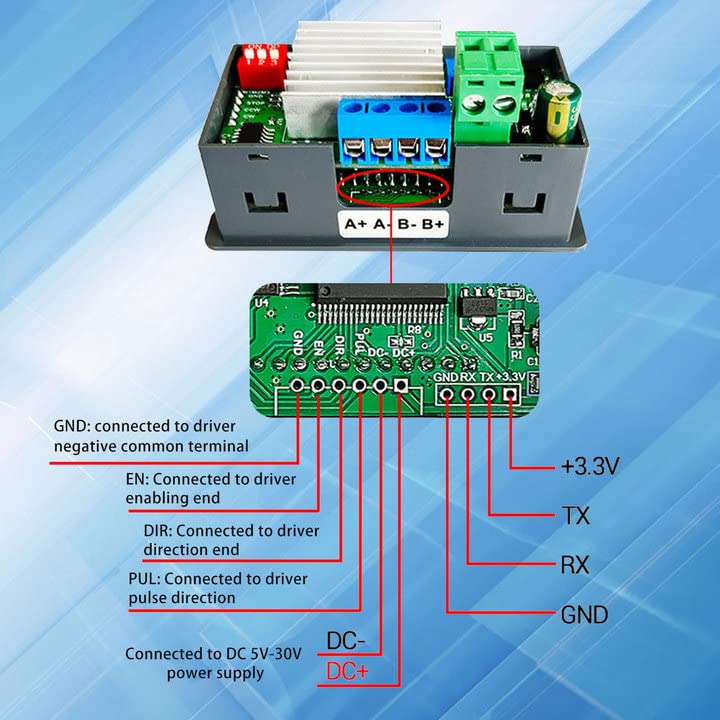
Image 4.4: Detailed internal wiring for the ZK-SMC02, showing connections for GND, EN, DIR, PUL, and power supply. This diagram is relevant for understanding the internal driver connections.
Connection Steps:
- Connect the stepper motor's A+, A-, B+, B- phases to the corresponding terminals on the ZK-SMC02 module.
- Connect the DC 5-30V power supply to the V+ (positive electrode) and V- (negative pole) terminals on the module. Ensure correct polarity.
- If using external control signals (e.g., via TTL serial port), refer to the detailed internal wiring diagram (Image 4.4) for GND, EN, DIR, and PUL connections.
- Adjust the current regulation potentiometer (0-4A) if necessary, located on the top side of the module (Image 4.3), to match your stepper motor's current requirements.
- Set the desired subdivision using the DIP switches or jumpers, also located on the top side (Image 4.3).
5. Operating Instructions
5.1 Basic Operation
The ZK-SMC02 features an encoder knob and several buttons for intuitive control:
- Encoder Knob: Rotate to adjust speed in operation mode. Press and hold to enter the menu settings.
- CW Button: Initiates forward rotation.
- CCW Button: Initiates reverse rotation.
- RUN/STOP Button: Starts or stops the motor operation. Press and hold to exit the current operation.

Image 5.1: Guide to basic operation and menu entry using the encoder and buttons.
5.2 Menu Settings and Parameter Adjustment
To access and adjust parameters, follow these steps:
- Enter Menu: In the operation interface, press and hold the encoder knob to enter the menu setting interface.
- Navigate Parameters: Rotate the encoder to adjust and change the parameter codes (e.g., F-01 to F-13).
- Adjust Parameter Value: Briefly press the encoder to enter the corresponding menu parameter setting state. The parameter value will flash. Then, rotate the encoder to adjust the value.
- Save and Exit: After adjusting a parameter, briefly press the RUN/STOP key to exit the parameter setting and return to the main menu number adjustment interface. To save all parameters and exit the menu, press and hold the encoder.
The module supports 9 work states and various parameters for fine-tuning motor behavior, including:
- Forward/Reverse Pulses
- Speed (RPM)
- Delay Times (Forward/Reverse)
- Cycle Times
- Subdivision Settings
6. Important Notes and Safety
Please observe the following important notes and safety guidelines:
- This module is intended for general industrial control applications.
- DO NOT USE this product in critical applications such as medical equipment, life-saving systems, fire protection systems, or any other life-critical fields.
- DO NOT USE in dangerous environments such as coal mines or oil depots where explosive atmospheres may be present.
- Electronic module products require a basic understanding of electronics for safe and effective use. Read this product description and manual carefully before operation.
- Ensure the power supply voltage is within the specified range (DC 5-30V) and observe correct polarity during connection.
- Avoid operating the module in environments outside the specified temperature range (-5°C to 60°C) or in condensing conditions.
7. Troubleshooting
If you encounter issues with your ZK-SMC02 module, consider the following:
- Motor Not Responding:
- Check power supply connections and ensure voltage is within 5-30V DC.
- Verify motor wiring (A+, A-, B+, B-) is correct and secure.
- Ensure the motor is compatible (e.g., NEMA 17/23 stepper motor).
- Check the current regulation potentiometer setting; it might be too low for the motor.
- Incorrect Motor Movement/Speed:
- Review the set parameters (speed, pulses, delay, cycle times) in the menu.
- Verify the subdivision setting matches your motor and desired precision.
- Ensure the encoder knob is functioning correctly for speed adjustment.
- Display Issues:
- Confirm stable power supply.
- If the display is blank, check all power connections.
- Module Overheating:
- Ensure the current regulation potentiometer is set appropriately for your motor and not excessively high.
- Provide adequate ventilation around the module.
If problems persist after checking these points, please contact customer support for further assistance.
8. Warranty and Support
For warranty information and technical support, please refer to the product's purchase documentation or contact CDIYTOOL customer service directly. Ensure you have your product model (ZK-SMC02) and purchase details available when seeking support.