
1. Safety Instructions
Read all instructions carefully before operating the sweeper. Failure to follow these instructions may result in injury or damage to the equipment.
- Ensure all components are correctly assembled and secured before use.
- Operate the sweeper on stable, level surfaces.
- Do not attempt to sweep hazardous materials, liquids, or hot debris.
- Keep hands, feet, and loose clothing away from moving parts during operation.
- Store the sweeper in a dry, secure location when not in use.
- Children and unauthorized personnel should not operate or be near the sweeper.
- Wear appropriate personal protective equipment (PPE) if necessary, such as safety glasses.
2. Product Overview
The Tomahawk Industrial 38" Walk Behind Push Sweeper (Model TOS38) is designed for efficient cleaning of various hard surfaces, both indoors and outdoors. It features a triple power side broom system and a large collection bin for debris.
Key Features:
- 38-inch Working Width: Covers a wide path for faster cleaning of large areas.
- Triple Power Side Brooms: Enhances sweeping efficiency and debris collection.
- Versatile Use: Suitable for both indoor and outdoor applications on wet or dry surfaces.
- Adjustable Settings: Allows for deeper cleaning on various hard surfaces like concrete, asphalt, tile, marble, linoleum, and vinyl without causing damage.
- Large Collection Bin: A 14.5-gallon capacity bin collects dust, litter, grass, and other debris.
- Lightweight and Compact Design: Weighs 55 lbs, designed to fit through standard doorways, and features a foldable handle for easy storage and transport.
- Integrated Airflow Control: Includes a fine dust filter to capture airborne particles and minimize dust kick-up.
Components Diagram:
Refer to the images below for a visual representation of the sweeper's main components.

Figure 2.1: Front view of the Tomahawk Industrial 38" Walk Behind Push Sweeper, showing the main body, handle, wheels, and side brushes.

Figure 2.2: Detail of the robust nylon bristles and the 38-inch working width, designed for efficient debris collection.

Figure 2.3: View highlighting the adjustable brooms for varied cleaning depths, the 14.5-gallon collection bin, and the durable 12-inch wheels for maneuverability.
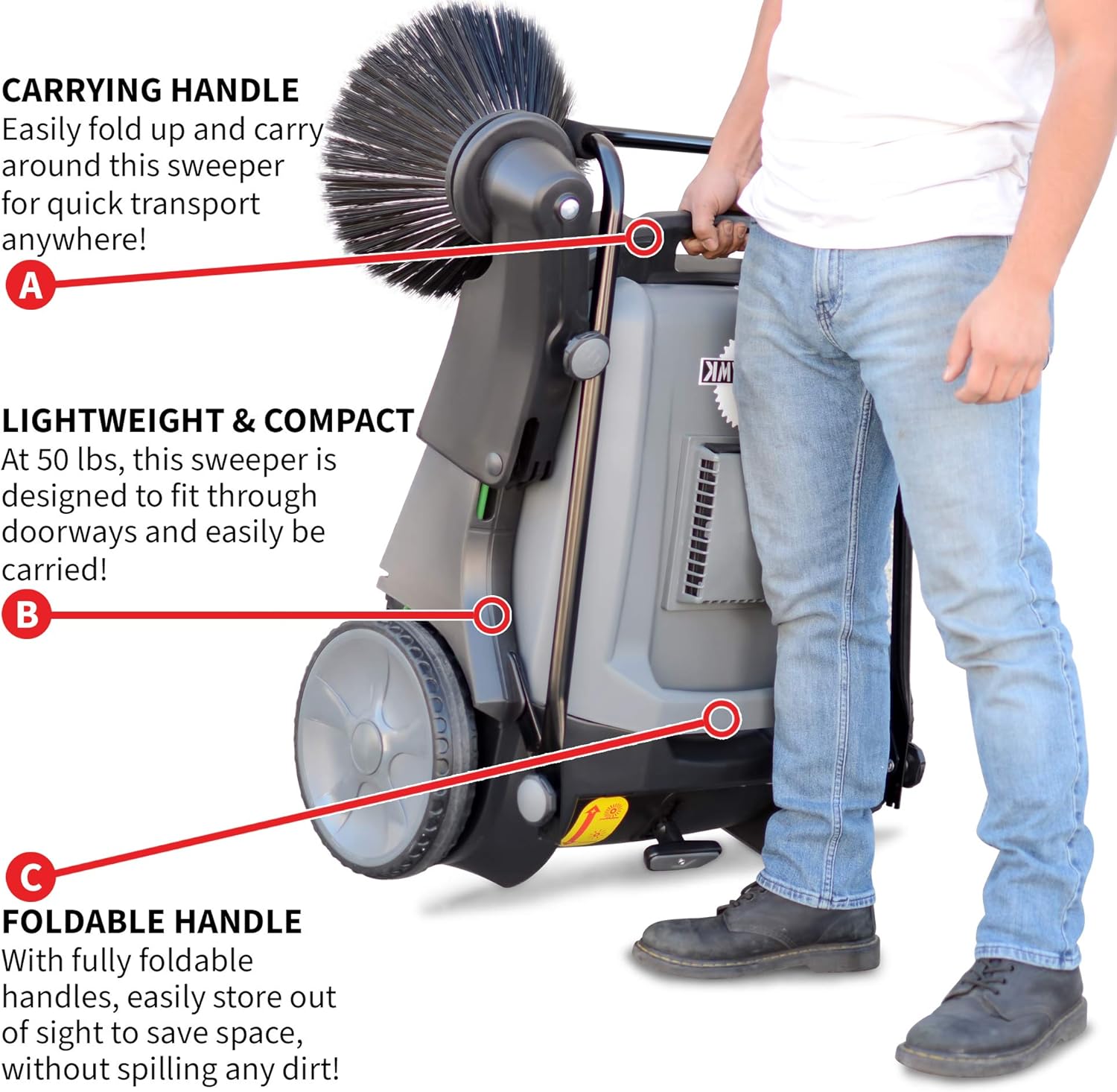
Figure 2.4: Illustration of the fine dust filter, which helps in capturing airborne particles and ensuring cleaner results.
3. Setup
The sweeper is designed for quick assembly. Follow these steps for initial setup:
- Unpacking: Carefully remove all components from the packaging. Inspect for any shipping damage.
- Handle Assembly: Unfold the handle into the upright operating position. Ensure all locking mechanisms (if present) are engaged to secure the handle.
- Brush Installation (if separate): If the side brushes are not pre-installed, attach them according to the diagrams provided in the packaging. Ensure they are securely fastened.
- Initial Inspection: Verify that all moving parts, including brushes and wheels, move freely. Check that the collection bin is properly seated.

Figure 3.1: The sweeper in its folded configuration, illustrating the carrying handle and foldable design for transport and storage.
4. Operating Instructions
Follow these steps for effective operation of your push sweeper:
- Prepare the Area: Remove any large obstacles that could damage the sweeper or impede its operation.
- Adjust Brush Height: Locate the brush height adjustment knobs (refer to Figure 2.3). Turn the knobs to raise or lower the brushes. For optimal sweeping, the brushes should lightly touch the surface, allowing them to flick debris into the collection bin without excessive pressure. Adjust as needed for different debris types and surface conditions.
- Start Sweeping: Grasp the handle firmly and push the sweeper forward at a steady, moderate pace. The rotation of the wheels powers the brushes.
- Overlap Passes: For thorough cleaning, overlap each sweeping pass slightly to ensure no areas are missed.
- Empty Collection Bin: Periodically check the collection bin. When it is full, unlatch and remove it, empty the contents, and reattach it securely.
- Corner and Edge Cleaning: The side brushes are designed to reach into corners and along edges. Guide the sweeper carefully to utilize this feature.

Figure 4.1: An individual demonstrating the use of the sweeper on an outdoor paved area, collecting debris.

Figure 4.2: The sweeper being operated indoors within a storage facility aisle, showcasing its maneuverability in confined spaces.
5. Maintenance
Regular maintenance ensures the longevity and optimal performance of your sweeper.
- After Each Use:
- Empty the collection bin.
- Clean the brushes of any tangled debris (e.g., string, hair).
- Wipe down the exterior of the sweeper with a damp cloth.
- Cleaning the Dust Filter:
The integrated fine dust filter should be cleaned regularly, especially after sweeping dusty areas. To clean:
- Locate the filter compartment (refer to Figure 2.4).
- Carefully remove the filter.
- Tap the filter gently to dislodge accumulated dust, or use compressed air to blow dust out from the clean side. Do not wash the filter with water unless specified by the manufacturer.
- Reinsert the clean filter securely into its compartment.
Figure 5.1: Demonstrates the removal of the fine dust filter for routine cleaning.
- Brush Replacement: Over time, brushes will wear down. Replace worn brushes to maintain sweeping efficiency. Contact Tomahawk Power for genuine replacement parts.
- Storage:
When not in use, fold the handle (refer to Figure 3.1) and store the sweeper in a dry, protected area to prevent damage and prolong its lifespan.
6. Troubleshooting
This section addresses common issues you might encounter with your sweeper.
| Problem | Possible Cause | Solution |
|---|---|---|
| Sweeper not picking up debris effectively. |
|
|
| Dust kick-up during operation. |
|
|
| Difficulty pushing the sweeper. |
|
|
If the problem persists after attempting these solutions, please contact Tomahawk Power customer support.
7. Specifications
| Feature | Detail |
|---|---|
| Brand | Tomahawk Power |
| Model Name | Walk Behind Push Sweeper |
| Item Model Number | TOS38 |
| Product Dimensions | 31"W x 16"H (Note: This refers to the main body dimensions, not overall working width.) |
| Item Weight | 55 Pounds |
| Color | Black |
| Bristle Material | Nylon |
| Handle Material | Aluminum or Polypropylene (PP) Polyvinyl Chloride (PVC) Vinyl |
| Bristle Type | Unflagged Bristle |
| Special Feature | Adjustable, Lightweight |
| Surface Recommendation | Hard Floor |
| Included Components | Triple Side Brooms for Floor Cleaning |
| UPC | 850016983534 |
| Assembly Required | No (Initial setup involves unfolding and minor adjustments) |
| Batteries Required | No |
8. Warranty and Support
For warranty information, technical support, or to inquire about replacement parts, please contact Tomahawk Power directly.
Manufacturer Contact Information:
- Phone: (866) 577-4476
- Operating Hours: 8:00 AM - 5:00 PM PST
- Website: Visit the Tomahawk Power Store on Amazon (for general product information)
Please have your model number (TOS38) and purchase date available when contacting support.


