
GreenForest DESK
GreenForest 47-inch Computer Desk Instruction Manual
Model: DESK
Introduction
Thank you for choosing the GreenForest 47-inch Computer Desk. This manual provides detailed instructions for assembly, operation, maintenance, and troubleshooting to ensure safe and efficient use of your new desk. Please read this manual thoroughly before beginning assembly or use.
Important Safety Information:
Do not exceed the weight limit of 150 lbs (68 kg). Always follow the assembly instructions carefully to ensure the desk's stability and safety.
Product Overview
The GreenForest 47-inch Computer Desk is designed for home office, gaming, and study activities, offering a versatile and ergonomic workspace. Key features include integrated power outlets, a monitor stand, and reversible storage shelves.
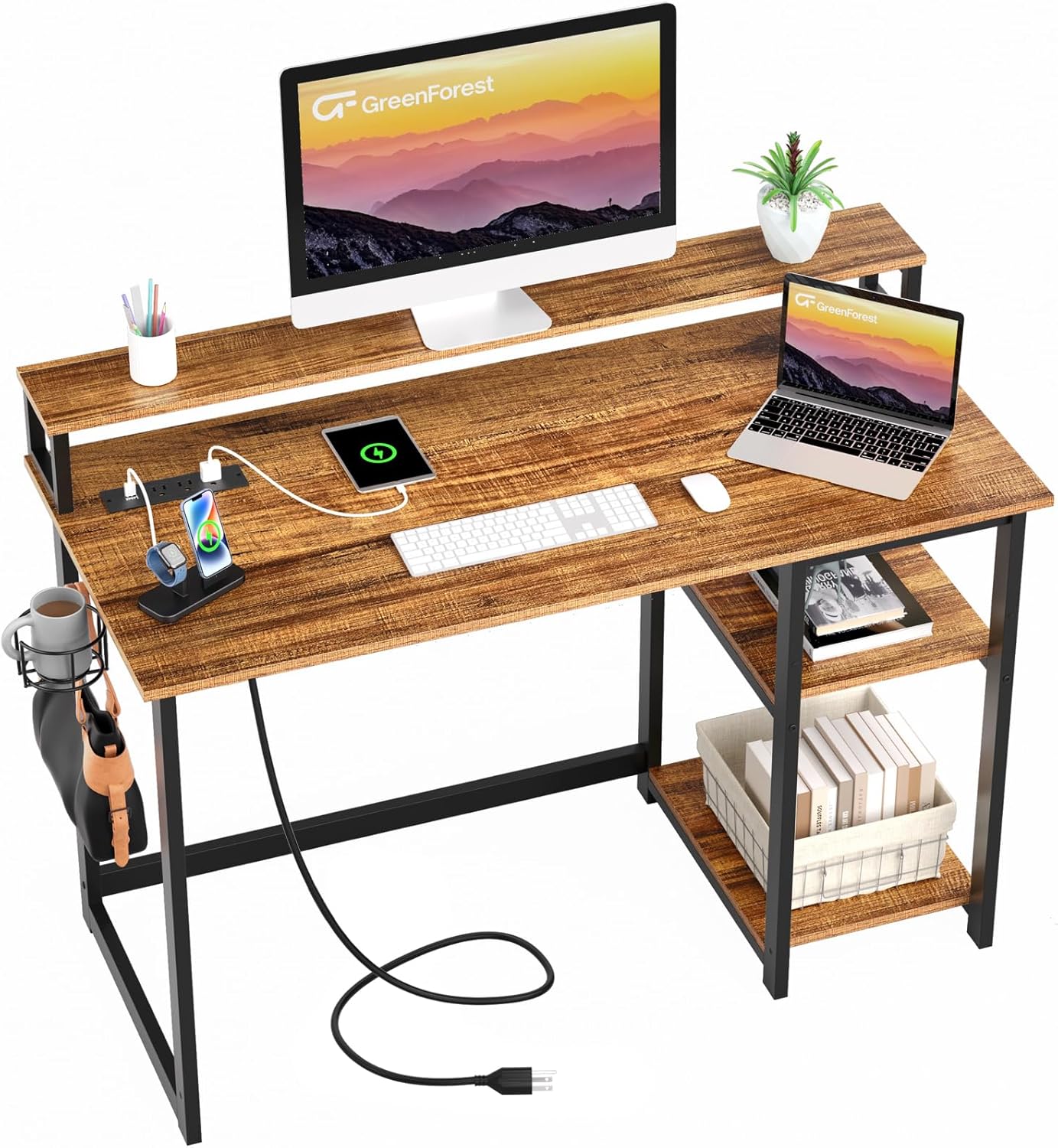
Figure 1: Fully assembled GreenForest 47-inch Computer Desk in a home office setting, showcasing its monitor stand, power outlets, and storage shelves.

Figure 2: The desk configured for a gaming setup, highlighting its spacious surface and integrated features for gaming peripherals.
Key Features:
- Convenient Power Outlets: Features 3 AC power outlets and 2 USB charging ports for easy device charging and cable management.
- Built-in Monitor Stand: An ergonomic monitor stand designed to reduce neck strain and promote better posture.
- Reversible Storage Shelves: Two-tier adjustable and reversible storage shelves to maximize workspace organization.
- Space-Saving Design: Includes a cup holder and a headphone hook for added convenience.
- Sturdy Construction: Built with a 40mm premium metal frame and thick particleboard for stability and durability.
Setup and Assembly
Before assembly, ensure all parts are present and undamaged. Refer to the included parts list and hardware pack. Assembly typically requires a Phillips head screwdriver (not included) and the provided Allen wrench.
Parts List:
Please refer to the separate assembly diagram for a visual representation of all components.
- Desktop Panel (1)
- Monitor Stand (1)
- Left Leg Frame (1)
- Right Leg Frame (1)
- Storage Shelves (2)
- Power Outlet Unit (1)
- Cup Holder (1)
- Headphone Hook (1)
- Connecting Bars (various sizes)
- Hardware Pack (screws, bolts, nuts, Allen wrench)
Assembly Instructions:
- Step 1: Assemble Leg Frames. Attach the connecting bars to the Left and Right Leg Frames using the provided screws. Ensure all connections are secure but do not fully tighten screws until the desk is fully assembled.
- Step 2: Attach Desktop Panel. Carefully place the Desktop Panel upside down on a soft, clean surface. Align the leg frames with the pre-drilled holes on the underside of the desktop and secure with screws.
- Step 3: Install Monitor Stand. Attach the monitor stand supports to the designated areas on the desktop. Place the monitor stand panel on top and secure it.
- Step 4: Install Power Outlet Unit. Insert the power outlet unit into the recessed opening on the desktop. Ensure it sits flush and is securely fastened if applicable.
- Step 5: Assemble Storage Shelves. The two-tier storage shelves can be assembled on either the left or right side of the desk. Attach the shelf supports to the leg frame using the adjustable holes. Place the shelves onto the supports. You can adjust the height of the shelves or remove the middle shelf to accommodate a larger computer tower.
- Step 6: Attach Accessories. Secure the cup holder and headphone hook to the desired locations on the side of the desk.
- Step 7: Final Tightening. Once all components are in place and aligned, carefully tighten all screws to ensure the desk is stable and sturdy.

Figure 3: Detailed dimensions of the desk, including the monitor stand and storage shelves, to assist with space planning.

Figure 4: Illustration of the adjustable hole positions for the storage shelves, demonstrating how to customize storage space or accommodate a computer tower.
Operating Instructions
Using the Power Outlets:
The integrated power outlet unit provides convenient access to power for your devices.
- Plug the desk's main power cord into a standard wall outlet.
- Utilize the 3 AC outlets for devices requiring standard power.
- Use the 2 USB charging ports (5V/2A) for charging smartphones, tablets, and other USB-powered devices.

Figure 5: Close-up view of the recessed power strip, detailing the 3 AC outlets and 2 USB ports, along with the 6.5-foot power cord.
Utilizing the Monitor Stand:
The built-in monitor stand is designed to raise your screen to an ergonomic height, reducing strain on your neck and back.
- Place your monitor(s) or laptop directly on the monitor stand.
- Ensure the weight of your equipment does not exceed the stand's capacity.
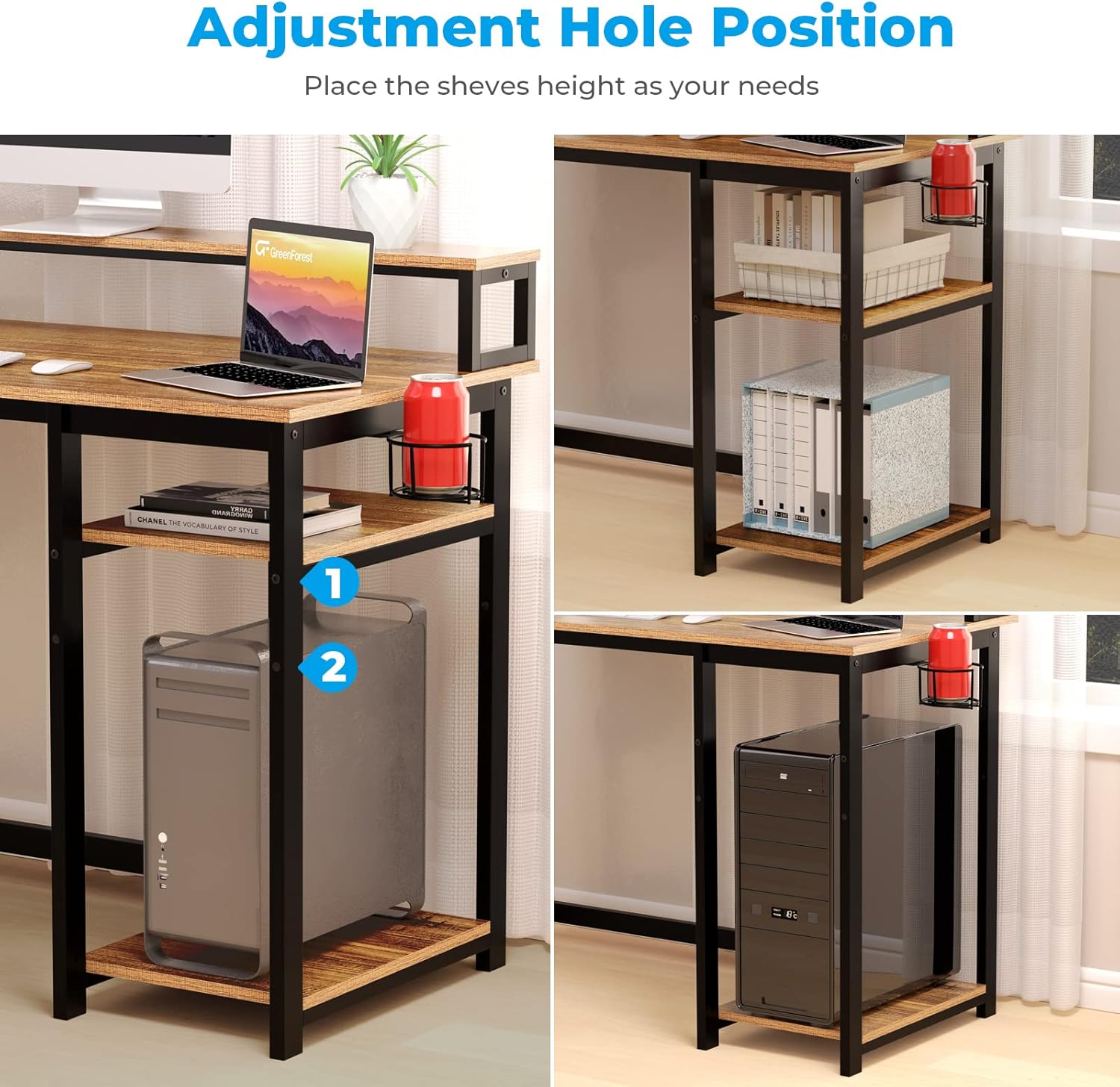
Figure 6: Visual representation of how the built-in monitor stand helps achieve an ergonomic viewing height, reducing neck and back strain.
Adjusting Storage Shelves:
The storage shelves can be configured to suit your needs.
- To change shelf height: Remove items from shelves, loosen screws on shelf supports, adjust to desired height using the pre-drilled holes, and re-tighten screws.
- To remove a shelf: Loosen and remove the screws securing the shelf supports and remove the shelf.
- To reverse shelf orientation: The entire shelf unit can be installed on either the left or right side during assembly.
Using Accessories:
- Cup Holder: Use for beverages to prevent spills on the desk surface.
- Headphone Hook: Hang headphones or other small accessories for easy access and to keep the desktop clear.
Maintenance
Proper maintenance will extend the life and appearance of your GreenForest Computer Desk.
- Cleaning: Wipe the desk surfaces with a dry, soft cloth. For stubborn marks, a slightly damp cloth can be used, followed immediately by a dry cloth. Avoid harsh chemicals or abrasive cleaners.
- Hardware: Periodically check all screws and bolts to ensure they remain tight. Re-tighten as necessary to maintain stability.
- Weight Distribution: Distribute weight evenly across the desktop and shelves to prevent stress on any single point.
- Environment: Avoid placing the desk in direct sunlight or near heat sources, as this can cause material degradation.
Troubleshooting
| Problem | Possible Cause | Solution |
|---|---|---|
| Desk is wobbly/unstable. | Loose screws or uneven floor. | Ensure all screws are fully tightened. Adjust floor levelers if present, or place shims under legs on uneven surfaces. |
| Power outlets not working. | Desk not plugged in, circuit breaker tripped, or faulty unit. | Check if the desk's power cord is securely plugged into a working wall outlet. Check your home's circuit breaker. If issues persist, contact customer support. |
| Assembly holes do not align. | Parts are oriented incorrectly or screws are overtightened prematurely. | Review the assembly instructions carefully to ensure correct part orientation. Loosen all screws slightly, align parts, then tighten gradually. |
Specifications
- Brand: GreenForest
- Model: DESK
- Product Dimensions: 21.65"D x 47.24"W x 29.5"H
- Color: Brown (Walnut finish)
- Material: Engineered Wood (Top), Metal (Base)
- Weight Capacity: 150 lbs (68 kg)
- Power Outlets: 3 AC Outlets (125V/12A), 2 USB Ports (5V/2A)
- Power Cord Length: 6.5 feet
- Special Features: Reversible shelves, Built-in Monitor Stand, Integrated Power Outlets, Cup Holder, Headphone Hook
- Assembly Required: Yes
Warranty and Support
The GreenForest Computer Desk comes with a Limited Warranty. For specific warranty details, please refer to the warranty card included in your product packaging or visit the official GreenForest website.
For any questions, missing parts, or support needs, please contact GreenForest Customer Service:
- Website: Visit the GreenForest Store on Amazon
- Email: Refer to product packaging for direct email support.
- Phone: Refer to product packaging for direct phone support.
Please have your model number (DESK) and purchase information ready when contacting support.
Product Videos
Watch these official videos for additional guidance and product demonstrations.
No official seller videos are available for this product at this time.
Related documentsDESK


Ask a question about this manual
Ask about setup, troubleshooting, compatibility, parts, safety, or missing instructions. Manuals+ will review the question and use this page’s manual context to help answer it.