
Rad Golf Hand+
Rad Golf Hand+ Handheld Golf GPS Device User Manual
Model: Hand+
Introduction
The Rad Golf Hand+ is a state-of-the-art handheld golf GPS device designed to provide golfers with precise distance measurements, comprehensive shot tracking, and advanced performance analytics. This manual provides essential information for setting up, operating, maintaining, and troubleshooting your Hand+ device, ensuring you maximize its capabilities on the golf course.
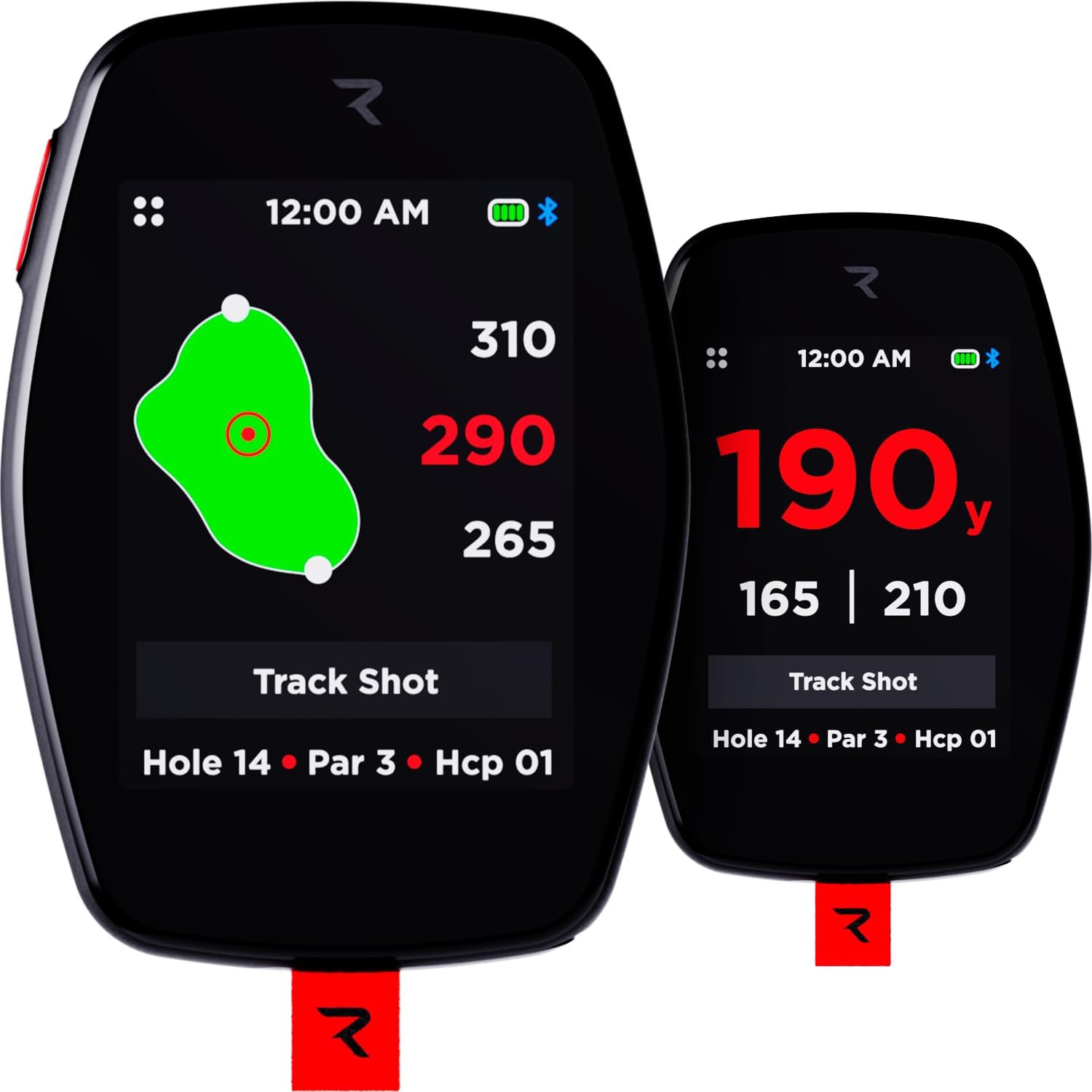
Image: The Rad Golf Hand+ device, showcasing its compact design and clear display with golf course data.
Setup and Initial Use
Charging the Device
Before first use, fully charge your Hand+ device. Connect the provided charging cable to the device's charging port and a compatible USB power source. The battery indicator on the screen will show charging progress. A full charge provides approximately 6 hours of continuous use, sufficient for multiple rounds of golf.
Powering On/Off
To power on the device, press and hold the power button located on the side until the screen illuminates. To power off, press and hold the power button until the shutdown prompt appears, then confirm. The device also features a smart sleep mode to conserve power when idle, waking instantly upon touch.
App Integration and Registration
For full functionality, including premium analytics and course updates, download the official Rad Golf mobile application. Register your Hand+ device within the app to gain access to the Rad Pass features. This integration allows you to track your rounds, review key stats, and access a personalized web portal without any subscription fees.

Image: Screenshots illustrating the Rad Golf mobile application interface, including course maps, score input, and device connectivity.
Operating the Hand+ Device
Course Selection and GPS Lock
Upon powering on, the device will automatically attempt to locate nearby golf courses using its GPS. Select your desired course from the list. The device will then lock onto your position, providing real-time distances.
Touchscreen Pin Positioning
The Hand+ features interactive touchscreen pin positioning. On the green view, simply touch and drag the pin icon to its exact location on the green for precise yardage readings. This technology ensures superior accuracy compared to static GPS systems.

Image: The Hand+ screen showing a detailed green layout with a movable pin, allowing users to adjust for exact flagstick location.
Front, Center, Back Distances
The device instantly provides precise distances to the front, center, and back of the green with a single tap. The large color display ensures all distances are clearly visible in various lighting conditions, aiding in club selection.

Image: A visual representation on the Hand+ screen of distances to the front, center, and back of the golf green.
Hazard Distances
The Hand+ displays front and back distances to all course hazards, including bunkers and water features. This information helps you make strategic decisions and avoid potential trouble spots on each hole.

Image: The Hand+ display indicating distances to different types of hazards on the golf course.
Shot Tracking
Utilize the one-touch shot measurement feature to record and track every shot automatically. This allows for detailed analysis of your game, helping you improve performance over time by understanding your club distances and shot tendencies.

Image: The Hand+ screen displaying the shot tracking function, indicating the distance of a recorded shot.
Performance Tracking
Beyond distances, the Hand+ tracks advanced analytics such as club used, greens in regulation (GIR), fairways hit, and putts. Review these detailed statistics via the free mobile app integration to gain insights into your game.

Image: The Hand+ display presenting various performance metrics, including carry distance, ball speed, and spin rate.
Dynamic Green View
The advanced GPS handheld provides a true-to-scale green visualization, showing the actual shape and layout of the green. This feature helps you understand the real challenge of each green, not just basic distance information.
Pocket Mode
To prevent accidental taps and swipes when the device is in your pocket, activate Pocket Mode. Side button activation ensures that no inadvertent hole changes or shot tracking mistakes occur during your round.
Maintenance
Cleaning
To clean your Hand+ device, gently wipe the screen and body with a soft, damp cloth. Avoid using abrasive cleaners or solvents, as these can damage the device's finish and screen. Ensure the charging port is free of debris.
Battery Care
To prolong battery life, avoid fully discharging the device regularly. Store the device in a cool, dry place when not in use. If storing for an extended period, ensure the battery has a partial charge (around 50%) to prevent degradation.
Water Resistance
The Hand+ device is IPX7 waterproof, meaning it can withstand heavy rain, splashes, and harsh course conditions. While it is highly water-resistant, it is not designed for prolonged submersion. Always ensure the charging port cover is securely closed to maintain water resistance.
Troubleshooting
Device Not Powering On
Ensure the device is fully charged. If the battery is depleted, connect it to a power source and allow it to charge for at least 30 minutes before attempting to power on again.
GPS Not Finding Course/Inaccurate Readings
Ensure you are in an open area with a clear view of the sky for optimal GPS signal reception. Verify that the device's software is up to date via the mobile app. If issues persist, try restarting the device. For course-specific issues, ensure the course data is downloaded and updated through the app.
Touchscreen Unresponsive/Buttons Sluggish
Ensure the screen is clean and dry. A soft reset (powering off and on) can often resolve minor software glitches. If buttons feel sluggish, ensure no debris is lodged around them. If the issue persists, contact customer support.
Accidental Screen Changes in Pocket
Activate the 'Pocket Mode' feature to lock the touchscreen and prevent unintended interactions when the device is carried in a pocket.
Specifications
| Feature | Detail |
|---|---|
| Item Weight | 9.6 ounces |
| Product Dimensions | 3.5 x 2.5 x 0.5 inches |
| Batteries | 1 Lithium Polymer battery required (included) |
| Display Size | 2.4 Inches |
| Battery Life | 6 Hours |
| Voice Command | Touchscreen |
| Water Protection | IPX7 Waterproof |
| Connectivity Technology | Bluetooth |
| Map Type | Worldwide (42,000+ Courses) |
| Special Feature | Touchscreen, Magnetic Attachment |
Warranty Information
The Rad Golf Hand+ device comes with a 1-year manufacturer warranty from the date of purchase. This warranty covers defects in materials and workmanship under normal use. For warranty claims or detailed terms and conditions, please refer to the official Rad Golf website or contact customer support.
Support
For further assistance, technical support, or inquiries regarding your Rad Golf Hand+ device, please visit the official Rad Golf website or contact their customer service department. You may also find additional resources and FAQs on their support pages. A comprehensive User Manual (PDF) is also available for download from the product's Amazon page or the Rad Golf website.
Official User Manual (PDF): Download PDF
Related documentsHand+


Ask a question about this manual
Ask about setup, troubleshooting, compatibility, parts, safety, or missing instructions. Manuals+ will review the question and use this page’s manual context to help answer it.