
1. Introduction
Thank you for choosing the Headwolf HPad3 Ultra 11-inch Android Tablet. This manual provides essential information for setting up, operating, maintaining, and troubleshooting your device. Please read this manual thoroughly before using your tablet to ensure optimal performance and longevity.

Image: Front view of the Headwolf HPad3 Ultra tablet.
2. Package Contents
Please check the box for the following items:
- Headwolf HPad3 Ultra Tablet
- 30W Charging Adapter
- Type-C Charging Cable
- Japanese Instruction Manual (for detailed local information)
- SIM Card Pin

Image: All items included in the package: tablet, charger, cable, manual, and SIM pin.
3. Product Overview
Familiarize yourself with the physical features and ports of your Headwolf HPad3 Ultra tablet.
3.1 Physical Features
- Display: 11-inch 2K FHD IPS In-cell display with blue light protection.
- Cameras: 8MP AI front camera, 20MP telephoto + 5MP wide-angle dual rear cameras.
- Body: Thin (7.3mm) and light (470g) aluminum alloy metal body.
3.2 Ports and Buttons
The tablet features various ports and buttons for connectivity and control:
- Power Button: Used to turn the device on/off or wake/sleep the screen.
- Volume Buttons: Adjust the audio volume.
- Type-C Charging Port: For charging the device and data transfer.
- Card Slot: Supports dual SIM cards and microSD card expansion up to 2TB.
- Reset Button: A small pinhole button for resetting the device if unresponsive.
- 3.5mm Audio Jack: For connecting headphones.

Image: Side view of the tablet highlighting the power button, volume buttons, and Type-C port.
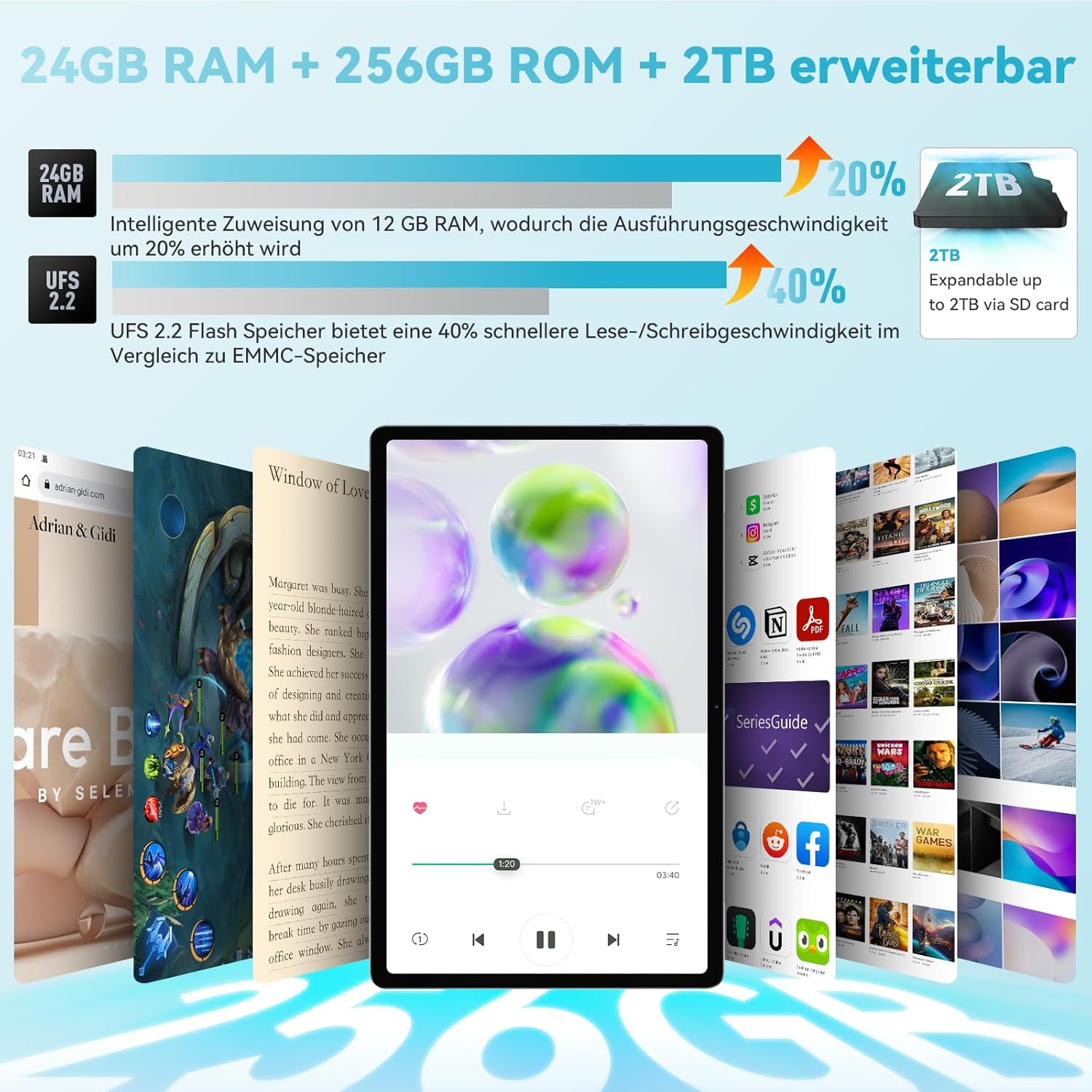
Image: Back view of the tablet, showing the dual camera setup.
4. Setup
4.1 Initial Power On
- Before first use, ensure the tablet is fully charged using the provided 30W charging adapter and Type-C cable.
- Press and hold the Power Button until the Headwolf logo appears on the screen.
- Follow the on-screen instructions to complete the initial setup, including language selection, Wi-Fi connection, and Google account setup.
4.2 Inserting SIM and MicroSD Cards
The tablet supports dual SIM cards and a microSD card for expanded storage.
- Locate the card slot on the side of the tablet.
- Use the provided SIM card pin to gently push into the small hole next to the card slot to eject the tray.
- Place your SIM card(s) and/or microSD card into the designated slots on the tray. Ensure they are correctly oriented.
- Carefully reinsert the tray into the tablet.
4.3 Memory Expansion Activation
The tablet features intelligent memory expansion, allowing you to allocate 12GB from storage to RAM for improved performance.
- Go to Settings.
- Navigate to Memory expansion.
- Enable Memory expansion.
- Select the desired Memory expansion size (e.g., 12GB).
- Restart the tablet for the changes to take effect.

Image: Visual representation of RAM and ROM expansion capabilities.
5. Operating Instructions
5.1 Display Features
The 11-inch 2K FHD IPS display offers a vibrant visual experience with eye protection features.
- Resolution: 2000x1200 pixels for clear and sharp images.
- Blue Light Protection: TÜV certified to filter blue light, reducing eye strain.
- Brightness: 360 Nits for good visibility in various lighting conditions.
- In-cell Full Fit Technology: Enhances touch response and display clarity.
- Aspect Ratio: 16:10 golden display ratio for an immersive viewing experience.
- Viewing Angle: 178° wide viewing angle.

Image: Features of the 2K FHD 11-inch display, including blue light protection.

Image: TÜV Rheinland certification for eye protection, demonstrating blue light filtering.
5.2 Performance
The HPad3 Ultra is powered by a robust processor and ample memory for smooth operation.
- Processor: MTK G99 Octa-Core CPU (2x A76 large cores + 6x A55 small cores) with a main frequency up to 2.2GHz.
- Operating System: Android 12, offering enhanced privacy, security, and user interface.
- RAM: 12GB physical RAM, expandable to 24GB (12GB + 12GB virtual RAM).
- Storage: 256GB UFS 2.2 flash memory, expandable up to 2TB via microSD card.

Image: Details on the MTK G99 CPU and Android 12 operating system.
5.3 Cameras and Face Recognition
Capture moments with the tablet's versatile camera system and unlock securely with face recognition.
- Rear Cameras: 20MP telephoto lens + 5MP wide-angle lens, supporting 13 shooting modes (e.g., portrait, landscape, night, snow).
- Front Camera: 8MP AI selfie camera.
- Face Recognition: Supports facial recognition for convenient and secure device unlocking.

Image: Overview of the tablet's 8MP front and 20MP+5MP rear AI cameras.

Image: Illustration of the face recognition function for enhanced security.
5.4 Connectivity
Stay connected with various wireless and cellular options.
- 4G LTE: Supports stable call and SMS communication, ideal for travel and business trips.
- Wi-Fi: Dual-band 2.4G/5G Wi-Fi (802.11ac) for fast internet access.
- Bluetooth: Bluetooth 5.0 for connecting wireless accessories.

Image: Connectivity options including 4G LTE, dual-band WiFi, and Bluetooth 5.0.
5.5 Navigation (GPS)
The tablet includes a comprehensive navigation system.
- 4-in-1 Navigation: Integrated GPS, GLONASS, Beidou, and Galileo systems provide accurate positioning, allowing the tablet to be used as an in-car navigation system.

Image: Tablet displaying a map, illustrating its GPS navigation capabilities.
5.6 Google Kids Space
For families, the tablet offers Google Kids Space with parental controls.
- Educational Content: Provides rich educational materials for children, supporting automatic language switching and real-time updates across multiple fields.
- Parental Controls: Parents can control the time children spend using the tablet to prevent excessive use.

Image: Google Kids Space interface on the tablet, highlighting educational apps and parental controls.
5.7 Wireless Projection
Mirror your tablet's screen to a larger display.
- Screen Mirroring: Wirelessly project the tablet's screen to a TV or other compatible display for a more impactful visual experience.

Image: Tablet screen being wirelessly projected onto a television.
5.8 Screen Splitting
Enhance productivity with the screen splitting feature.
- Multi-tasking: Supports displaying two applications simultaneously without switching, making operation more convenient.

Image: Tablet screen split into two, showing different applications running side-by-side.
6. Charging and Battery
The Headwolf HPad3 Ultra is equipped with a high-capacity battery and fast charging capabilities.
- Battery Capacity: 8500mAh cobalt acid lithium battery, offering long usage times.
- Fast Charging: Supports 30W PD/PE dual high-speed charging protocol via USB Type-C. Achieves 80% charge in approximately 1 hour.
- Usage Duration: Up to 45 hours of music playback, 12 hours of local video playback, or 7 hours of gaming.

Image: Information on the 8500mAh battery, 30W fast charging, and estimated usage times.
7. Maintenance
To ensure the longevity and optimal performance of your tablet, follow these maintenance guidelines:
- Keep the tablet away from extreme temperatures, direct sunlight, and high humidity.
- Avoid dropping the tablet or subjecting it to strong impacts.
- Clean the screen with a soft, lint-free cloth. Do not use harsh chemicals.
- Regularly back up your data to prevent loss.
- Keep the software updated to the latest version for security and performance improvements.
8. Troubleshooting
If you encounter issues with your tablet, refer to the following common solutions:
8.1 Tablet Does Not Power On
- Ensure the tablet is sufficiently charged. Connect the original 30W charger and cable, and charge for at least 3 hours before attempting to power on.
- If unresponsive, try pressing and holding the power button for 10-15 seconds to force a restart.
8.2 SD Card Not Readable
- If the SD card is not recognized, try formatting it on a computer. Recommended formats are exFAT or FAT32.
- Ensure the SD card is correctly inserted into the card slot.
8.3 Other Issues
For other issues, please refer to the warranty and support section for contact information.

Image: Customer support illustration with common troubleshooting advice.
9. Specifications
Detailed technical specifications for the Headwolf HPad3 Ultra tablet:
| Feature | Specification |
|---|---|
| Brand | Headwolf |
| Model Name | HPad3 Ultra |
| Memory Storage Capacity | 256 GB |
| Screen Size | 11 Inches |
| Display Max Resolution | 1200*2000 |
| Release Year / Model Year | 2023 |
| Warranty Content | 12 Months |
| Product Use | Entertainment |
| Battery Capacity | 8500 mAh |
| Battery Cell Type | Lithium Ion |
| Computer CPU Speed | 2.2 GHz |
| Processor Description | G99 |
| OS | Android 12 |
| Product Weight | 0.47 Grams (470g) |
| Item Dimensions (L x W x H) | 25.8 x 16.2 x 0.7 cm |
| Touchscreen, Voice Recognition, Other Features | Touchscreen |
| Graphics Description | Mali-G57 |
| Display Type | IPS incell |
| Native Resolution | 2000x1200 pixels |
| Aspect Ratio | 16:10 |
| Internal Memory Capacity | 12 GB |
| Hardware Interface | 3.5mm Audio, 802.11 ac/b/g/n, Bluetooth |
| Wireless Type | Wi-Fi |
| Mobile Phone Technology | 4G |
| Number of USB Ports | 1 |
| Communication & Connectivity Interface | Bluetooth, USB, Wi-Fi |
| Wireless Communication Standard | 802.11ac |
| Camera Description | Rear |
| Photo Sensor Resolution | 8 MP (Front) |
10. Warranty and Support
Your Headwolf HPad3 Ultra tablet comes with comprehensive support and warranty.
- Warranty: A 12-month quality warranty is provided from the date of purchase. In case of product defects, free repair or exchange services are available.
- Returns: A 30-day return and refund policy is in effect.
- Dedicated Repair Center: Headwolf operates a dedicated repair center in Tokyo for prompt after-sales service.
- Contact Support: If you have any questions or issues, please contact us through one of the following methods:
- On the product page, click on the store name "Headwolf official store" and then click "Ask a question" to send an email.
- Via your Amazon account: Go to "Your Orders" -> Select the relevant order -> Click "Contact Seller."


