
1. Introduction
This manual provides detailed instructions for the assembly, operation, and maintenance of your OUTON Wood Tripod Floor Lamp with Shelves. Please read this manual thoroughly before use to ensure proper functionality and safety.
The OUTON Wood Tripod Floor Lamp combines functional lighting with a convenient storage shelf, featuring adjustable light settings and multiple control options.
2. Product Overview
The OUTON Wood Tripod Floor Lamp (Model FL09) is designed to provide versatile lighting and a practical storage solution. Key features include:
- Adjustable Lighting: Offers 4 color temperatures (warm, warm white, cool white, daylight) and stepless dimmable brightness (5% to 100%).
- Memory Function: Remembers your last light setting when the lamp is turned back on.
- Solid Wood Construction: Features a high-quality natural rubber wood tripod base for stability and durability.
- Integrated Shelf: Includes a sturdy round wood shelf (10.8" diameter) for displaying small items like books, plants, or decorative objects.
- Dual Control Options: Operates via a remote control and a convenient foot switch.
- Timer Function: A 1-hour timer mode can be set to automatically turn off the light.
- Lampshade: Equipped with a durable beige linen lampshade.

Image: The OUTON Wood Tripod Floor Lamp with its beige linen shade and integrated shelf.

Image: The integrated round shelf provides a convenient space for small items.

Image: Close-up view of the real solid wood construction, highlighting the quality material.

Image: Diagram illustrating the sturdy tripod base design for enhanced stability.
3. Package Contents
Please check the package to ensure all components are present:
- Tripod Lamp Base (pre-assembled sections)
- Lampshade (fabric and frame)
- LED Bulb (9W, E26 base)
- Remote Control (AAA batteries not included)
- Instruction Manual
4. Assembly Instructions
The OUTON Wood Tripod Floor Lamp is designed for easy, tool-free assembly, typically completed within 15 minutes. Follow these steps:
- Unpack Components: Carefully remove all parts from the packaging and lay them out on a clean, flat surface.
- Assemble Tripod Legs: Connect the wooden tripod leg sections by twisting them clockwise until secure. Ensure all connections are tight.
- Attach Shelf: Slide the round wooden shelf onto the designated position on the tripod legs. Ensure it sits securely and is level.
- Install Bulb: Screw the provided LED bulb into the E26 bulb base until snug.
- Assemble Lampshade: Attach the fabric lampshade to the metal frame, securing it with the clips provided. Then, place the assembled lampshade onto the lamp's top fixture.
- Manage Power Cord: Use the included cord neater to secure the power cord along one of the tripod legs for a tidy appearance and to prevent tripping hazards.
- Position Lamp: Place the assembled lamp in your desired location, ensuring it is stable on a flat surface.

Image: Visual representation of the easy, tool-free assembly process.
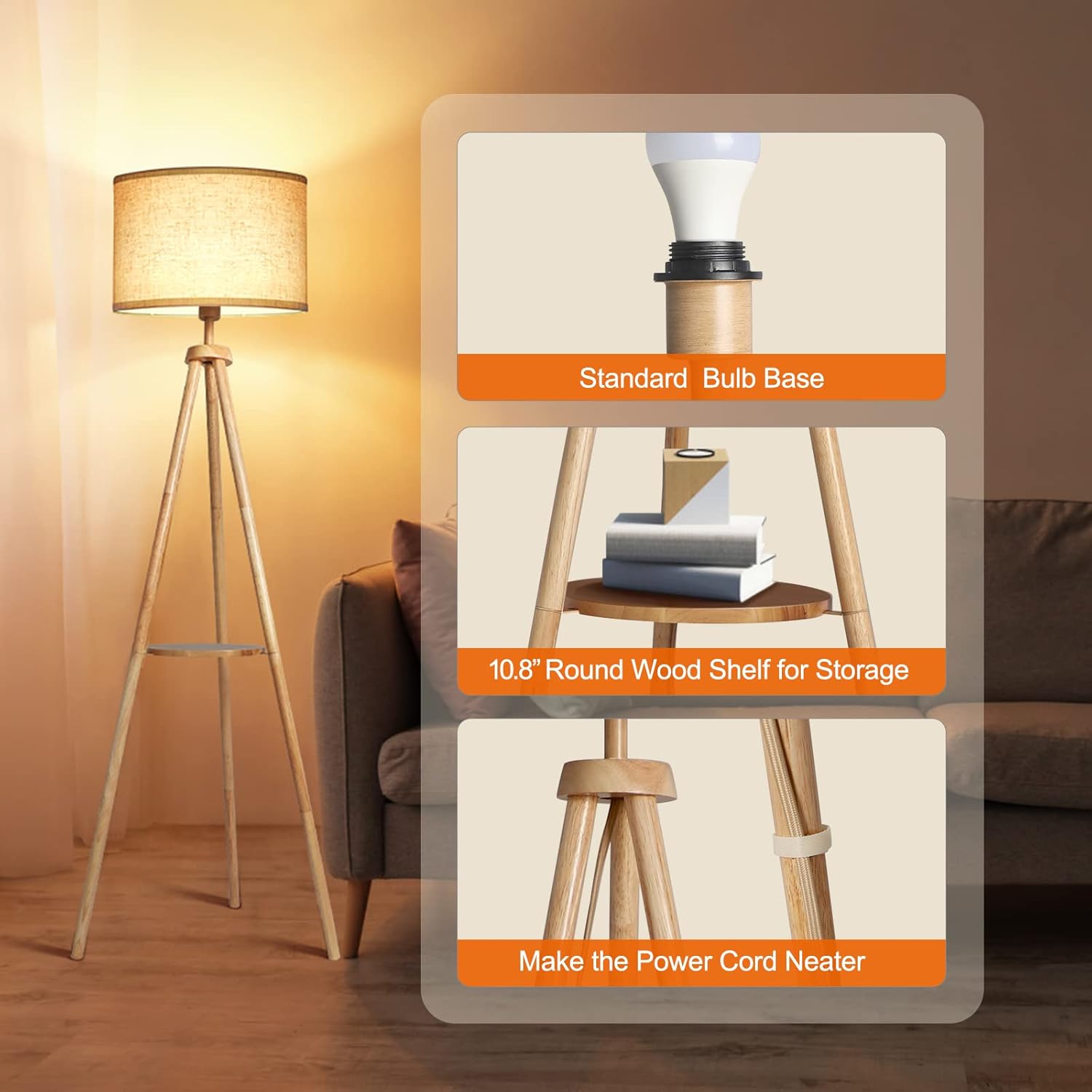
Image: Detail showing the standard bulb base, round wood shelf, and power cord management clip.
5. Operating Instructions
Your OUTON floor lamp offers multiple ways to control its lighting features:
5.1 Power On/Off
- Foot Switch: Press the foot switch located on the power cord to turn the lamp on or off.
- Remote Control: Press the power button (ON/OFF) on the remote control.

Image: Illustration of the two control methods: remote control and foot switch.
5.2 Adjusting Brightness (Dimmable)
Use the remote control to adjust the brightness from 5% to 100%:
- Press the + button to increase brightness.
- Press the - button to decrease brightness.
5.3 Changing Color Temperature
The lamp offers four color temperature settings. Use the remote control to cycle through them:
- Press the K button to switch between Warm, Warm White, Cool White, and Daylight.

Image: Visual guide to the 4 color temperatures and dimmable brightness levels.

Image: Examples of the lamp's appearance at different color temperatures (Warm White, Natural White, Daylight, Cool White).
5.4 Preset Scenes
The remote control includes buttons for 5 preset lighting scenes:
- Night Light: Provides a very low light level for nighttime use.
- Breastfeeding: A soft, warm light setting.
- Working: Brighter, cooler light suitable for tasks.
- Reading: Optimized light for reading comfort.
- 1-Hour Timer: Activates the timer function.

Image: Remote control and visual examples of the 5 preset lighting scenes.
5.5 1-Hour Timer
To activate the 1-hour timer, press the 1H button on the remote control. The lamp will automatically turn off after one hour.

Image: Illustration of the 1-hour timer function, showing the lamp turning off after a set period.
5.6 Memory Function
The lamp will recall the last brightness and color temperature setting used when it is turned back on, whether via the foot switch or remote control.
6. Remote Control Functions
The remote control provides full access to the lamp's features. Ensure AAA batteries are installed (not included).
| Button | Function |
|---|---|
| ON/OFF | Turns the lamp on or off. |
| + / - | Adjusts brightness (increase/decrease). |
| K | Cycles through 4 color temperatures. |
| 1H | Activates 1-hour timer. |
| Night Light | Sets a low light level. |
| Breastfeeding | Sets a soft, warm light. |
| Working | Sets a brighter, cooler light. |
| Reading | Sets an optimized light for reading. |
The remote control has an effective range of approximately 50 feet.
7. Maintenance
To ensure the longevity and optimal performance of your lamp:
- Cleaning: Dust the lamp regularly with a soft, dry cloth. For the lampshade, a lint roller or a slightly damp cloth can be used. Avoid abrasive cleaners or solvents.
- Bulb Replacement: When replacing the bulb, ensure the lamp is unplugged. Use an E26 base LED bulb with a maximum compatible wattage of 60 Watts.
- Cord Care: Periodically check the power cord for any damage. If damaged, discontinue use and contact customer support.
8. Troubleshooting
If you encounter issues with your OUTON Wood Tripod Floor Lamp, refer to the following common solutions:
- Lamp does not turn on:
- Ensure the power cord is securely plugged into a working electrical outlet.
- Check if the bulb is screwed in tightly and is not burnt out. Replace if necessary.
- Verify that the foot switch is pressed to the 'ON' position.
- Remote control not working:
- Check if the remote control batteries (AAA) are correctly installed and not depleted. Replace if needed.
- Ensure there are no obstructions between the remote control and the lamp's receiver.
- Try re-pairing the remote: Unplug the lamp while it is on, wait 5 seconds, then plug it back in while holding down the power button on the remote.
- Light flickers or is inconsistent:
- Ensure the bulb is fully screwed into the socket.
- Try a different compatible LED bulb to rule out a faulty bulb.
If these steps do not resolve the issue, please contact customer support for further assistance.
9. Specifications
| Feature | Detail |
|---|---|
| Model Number | FL09 |
| Product Dimensions | 21"D x 21"W x 63"H (53.34 cm D x 53.34 cm W x 160.02 cm H) |
| Item Weight | 6.6 pounds (3 Kilograms) |
| Base Material | Wood |
| Shade Material | Linen, Wood |
| Shade Color | Beige |
| Light Source Type | LED |
| Bulb Base | E26 |
| Wattage | 9 Watts (LED bulb included) |
| Maximum Compatible Wattage | 60 Watts |
| Brightness | 810 Lumen |
| Color Temperature | Adjustable (Warm, Warm White, Cool White, Daylight) |
| Control Method | Remote Control, Foot Switch |
| Special Features | 1 Hour Timer, 4 Color Temperature, Foot Switch, LED Light, Memory Function, Remote Control, Stepless Dimmable |
| Power Source | Corded Electric |
| Indoor/Outdoor Usage | Indoor use only |
| Assembly Required | Yes |
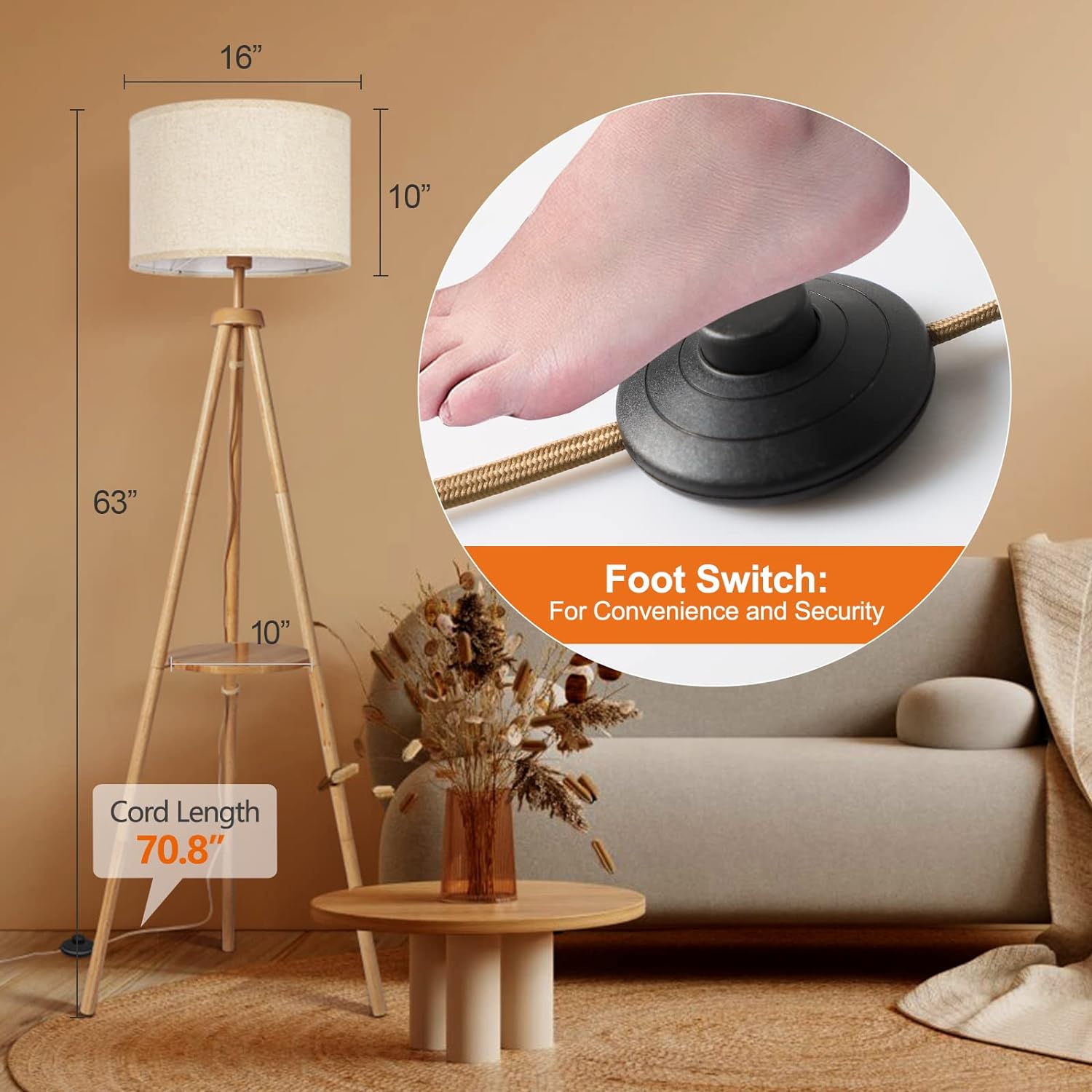
Image: Detailed dimensions of the lamp and a close-up of the foot switch.

Image: Various bulb types compatible with the E26 base.
10. Warranty and Support
OUTON provides 1 year of support for this product. If you encounter any problems during the use of your lamp, please do not hesitate to contact our customer service team. We are committed to providing quick and friendly service to ensure your satisfaction.
For support, please visit the OUTON store on Amazon or refer to the contact information provided with your purchase documentation.