
Ewon DUR361 DUR362 DUR364 DUR365
Instruction Manual
Ewon Trimmer Head for Makita String Trimmers
Product Overview
This Ewon Trimmer Head is a replacement part designed for various Makita string trimmer and brushcutter models. It provides an efficient solution for maintaining your lawn and garden equipment, ensuring optimal performance for cutting and trimming tasks.

Image: The Ewon Trimmer Head, accompanied by various adapter nuts and a spool of orange trimmer line, showcasing the complete package contents.
Compatibility
This trimmer head is compatible with the following Makita String Trimmer and Brushcutter models:
- DUR361
- DUR362
- DUR364
- DUR365
- DUR366
- DUR368
- DUR369
- GRU05PM
- GRU05Z
- GRU02M1
- GRU02Z
- GRU03M1
- GRU03Z
- GRU04M1
- GRU04Z
- GUX01ZX1
Important: Please verify your machine model before purchasing and installing to ensure proper fit and function.
Package Contents
Upon opening the package, please ensure all the following items are present:
- 1 x Trimmer Head
- 7 x Thread Adapters (various sizes for compatibility)
- 1 x Spool of Trimmer Line

Image: A detailed view of the trimmer head along with the seven different thread adapters and a coil of nylon trimmer line, illustrating the complete contents.
Setup and Installation
Follow these steps to properly install the trimmer head on your compatible Makita string trimmer or brushcutter.
- Safety First: Before beginning installation, ensure your trimmer's engine is off and the spark plug cap is disconnected to prevent accidental starting. Wear appropriate safety gear, including gloves.
- Remove Old Head: If replacing an existing trimmer head, carefully remove it according to your trimmer's original instruction manual. This usually involves holding the shaft to prevent rotation and unscrewing the head.
- Identify Correct Adapter: Examine the shaft thread on your Makita trimmer. Select the appropriate thread adapter from the seven provided that matches your trimmer's thread size and direction (left-hand or right-hand). Refer to the image below for common thread types.
- Attach Adapter to Trimmer Head: Screw the selected thread adapter securely into the center of the new Ewon Trimmer Head. Ensure it is tightened firmly.
- Install Trimmer Head: Align the trimmer head (with the attached adapter) with the shaft of your Makita trimmer. Screw the trimmer head onto the shaft. You may need to use a locking pin or tool to hold the shaft steady while tightening the head. Tighten until secure, but do not overtighten.
- Verify Installation: Gently tug on the trimmer head to ensure it is firmly attached and does not wobble.
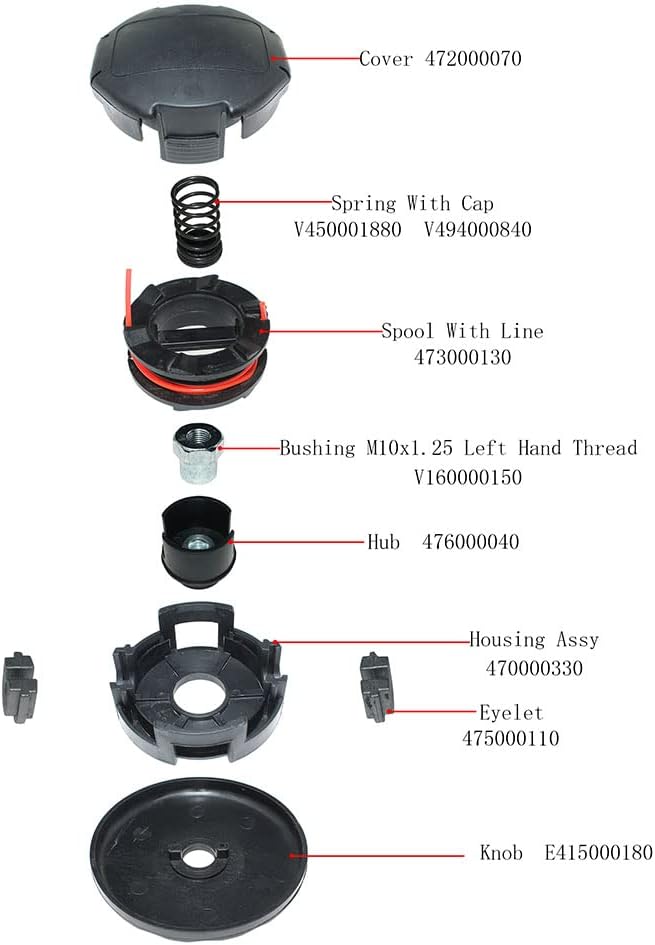
Image: An exploded diagram illustrating the individual components of the trimmer head, including the cover, spring, spool with line, bushing, hub, housing assembly, eyelet, and knob, with corresponding part numbers for assembly reference.
The exploded view above shows the internal components for reference during reassembly or line replacement. The main components are the Cover, Spring, Spool with Line, Bushing, Hub, Housing Assy, Eyelet, and Knob.
Operating Instructions
This trimmer head operates as a bump-feed system. To advance the trimmer line:
- Start Trimmer: Start your Makita string trimmer according to its manufacturer's instructions.
- Engage Head: Allow the trimmer head to reach full operating speed.
- Bump to Advance Line: Lightly tap the bottom of the trimmer head on a firm, flat surface (e.g., the ground). This action will release a small amount of new trimmer line.
- Line Cutter: Most trimmers have a line cutter blade on the guard. The excess line will be automatically trimmed to the correct length.
- Avoid Overtapping: Only tap the head when the line needs to be advanced. Excessive tapping can waste line.
Maintenance
Regular maintenance will extend the life of your trimmer head and ensure optimal performance.
- Clean After Use: After each use, clean any grass, dirt, or debris from the trimmer head. This prevents buildup that can impede line feeding.
- Inspect for Damage: Periodically inspect the trimmer head for cracks, excessive wear, or damage. Replace the head if significant damage is observed.
- Replace Trimmer Line: When the included trimmer line runs out, or if it becomes brittle or damaged, replace it with new line of the appropriate diameter. Refer to your trimmer's manual for recommended line specifications.
- Spool Replacement: If the internal spool is damaged, it can be replaced using the components shown in the exploded view.
Troubleshooting
| Problem | Possible Cause | Solution |
|---|---|---|
| Trimmer line does not advance. | Line is tangled or fused inside the spool; insufficient line remaining; head not bumped correctly. | Remove the cover and untangle/rewind the line. Replace line if too short. Ensure the head is bumped firmly while the trimmer is at full speed. |
| Trimmer head wobbles or is loose. | Incorrect adapter used; head not tightened sufficiently. | Ensure the correct thread adapter is used for your trimmer model. Re-tighten the trimmer head securely onto the shaft. |
| Excessive vibration. | Damaged trimmer head; unbalanced line. | Inspect the trimmer head for damage and replace if necessary. Ensure trimmer line is evenly spooled and cut to the correct length. |
Specifications
| Attribute | Detail |
|---|---|
| Product Dimensions | 4.92 x 3.15 x 4.92 inches |
| Item Weight | 1.25 pounds |
| Manufacturer | Ewon |
| ASIN | B0BZ894Q62 |
| Country of Origin | China |
| Compatible Models | DUR361, DUR362, DUR364, DUR365, DUR366, DUR368, DUR369, GRU05PM, GRU05Z, GRU02M1, GRU02Z, GRU03M1, GRU03Z, GRU04M1, GRU04Z, GUX01ZX1 |
Warranty and Support
This product comes with a warranty period of 6 months from the date of purchase.
If you encounter any questions, issues, or require support regarding your Ewon Trimmer Head, please do not hesitate to contact us. We are committed to providing assistance and will respond to your inquiries within 24 hours.
For support, please refer to the contact information provided by your retailer or on the product packaging.
Ask a question about this manual
Ask about setup, troubleshooting, compatibility, parts, safety, or missing instructions. Manuals+ will review the question and use this page’s manual context to help answer it.