Introduction
This manual provides essential information for the proper setup, operation, and maintenance of your Motorola Solutions T470 Two-Way Radios and First Aid Only 442 All-Purpose First Aid Kit. Please read these instructions carefully before use to ensure optimal performance and safety.

Image: The Motorola T470 Two-Way Radios (left) and the First Aid Only 442 All-Purpose First Aid Kit (right) are shown together. The radios are black and yellow, and the first aid kit is open, displaying various medical supplies.
Motorola Solutions T470 Two-Way Radios
Setup
Before using your T470 radios, ensure they are properly set up and charged.
- Battery Installation: Open the battery compartment cover on the back of the radio. Insert the rechargeable battery pack, ensuring correct polarity. Close the cover securely.
- Charging: Connect the charging cable to the micro-USB port on the side of the radio. Connect the other end to a compatible USB power source. The battery indicator on the display will show charging status. A full charge typically takes several hours.

Image: A side view of the Motorola T470 two-way radio, highlighting the micro-USB charging port located on the lower side of the device. The radio's yellow and black casing is visible.
Operating Instructions
Familiarize yourself with the radio's controls and functions for effective communication.
- Power On/Off: Rotate the On/Off/Volume knob clockwise to turn the radio on and counter-clockwise to turn it off.
- Channel Selection: Use the + and - buttons to select a channel (1-22). Ensure both radios are on the same channel for communication.
- Privacy Codes: To enhance privacy, select a privacy code (1-121) for your chosen channel. Both radios must use the same channel and privacy code.
- Transmitting and Receiving: Press and hold the Push-to-Talk (PTT) button on the side of the radio to transmit. Release the PTT button to receive.
- NOAA Weather Alerts: The T470 can receive NOAA weather and emergency alerts. Refer to the full user manual for specific instructions on activating and managing this feature.
- Built-in LED Flashlight: Press the dedicated flashlight button to activate the LED light.
- VOX (Voice Operated Transmission): This feature allows hands-free operation. When VOX is enabled, the radio transmits when it detects your voice. Adjust VOX sensitivity as needed.

Image: Two Motorola T470 two-way radios are displayed side-by-side, with their blue LCD screens illuminated, showing channel and privacy code settings. The radios feature a black body with yellow accents.

Image: A woman is seated outdoors in a camping chair, holding and speaking into a Motorola T470 two-way radio. She is wearing sunglasses, and a tent is visible in the background, suggesting an outdoor recreational setting.
First Aid Only 442 All-Purpose First Aid Kit
Contents
The First Aid Only 442 kit is designed to address minor injuries and emergencies. It contains 298 pieces of essential first aid supplies.
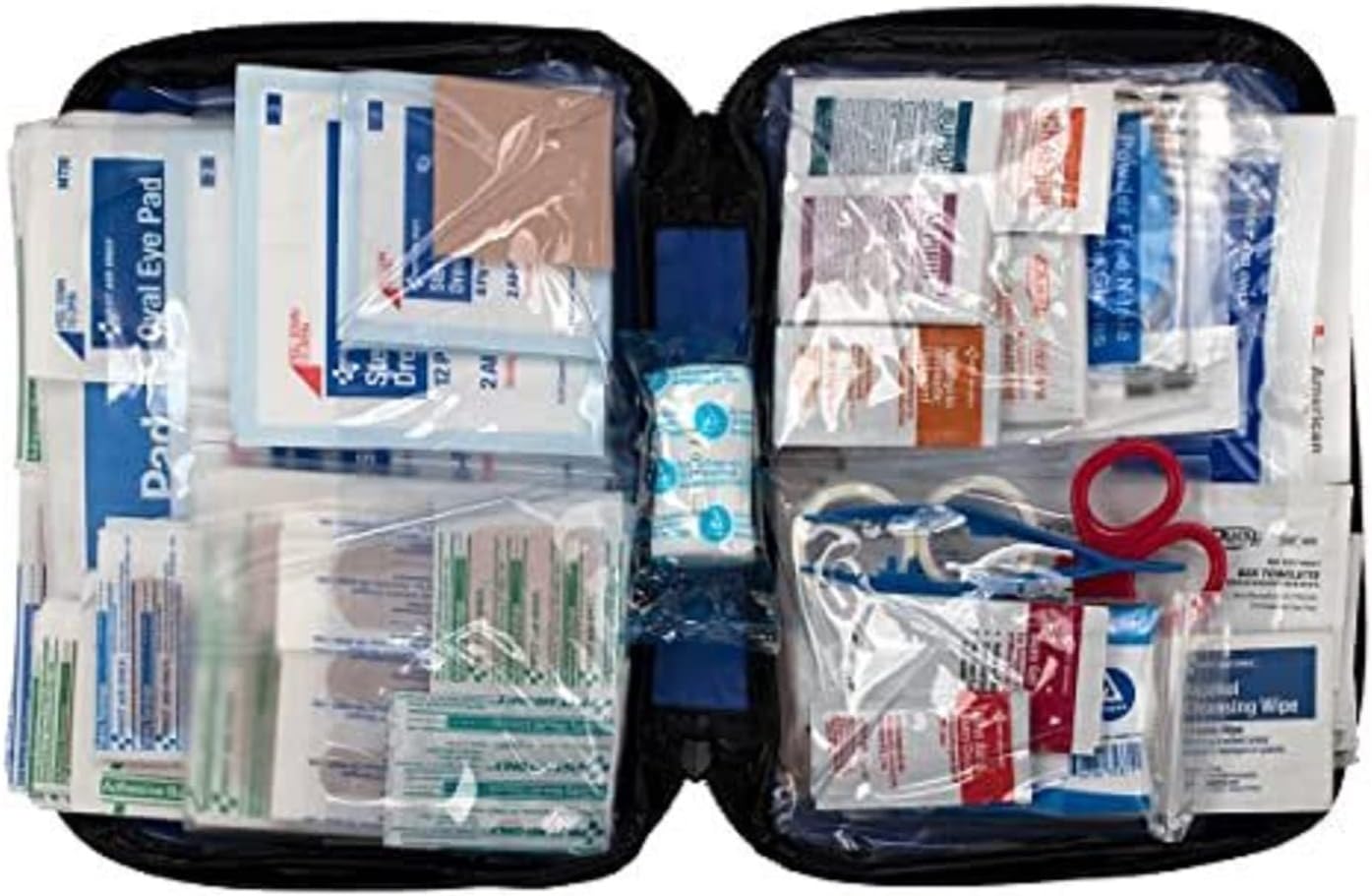
Image: The First Aid Only 442 All-Purpose First Aid Kit is shown open, revealing its contents neatly organized within clear plastic compartments. Various bandages, antiseptic wipes, and other medical supplies are visible.

Image: A detailed list of the contents included in the First Aid Only 442 All-Purpose First Aid Kit, along with their respective quantities. Items range from various types of bandages and antiseptic wipes to pain relievers and specialized wound care items.
Key contents include:
- Adhesive bandages (various sizes)
- Alcohol wipes and antiseptic towelettes
- Antibiotic ointment packets
- Gauze pads and rolls
- Pain relievers (e.g., Aspirin, Ibuprofen)
- Burn gel packet
- Cold pack
- Scissors and tweezers
- Disposable gloves
- First aid guide
Usage
This kit is intended for immediate treatment of minor injuries. For serious injuries or medical emergencies, seek professional medical attention immediately.
- Cuts and Scrapes: Clean the wound with an antiseptic wipe, apply antibiotic ointment, and cover with an appropriate bandage.
- Pain and Swelling: Use pain relievers as directed. For swelling, apply the cold pack to the affected area.
- Burns: For minor burns, apply burn gel and cover with a sterile dressing.
- General Guidance: Always refer to the included first aid guide for specific instructions on treating various injuries.
Storage and Maintenance
Proper storage ensures the longevity and effectiveness of your first aid supplies.
- Store the kit in a cool, dry place, away from direct sunlight and extreme temperatures.
- Regularly check expiration dates of medications and sterile products. Replace expired items promptly.
- After use, replenish any used supplies to ensure the kit is ready for the next emergency.

Image: The First Aid Only 442 All-Purpose First Aid Kit is shown in its closed, compact blue zippered case. The "FIRST AID ONLY" logo is visible on the front.
Specifications
| Feature | Detail |
|---|---|
| Channels | 22 FRS Channels |
| Privacy Codes | 121 |
| Range | Up to 35 miles (terrain dependent) |
| Weatherproof Rating | IPx4 |
| Battery Life | Up to 12 hours |
| Special Features | NOAA Weather Alerts, Built-in LED Flashlight, Quiet Charge, VOX |
| Feature | Detail |
|---|---|
| Number of Pieces | 298 |
| Dimensions | 9.25 x 2.875 x 7 inches |
| Case Type | Soft-sided zippered case with clear plastic pockets |
| Intended Use | Minor injuries, cuts, scrapes, burns, pain, swelling |
Troubleshooting
Common issues and their solutions for the Motorola T470 Radios:
- No Power:
- Ensure batteries are correctly installed and charged.
- Check if the On/Off/Volume knob is turned sufficiently clockwise.
- Cannot Communicate:
- Verify both radios are on the same channel and privacy code.
- Ensure radios are within range. Obstacles like buildings or dense foliage can reduce range.
- Check battery levels; low battery can affect transmission power.
- Static or Poor Audio Quality:
- Move to an open area away from interference sources (e.g., other electronic devices, large metal structures).
- Adjust volume levels.
For the First Aid Kit, ensure all components are present and not expired. Replace items as needed.
Warranty and Support
For detailed warranty information and customer support regarding your Motorola Solutions T470 Two-Way Radios, please refer to the official Motorola Solutions website or the full user manual provided with your product. The First Aid Only 442 All-Purpose First Aid Kit is a consumable product; for specific inquiries about its contents or components, please contact First Aid Only customer service.
A digital version of the user manual for the Motorola T470 radios may be available at: Motorola T470 User Manual (PDF)


