
Introduction
This manual provides detailed instructions for the proper use and maintenance of your MEDca MZ-100 Mini BTE Slim Tube Digital Hearing Amplifier Pair. Please read this manual thoroughly before using the device to ensure optimal performance and longevity.
Important Safety Information
Legal Disclaimer:
This product is a Personal Sound Amplifier Product (PSAP) as defined by the United States FDA. PSAPs are not intended to amplify speech or environmental sounds for individuals with impaired hearing or to compensate for hearing impairment. Because PSAPs are not intended to diagnose, treat, cure or mitigate disease and do not alter the body, they are not devices as defined in the Food, Drug and Cosmetic Act.
- Consult a medical professional if you experience sudden hearing loss, ear discharge, or discomfort.
- Keep out of reach of children and pets. Small parts can be a choking hazard.
- Do not expose the device to extreme temperatures, humidity, or direct sunlight.
- Avoid dropping the device or subjecting it to strong impacts.
Package Contents
Your MEDca MZ-100 package should contain the following items:
- 2 x MEDca MZ-100 Digital Hearing Amplifiers (one for each ear)
- 1 x Carrying Case
- 8 x Extra Ear Domes (various sizes)
- 2 x Cleaning Brushes
- 4 x 312 Zinc-Air Batteries
- 1 x Instruction Manual (this document)
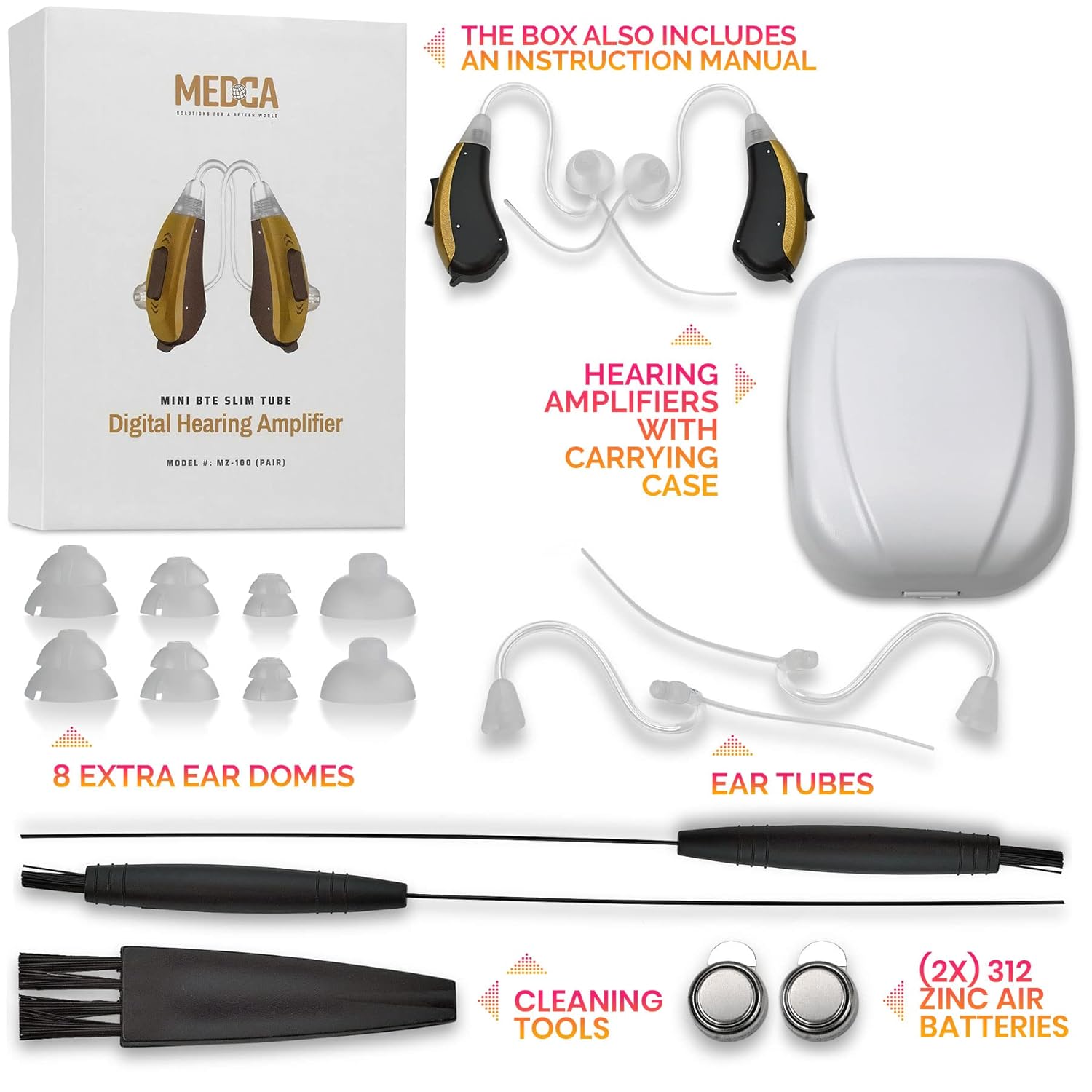
Image: All components included in the MEDca MZ-100 package.
Product Overview
The MEDca MZ-100 is a Mini Behind-The-Ear (BTE) digital hearing amplifier designed for comfortable daily use. It features a slim tube design and easy-to-use controls.

Image: Detailed view of the MEDca MZ-100 amplifier, highlighting its rocker switch and battery compartment.
Key Features:
- One-Finger Rocker Switch: Controls both volume and program settings.
- 4 Program Settings: Basic, Noisy, Treble, and Power.
- Two-Stage Battery Door: Functions as an On/Off switch and secures the battery.
- Lightweight and Comfortable: Designed for extended wear.
- Digital Sound Processing: Offers superior sound quality with background noise reduction and feedback cancellation.
Setup
1. Battery Installation
- Gently open the battery door located at the bottom of the amplifier.
- Remove the sticker from a new 312 Zinc-Air battery. Allow the battery to sit for 1-2 minutes after removing the sticker to activate it with oxygen.
- Insert the battery into the compartment with the positive (+) side facing up (as indicated by the diagram inside the compartment).
- Close the battery door firmly. Closing the door turns the device ON. Leaving it slightly open (using the off button) conserves power.

Image: Visual guide for battery insertion into the hearing amplifier.
2. Ear Dome Selection and Placement
Choosing the correct ear dome size is crucial for comfort and to prevent feedback (howling) noise.
- Select an ear dome from the provided assortment that fits snugly and comfortably in your ear canal.
- Attach the chosen ear dome securely to the slim tube of the amplifier.
- Place the amplifier behind your ear, with the slim tube and ear dome inserted into your ear canal.

Image: Selection of ear domes to ensure a proper fit and prevent feedback.
Operating Instructions
The MEDca MZ-100 is designed for simple operation with a single rocker switch.
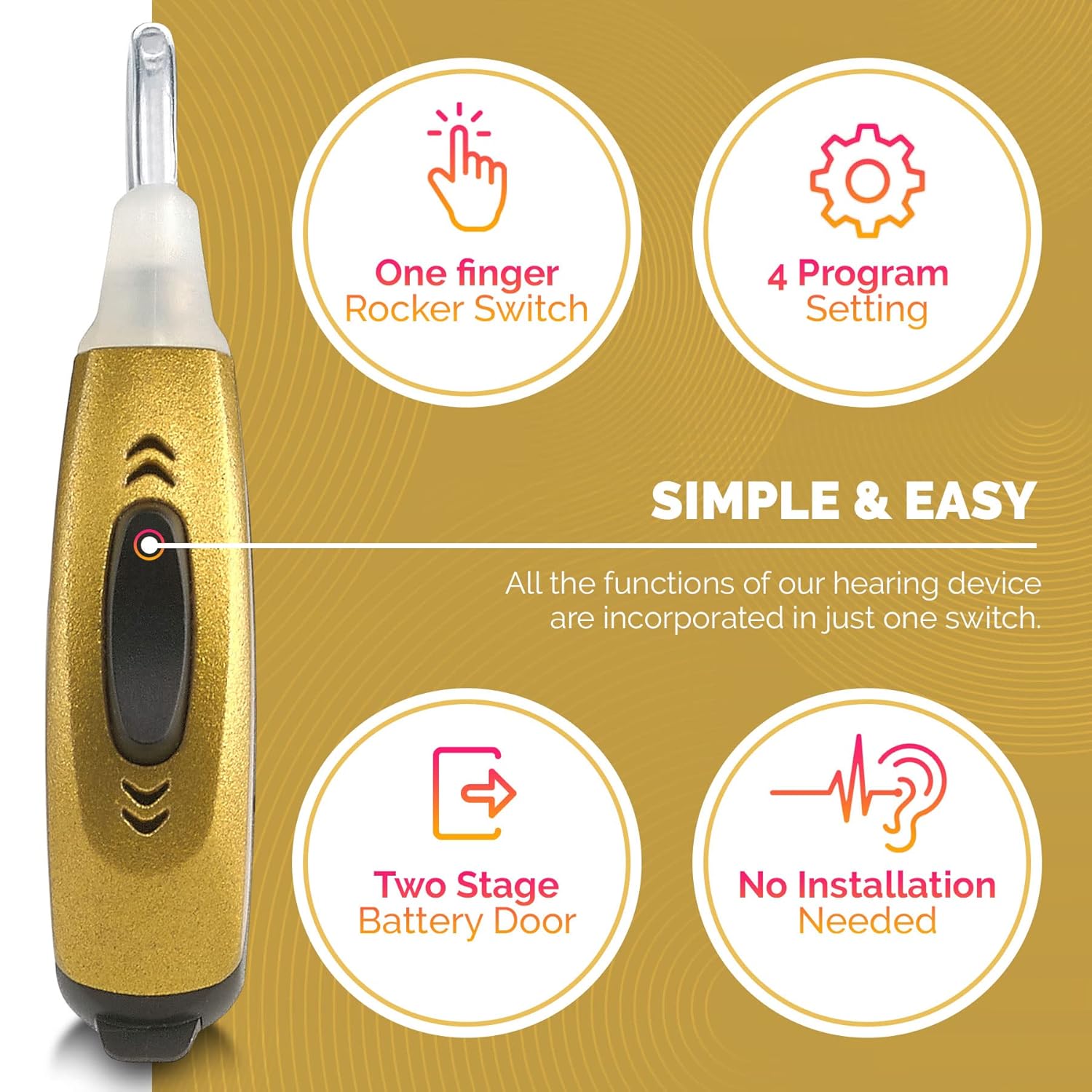
Image: Overview of the simple controls on the MEDca MZ-100 amplifier.
1. Power On/Off
- To turn ON, ensure the battery door is fully closed.
- To turn OFF and conserve battery life, slightly open the battery door.
2. Adjusting Volume
- Press the upper part of the rocker switch to increase volume.
- Press the lower part of the rocker switch to decrease volume.
- Adjust to a comfortable listening level.
3. Changing Program Settings
The device offers 4 program settings to adapt to different listening environments:
- While the device is on, press and hold the rocker switch (either upper or lower part) for approximately 2 seconds to cycle through the programs.
- Each press will advance to the next program. Listen for a series of beeps indicating the current program:
- 1 Beep: Basic (General listening)
- 2 Beeps: Noisy (Reduces background noise)
- 3 Beeps: Treble (Enhances high-frequency sounds)
- 4 Beeps: Power (Maximum amplification)
- Select the program that best suits your current environment.
Maintenance
Regular cleaning and proper care will extend the life of your hearing amplifier.
- Daily Cleaning: Use the provided cleaning brush to gently remove any earwax or debris from the ear dome and slim tube.
- Weekly Cleaning: Detach the ear dome and clean it thoroughly with a soft, damp cloth. Ensure it is completely dry before reattaching.
- Storage: When not in use, store the amplifier in its carrying case in a cool, dry place. Always open the battery door to turn off the device and conserve battery life.
- Battery Replacement: Replace batteries when sound becomes weak or unclear. Zinc-Air batteries are activated by air; once the sticker is removed, they continuously discharge.

Image: The hearing amplifier with various ear domes, illustrating the importance of maintenance for optimal performance.
Troubleshooting
| Problem | Possible Cause | Solution |
|---|---|---|
| No sound or weak sound |
|
|
| Whistling or feedback noise |
|
|
| Sound is distorted or unclear |
|
|
Specifications
| Feature | Detail |
|---|---|
| Model Name | MZ-100 |
| Brand | MEDca |
| Style | Pair (Mini BTE Slim Tube) |
| Power Source | 312 Zinc-Air Batteries (2 included, 4 total in package) |
| Product Dimensions | 0.39 x 0.39 x 0.39 inches (per device) |
| Item Weight | 5.3 ounces (total package weight) |
| Material | Plastic |
| Program Settings | 4 (Basic, Noisy, Treble, Power) |
Warranty Information
Specific warranty details for the MEDca MZ-100 are not provided in the available product information. Please refer to the product packaging or contact MEDca customer support for warranty terms and conditions.
Customer Support
For further assistance, questions, or technical support regarding your MEDca MZ-100 Digital Hearing Amplifier, please contact MEDca customer service. Contact information can typically be found on the product packaging or the official MEDca website.
You may also visit the MEDca Store on Amazon for more product information and support resources.