
Introduction
Thank you for choosing the Broonel Contour Series Messenger Case. This case is engineered to provide robust protection for your laptop or notebook while offering practical features for daily use. Its design integrates an elevated stand for ergonomic typing and ample storage for accessories. This manual will guide you through the proper use and care of your new messenger case.
Package Contents
Please verify that all items are present in your package:
- Broonel Contour Series Messenger Case
- Removable Shoulder Strap
Setup
Initial Setup
- Inserting Your Device: Open the main zipper compartment of the case. Carefully slide your laptop or notebook into the designated padded sleeve. Ensure the device is centered and secured by the internal elastic straps or corner holders.

Image: The messenger case open, showing a laptop securely placed inside with elastic corner straps.
- Attaching the Shoulder Strap: Locate the D-rings on the top corners of the case. Attach the metal clasps of the removable shoulder strap to these D-rings. Adjust the strap length for comfortable carrying.

Image: The messenger case with its shoulder strap attached, highlighting the external pouch for accessories.
Operating Instructions
Laptop Protection
The Contour Series case is designed with a soft, anti-dust suede microfiber interior to prevent scratches and provide a snug fit for your device. The durable exterior offers heavy-duty protection against impacts and abrasions during transport.

Image: The messenger case in its closed state, showcasing its compact and protective design.
Ergonomic Typing Stand
For enhanced comfort during use, the case features an ergonomic flip-out stand. When the case is open and your laptop is inside, simply unfold the integrated stand at the bottom. This elevates your device to a more comfortable typing angle, reducing strain during extended work sessions.

Image: The messenger case with a laptop, demonstrating the use of the ergonomic flip-out stand for improved typing posture.
Storage and Organization
The case includes multiple compartments for organizing your essentials:
- Side Pocket: A dedicated side pocket is available for storing chargers, cables, and other small accessories.
- Internal Organizers: Inside the case, you will find slots for pens, cards, and a larger elastic strap for securing a tablet or other documents.

Image: The interior of the messenger case, showcasing its organizational features including a tablet compartment, pen holders, and card slots.
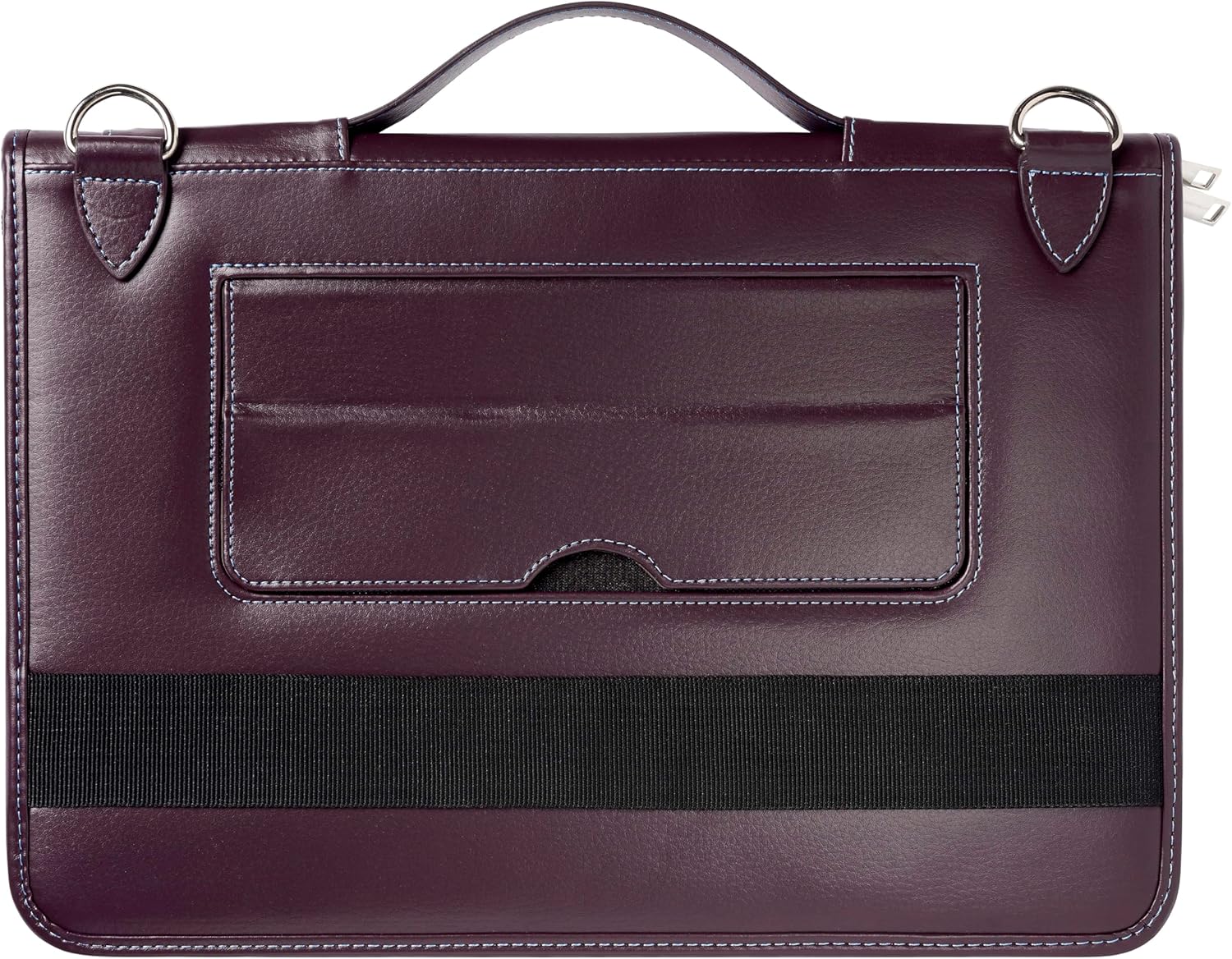
Image: The rear view of the messenger case, highlighting the convenient external pouch for quick access items.
Carrying Options
The Broonel Contour Series Messenger Case offers versatile carrying options:
- Top Handle: Use the sturdy top handle for quick grabs and short-distance carrying.
- Shoulder Strap: Attach the adjustable shoulder strap for hands-free carrying, distributing the weight comfortably across your shoulder.
Maintenance
Care and Cleaning
- Exterior: For the leather exterior, wipe gently with a soft, damp cloth. Avoid harsh chemicals or abrasive cleaners, as these can damage the material.
- Interior: The microfiber interior can be gently wiped with a dry, soft cloth to remove dust. For spills, lightly dampen a cloth with water and mild soap, then wipe and allow to air dry completely.
- Storage: When not in use, store the case in a cool, dry place away from direct sunlight to preserve the material's integrity.
Troubleshooting
Common Issues and Solutions
- Laptop does not fit: Ensure your laptop's dimensions are compatible with the case's specifications (up to 13.3 inches). Do not force the device into the case, as this may cause damage to both the case and your laptop.
- Zipper sticking: Apply a small amount of zipper lubricant or graphite from a pencil to the zipper teeth and gently work the zipper back and forth.
- Case appears creased: Due to packaging or storage, the leather may develop minor creases. These often smooth out with regular use. For deeper creases, consult a leather care specialist.
Specifications
| Feature | Detail |
|---|---|
| Product Dimensions | 12.4 x 8.46 x 0.79 inches |
| Color | Purple |
| Form Factor | Case |
| Shell Type | Soft |
| Compatible Devices | Laptops, Tablets (up to 13.3 inches) |
| Special Features | TSA-compliant, Ergonomic Flip-out Stand, Side Pocket, Removable Shoulder Strap, Anti-dust Suede Microfiber Interior |
| Manufacturer | Broonel |
Warranty and Support
Warranty Information
Broonel products are manufactured to high-quality standards. For specific warranty details and terms, please refer to the warranty card included with your purchase or visit the official Broonel website. Keep your proof of purchase for any warranty claims.
Customer Support
If you encounter any issues or have questions regarding your Broonel Contour Series Messenger Case, please contact Broonel customer support. Contact information can typically be found on the product packaging or the official Broonel website.
Official Product Videos
No official product videos from the seller were found for this product at this time.